
1. Introduzione
Welcome to your new Havit I96 TWS V5.0 HD Stereo Wireless Earbuds. These earbuds are designed to provide a high-quality audio experience with the convenience of wireless connectivity. This manual will guide you through the features and functions of your device, ensuring optimal performance and longevity.
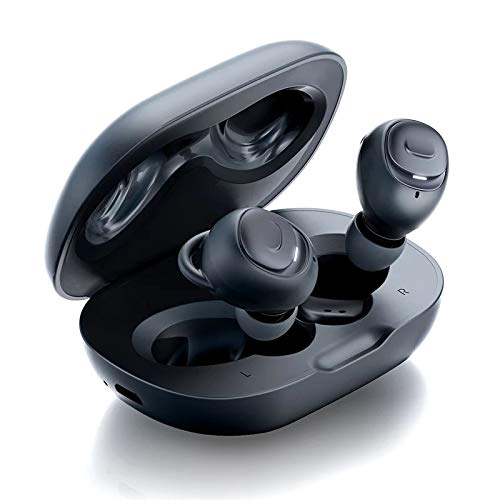
Image 1.1: Havit I96 TWS Earbuds in their charging case.
2. Contenuto della confezione
Si prega di controllare la confezione per verificare la presenza dei seguenti elementi:
- Havit I96 TWS Earbuds (Left and Right)
- Custodia di ricarica
- Cavo di ricarica USB
- Manuale d'uso
- Punte auricolari (varie misure)
3. Prodotto finitoview
Familiarize yourself with the components of your Havit I96 earbuds and charging case.

Image 3.1: The Havit I96 earbuds shown inside and outside their charging case, highlighting their compact design.
Componenti degli auricolari:
- Area di controllo touch: Per gestire la riproduzione musicale, le chiamate e l'assistente vocale.
- Indicatore LED: Visualizza lo stato di associazione, il livello della batteria e lo stato di carica.
- Microfono: Per chiamate in vivavoce.
- Auricolare: Ensures a comfortable and secure fit, and optimizes sound quality.
Componenti della custodia di ricarica:
- Porta di ricarica: Per collegare il cavo di ricarica USB.
- Indicatori LED: Mostra lo stato di carica della custodia e degli auricolari.
4. Impostazione
4.1 Ricarica
Before first use, fully charge the earbuds and the charging case. This ensures maximum battery life and optimal performance.
- Connect the provided USB charging cable to the charging port on the case and to a compatible USB power source (e.g., wall adapter, computer USB port).
- Gli indicatori LED sulla custodia di ricarica si illumineranno per mostrare lo stato di carica. Una volta completata la carica, gli indicatori potrebbero cambiare colore o spegnersi.
- Place the earbuds into their respective slots in the charging case. The earbud indicators will show that they are charging.
4.2 Abbinamento
The Havit I96 earbuds offer flexible pairing options, including stereo mode, mono mode, and separate pairing.

Image 4.1: Illustration of Stereo Mode, Mono Mode, and Separately Paired modes for the Havit I96 earbuds.
Initial Pairing (Stereo Mode):
- Aprire la custodia di ricarica. Gli auricolari si accenderanno automaticamente ed entreranno in modalità di associazione. Gli indicatori LED sugli auricolari lampeggeranno.
- Enable Bluetooth on your device (smartphone, tablet, computer, etc.).
- Cercare "Havit I96" in the list of available Bluetooth devices and select it to connect.
- Una volta effettuata la connessione, un messaggio vocale confermerà l'avvenuta associazione e i LED degli auricolari smetteranno di lampeggiare.
Mono Mode (Single Earbud Use):
- Take one earbud (either left or right) out of the charging case. It will automatically power on and enter pairing mode.
- Enable Bluetooth on your device and search for "Havit I96" to connect.
- To switch back to stereo mode, simply take the other earbud out of the case. The two earbuds will automatically connect to each other and then to your device.
Pairing Separately:
Each earbud can be paired to a different device independently. Follow the mono mode pairing steps for each earbud with its respective device.
5. Istruzioni per l'uso
The Havit I96 earbuds feature intuitive touch controls for easy management of your audio and calls.

Image 5.1: A user wearing the Havit I96 earbuds, demonstrating their ergonomic and lightweight design.
5.1 Accensione/spegnimento
- Accensione: Apri la custodia di ricarica e gli auricolari si accenderanno automaticamente. In alternativa, tieni premuta l'area di controllo touch su entrambi gli auricolari per 3 secondi.
- Spegni: Riposizionare gli auricolari nella custodia di ricarica e chiudere il coperchio. In alternativa, tenere premuta l'area di controllo touch su entrambi gli auricolari per 5 secondi.
5.2 Controllo della musica
- Riproduci/Pausa: Single tap on the touch control area of either earbud.
- Traccia successiva: Double tap on the touch control area of the Giusto auricolare.
- Traccia precedente: Double tap on the touch control area of the Sinistra auricolare.
5.3 Controllo delle chiamate
- Rispondi/Termina chiamata: Single tap on the touch control area of either earbud.
- Rifiuta chiamata: Press and hold the touch control area of either earbud for 2 seconds.
5.4 Assistente vocale
- Attiva l'assistente vocale: Triple tap on the touch control area of either earbud to activate your device's voice assistant (e.g., Siri, Google Assistant).
6. Manutenzione
Proper maintenance ensures the longevity and optimal performance of your Havit I96 earbuds.

Image 6.1: The Havit I96 earbuds are shown with water droplets, illustrating their IPX5 water-resistant rating.
- Pulizia: Use a soft, dry, lint-free cloth to clean the earbuds and charging case. Do not use harsh chemicals, abrasive materials, or liquids directly on the device.
- Magazzinaggio: Always store the earbuds in their charging case when not in use. This protects them from damage and keeps them charged. Avoid storing them in extreme temperatures (hot or cold) or in areas with high humidity.
- Resistenza all'acqua: The Havit I96 earbuds are rated IPX5 water-resistant, meaning they are protected against splashing water from any direction. They are suitable for workouts and light rain but are not designed for submersion in water. Ensure the earbuds are completely dry before placing them back into the charging case to prevent damage to the charging contacts.
7. Risoluzione Dei Problemi
If you encounter any issues with your Havit I96 earbuds, refer to the following common problems and solutions:
| Problema | Soluzione |
|---|---|
| Earbuds not pairing with each other | Place both earbuds back into the charging case, close the lid, then open it again. This will reset their connection. Re-attempt pairing with your device. |
| Gli auricolari non si connettono al dispositivo | Ensure Bluetooth is enabled on your device. Go to your device's Bluetooth settings, "forget" or "unpair" "Havit I96", then re-attempt the initial pairing process. Ensure earbuds are charged. |
| Nessun suono da un auricolare | Ensure both earbuds are charged. Place both earbuds back into the charging case, close the lid, and then open it again to force a re-sync. Check if the earbud is properly seated in your ear. |
| La custodia di ricarica non si ricarica | Verify that the USB charging cable is securely connected to both the case and the power source. Try a different USB cable or power adapter. Ensure the charging port is clean and free of debris. |
| Low audio quality or intermittent connection | Ensure your device is within the effective Bluetooth range (typically 10 meters/33 feet) and there are no significant obstacles between the earbuds and your device. Avoid environments with strong Wi-Fi or other wireless interference. |
8. Specifiche
Detailed technical specifications for the Havit I96 TWS V5.0 HD Stereo Wireless Earbuds.

Image 8.1: An illustration highlighting the Hi-Fi Premium Sound driver technology within the Havit I96 earbuds.
- Marca: avere
- Modello: I96
- Connettività: Versione Bluetooth 5.0
- Fattore di forma: In-ear (auricolare)
- Colore: Nero
- Controllo del rumore: Cancellazione attiva del rumore
- Metodo di controllo: Tocco
- Resistenza all'acqua: IPX5 (resistente agli spruzzi)
- Tempo di gioco: Up to 3.5 hours per earbud charge
- Tempo di riproduzione totale (con custodia di ricarica): Fino a 10 ore
- Batteria della custodia di ricarica: 500 mAh (approximate, based on description)
- Microfono: Incluso
- Componenti inclusi: Custodia di ricarica wireless

Image 8.2: A user enjoying music with Havit I96 earbuds, illustrating the 10 hours of total playing time with the charging case.
9. Informazioni sulla sicurezza
Si prega di leggere e seguire queste linee guida di sicurezza per evitare danni al dispositivo o lesioni personali:
- Non smontare, riparare o modificare il prodotto. Ciò potrebbe causare incendi, scosse elettriche o danni totali al prodotto.
- Keep the earbuds and charging case away from extreme temperatures (above 45°C or below 0°C), direct sunlight, and high humidity.
- Evitare di utilizzare gli auricolari ad alto volume per periodi prolungati per prevenire danni all'udito.
- Do not use the earbuds in situations where inability to hear ambient sounds could be dangerous, such as while driving, cycling, or walking in traffic.
- Smaltire le batterie e i componenti elettronici in modo responsabile, rispettando le normative locali.
- Tenere fuori dalla portata dei bambini e degli animali domestici.
10. Garanzia e supporto
10.1 Informazioni sulla garanzia
Your Havit I96 TWS V5.0 HD Stereo Wireless Earbuds come with a standard manufacturer's warranty. Please refer to the warranty card included in your product package for specific terms, conditions, and duration of the warranty.
10.2 Assistenza clienti
For technical assistance, troubleshooting, or any other customer service inquiries, please visit the official Havit websito o contattare il loro team di assistenza clienti tramite le informazioni di contatto fornite sul loro websito o nella documentazione del prodotto.
Websito: www.havit.com (Exampil collegamento, fare riferimento alla documentazione del prodotto effettivo per la corretta URL)
E-mail: support@havit.com (Examp(per informazioni sul contatto corretto, fare riferimento alla documentazione del prodotto effettivo)