
Introduzione
Welcome to the user manual for the BUFFALO BS-GU2105 5-Port Gigabit Unmanaged Switch. This document provides essential information for the proper installation, operation, and maintenance of your device. Please read this manual thoroughly before using the product to ensure safe and efficient operation.
Prodotto finitoview
The BUFFALO BS-GU2105 is a Layer2 unmanaged switch designed for business environments, offering reliable high-speed network connectivity. It features five Gigabit-compatible ports and a robust metal housing with an integrated power supply.
Caratteristiche principali:
- 5 Gigabit Ethernet Ports (10/100/1000 BaseT(X))
- Metal Housing with Built-in Power Supply
- Loop Prevention Function (ON/OFF switchable)
- EEE (Energy Efficient Ethernet, 802.3az) Function (ON/OFF switchable)
- Intervallo di temperatura di esercizio: da 0°C a 50°C (da 32°F a 122°F)
- Equipped with Anti-Theft Security Slots
- Flexible Installation: Horizontal or Wall-Mountable
Contenuto della confezione
Please verify that all items are present in your package. If any items are missing or damaged, contact your vendor or BUFFALO support.
- BUFFALO BS-GU2105 5-Port Gigabit Unmanaged Switch
- Magnete per il montaggio
- AC Cable Prevention Band
- Power Cord (integrated power supply)
Configurazione e installazione
1. Posizionamento fisico
The BS-GU2105 switch can be placed horizontally on a flat surface or mounted on a wall. Ensure adequate ventilation around the device to prevent overheating. Avoid placing the switch near heat sources or in direct sunlight.

Immagine: Frontale view of the BUFFALO BS-GU2105 switch, displaying its indicators and switches.
For enhanced security, the switch is equipped with anti-theft security slots. A compatible security cable (not included) can be used to secure the device to a fixed object, preventing unauthorized removal.
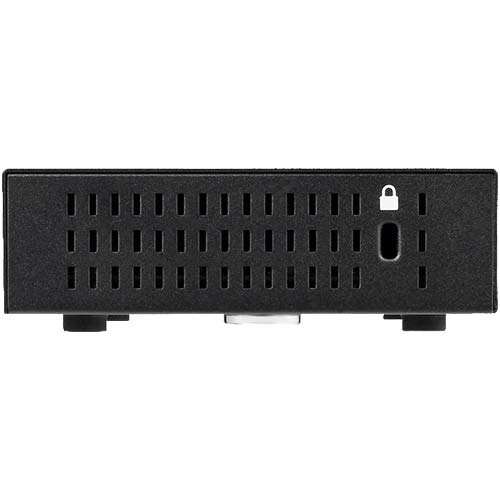
Immagine: Lato view of the BUFFALO BS-GU2105 switch, highlighting the security slot.

Image: BUFFALO BS-GU2105 switch with an optional security cable lock installed.
2. Collegamento dei cavi di rete
Connect your network devices (computers, servers, network printers, or other switches) to the RJ-45 ports (1-5) on the rear of the switch using standard Ethernet cables. The switch automatically detects the speed and duplex mode of the connected devices.

Immagine: Posteriore view of the BUFFALO BS-GU2105 switch, showing the five RJ-45 ports and AC power input.
3. Collegamento elettrico
Connect the power cord to the AC-IN port on the rear of the switch and then to a standard power outlet. The switch has a built-in power supply. Use the included AC cable prevention band to secure the power cord, preventing accidental disconnection.
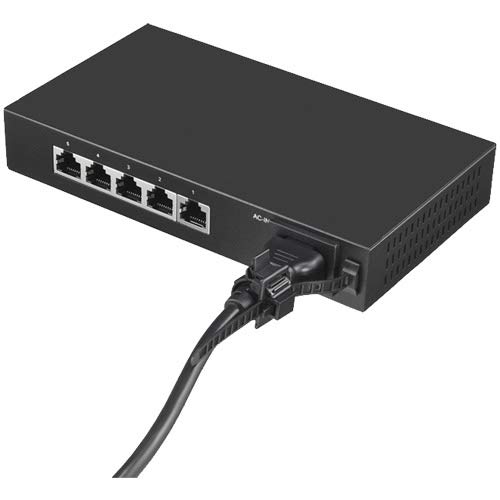
Image: Power cord connected to the BUFFALO BS-GU2105 switch, secured with the AC cable prevention band.
Azionamento dell'interruttore
Indicatori LED
Il pannello frontale dello switch è dotato di diversi indicatori LED per fornire informazioni sullo stato:
- LED DI ALIMENTAZIONE: Si illumina quando l'interruttore è acceso.
- LINK/ACT LEDs (1-5): For each port, this LED indicates network activity and connection status.
- Verde pieno: A device is connected and operating at 1000 Mbps (Gigabit).
- Verde lampeggiante: Data is being transmitted or received at 1000 Mbps.
- Ambra Solida: A device is connected and operating at 10/100 Mbps.
- Ambra lampeggiante: Data is being transmitted or received at 10/100 Mbps.
- Spento: No device is connected or the connected device is powered off.
Loop Prevention Function
The BS-GU2105 includes a loop prevention function to avoid network loops that can cause broadcast storms and network instability. This function can be enabled or disabled using the "LOOP PREVENTION" ON/OFF switch on the front panel.
- SOPRA: Loop prevention is active. If a network loop is detected, the affected port will be temporarily disabled to prevent network disruption.
- OFF: Loop prevention is inactive.
EEE (Energy Efficient Ethernet) Function
The Energy Efficient Ethernet (EEE) function (IEEE 802.3az) allows the switch to reduce power consumption during periods of low data activity. This function can be enabled or disabled using the "EEE" ON/OFF switch on the front panel.
- SOPRA: EEE is active, reducing power consumption when network traffic is low.
- OFF: EEE is inactive.
Manutenzione
To ensure optimal performance and longevity of your BUFFALO BS-GU2105 switch, follow these maintenance guidelines:
- Conservare il dispositivo in un ambiente pulito e privo di polvere.
- Ensure proper ventilation and do not block the air vents.
- Pulire l'esterno dell'interruttore con un panno morbido e asciutto. Non utilizzare detergenti liquidi o spray.
- Controllare periodicamente i collegamenti dei cavi per accertarsi che siano saldi.
Risoluzione dei problemi
If you encounter issues with your BS-GU2105 switch, refer to the following common troubleshooting steps:
- Nessun potere: Ensure the power cord is securely connected to both the switch and a working power outlet. Check if the power outlet is functional.
- Nessun LED di collegamento/attività: Verify that the Ethernet cable is properly connected to both the switch port and the network device. Ensure the connected device is powered on and functioning correctly. Try a different cable or port.
- Bassa velocità di rete: Check the LINK/ACT LED color. Green indicates Gigabit speed, while amber indicates 10/100 Mbps. Ensure all connected devices and cables support Gigabit Ethernet for optimal performance.
- Network Instability (if Loop Prevention is OFF): If you experience network instability or broadcast storms, ensure the "LOOP PREVENTION" switch is set to ON.
If problems persist after attempting these steps, please contact technical support.
Specifiche
| Caratteristica | Descrizione |
|---|---|
| Marca | BUFALO |
| Modello | BS-GU2105 |
| Numero di porte | 5 x 10/100/1000 BaseT(X) RJ-45 |
| Tipo di interruttore | Unmanaged, Layer2 |
| Alloggiamento | Metallo |
| Alimentazione elettrica | Incorporato |
| Temperatura di esercizio | 0°C - 50°C (32°F - 122°F) |
| Dimensioni (L x P x A) | 10.04 x 5.71 x 2.76 pollici (25.5 x 14.5 x 7.0 cm) |
| Peso | 0.8 chilogrammi (1.76 libbre) |
| Caratteristiche speciali | Loop Prevention, EEE (802.3az), Anti-theft Security Slot, Magnet for mounting, AC Cable Prevention Band |
Informazioni sulla garanzia
The BUFFALO BS-GU2105 switch comes with a 5-year limited warranty. This includes a standard 3-year warranty, which can be extended by an additional 2 years upon user registration on the official BUFFALO website. Please retain your proof of purchase for warranty claims and refer to the official BUFFALO warranty policy for full terms and conditions.
Supporto tecnico
For technical assistance, troubleshooting, or further inquiries regarding your BUFFALO BS-GU2105 switch, please visit the official BUFFALO support website or contact their customer service department. Up-to-date contact information and resources can typically be found on the BUFFALO brand's official channels.
BUFFALO Store: Visit the BUFFALO Store on Amazon