
1. Introduzione
This manual provides instructions for the proper use and maintenance of your Yenkee YHC 101SR USB 2.0 Hub and Card Reader. Please read this guide thoroughly before using the device to ensure optimal performance and longevity. The YHC 101SR is a versatile adapter that combines a 3-port USB 2.0 hub with a multi-format card reader, designed to expand your computer's connectivity.
2. Contenuto della confezione
- Yenkee YHC 101SR USB 2.0 Hub and Card Reader
- Manuale dell'utente (questo documento)
3. Caratteristiche principali
- Collega e usa: Per la maggior parte dei sistemi operativi non è richiesta l'installazione di alcun driver.
- 3 porte USB 2.0: Expand your PC's connectivity for external devices.
- Multi-Format Card Reader: Supports SD, SDXC, SDHC, and Micro SD cards.
- Automatic Card Recognition: Simplifies data transfer from memory cards.
- Design compatto: Portatile e facile da trasportare.
- Trasferimento dati ad alta velocità: Up to 480 Mbps via USB 2.0.
4. Istruzioni per l'installazione
The Yenkee YHC 101SR is designed for simple Plug & Play operation. Follow these steps to set up your device:
- Connessione al computer: Locate an available USB port on your computer. Insert the USB connector of the YHC 101SR into this port.
- Installazione del driver (automatica): Your operating system (Windows, macOS, Linux) will automatically detect the device and install the necessary drivers. This process usually takes a few seconds.
- Pronto per l'uso: Once the installation is complete, the device is ready to use. You can now connect USB devices or insert memory cards.
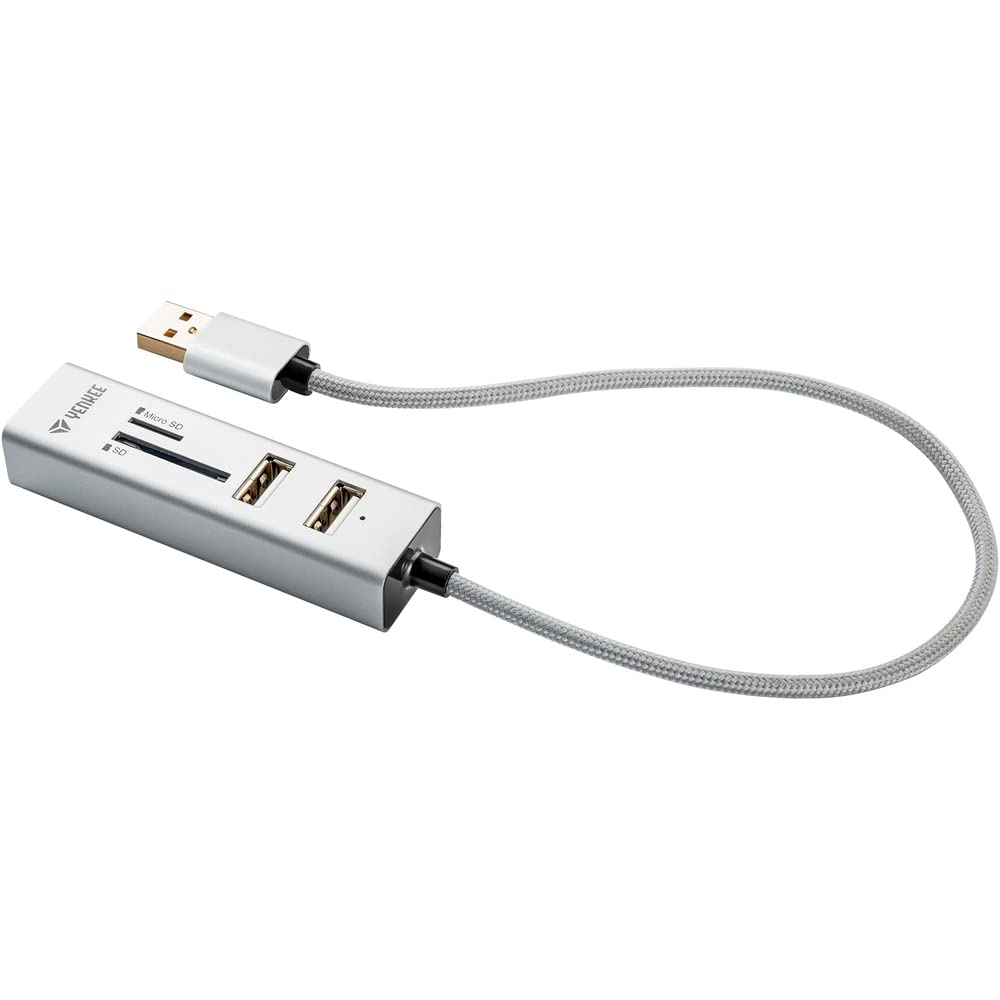
Image 1: The Yenkee YHC 101SR USB 2.0 Hub and Card Reader. This image shows the compact design of the device with its integrated USB cable, ready to be connected to a computer.
5. Istruzioni per l'uso
5.1 Utilizzo dell'hub USB
The YHC 101SR provides three additional USB 2.0 ports for connecting various peripherals.
- Connetti dispositivi USB: Plug your USB devices (e.g., mouse, keyboard, flash drive, external hard drive) into any of the three available USB ports on the hub.
- Riconoscimento del dispositivo: Your computer will recognize the connected devices automatically.
- Considerazioni sulla potenza: For high-power consumption devices (e.g., some external hard drives), ensure your computer's USB port can provide sufficient power. If issues arise, try connecting the high-power device directly to a computer port or use a powered USB hub (if available).
5.2 Utilizzo del lettore di schede
The integrated card reader supports common memory card formats.
- Identifica lo slot della carta: The device has two slots: one for standard SD cards and another for Micro SD cards.
- Inserire la scheda di memoria: Gently insert your SD, SDXC, SDHC, or Micro SD card into the corresponding slot until it clicks into place. Ensure the card is inserted in the correct orientation.
- Dati di accesso: Your computer will detect the memory card as a removable drive. You can then access, transfer, or manage files using your computer's file esploratore.
- Espulsione sicura: Before removing the memory card, always safely eject it from your operating system to prevent data corruption.
6. Manutenzione e cura
- Pulizia: Per pulire il dispositivo, utilizzare un panno morbido e asciutto. Non utilizzare detergenti liquidi o solventi.
- Magazzinaggio: Conservare il dispositivo in un luogo fresco e asciutto, lontano dalla luce solare diretta e da temperature estreme.
- Gestione: Evitare di far cadere il dispositivo o di sottoporlo a forti impatti.
- Umidità: Tenere il dispositivo lontano dall'acqua e dall'umidità elevata.
7. Risoluzione Dei Problemi
| Problema | Possibile causa | Soluzione |
|---|---|---|
| Dispositivo non riconosciuto dal computer. | Loose connection, faulty USB port, operating system issue. |
|
| USB device connected to hub is not working. | Insufficient power, faulty USB device, driver issue for the connected device. |
|
| Scheda di memoria non rilevata. | Incorrect insertion, unsupported card format, faulty card. |
|
8. Specifiche
| Numero di modello | YHC 101SR |
| Marca | Yenkee |
| standard USB | USB 2.0 |
| Numero di porte USB | 3 |
| Slot per lettore di schede | SD slot, Micro SD slot |
| Formati di scheda supportati | SD, SDXC, SDHC, Micro SD |
| Velocità di trasferimento dati | Fino a 480 Mbps |
| Potenza di uscita | DC 5V / 500mA |
| Lunghezza del cavo | 30 centimetri |
| Dimensioni (L x P x A) | Dimensioni: 84 x 24 x 16 mm |
| Peso | 39 grammi |
| Requisiti di sistema | USB port, Windows Vista/7/8/10, Linux 2.4 or higher, Mac OS X |
| Dispositivi compatibili | Keyboards, Monitors (as per manufacturer's data) |
9. Garanzia e supporto
Yenkee products are designed for reliability and performance. For information regarding warranty terms, technical support, or service, please refer to the official Yenkee webo contattare il rivenditore locale. Conservare la ricevuta d'acquisto come prova d'acquisto per eventuali reclami in garanzia.
Note: Specific warranty details may vary by region and retailer.