
Introduzione
The Behringer 961 INTERFACE is an authentic reproduction of the circuitry from the classic "Modular 55" Series, designed to integrate seamlessly into your Eurorack modular synthesizer system. This module functions as a versatile trigger converter, enabling communication between different trigger voltage standards commonly found in modular synthesis environments.
It features dual multi-channel V-trig to S-trig conversion, dual S-trig to V-trig conversion, and an audio to V-trig converter. This manual provides essential information for setting up, operating, and maintaining your 961 INTERFACE module.
Importanti istruzioni di sicurezza
Please read these instructions carefully before operating your Behringer 961 INTERFACE module. Keep this manual for future reference.
- Alimentazione elettrica: Ensure your Eurorack power supply meets the module's power requirements. Incorrect voltagpuò danneggiare il modulo.
- Installazione: Install the module correctly into your Eurorack case, paying attention to the power ribbon cable orientation. Incorrect connection can cause permanent damage.
- Umidità: Non esporre questo apparecchio a pioggia o umidità. Non utilizzare questo apparecchio vicino all'acqua.
- Calore: Non installare vicino a fonti di calore come radiatori, bocchette di riscaldamento, stufe o altri apparecchi (inclusi amplificatori) che producono calore.
- Pulizia: Pulire solo con un panno asciutto.
- Manutenzione: Affidare tutte le operazioni di manutenzione a personale di assistenza qualificato. L'assistenza è necessaria quando l'apparecchio è stato danneggiato in qualsiasi modo.
Impostare
Installazione Eurorack
The 961 INTERFACE module is designed for installation in a standard Eurorack case. Follow these steps for proper installation:
- Spegni: Always ensure your Eurorack case is powered off and unplugged from the mains before installing or removing any modules.
- Montaggio: Align the module with an available space in your Eurorack case. Secure it using the provided screws.
- Collegamento elettrico: Connect the 16-pin power ribbon cable from your Eurorack power supply to the module's power header. Ensure the red stripe on the ribbon cable (indicating -12V) aligns with the corresponding pin on the module's power header. Incorrect connection can damage the module and/or power supply.
- Accensione: Once securely mounted and connected, you can power on your Eurorack case.
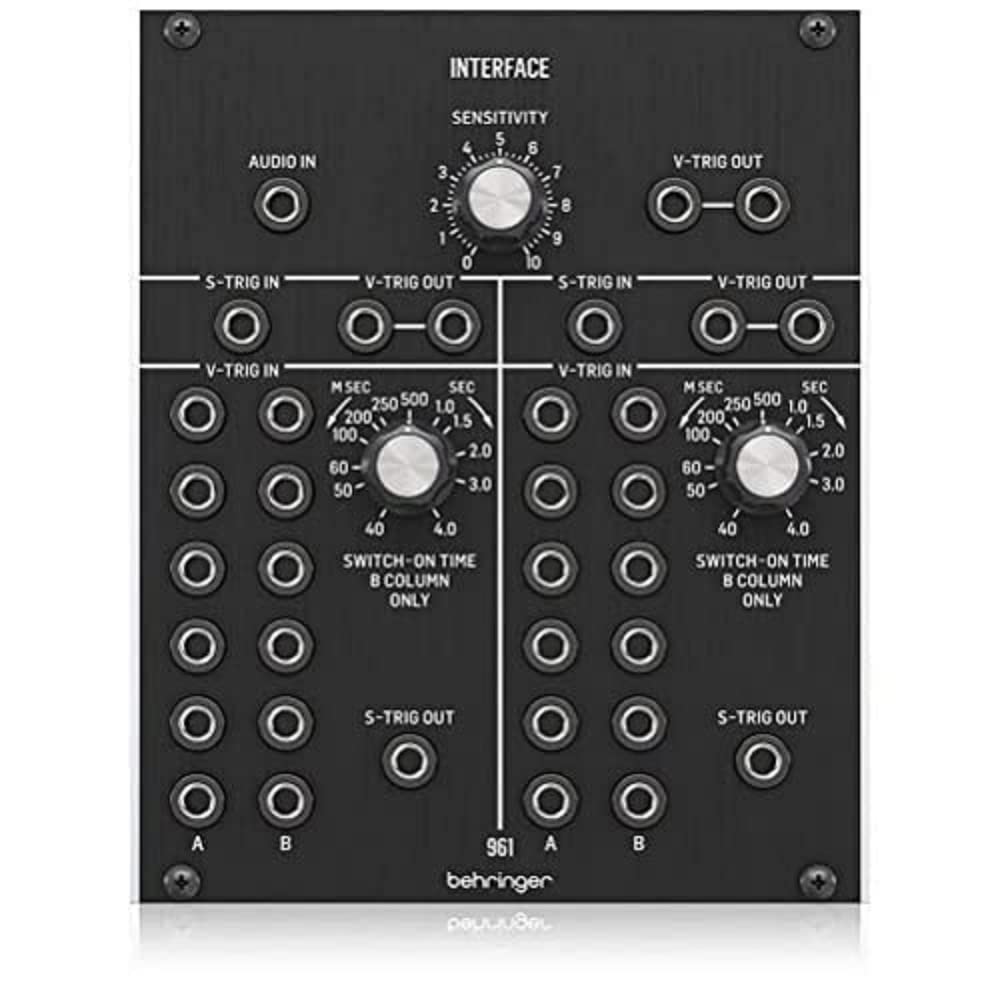
Figure 1: Front panel of the Behringer 961 INTERFACE module, showing inputs, outputs, and controls.
Istruzioni per l'uso
The 961 INTERFACE module provides essential conversion capabilities between different trigger standards and allows audio signals to generate triggers.
Controlli e connessioni

Figure 2: Detail of the upper section of the 961 INTERFACE, showing the SENSITIVITY knob and V-TRIG OUT jacks.
- INGRESSO AUDIO: (Top Left) This jack accepts an audio signal. When the audio signal crosses a certain threshold, it generates a V-trig signal at the V-TRIG OUT jacks.
- SENSIBILITÀ: (Top Center Knob) This control adjusts the threshold for the AUDIO IN signal. Turning it clockwise increases sensitivity, meaning lower audio levels will trigger a V-trig.
- V-TRIG IN: (Left and Right Sections) These jacks accept Voltage Triggers (V-trig) signals. The module converts these V-trig signals into S-trig signals at the S-TRIG OUT jacks. There are two independent V-trig to S-trig converter sections.
- S-TRIG IN: (Left and Right Sections) These jacks accept Shorting Triggers (S-trig) signals. The module converts these S-trig signals into V-trig signals at the V-TRIG OUT jacks. There are two independent S-trig to V-trig converter sections.
- V-TRIG OUT: (Top Right and Bottom Left/Right Sections) These jacks output Voltage Triggers (V-trig). These are generated either from the AUDIO IN (top section) or from converted S-trig signals (bottom sections).
- S-TRIG OUT: (Bottom Left and Bottom Right Sections) These jacks output Shorting Triggers (S-trig). These are generated from converted V-trig signals.
- SWITCH-ON TIME (MSEC/SEC): (Bottom Left and Bottom Right Knobs) These controls adjust the duration of the output trigger pulse when converting S-trig to V-trig. The range is typically from milliseconds (MSEC) to seconds (SEC), allowing for fine-tuning of trigger length. The labels "B COLUMN ONLY" indicate that these controls specifically affect the B column outputs for their respective sections.
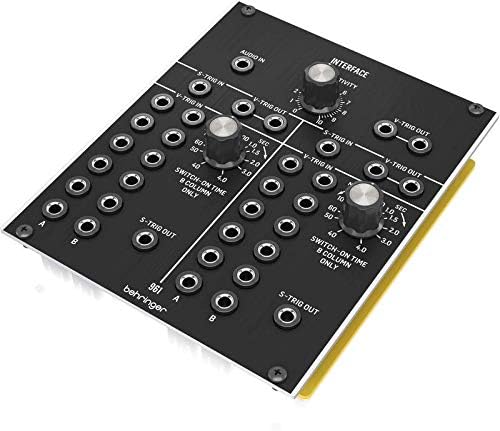
Figure 3: Detail of the lower section of the 961 INTERFACE, showing the SWITCH-ON TIME knobs and S-TRIG OUT jacks.
Modalità di conversione
- Audio to V-trig Conversion: Connect an audio signal to the AUDIO IN jack. Adjust the SENSITIVITY knob to set the threshold at which the audio signal generates a V-trig. The resulting V-trig signals will be available at the V-TRIG OUT jacks in the top right section.
- V-trig to S-trig Conversion: Connect a V-trig signal to any V-TRIG IN jack. The module will convert this into an S-trig signal, available at the corresponding S-TRIG OUT jack in the same section.
- S-trig to V-trig Conversion: Connect an S-trig signal to any S-TRIG IN jack. The module will convert this into a V-trig signal, available at the corresponding V-TRIG OUT jack in the same section. Use the SWITCH-ON TIME knob to adjust the duration of the output V-trig pulse.
Manutenzione
Pulizia
To clean the module, use a soft, dry cloth. Do not use any liquid cleaners, solvents, or abrasive materials, as these can damage the finish or internal components.
Magazzinaggio
When not in use for extended periods, store the module in a dry, dust-free environment. If removed from the Eurorack case, consider using an anti-static bag for protection.
Risoluzione dei problemi
- Nessun potere: Ensure the Eurorack case is powered on and the module's power ribbon cable is correctly connected (red stripe aligned with -12V). Check the power supply of your Eurorack case.
- No Output Trigger:
- Verify the input signal is present and of the correct type (V-trig, S-trig, or audio).
- For audio to V-trig conversion, adjust the SENSITIVITY knob.
- For S-trig to V-trig conversion, ensure the SWITCH-ON TIME is set appropriately.
- Check patch cables for proper connection and integrity.
- Incorrect Trigger Behavior:
- Ensure the input trigger voltage levels are within the expected range for V-trig or S-trig standards.
- Adjust the SWITCH-ON TIME for S-trig to V-trig conversions to match the requirements of the receiving module.
Specifiche
| Nome del modello | 961 INTERFACCIA |
| Dimensioni (L x P x A) | 5.08 x 4.17 x 1.38 pollici (129 x 106 x 35 mm) |
| Peso | 3.52 once (100 g) |
| Materiale | Acciaio legato |
| Tipo di connettore | Auxiliary (3.5mm TS jacks) |
| Consumo energetico | (Typical Eurorack +/-12V, specific current draw not provided in source data, general statement) |
Garanzia
For detailed warranty information, please refer to the official Behringer website or the Music Tribe support community.
Risorsa online: community.musictribe.com/support
Supporto
Should you require technical assistance or have questions regarding your Behringer 961 INTERFACE module, please visit the Music Tribe support community for comprehensive resources, FAQs, and contact options.
Portale di supporto: community.musictribe.com/support