
1. Introduzione
This manual provides detailed instructions for the safe installation, operation, and maintenance of your Utilitech 6-Pack Canless Color Choice Dimmable Recessed Downlight. Please read all instructions carefully before beginning installation and retain this manual for future reference.
1.1 Informazioni sulla sicurezza
- Always turn off power at the circuit breaker before installation, removal, or servicing.
- Se non si è sicuri di una qualsiasi fase del processo di installazione, consultare un elettricista qualificato.
- Assicurarsi che tutti i collegamenti elettrici siano conformi ai codici e alle ordinanze locali.
- Do not install in areas with direct exposure to water spray unless specifically rated for such conditions. This product is rated for indoor and outdoor use.
- Do not attempt to modify the product. Any modifications may void the warranty and create a safety hazard.
- Durante l'installazione, indossare dispositivi di sicurezza adeguati, tra cui occhiali e guanti.
2. Contenuto della confezione
Verificare che tutti i componenti siano presenti prima di iniziare l'installazione.
- 6 x Canless Tethered Downlights
- 6 x Trim Kits
- Manuale di istruzioni (questo documento)
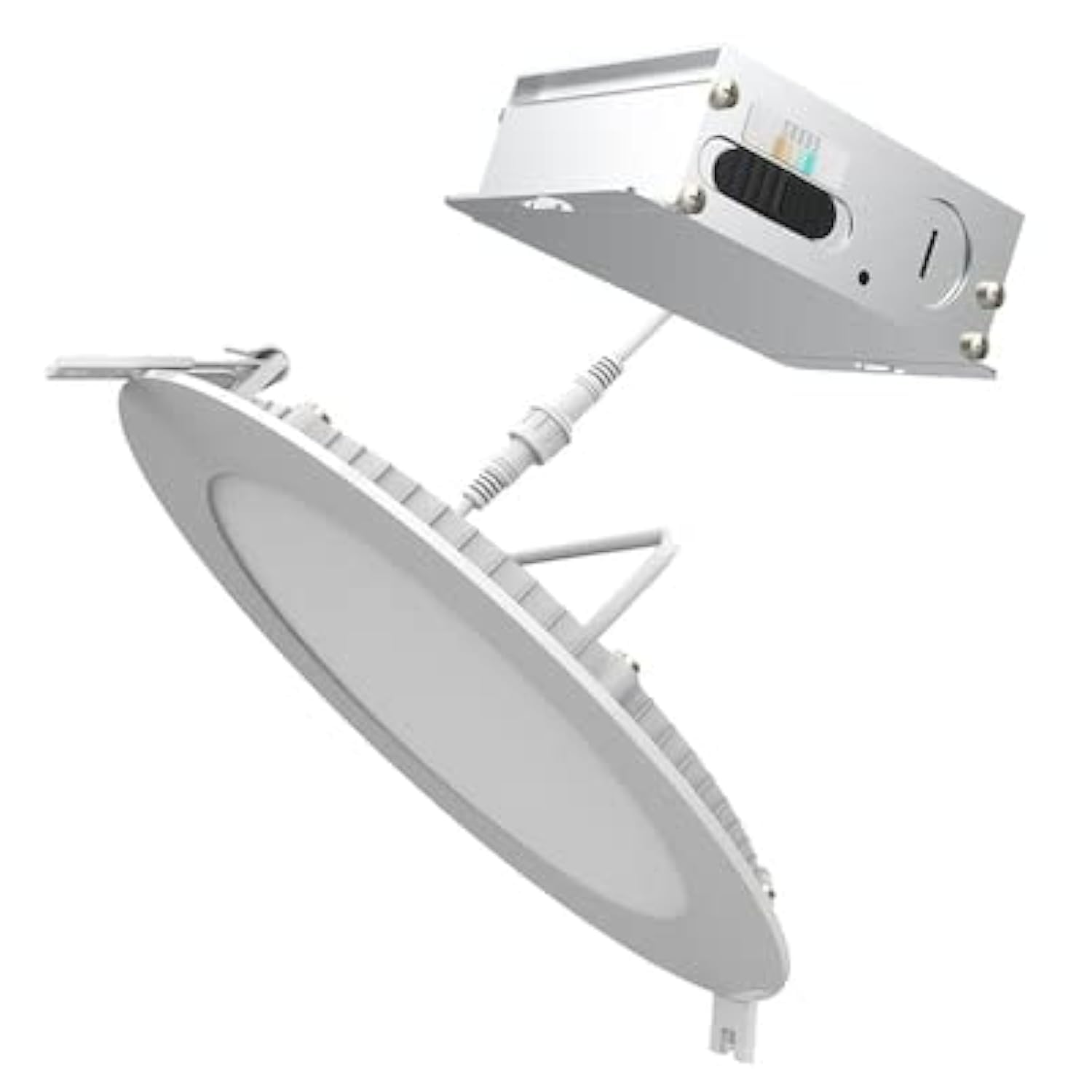
Image 2.1: Contents of the Utilitech 6-Pack Canless Recessed Downlight Kit. Includes the downlights and trim kits.
3. Configurazione e installazione
These canless recessed downlights are designed for easy installation without the need for an existing recessed can or junction box. They are suitable for low plenum clearance applications.
3.1 Strumenti necessari (non inclusi)
- Hole Saw (appropriate size for 5-inch or 6-inch fixture, refer to instruction sheet for exact dimension)
- Spellafili
- Cacciavite
- Occhiali di sicurezza
- Guanti
3.2 Passaggi di installazione
- Spegnimento dell'alimentazione: Prima di iniziare, assicurarsi che l'alimentazione elettrica nell'area di installazione sia stata interrotta tramite l'interruttore automatico.
- Foro tagliato: Using a hole saw, cut a hole in the drywall at the desired location. Refer to the separate instruction sheet for the precise hole dimension required for your 5-inch or 6-inch fixture.
- Run Wiring: Run the electrical wire cable from the direct line voltage to the location of the canless retrofit kit.
- Collegare il cablaggio: Open the knockout on the canless retrofit kit's quick connect terminal. Connect the line voltage wires to the quick connect terminal. Ensure proper polarity (Live, Neutral, Ground).
- Collegamento a margherita (facoltativo): If installing multiple downlights, you can daisy chain additional wire from the quick connect terminal through another knockout to your next canless retrofit kit.
- Inserisci dispositivo: Gently push the spring-loaded clips on the downlight fixture through the cut hole in the ceiling.
- Dispositivo sicuro: The springs will pull up on the retrofit kit, securing it firmly against the ceiling for an airtight seal.
- Ripristina alimentazione: Once all fixtures are installed and secured, restore power at the circuit breaker.
4. Istruzioni per l'uso
This downlight features Color Choice (5CCT) and dimmable functionality.
4.1 Selezione della temperatura del colore (5CCT)
The fixture allows you to select from five color temperatures (2700K to 6500K). The color temperature switch is located on the fixture itself, typically on the driver box or the back of the light. Before final installation into the ceiling, select your desired color temperature. Once installed, you may need to remove the fixture to change the setting.
- 2700K: Warm White, similar to incandescent light.
- 3000K: Soft White, slightly cooler than 2700K.
- 4000K: Cool White, neutral white light.
- 5000K: Bright White, daylight-like appearance.
- 6500K: Daylight, very cool white with a bluish tint.
4.2 Funzionalità di oscuramento
This downlight is dimmable. To utilize the dimming feature, ensure you have a compatible LED dimmer switch installed on the circuit. Refer to your dimmer switch's instructions for proper operation.
5. Manutenzione
The Utilitech Canless Recessed Downlight requires minimal maintenance.
- Pulizia: Assicurarsi che l'alimentazione sia spenta prima di pulire. Pulire l'apparecchio con un panno morbido, asciutto o leggermente asciutto.amp panno. Non usare detergenti abrasivi o solventi.
- LED: La sorgente luminosa a LED integrata è progettata per durare a lungo e non è sostituibile dall'utente.
6. Risoluzione Dei Problemi
Se riscontri problemi con il downlight, fai riferimento ai seguenti problemi comuni e alle relative soluzioni:
| Problema | Possibile causa | Soluzione |
|---|---|---|
| La luce non si accende. | Nessuna alimentazione al dispositivo. Collegamento del cablaggio allentato. Interruttore difettoso. | Controllare l'interruttore. Verificare che tutti i collegamenti dei cavi siano ben saldi (prima spegnere l'alimentazione). Provare l'interruttore con un altro dispositivo. |
| La luce tremola o si attenua in modo anomalo. | Interruttore dimmer incompatibile. Cablaggio allentato. | Assicurarsi che il dimmer sia compatibile con i LED. Controllare i collegamenti elettrici (prima spegnere l'alimentazione). |
| Temperatura del colore errata. | L'interruttore della temperatura del colore è impostato in modo errato. | Turn off power, carefully remove fixture, adjust 5CCT switch to desired setting, reinstall. |
7. Specifiche
| Caratteristica | Dettaglio |
|---|---|
| Marca | Utilità |
| Numero di modello | LLEDR6XT/5CCT/6 |
| Dimensioni del prodotto | 7.1 cm L x 7.1 cm P x 1.3 cm A |
| Colore | Bianco |
| Tipo di sorgente luminosa | LED integrato |
| Cosatage | 65 Watt (equivalenti) |
| Luminosità | 65 Lumens (Note: This seems low for 65W equivalent, usually 65W equivalent is around 800 lumens. User should verify actual lumen output from product packaging if available.) |
| Temperatura del colore (CCT) | 2700K - 6500K (5CCT Selectable) |
| Dimmerabile | SÌ |
| Tipo di installazione | Flush Mount, Canless Recessed |
| Uso interno/esterno | Interno, Esterno |
| Fonte di alimentazione | Cablato |
| Efficienza | Certificato Energy Star |
| Certificazione | ETL |
| Materiale | Plastic (Shade) |
| Peso dell'articolo | 6 libbre (per la confezione) |
8. Garanzia e supporto
For warranty information or technical support, please refer to the documentation included with your purchase or contact Utilitech customer service. Keep your proof of purchase for warranty claims.