
1. Introduzione
This manual provides detailed instructions for the installation, operation, and maintenance of your Axis Communications M3064-V Mini Dome Camera. This camera is designed for indoor surveillance, offering HDTV 720p video quality, dust resistance, and IK08 impact protection. Please read this manual thoroughly before using the product to ensure proper functionality and safety.
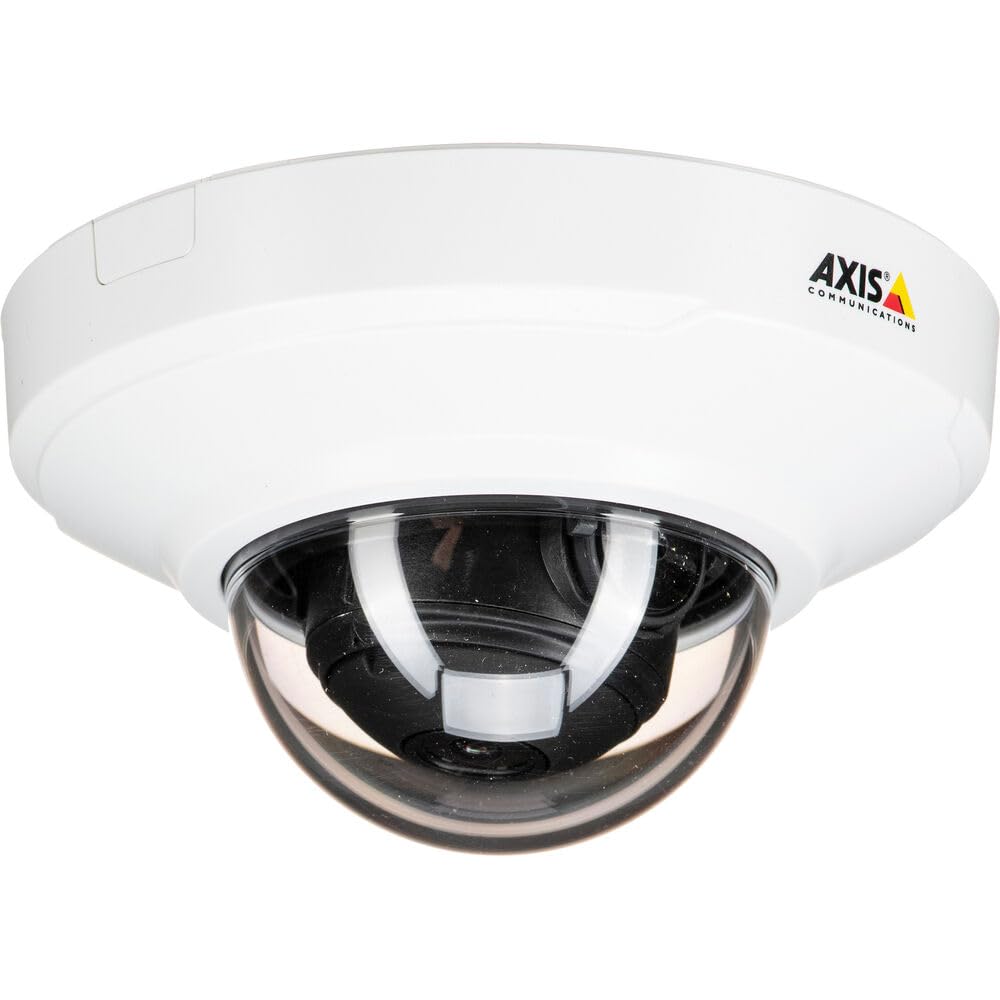
Figura 1: Fronte view of the Axis M3064-V Mini Dome Camera. This image shows the compact dome design suitable for discreet indoor surveillance.
2. Informazioni sulla sicurezza
- Alimentazione elettrica: Use only the specified power supply (AC/DC, 220 Volts, 1.6 Watts) to prevent damage or fire.
- Installazione: Installation should be performed by qualified personnel and comply with all local electrical codes. Ensure the mounting surface can support the camera's weight.
- Ambiente: This camera is designed for indoor use. While dust-resistant and IK08 rated, avoid exposing it to extreme temperatures, direct water spray, or corrosive substances.
- Pulizia: Scollegare l'alimentazione prima della pulizia. Utilizzare un panno morbido e asciutto. Non utilizzare detergenti liquidi o spray.
- Manutenzione: Non tentare di riparare questo prodotto da soli. Affidare tutte le operazioni di manutenzione a personale di assistenza qualificato.
3. Contenuto della confezione
Verificare che tutti gli articoli siano presenti nel pacco. Se qualche articolo risulta mancante o danneggiato, contattare il fornitore.
- Axis M3064-V Mini Dome Camera (1 unit)
- Guida all'installazione
- Staffa di fissaggio
- Viti di montaggio e tasselli
- Resistorx L-key
4. Configurazione e installazione
4.1 Montaggio della telecamera
The Axis M3064-V camera can be mounted on a ceiling or wall. Ensure the mounting surface is stable and can support the camera's weight.
- Preparare la superficie: Choose a suitable location. Use the mounting bracket as a template to mark drill holes.
- Fori di perforazione: Drill pilot holes for the mounting screws. Insert wall plugs if necessary.
- Fissare la staffa: Fissare la staffa di montaggio alla superficie utilizzando le viti fornite.
- Collegare i cavi: Route the network cable (wired connectivity) through the bracket and connect it to the camera's Ethernet port.
- Collega la fotocamera: Secure the camera body to the mounting bracket. Ensure it clicks into place or is fastened according to the specific bracket design.

Figure 2: Illustrative diagram of the camera mounting process on a ceiling. This shows the steps from marking holes to securing the camera.
4.2 Accensione e connessione di rete
- Connessione cablata: Connect an Ethernet cable from your network switch or router to the camera's Ethernet port. The camera supports Power over Ethernet (PoE), simplifying power delivery.
- Connessione Wi-Fi: The camera supports Wi-Fi connectivity. After initial wired setup, you can configure wireless settings via the camera's web interfaccia.
- Alimentazione elettrica: If not using PoE, connect a compatible AC/DC power adapter (220V, 1.6W) to the camera's power input.
- Accesso iniziale: Once powered, the camera will obtain an IP address from your network (DHCP). Use an Axis IP Utility tool or your network router's client list to find the camera's IP address.
5. Istruzioni per l'uso
5.1 Accesso all'interfaccia della fotocamera
Aprire un web browser (e.g., Chrome, Firefox) and enter the camera's IP address in the address bar. You will be prompted to create a new password for the root user upon first access. Follow the on-screen instructions.
5.2 Vivere View and Video Settings
- Vivere View: The main interface provides a live video feed. You can adjust the viewing angle remotely if the camera supports pan/tilt/zoom (PTZ) functions, though this model features a fixed dome with 3x optical zoom.
- Risoluzione: The camera supports HDTV 720p video capture resolution. You can configure streaming profiles for different quality and frame rate needs.
- Visione notturna: The camera includes Night Color functionality, providing enhanced visibility in low-light conditions. This feature can be configured in the image settings.
- Zoom ottico: Utilize the 3x optical zoom feature through the web interface to focus on specific areas within the 83-degree viewangolo di ing.
5.3 Registrazione e archiviazione
La telecamera supporta diverse opzioni di registrazione:
- Archiviazione Edge: The camera has 128 GB of flash memory installed for local recording. Insert a compatible microSD card (not included) for additional storage.
- Registratore video di rete (NVR): Integrate the camera with an NVR or video management system (VMS) for centralized recording and management.
- Registrazione basata sugli eventi: Configure motion detection or other event triggers to start recording, saving storage space.
6. Manutenzione
6.1 Pulizia della fotocamera
Una pulizia regolare aiuta a mantenere una qualità ottimale dell'immagine.
- Spegni: Always disconnect the camera from its power source before cleaning.
- Lente: Gently wipe the lens cover with a soft, lint-free cloth. For stubborn dirt, slightly dampen the cloth with water or a mild lens cleaning solution. Avoid abrasive materials.
- Alloggiamento: Wipe the camera housing with a soft, dry cloth. Do not use strong detergents or solvents.
6.2 Aggiornamenti firmware
Controllare periodicamente le comunicazioni Axis website for firmware updates. Keeping your camera's firmware up-to-date ensures optimal performance, security, and access to new features. Follow the instructions provided with the firmware update package.
7. Risoluzione Dei Problemi
| Problema | Possibile causa | Soluzione |
|---|---|---|
| La fotocamera non si accende | No power supply; Faulty PoE switch/injector; Damaged cable. | Check power connection. Verify PoE functionality. Test with a different Ethernet cable or power adapter. |
| Nessun feed video | Network connectivity issue; Incorrect IP address; Firewall blocking access; Camera not configured. | Verify network connection. Confirm camera's IP address. Check firewall settings. Ensure camera is properly configured via its web interfaccia. |
| Scarsa qualità dell'immagine | Lente sporca; messa a fuoco errata; condizioni di scarsa illuminazione; problemi di larghezza di banda della rete. | Clean the lens. Adjust focus settings in the web interface. Ensure adequate lighting or verify Night Color settings. Check network bandwidth. |
| Impossibile accedere web interfaccia | Incorrect IP address; Network issue; Browser compatibility. | Confirm IP address. Ping the camera's IP. Try a different web browser. Svuota la cache del browser. |
8. Specifiche
| Caratteristica | Dettaglio |
|---|---|
| Nome del modello | M3064-V |
| Numero di modello | 01716-001 |
| Marca | Comunicazioni dell'asse |
| Fattore di forma | Cupola |
| Tecnologia di connettività | Cablato, Wi-Fi |
| Risoluzione di acquisizione video | 720p (HDTV) |
| Risoluzione fissa efficace | 64 MP (Note: This might refer to sensor resolution, actual video output is 720p) |
| Risoluzione del sensore fotografico | 5 MP |
| Viewangolo di ing | 83 gradi |
| Zoom ottico | 3x |
| Visione notturna | Colore notturno |
| Grado di impermeabilità | IP42 (Dust-resistant) |
| Protezione dagli impatti | IK08 |
| Fonte di alimentazione | AC/DC, PoE |
| Voltage | 220 Volt |
| Cosatage | 1.6 Watt |
| Dimensioni della memoria flash installata | 128 GB |
| Dimensioni articolo (LxPxA) | 3.98 x 3.98 x 2.2 pollici |
| Peso dell'articolo | 150 grammi |
| Colore | Nero / Bianco |
9. Garanzia e supporto
9.1 Garanzia del prodotto
Axis Communications products typically come with a limited manufacturer's warranty. Please refer to the warranty card included with your product or visit the official Axis Communications website for detailed warranty terms and conditions specific to the M3064-V model. Keep your proof of purchase for warranty claims.
9.2 Supporto tecnico
For technical assistance, troubleshooting beyond this manual, or service inquiries, please contact Axis Communications customer support. You can find contact information, FAQs, and additional resources on the official Axis Communications support website. When contacting support, please have your product model number (M3064-V or 01716-001) and serial number ready.
Risorse online: www.axis.com/support