
1. Introduzione
The KLIM Light v2 is a high-performance wireless gaming keyboard designed for an optimal typing and gaming experience. Featuring a Spanish ES layout, vibrant RGB backlighting, and a long-lasting rechargeable battery, this keyboard offers instant connectivity and enhanced durability. This manual provides detailed instructions for setting up, operating, maintaining, and troubleshooting your KLIM Light v2 keyboard.
2. Impostazione
2.1 Contenuto della confezione
- KLIM Light v2 Wireless Gaming Keyboard
- Ricevitore USB
- Cavo di ricarica USB
2.2 Collegamento della tastiera
- Locate the USB receiver, typically stored in a compartment on the keyboard.
- Plug the USB receiver into an available USB port on your computer, console (PS4/PS5, Xbox), or other compatible device.
- The keyboard will automatically connect. No additional drivers are required for installation.

The KLIM Light v2 Wireless Gaming Keyboard, featuring a Spanish ES layout, is shown with its compact USB receiver, ready for instant plug-and-play connectivity.
2.3 Ricarica della tastiera
The KLIM Light v2 keyboard features a built-in rechargeable Lithium Ion battery. To charge:
- Collegare il cavo di ricarica USB in dotazione alla porta di ricarica della tastiera.
- Collegare l'altra estremità del cavo USB a una porta USB alimentata (ad esempio, computer, adattatore USB da parete).
- The charging indicator light will illuminate. Once fully charged, the light will turn off or change color.
- The keyboard can be used while charging. A full charge typically takes 4-6 hours.

This image illustrates the keyboard's power management features, including adjustable backlighting brightness, an automatic stand-by mode after 120 seconds of inactivity, and its extended battery capacity.
3. Istruzioni per l'uso
3.1 Controllo della retroilluminazione
The KLIM Light v2 features stunning rainbow RGB backlighting. You can adjust the lighting to suit your preference:
- Regolazione della luminosità: Use the dedicated keys (often Fn + arrow keys or specific lighting keys) to cycle through different brightness levels or turn the backlighting off completely.
- Modalità di illuminazione: Switch between static and breathing modes using the designated function keys.
- Nota: The colors of the rainbow backlighting are fixed and not customizable.

The keyboard's vibrant rainbow RGB backlighting is displayed, emphasizing its quiet membrane keys and soft-touch typing experience, ideal for use in low-light environments.
3.2 Funzioni chiave
- Tasti a membrana: The keyboard utilizes membrane keys with a short travel distance, providing a responsive and quiet typing experience.
- Tasti multimediali: Access various multimedia functions (e.g., volume control, play/pause) using the Fn key in combination with the corresponding function keys (F1-F12).
- Basso Profile Progetto: Il basso professionistafile keys contribute to comfortable and efficient typing.
3.3 Modalità risparmio energetico
To conserve battery life, the keyboard features an automatic stand-by mode. After approximately 120 seconds of inactivity, the keyboard will enter a low-power state. Press any key to wake it up instantly.
4. Manutenzione
4.1 Gestione della batteria
- Regularly charge the keyboard to maintain optimal battery performance.
- Evitare di scaricare completamente la batteria frequentemente, poiché ciò può ridurne la durata complessiva.
- If the keyboard is not used for an extended period, charge it periodically to prevent deep discharge.
4.2 Pulizia
To clean your KLIM Light v2 keyboard:
- Disconnect the keyboard from its power source and turn it off.
- Utilizzare un panno morbido e privo di lanugine leggermente damplucidato con acqua o una soluzione detergente delicata.
- Pulisci delicatamente i tasti e la superficie. Evita l'eccessiva umidità.
- The keyboard has an IP03 water resistance rating, offering protection against light splashes, but it is not fully waterproof and should not be submerged.

Un oltreview of the KLIM Light v2's key features, including its wireless connectivity, RGB lighting, anti-ghosting technology, 2ms response time, compact design, IP03 water resistance, and long-lasting battery.
5. Risoluzione Dei Problemi
5.1 Problemi di connettività
- La tastiera non risponde: Assicurati che il ricevitore USB sia collegato saldamente a una porta USB funzionante. Prova una porta USB diversa.
- Connessione intermittente: Ensure the keyboard is within the operating range (up to 10 feet) of the USB receiver and there are no significant obstructions.
- Ritardo o ritardo: Ensure the keyboard is sufficiently charged. Low battery can affect wireless performance.
5.2 Problemi di addebito
- La tastiera non si carica: Verify the USB charging cable is properly connected to both the keyboard and a powered USB source. Try a different USB cable or port.
- La batteria non mantiene la carica: If the battery life significantly decreases or the keyboard fails to hold a charge after repeated attempts, contact KLIM customer support.
5.3 Il tasto non risponde
- Assicurarsi che la tastiera sia completamente carica.
- If specific keys are unresponsive, try cleaning around the keycap to remove any debris.
- Se il problema persiste, contattare l'assistenza clienti per ulteriore assistenza.
5.4 Supporto generale
For any issues not covered in this section, please refer to the KLIM customer support resources mentioned in the Warranty and Support section.
6. Specifiche
| Caratteristica | Specificazione |
|---|---|
| Dimensioni del prodotto | 17.13 x 5.47 x 1.14 pollici |
| Peso dell'articolo | 1.19 libbre |
| Produttore | CLIMA |
| Numero modello articolo | k69es |
| Batterie | È necessaria 1 batteria agli ioni di litio (inclusa) |
| Marca | CLIMA |
| Dispositivi compatibili | Computer portatile, Mac, PC, PS4/PS5, Xbox |
| Tecnologia di connettività | Senza fili |
| Descrizione della tastiera | Spanish ES Layout |
| Usi consigliati per il prodotto | Scrivania |
| Caratteristica speciale | Travel, Water-resistant (IP03) |
| Colore | Nero |
| Supporto colore retroilluminazione tastiera | RGB (Rainbow) |
| Componenti inclusi | Cavo USB |
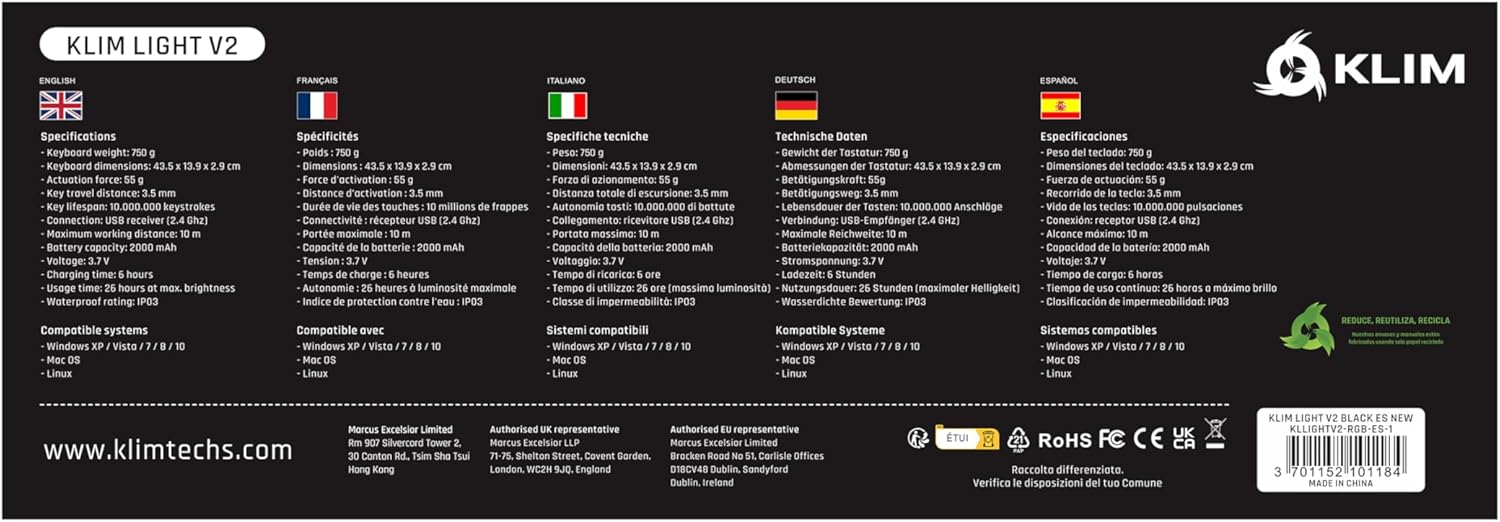
A comprehensive table detailing the technical specifications of the KLIM Light v2 keyboard, presented in multiple languages, covering aspects such as weight, dimensions, battery type, and system compatibility.
7. Garanzia e assistenza clienti
KLIM stands behind the quality of its products. The KLIM Light v2 Wireless Gaming Keyboard comes with an unbeatable Garanzia di 5 anno.
If you encounter any issues or have questions regarding your product, KLIM provides Assistenza clienti 24 ore su 7, XNUMX giorni su XNUMX. Please visit the official KLIM website or contact their support team directly for assistance.

KLIM's commitment to quality and customer satisfaction is underscored by its 5-year product protection, ensuring long-term reliability for your keyboard.