
1. Introduzione
This manual provides comprehensive instructions for the REDLIRO Under Desk Treadmill, model JK03F. Designed for both walking and running, this compact and foldable treadmill offers a versatile solution for exercise at home or in the office. Please read this manual thoroughly before initial use to ensure proper setup, safe operation, and effective maintenance of your equipment.

Figura 1.1: The REDLIRO Under Desk Treadmill in both walking (under desk) and running (with handrail) modes, alongside its remote control.
2. Istruzioni di sicurezza
To prevent injury and ensure safe operation, adhere to the following safety guidelines:
- Consultare sempre un medico prima di iniziare qualsiasi nuovo programma di esercizi.
- Place the treadmill on a flat, stable surface with adequate clearance around it (at least 2 feet at the rear and sides).
- Ensure the safety key is properly attached to your clothing and the treadmill console before starting.
- Non permettere ai bambini o agli animali domestici di avvicinarsi al tapis roulant mentre è in funzione.
- Wear appropriate athletic footwear and clothing. Avoid loose clothing that could get caught.
- Non utilizzare il tapis roulant se è danneggiato o non funziona correttamente.
- Scollegare il tapis roulant dalla presa di corrente quando non è in uso o prima di pulirlo/manutenerlo.
- The maximum user weight for this treadmill is 220 lbs (100 kg). Do not exceed this limit.
- Maintain a firm grip on the handrails when starting or stopping the treadmill, or if you feel unsteady.
- Non salire o scendere dal tapis roulant mentre il nastro è in movimento.
3. Contenuto della confezione
Verificare che tutti i componenti siano presenti e integri al momento del disimballaggio:
- REDLIRO Under Desk Treadmill (Model JK03F)
- Telecomando
- Cavo di alimentazione
- Chiave di sicurezza
- Olio lubrificante
- Manuale dell'utente (questo documento)
4. Impostazione
4.1 Disimballaggio e posizionamento
- Estrarre con cautela il tapis roulant dalla confezione.
- Place the treadmill on a firm, level surface. Ensure there is at least 2 feet of clear space behind and on both sides of the treadmill for safety.
4.2 Handrail Configuration
The REDLIRO JK03F treadmill features a foldable handrail, allowing for two operational modes:
- Modalità di camminata: For under-desk use, the handrail can be folded down. This limits the maximum speed.
- Modalità di esecuzione: For higher speeds and added stability, raise the handrail to its upright position.
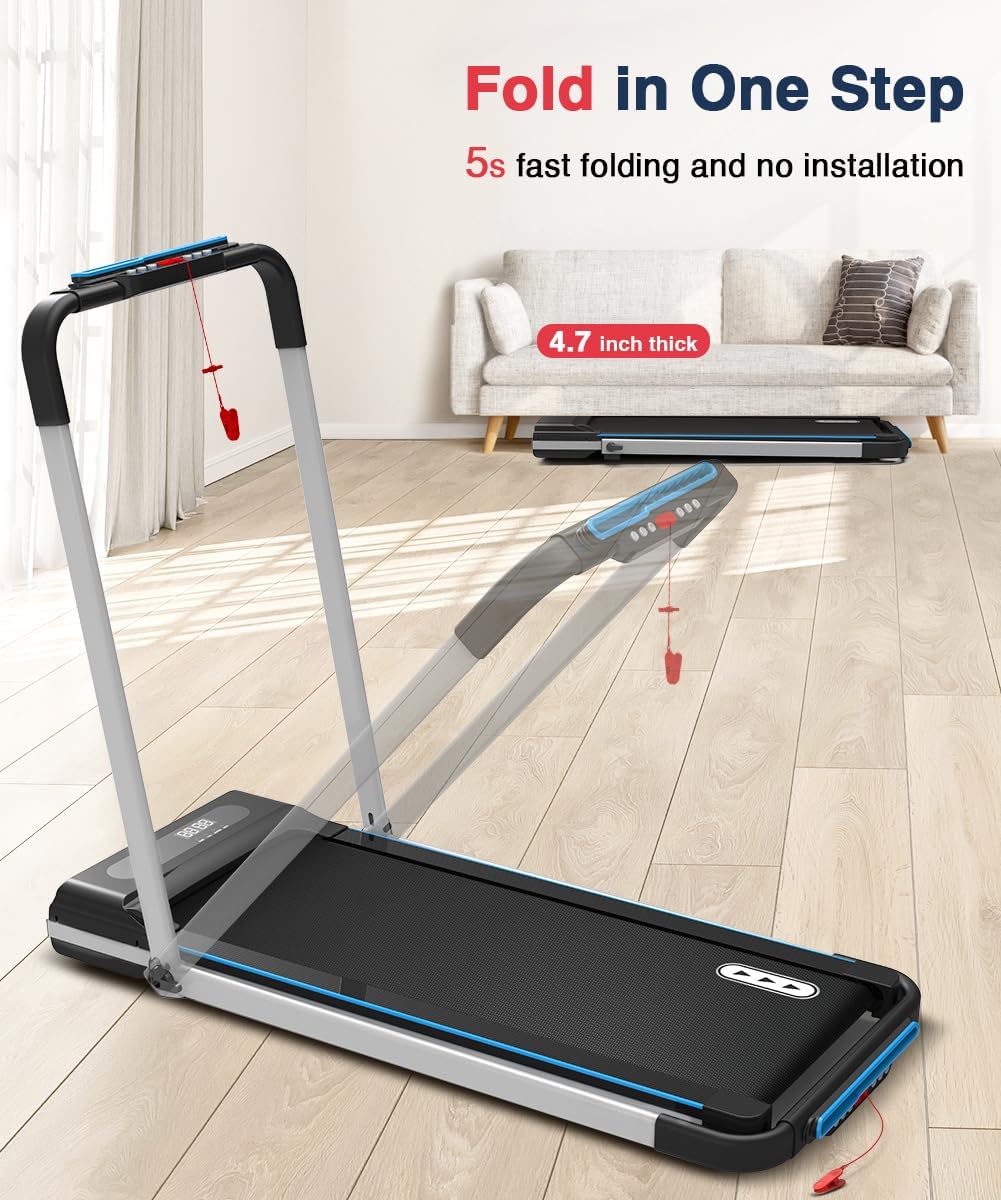
Figura 4.1: Illustration of the treadmill's one-step folding mechanism, showing the handrail lowering for compact storage or walking mode.
4.3 Collegamento di alimentazione
- Collegare il cavo di alimentazione alla porta di ingresso dell'alimentazione del tapis roulant.
- Collegare l'altra estremità del cavo di alimentazione a una presa elettrica da 110 V dotata di messa a terra.
- Assicurarsi che l'interruttore di alimentazione del tapis roulant sia in posizione "ON".
5. Istruzioni per l'uso
5.1 Per iniziare
- Attach the safety key clip to your clothing. The magnetic end of the safety key must be placed on the designated area of the console for the treadmill to operate.
- Posizionatevi sui binari laterali del tapis roulant, non sul nastro trasportatore.
- Press the Power button on the remote control to turn on the treadmill.
5.2 Funzioni del telecomando
The remote control allows you to manage all treadmill functions:
- Pulsante di accensione: Accende/spegne il tapis roulant.
- Pulsante '+': Aumenta la velocità.
- Pulsante '-': Diminuisce la velocità.
- Pulsante 'M': Cycles through different modes (e.g., manual, preset programs).
- Pulsante 'P': Selects preset programs.

Figura 5.1: The LED display showing exercise data and the remote control for operational adjustments.
5.3 Walking Mode (Handrail Down)
With the handrail folded down, the treadmill operates in walking mode, ideal for use under a standing desk.
- Maximum speed in this mode is typically 4.0 MPH.
- Use the remote control to adjust speed.

Figura 5.2: A user utilizing the treadmill in walking mode under a standing desk, demonstrating its quiet operation.
5.4 Running Mode (Handrail Up)
When the handrail is in the upright position, the treadmill can be used for jogging and running at higher speeds.
- Speed range is 0.5-7.5 MPH.
- Hold the handrails for balance, especially when increasinvelocità g.

Figura 5.3: A user running on the treadmill with the handrail extended for support.
5.5 programmi preimpostati
The treadmill includes 12 preset programs. To select a program:
- Press the 'M' button to enter program selection mode.
- Use the 'P' button to cycle through the 12 available programs.
- Once a program is selected, the treadmill will automatically adjust speed according to the program's profile.
5.6 Display a LED
Il display LED fornisce un feedback in tempo reale sul tuo allenamento:
- TEMPO: Durata del tuo allenamento.
- CAL: Calorie bruciate stimate.
- VELOCITÀ: Velocità attuale del nastro trasportatore.
- DISTRIBUZIONE: Distanza percorsa durante l'allenamento.
6. Manutenzione
6.1 Pulizia
- Scollegare sempre il tapis roulant prima di pulirlo.
- Pulisci la console e le superfici esterne con un panno morbido eamp panno. Evitare detergenti abrasivi o solventi.
- Regularly vacuum underneath the treadmill to prevent dust and debris buildup.
6.2 Lubrificazione
The running belt requires periodic lubrication to ensure smooth operation and prolong its lifespan.
- Scollegare il tapis roulant.
- Allentare leggermente i bulloni del rullo posteriore per sollevare la cinghia.
- Apply a small amount of the provided silicone lubricant evenly under the center of the running belt.
- Stringere i bulloni del rullo posteriore.
- Plug in the treadmill and run it at a low speed (e.g., 1-2 MPH) for 5 minutes to distribute the lubricant.
- Lubricate every 3-6 months, or after approximately 50 hours of use, depending on usage frequency.
6.3 Regolazione della cinghia
If the running belt starts to slip or drift to one side, it may need adjustment. Refer to the specific instructions in the included quick start guide or contact customer support for detailed guidance.
7. Risoluzione Dei Problemi
Se riscontri problemi con il tuo tapis roulant, fai riferimento ai seguenti problemi comuni e alle relative soluzioni:
| Problema | Possibile causa | Soluzione |
|---|---|---|
| Il tapis roulant non si accende. | Power cord not connected, power switch off, safety key not in place. | Ensure power cord is securely plugged in, power switch is ON, and safety key is correctly positioned. |
| Il nastro trasportatore si ferma o slitta. | Cinghia troppo lenta, lubrificazione insufficiente, sovraccarico del motore. | Adjust belt tension, apply lubricant (see Section 6.2), ensure user weight is within limits. |
| Rumore insolito durante il funzionamento. | Componenti allentati, attrito della cinghia, problema al motore. | Check for loose screws, lubricate belt, contact customer support if noise persists. |
| Il telecomando non risponde. | Batterie scariche, telecomando fuori portata, interferenze. | Replace remote control batteries, ensure clear line of sight to treadmill console, reduce interference. |
8. Specifiche
Detailed technical specifications for the REDLIRO Under Desk Treadmill JK03F:
| Numero di modello | JK03F |
| Marca | REDLIRO |
| Potenza motore | 2.25 CV |
| Gamma di velocità | 0.5 - 7.5 MPH (0.8 - 12 km/h) |
| Area di corsa (L x P) | 41 pollici x 15 pollici (104.14 cm x 38.1 cm) |
| Peso massimo dell'utente | 220 libbre (100 kg) |
| Volume nominaletage | 110 Volt |
| Dimensioni del prodotto (L x P x A) | 51.9 x 24.8 x 42.1 pollici (132 x 63.5 x 106.6 cm) |
| Dimensioni piegate (L x P x A) | 20.4 x 9.8 x 16.9 pollici (51.8 x 24.9 x 42.9 cm) |
| Peso del prodotto | 48.63 libbre (22.06 kg) |
| Tipo di visualizzazione | LED (Time, Calories, Speed, Distance) |
| Programmi preimpostati | 12 |
| Materiale | Aluminum (main), Alloy Steel (frame) |
| Caratteristiche speciali | Foldable, Remote Control |

Figura 8.1: An illustration of the treadmill's 2.25 HP motor and key performance specifications.

Figura 8.2: Depiction of the 5-layer running belt and 4-point softer rubber cushioning system for enhanced user comfort.
9. Garanzia e supporto
The REDLIRO Under Desk Treadmill (Model JK03F) comes with a 12-month warranty from the date of purchase. This warranty covers manufacturing defects and material flaws under normal use. It does not cover damage caused by misuse, accidents, unauthorized modifications, or improper maintenance.
For warranty claims, technical assistance, or replacement parts, please contact REDLIRO customer support. Have your purchase receipt and product model number (JK03F) ready when contacting support.