
Maxxter Maxxter Web Cam ACT-BCAM-01 USB
Maxxter Web Manuale utente Cam ACT-BCAM-01 USB
Model: ACT-BCAM-01 | Brand: Maxxter
Introduzione
This user manual provides comprehensive instructions for the Maxxter Web Cam ACT-BCAM-01 USB. This compact and versatile camera is designed for various recording needs, offering high-definition video capture and ease of use. Please read this manual thoroughly before operating the device to ensure proper functionality and safety.
Informazioni sulla sicurezza
- Non esporre il dispositivo a temperature estreme, umidità o luce solare diretta.
- Evitare di far cadere o sottoporre il dispositivo a forti impatti.
- Keep the device away from water and other liquids. It is not waterproof.
- Non tentare di smontare o modificare il dispositivo. Ciò invaliderà la garanzia.
- Per la ricarica e il trasferimento dei dati utilizzare esclusivamente il cavo USB fornito.
Contenuto della confezione
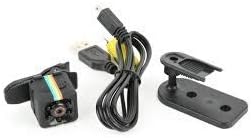
Image: Maxxter Web Cam ACT-BCAM-01 USB, USB cable, and mounting accessories.
Si prega di controllare il contenuto della confezione al momento dell'apertura. La confezione standard dovrebbe includere:
- Maxxter Web Cam ACT-BCAM-01 USB Unit
- Cavo USB
- Manuale dell'utente (questo documento)
- Mounting Bracket/Clip
Prodotto finitoview

Immagine: frontale e laterale view of the Maxxter Web Cam ACT-BCAM-01 USB, showing the lens and control buttons.

Immagine: dall'alto verso il basso view of the Maxxter Web Cam ACT-BCAM-01 USB, highlighting the button layout.

Image: Diagram illustrating key features such as 140-degree wide viewing angle, night vision, motion detection, support for storage cards, and the 360-degree adjustable bracket. Dimensions are also shown.
Componenti chiave:
- Lente: High-definition camera lens for video recording.
- Porta USB: Per la ricarica e il trasferimento dei dati.
- Slot per scheda MicroSD: For expandable storage (card not included).
- Pulsante di accensione / modalità: To turn the device on/off and switch between modes.
- Pulsante di registrazione: Per avviare e interrompere la registrazione.
- Luci di segnalazione: Provide status feedback (e.g., power, recording, charging).
Impostare
1. Ricarica del dispositivo:
- Collegare l'estremità più piccola del cavo USB alla porta USB della fotocamera.
- Collegare l'altra estremità del cavo USB a un adattatore di alimentazione USB (non incluso) o alla porta USB di un computer.
- La spia luminosa indicherà lo stato di carica (ad esempio, rossa fissa durante la carica, spenta quando la carica è completa).
2. Inserting a MicroSD Card:
- Assicurati che la fotocamera sia spenta.
- Individuare lo slot per la scheda MicroSD sul lato della fotocamera.
- Gently insert a MicroSD card (Class 10 or higher, up to 32GB recommended) into the slot until it clicks into place.
- Per rimuoverla, spingere leggermente la scheda finché non scatta fuori.
Istruzioni per l'uso
Accensione/spegnimento:
- Per accendere: Press and hold the Power/Mode button for 2-3 seconds. The indicator light will illuminate.
- Per spegnere: Press and hold the Power/Mode button for 5-6 seconds until the indicator light turns off.
Registrazione video:
- Ensure the camera is powered on and a MicroSD card is inserted.
- Press the Record button once to start video recording. The indicator light will flash.
- Press the Record button again to stop recording. The indicator light will stop flashing and return to standby mode.
Registrazione di rilevamento del movimento:
This feature allows the camera to record only when motion is detected, conserving battery and storage space.
- While in standby mode, press the Power/Mode button twice quickly to enter motion detection mode. The indicator light will change (refer to device specific light pattern).
- The camera will automatically start recording when motion is detected and stop when motion ceases.
- To exit motion detection mode, press the Power/Mode button once.
Collegamento al computer:
Per accedere alla registrazione files, connect the camera to your computer using the provided USB cable. The camera will appear as a removable disk drive.
Manutenzione
- Pulizia: Use a soft, dry cloth to clean the camera body. For the lens, use a specialized lens cleaning cloth. Do not use liquid cleaners or solvents.
- Magazzinaggio: Quando non viene utilizzata, conservare la fotocamera in un luogo fresco e asciutto, lontano dalla luce solare diretta e da temperature estreme.
- Cura della batteria: Per una durata ottimale della batteria, evitare di scaricarla completamente frequentemente. Caricare il dispositivo regolarmente, anche se non lo si utilizza per periodi prolungati.
Risoluzione dei problemi
| Problema | Possibile causa | Soluzione |
|---|---|---|
| La fotocamera non si accende. | Batteria scarica; malfunzionamento del dispositivo. | Charge the camera for at least 2 hours. If still unresponsive, contact support. |
| Impossibile registrare il video. | Nessuna scheda MicroSD; Scheda piena o danneggiata; Formato scheda non corretto. | Insert a MicroSD card. Check card capacity. Format the card (FAT32) on a computer. Try a different card. |
| Il computer non riconosce la fotocamera. | Faulty USB cable; Driver issue; Incorrect connection mode. | Try a different USB port or cable. Restart your computer. Ensure the camera is powered on when connected. |
| Scarsa qualità video. | Low light conditions; Dirty lens; Incorrect settings. | Ensure adequate lighting. Clean the camera lens. |
Specifiche
| Caratteristica | Dettaglio |
|---|---|
| Modello | Maxxter Web Cam ACT-BCAM-01 USB |
| Marca | Maxxter |
| Tecnologia di connettività | USB |
| Risoluzione video | 720p o 1080p |
| Lunghezza focale massima | 22 millimetri |
| Caratteristiche speciali | Low light capability, Motion detection |
| Dimensioni (L x P x A) | Dimensioni: 20 x 30 x 20 cm |
| Peso | 40 grammi |
| Archiviazione supportata | MicroSD (SDHC) |
| Formato di acquisizione video | MP4 |
| Formato audio | PCM, CAA |
| Tipo di messa a fuoco | Messa a fuoco manuale |
| Resistenza all'acqua | Non impermeabile |
Garanzia e supporto
For warranty information and technical support, please refer to the official Maxxter webo contatta il tuo rivenditore locale. Conserva la ricevuta d'acquisto come prova d'acquisto.
Nota: al momento non sono disponibili informazioni sulla disponibilità dei pezzi di ricambio e sugli aggiornamenti software.
Ask a question about this manual
Ask about setup, troubleshooting, compatibility, parts, safety, or missing instructions. Manuals+ will review the question and use this page’s manual context to help answer it.