
smartmi ZLBPLDS03ZM
Smartmi Outdoor Pedestal Fan 2S User Manual
Model: ZLBPLDS03ZM | Brand: Smartmi
Introduzione
The Smartmi Outdoor Pedestal Fan 2S is designed to provide a natural and comfortable breeze for both indoor and outdoor environments. Featuring a premium DC inverter motor, this fan offers quiet operation, energy efficiency, and a long lifespan. Its cordless design and smart control options enhance user convenience and portability.
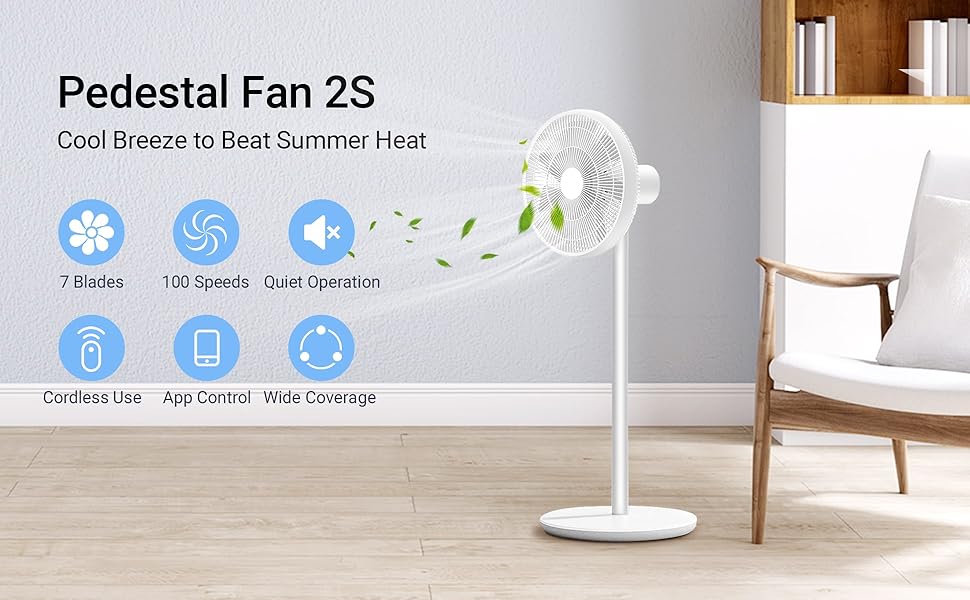
Figure 1: Smartmi Pedestal Fan 2S highlighting key features.
Installazione e assemblaggio
The Smartmi Pedestal Fan 2S is designed for quick and easy assembly, typically taking about 5 minutes. Follow these steps to set up your fan:
- Unpack all components from the packaging. Ensure you have the base, fan assembly, motor+support pole, power cord, Allen wrench, and fan blades.
- Attach the motor+support pole to the base.
- Secure the fan blades to the motor shaft.
- Attach the fan assembly (grille) to the motor+support pole, ensuring it is securely fastened.
- Connect the power cord to the fan and a suitable power outlet for charging or wired operation.

Figure 2: Fan components for easy 5-minute assembly.
Istruzioni per l'uso
Accensione/spegnimento e controllo della velocità
The fan can be controlled via physical buttons on the unit or through the Mi Home APP for smart features. It offers 100 stepless speed settings for precise airflow adjustment.
- Controlli fisici: Use the buttons on the fan unit to power on/off and adjust basic speed settings.
- Mi Home APP Control: For full functionality, including 100 speed settings, natural breeze mode, oscillation control, and timer functions, connect the fan to the Mi Home APP.

Figure 3: Controlling the fan via the Mi Home App.
Modalità e funzionalità
- Modalità Brezza Naturale: Replicates the irregular patterns of natural wind for a more comfortable experience.
- Modalità standard: Fornisce un flusso d'aria costante.
- Oscillazione: The fan supports a 120° wide oscillation angle and a 40° tilt angle to cool a larger area. These can be adjusted via the app.
- Funzione timer: Set a shut-off timer through the Mi Home APP for automated operation.
- Funzionamento senza fili: Equipped with a built-in lithium-ion battery, the fan can operate wirelessly for 3 to 20 hours depending on the speed setting.

Figure 4: Fan oscillation and tilt capabilities.

Figure 5: The fan's portable design for cordless use.
Dimostrazioni video
Video 1: Smartmi Outdoor Fan 2S Creative - Demonstrates the fan's quiet operation and natural breeze feature in various settings.
Video 2: Smartmi Outdoor Fan 2S - Showcases the fan's features and quiet performance.
Manutenzione
Regular maintenance ensures optimal performance and longevity of your Smartmi Pedestal Fan 2S.
- Pulizia: Periodically wipe down the exterior of the fan with a soft, damp panno. Assicurarsi che la ventola sia scollegata prima di pulirla.
- Pulizia della lama: While the fan is designed for easy assembly, some users have noted difficulty in removing the front grille for deep cleaning of the blades. Refer to the detailed user manual (PDF link provided in product documents) for specific instructions on disassembling the fan for thorough cleaning, if required.
- Magazzinaggio: When not in use for extended periods, store the fan in a cool, dry place. Its compact design allows for easy storage.
Risoluzione dei problemi
If you encounter issues with your Smartmi Pedestal Fan 2S, refer to the common problems and solutions below:
| Problema | Possibile causa | Soluzione |
|---|---|---|
| La ventola non si accende. | Not plugged in, battery depleted, or power switch off. | Ensure the power cord is securely plugged in. Charge the battery if operating wirelessly. Check the power button on the unit or in the app. |
| Cannot connect to Mi Home APP. | Incorrect Wi-Fi band (only 2.4GHz supported), app issues, or fan not in pairing mode. | Ensure your Wi-Fi is 2.4GHz. Restart the app and the fan. Follow the app's pairing instructions carefully. |
| La ventola è rumorosa. | Obstruction in blades, loose parts, or fan not on a stable surface. | Check for any foreign objects near the blades. Ensure all parts are securely assembled. Place the fan on a flat, stable surface. |
| La durata della batteria è più breve del previsto. | Operating at high speeds, aging battery, or frequent charging/discharging. | Battery life varies significantly with speed settings. Lower speeds extend battery life. Ensure proper charging practices. |
Specifiche
| Caratteristica | Dettaglio |
|---|---|
| Marca | smartmi |
| Nome del modello | ZLBPLDS03ZM |
| Colore | Bianco |
| Fonte di alimentazione | Elettrico |
| Dimensioni del prodotto | 12.99"P x 15.38"L x 37.8"A |
| Caratteristiche speciali | 7 Blades, Natural Wind, 4 Oscillation Angles, Auto-off Timer, 29dB Quiet Operation, 100 Stepless Speeds, Cordless, Portable |
| Livello di rumore | 60 dB (Max), as low as 28.6dB |
| Cosatage | 25 watt |
| Voltage | 220 Volt (CC) |
| Peso dell'articolo | 7.72 libbre |
| Batteria | 1 batteria agli ioni di litio (inclusa) |
| Tempo di funzionamento senza fili | 3h (highest speed) to 20h (lowest speed) |
| Metodo di controllo | Remote (via Mi Home App) |
Garanzia e supporto
For warranty information and customer support, please refer to the official Smartmi website or contact their customer service directly. A detailed user manual in PDF format is also available for download from the product's Amazon page for further reference.
Link to official user manual (PDF): Smartmi Outdoor Pedestal Fan 2S User Manual PDF
Ask a question about this manual
Ask about setup, troubleshooting, compatibility, parts, safety, or missing instructions. Manuals+ will review the question and use this page’s manual context to help answer it.