
1. Introduzione
The PWAYTEK HDMI Extender Splitter HTS010X is designed to distribute a single HDMI source to multiple displays over long distances using Ethernet cables. This device supports high-definition video up to 1080P@60Hz and 3D signals, making it suitable for various applications including home entertainment, security systems, and professional presentations. It features Power Over Cable (POC) functionality, requiring only one power adapter for the entire system, simplifying installation.
2. Contenuto della confezione
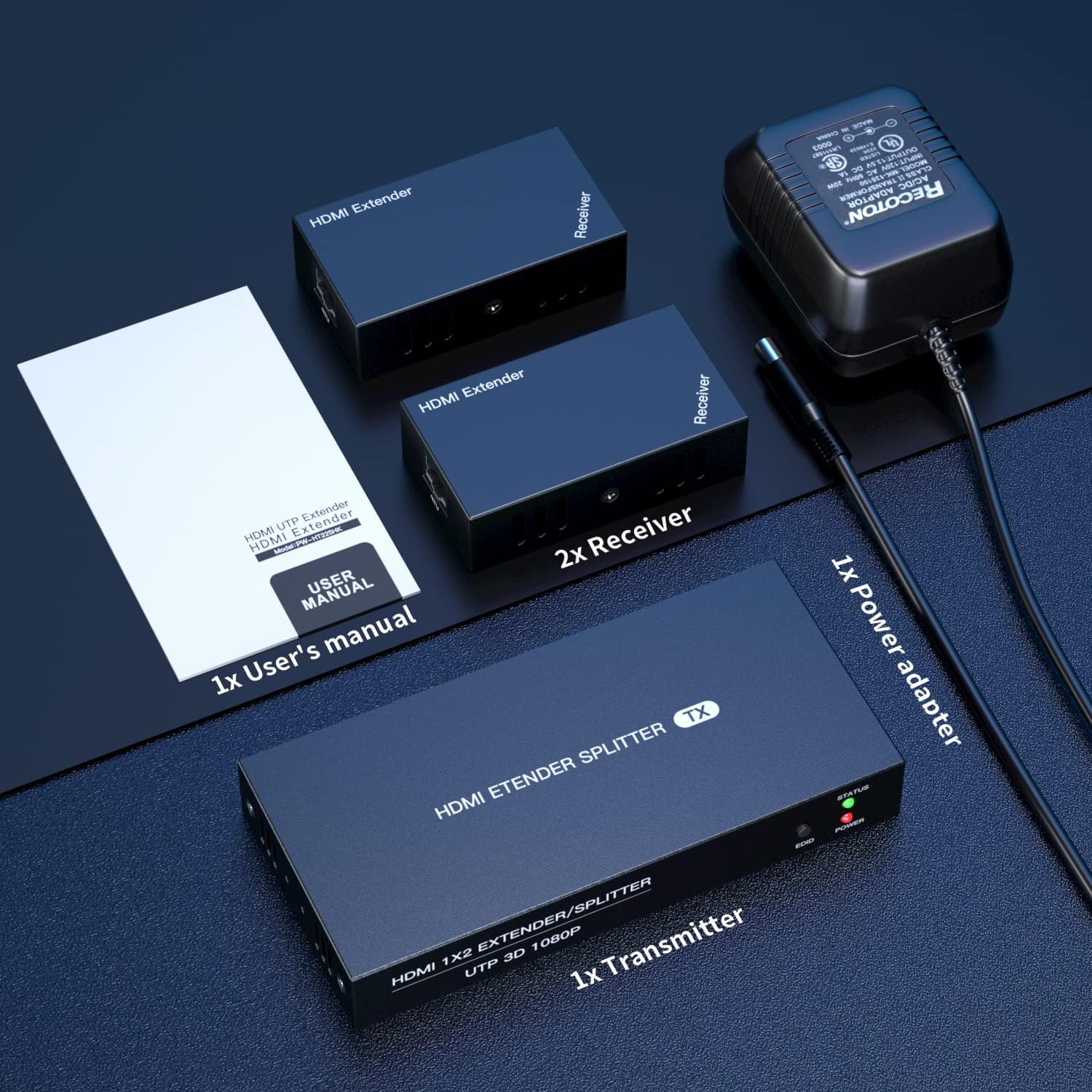
Si prega di verificare che tutti gli articoli elencati di seguito siano inclusi nel pacchetto:
- 1x unità trasmettitore HDMI
- 2x HDMI Receiver Units
- 1x adattatore di alimentazione (CC 12 V)
- 1x Manuale utente
- 1x Scheda di garanzia

3. Prodotto finitoview
The PWAYTEK HDMI Extender Splitter system consists of a transmitter unit and two receiver units. Below are the descriptions of their ports and indicators.
3.1 Transmitter Unit (TX)
The transmitter unit is the central hub where the HDMI source connects and signals are distributed.
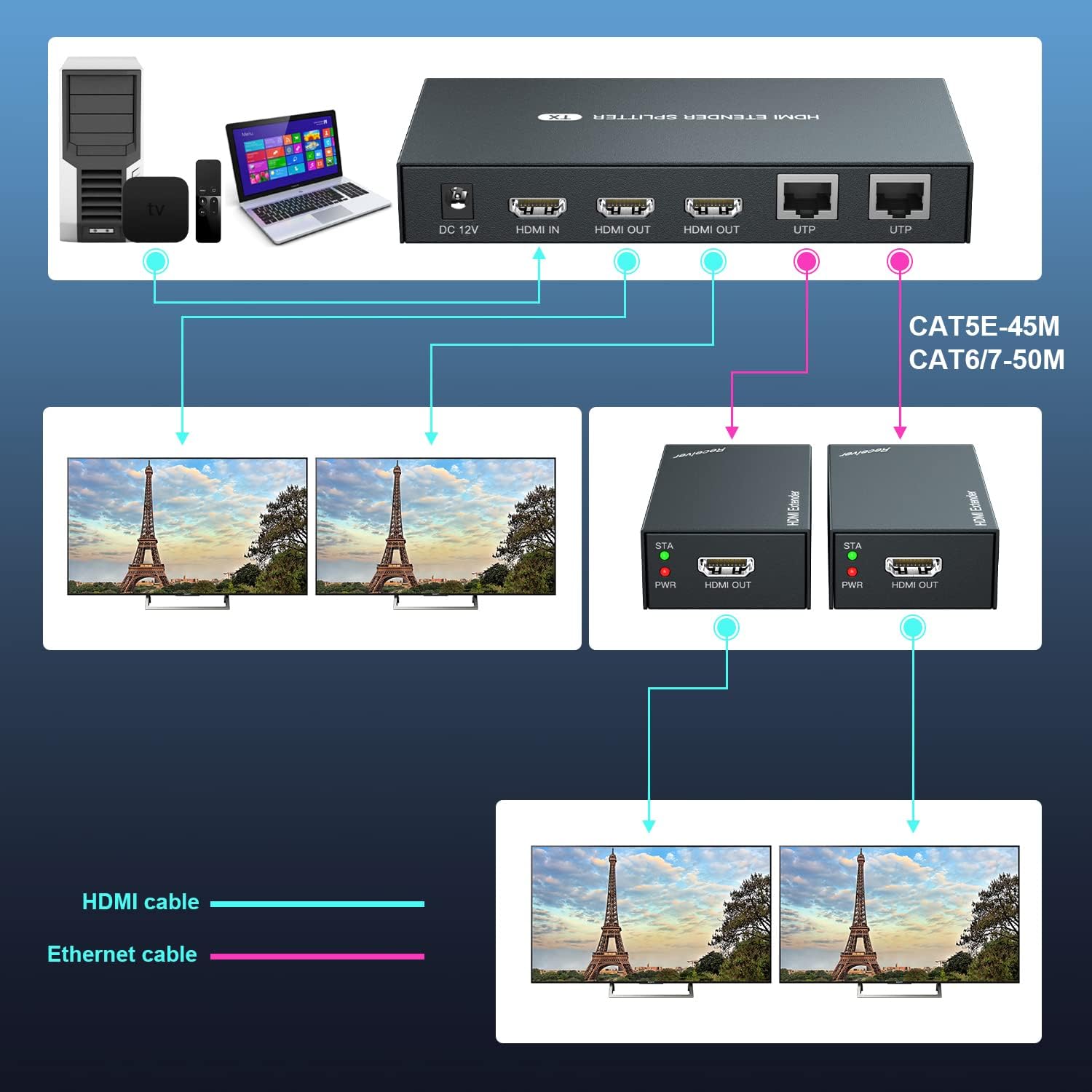
- CC-12V: Porta di ingresso alimentazione per l'adattatore di alimentazione incluso.
- INGRESSO HDMI: Connect your HDMI source device (e.g., laptop, TV box).
- HDMI OUT (x2): Two HDMI loop-out ports for connecting local monitors.
- UTP (x2): Two RJ45 ports for connecting to the receiver units via Ethernet cable.
- Indicatore di STATO: Lights up when a stable connection is established.
- Pulsante EDID: Used for EDID copy function.
- Indicatore di energia: Si illumina quando il dispositivo è acceso.
3.2 Unità ricevente (RX)
Each receiver unit connects to a remote display and receives the HDMI signal from the transmitter via an Ethernet cable.
- USCITA HDMI: Connect your remote HDMI display.
- UTP: RJ45 port for connecting to the transmitter unit via Ethernet cable.
- Indicatore STA: Lights up when a stable connection is established with the transmitter.
- Indicatore PWR: Lights up when the device is powered on (receives power via POC).

4. Configurazione e installazione
Follow these steps to set up your PWAYTEK HDMI Extender Splitter:
- Connetti alimentazione: Plug the included 12V power adapter into the DC-12V port on the transmitter unit. Connect the power adapter to an electrical outlet. The POWER indicator on the transmitter will light up.
- Collegare la sorgente HDMI: Connect an HDMI cable (not included) from your HDMI source device (e.g., laptop, Blu-ray player, TV box) to the HDMI IN port on the transmitter unit.
- Collegamento dei display locali (facoltativo): If you wish to use local monitors, connect HDMI cables from the Uscita HDMI ports on the transmitter unit to your local displays.
- Collegare i cavi Ethernet: Connect Cat 5E/6/7 Ethernet cables from the UTP porte sull'unità trasmittente al UTP ports on each receiver unit. Ensure the cables are securely connected.
- Collegare i display remoti: Collegare un cavo HDMI dal Uscita HDMI port on each receiver unit to your remote displays.
- Verifica connessione: Once all connections are made, the STATUS indicator on the transmitter and the STA indicator on the receivers should turn green, indicating a successful connection.
- Funzione di copia EDID: If your display does not show an image or experiences compatibility issues, you may need to perform an EDID copy. Connect a compatible monitor directly to the HDMI IN port of the transmitter. Power on the transmitter. Press and hold the EDID button on the transmitter for 3-5 seconds until the green light stops flashing. This copies the monitor's EDID information to the transmitter, which can resolve display issues.

5. Istruzioni per l'uso
Once the setup is complete, operating the HDMI Extender Splitter is straightforward:
- Ensure all devices (HDMI source, transmitter, receivers, and displays) are powered on.
- Select the correct HDMI input source on your connected displays.
- The content from your HDMI source will now be mirrored on all connected local and remote displays.


6. Manutenzione
To ensure the longevity and optimal performance of your PWAYTEK HDMI Extender Splitter, follow these maintenance guidelines:
- Keep the devices in a cool, dry environment, away from direct sunlight and excessive heat.
- Evitare di esporre le unità all'umidità o ai liquidi.
- Pulire le unità con un panno morbido e asciutto. Non utilizzare prodotti chimici aggressivi o detergenti abrasivi.
- Ensure all cables are securely connected and not bent or kinked, which can damage the cables or ports.
- Periodically check for firmware updates (if available from the manufacturer) to ensure compatibility and performance improvements.
7. Risoluzione Dei Problemi
If you encounter issues with your HDMI Extender Splitter, refer to the following troubleshooting tips:
- Nessuna immagine visualizzata:
- Ensure all power connections are secure and the power indicator on the transmitter is lit.
- Verify that the HDMI source device is powered on and outputting a signal.
- Check that all HDMI and Ethernet cables are correctly and securely connected.
- Verificare che il display sia impostato sulla sorgente di ingresso HDMI corretta.
- Try performing the EDID Copy function as described in Section 4.
- Ensure the HDMI source provides a strong signal. Some sources may require a booster if the signal is weak.
- Segnale tremolante o intermittente:
- Check the quality and length of your Ethernet cables. High-quality Cat 6/7 cables are recommended for stable, long-distance transmission.
- If using Ethernet cables between 1-10 feet, try a longer cable as very short cables can sometimes cause issues.
- Ensure there are no kinks or damage to the Ethernet or HDMI cables.
- Nessun audio:
- Verify that your display's audio settings are correctly configured.
- Check the audio output settings on your HDMI source device.
- Remote Displays Not Working:
- Ensure the STA indicator on the receiver units is green, indicating a successful Ethernet connection.
- Confirm the Ethernet cable length is within the specified limits (50m/164ft for Cat6/7, 45m/147ft for Cat5e, 40m/131ft for Cat5).
8. Specifiche
| Categoria | Specificazione |
|---|---|
| Standard HDMI | Uscita HDMI 1.3 |
| Orologio pixel massimo | 165 MHz |
| Tasso Massimo dati | 6.75 Gbps |
| Supporto alla risoluzione | 1920x1080@60Hz, 3D (also compatible with 1080i/720p) |
| Connettore HDMI | HDMI-A |
| Interfaccia Ethernet | RJ45 |
| Transmission Distance (Cat6/7) | Fino a 50 m (164 piedi) |
| Distanza di trasmissione (Cat5e) | Fino a 45 m (147 piedi) |
| Distanza di trasmissione (Cat5) | Fino a 40 m (131 piedi) |
| Ingresso alimentazione | 110~220 V |
| Uscita alimentazione | 12V |
| Dissipazione di potenza | MAX 12 W. |
| Temperatura di esercizio | -5℃ ~ +70℃ |
| Umidità di esercizio | 5% ~ 90% (senza condensa) |
| Transmitter Dimensions (TX) | 150 x 71 x 23 mm |
| Receiver Dimensions (RX) | 81 x 45 x 23 mm |
| Peso dell'articolo | 1.43 libbre |
| ASIN | B087FVWQCT |
| Numero modello articolo | HTS010X |
9. Garanzia
This product comes with a warranty. Please refer to the included Warranty Card in your package for detailed information regarding warranty terms, conditions, and duration. Keep your proof of purchase for warranty claims.
10. Supporto
For technical assistance, troubleshooting, or any questions regarding your PWAYTEK HDMI Extender Splitter HTS010X, please contact PWAYTEK customer support. Refer to the contact information provided on the warranty card or the official PWAYTEK websito per i dettagli di supporto più aggiornati.