
Introduzione
The ANCEL BT500 is a Bluetooth-enabled battery load tester designed for comprehensive analysis of 12-volt batteries and charging systems. It provides quick and accurate test results directly to your smartphone via a dedicated application. This manual will guide you through the setup, operation, and maintenance of your BT500 device.
Informazioni sulla sicurezza
- Quando si lavora con le batterie, indossare sempre protezioni per gli occhi e guanti protettivi.
- Assicurare una buona ventilazione nell'area di lavoro.
- Non fumare o permettere scintille o fiamme vicino alla batteria.
- Evitare il contatto con l'acido della batteria. In caso di contatto, sciacquare immediatamente con acqua e consultare un medico.
- Collegare il cl rossoamp al terminale positivo (+) e al cl . neroamp to the negative (-) terminal. Reverse polarity can damage the device and battery.
- Do not leave the BT500 connected to the battery while driving or charging the battery. Disconnect the device after testing.
Caratteristiche del prodotto
- Bluetooth 4.0 connectivity for smartphone integration.
- Tests 12-volt batteries from 100 to 2000 CCA.
- Compatible with multiple battery types: Regular Flooded, AGM Flat Plate, AGM Spiral, GEL, EFB.
- Performs Cranking Test, Charging System Test, State of Health (SoH) Display, CCA Test, Voltage Test, Internal Resistance Test, State of Charge (SoC) Display.
- Provides quick and accurate test results in approximately 3 seconds.
- Supports 9 testing standards: CCA, EN, JIS, SAE, DIN, IEC, GB, CA, MCA.

Immagine: Oltreview of the ANCEL BT500's main testing functions displayed on a smartphone screen, with a car battery in the background.
Specifiche
- Volume di sistematage: 12 Volt
- Ingresso volumetage Intervallo: 6 V~30 V
- Temperatura di funzionamento: -40°C ~ 80°C (-40°F ~ 176°F)
- Connettività: Bluetooth 4.0
- Supported Battery Types: Regular Flooded, AGM Flat Plate, AGM Spiral, GEL, EFB
- CCA Range: 100-2000 CCA
- Dimensioni: 5.2 x 4.76 x 1.54 pollici
- Peso: 5.29 once
Impostare
1. Download the ANCEL BT500 App
The ANCEL BT500 requires a smartphone application to operate.
- For iOS devices, search for "ANCEL BT500" in the Apple App Store.
- For Android devices, search for "ANCEL BT500" in the Google Play Store.
- Alternatively, scan the QR code on the device or packaging, or visit http://link.quicklynks.com/ancel-bt500.html per scaricare l'app.

Image: The ANCEL BT500 device with its clamps, next to a smartphone showing the app interface and QR codes for downloading the application.
2. Collegare il dispositivo
Ensure the vehicle's ignition is off before connecting the tester.
- Collegare il cl rossoamp del BT500 al terminale positivo (+) della batteria da 12 V.
- Collegare il cl neroamp of the BT500 to the negative (-) terminal of the 12V battery.
- The device will power on automatically once connected correctly.

Immagine: un primo piano view of the ANCEL BT500's red clamp connected to a battery terminal, emphasizing the secure and accurate connection.
3. Accoppiamento Bluetooth
Open the ANCEL BT500 application on your smartphone. The app will automatically detect and connect to the BT500 device via Bluetooth. You do not need to pair through your phone's Bluetooth settings.
Istruzioni per l'uso
1. Select Battery Type and Standard
Once connected, the app will prompt you to select the battery type and testing standard.
- Supported Battery Types: Regular Flooded, AGM Flat Plate, AGM Spiral, GEL, EFB.
- Supported Standards: CCA, EN, JIS, SAE, DIN, IEC, GB, CA, MCA.

Image: The ANCEL BT500 device shown with a graphic detailing its compatibility with various battery types and international testing standards.
2. Perform a Test
The ANCEL BT500 offers several testing functions:
Prova di avviamento
This test analyzes the battery's ability to start the engine.
- Seguire le istruzioni visualizzate sullo schermo dell'app.
- Start the vehicle's engine when prompted.
- The app will display the minimum cranking voltage and cranking time.

Image: A smartphone screen displaying the results of a Cranking Test, including a voltage graph and a "Cranking System OK" status.
Test del sistema di ricarica
This test evaluates the vehicle's charging system (alternator, rectifier, etc.).
- Follow the app's instructions.
- The app will measure charging voltage at idle speed and high RPM, and charging voltage increspatura.
- Ensure the engine is running during this test.

Image: A smartphone screen displaying the results of a Charging System Test, showing voltage readings at different engine speeds and a "Charging System is OK" status.
Battery Health Test (SoH, SoC, CCA, Voltage, Resistance)
This test provides a comprehensive analysis of the battery's overall condition.
- Select "Quick Test" or "Battery Test" in the app.
- The app will display:
- SoH (State of Health): percentualetage indicating the battery's remaining lifespan.
- SoC (State of Charge): percentualetage indicating the current charge level.
- CCA (Azionamento a freddo Amps): The battery's actual CCA value compared to its rated CCA.
- Voltage: Batteria attuale voltage.
- Resistenza: Resistenza interna della batteria.
- The app will provide a recommendation, such as "Good battery" or "Replace battery."
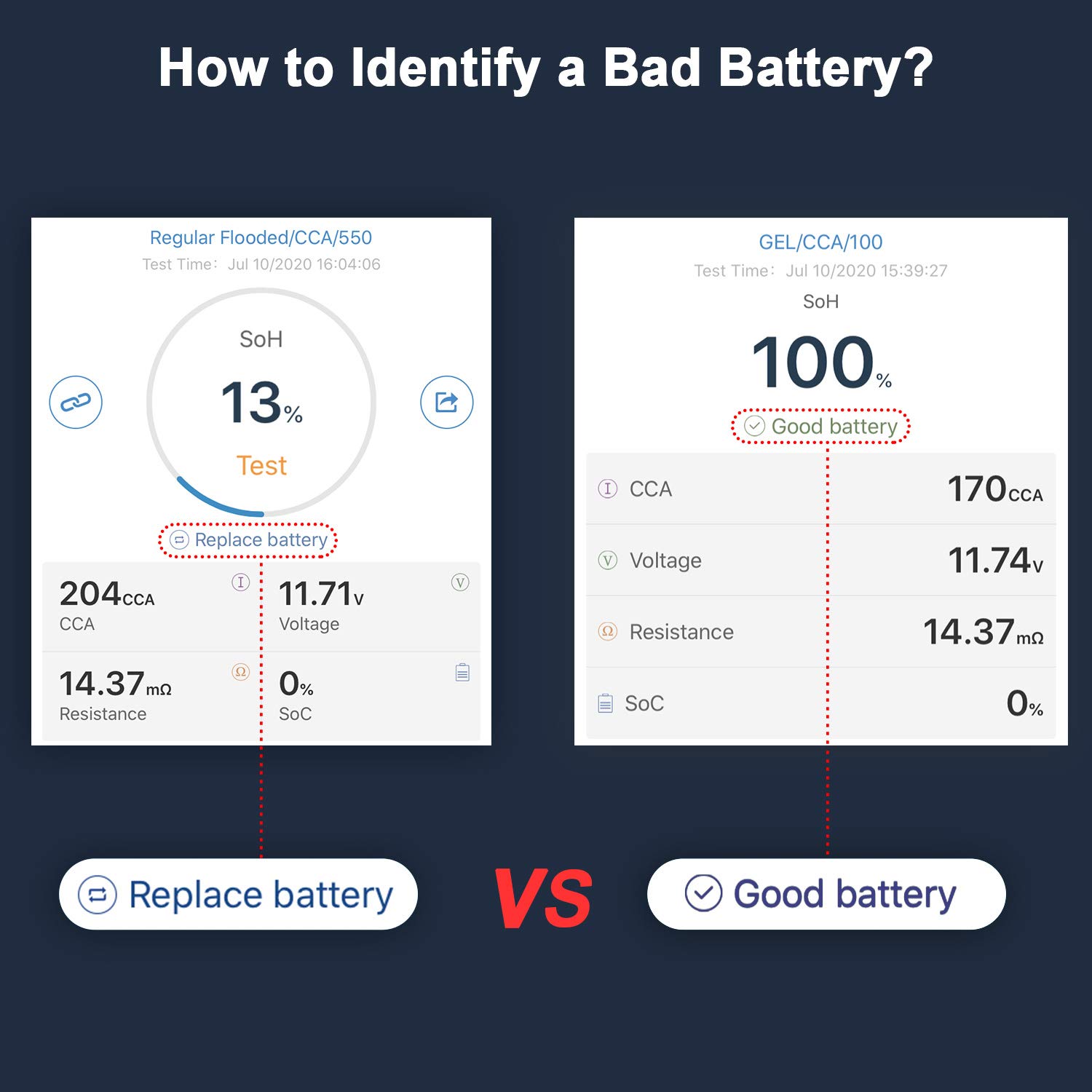
Image: A comparison of two battery test results from the ANCEL BT500 app, illustrating the difference between a battery that needs replacement and a healthy battery.
3. Rifview and Share Reports
L'app ti consente di view historical test records and share reports for further analysis or record-keeping.
Compatibilità
The ANCEL BT500 is compatible with all 12-volt vehicle batteries, including those found in:
- Auto
- Camion
- Motociclette
- Camper
- Barche
- Sistemi di energia solare

Image: The ANCEL BT500 device surrounded by icons representing various 12-volt vehicles, indicating its broad compatibility.
Manutenzione
- Mantenere il dispositivo pulito e asciutto. Pulire con un panno morbido e asciutto.amp panno se necessario.
- Conservare il BT500 in un luogo fresco e asciutto, lontano dalla luce solare diretta e da temperature estreme.
- Ispezionare il clamps and cables regularly for any signs of damage. Do not use the device if the cables or clampsono danneggiati.
Risoluzione dei problemi
Il dispositivo non si accende
- Garantire il clampsiano collegati correttamente ai terminali della batteria (rosso al positivo, nero al negativo).
- Verify the battery has sufficient voltage (above 6V) for the device to power on.
App Not Connecting to Device
- Assicurati che il Bluetooth sia attivato sul tuo smartphone.
- Ensure the BT500 device is powered on and within Bluetooth range of your phone.
- Close and reopen the ANCEL BT500 app.
- Riavvia il tuo smartphone.
Letture imprecise
- Garantire il clamps have a clean and secure connection to the battery terminals. Remove any corrosion or dirt.
- Verify that the correct battery type and testing standard are selected in the app.
- For best accuracy, test a battery that has been at rest for at least 15 minutes after charging or use.
- Remember that connecting the tester indirectly through boost terminals can lower the state of health readings. Always connect directly to the battery for accurate results.
"Replace Battery" Result
- If the tester indicates "Replace battery," it suggests the battery's State of Health (SoH) is significantly degraded. Consider replacing the battery.
- Note: Some deep-cycle marine batteries may recover after extended charging, even if initially reported as low. However, for standard automotive batteries, this usually indicates replacement is due.
Garanzia e supporto
For warranty information, technical support, or service inquiries, please refer to the warranty card included with your product or visit the official ANCEL webluogo. Puoi anche visitare il Negozio ANCEL su Amazon per ulteriori informazioni.