
1. Introduzione
Thank you for choosing the BolyGuard MG984G-36M Trail Camera. This manual provides detailed instructions for the setup, operation, and maintenance of your camera. Designed for outdoor surveillance, this camera captures high-resolution images and videos, offering 4G connectivity for cloud services and remote management via a dedicated application.
Please read this manual thoroughly before using the camera to ensure optimal performance and longevity.
2. Prodotto finitoview
The BolyGuard MG984G-36M is a robust trail camera featuring a camouflage design for discreet outdoor placement. It is equipped with a high-resolution sensor, infrared LEDs for night vision, and an external antenna for reliable 4G communication.
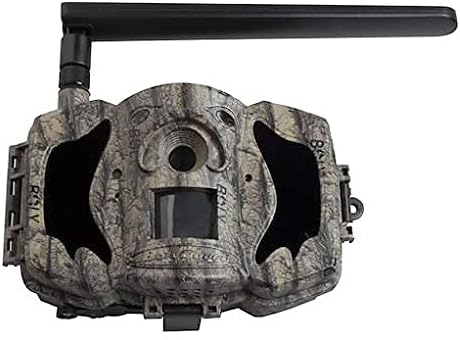
Figura 1: Fronte view of the BolyGuard MG984G-36M trail camera. This image displays the front view of the BolyGuard MG984G-36M trail camera. It features a camouflage pattern casing, a prominent external antenna on the top left, and the main lens and sensor area visible on the front. The camera is designed for outdoor use and blends with natural environments.
Componenti chiave:
- Obiettivo principale: Cattura immagini e video.
- Sensore PIR: Rileva il movimento per attivare la registrazione.
- LED infrarossi: Fornisce illuminazione per la visione notturna.
- Antenna esterna: Ensures stable 4G network connectivity.
- Schermo LCD: For menu navigation and settings adjustment (located inside the camera).
- Vano batteria: Holds required batteries (not included).
- Slot per scheda SD: Per l'archiviazione dei contenuti multimediali acquisiti.
- Slot per scheda SIM: For 4G network access.
3. Impostazione
3.1 Installazione della batteria
- Aprire la fotocamera casing chiusure.
- Individua il vano batteria.
- Insert the required batteries (e.g., AA batteries, not included) according to the polarity indicators (+/-). Ensure all batteries are new and of the same type.
- Chiudere bene il vano batterie.
3.2 Installazione della scheda SIM e della scheda SD
- With the camera powered off, locate the SIM card slot. Insert a activated 4G SIM card into the slot until it clicks into place.
- Locate the SD card slot. Insert a compatible SD card (up to 32GB, Class 10 recommended, not included) into the slot until it clicks.
- Attach the external antenna to the designated port on the camera.
3.3 Initial Power-On and App Setup
- Switch the camera to the 'SETUP' mode. The internal LCD screen will power on.
- Follow the on-screen prompts to set the date, time, and other basic settings.
- Download the official BolyGuard app from your smartphone's app store.
- Register an account and add your camera to the app by following the in-app instructions, typically involving scanning a QR code or entering the camera's serial number.
- Ensure the camera has a stable 4G signal, indicated on the LCD screen.
4. Istruzioni per l'uso
4.1 Modalità operative di base
- OFF: La fotocamera è spenta.
- IMPOSTARE: Allows access to the camera's menu for configuration and viewing dei media catturati.
- SOPRA: Camera is in active surveillance mode, detecting motion and capturing media according to settings.
4.2 Configurazione delle impostazioni
In 'SETUP' mode, use the navigation buttons to access and modify settings:
- Modalità: Seleziona Foto, Video o Foto+Video.
- Dimensioni dell'immagine: Set photo resolution (e.g., 36MP, 24MP).
- Dimensioni video: Imposta la risoluzione video (ad esempio, 1080P, 720P).
- Sensibilità PIR: Adjust motion detection sensitivity (High, Normal, Low).
- Intervallo di attivazione: Imposta il ritardo tra trigger consecutivi.
- Lasso di tempo: Configure time-lapse photography settings.
- Modalità di invio: Configure how media is sent via 4G (e.g., instant, daily report).
- Servizio Cloud: Enable or disable cloud storage and app connectivity.
4.3 Remote Management via App
Once connected to the BolyGuard app, you can:
- Receive real-time notifications of detected activity.
- View captured photos and videos remotely.
- Change camera settings from your smartphone.
- Monitor camera status (battery level, signal strength, SD card capacity).
5. Manutenzione
- Pulizia: Regularly clean the camera lens and PIR sensor window with a soft, dry cloth. Avoid abrasive materials or harsh chemicals.
- Sostituzione della batteria: Replace all batteries when the low battery indicator appears or when performance degrades. Always use fresh batteries of the same type.
- Gestione della scheda SD: Periodically format the SD card in the camera's menu to maintain optimal performance and prevent data corruption. Back up important files prima della formattazione.
- Aggiornamenti del firmware: Check the BolyGuard official website for any available firmware updates. Follow the provided instructions carefully for installation.
- Magazzinaggio: When not in use for extended periods, remove batteries and store the camera in a cool, dry place away from direct sunlight.
6. Risoluzione Dei Problemi
- La fotocamera non si accende: Ensure batteries are correctly inserted with correct polarity and are fully charged. Check if the power switch is in the 'SETUP' or 'ON' position.
- Nessun segnale 4G: Verify the SIM card is active and correctly inserted. Ensure the external antenna is securely attached. Move the camera to an area with better network coverage.
- Nessuna immagine/video catturato: Check if the SD card is inserted and has sufficient free space. Verify PIR sensitivity settings and ensure the camera is in 'ON' mode.
- Scarsa qualità dell'immagine/video: Clean the camera lens. Ensure the camera is securely mounted and not subject to excessive vibration. Check resolution settings.
- Problemi di connettività dell'app: Ensure the camera has a stable 4G connection. Verify your smartphone has internet access. Re-add the camera to the app if necessary.
7. Specifiche
| Caratteristica | Dettaglio |
|---|---|
| Numero di modello | Modello MG984G-36M |
| Risoluzione dell'immagine | Fino a 36 Megapixel |
| Risoluzione video | Full HD (1080P) |
| Tecnologia di connettività | Senza fili (4G) |
| Dimensioni del prodotto | Dimensioni: 50 x 50 x 28 cm |
| Peso dell'articolo | 5.66 kg |
| Batterie | Richiesto (non incluso) |
| ASIN | B087V4SWGH |
| Data prima disponibilità | 7 luglio 2020 |
8. Garanzia e supporto
For warranty information and technical support, please refer to the official BolyGuard webo contattare il rivenditore autorizzato. Conservare la ricevuta d'acquisto come prova d'acquisto per eventuali reclami in garanzia.
Online resources, including FAQs and additional troubleshooting guides, may be available on the manufacturer's support pages.


