
1. Introduzione
This manual provides instructions for the Yunir AKB69680403 Universal TV Remote Control. This remote is designed as a replacement and is compatible with most LG LCD, LED, and Plasma televisions. It offers stable performance and includes all essential functions of an original remote without requiring any programming or setup.

Image 1.1: The Yunir AKB69680403 remote control in hand, demonstrating its ergonomic design.
The remote control features a compact size and an easy-to-grip design, ensuring comfortable use. Its dedicated menu navigation keys and direct channel access simplify TV operation.
2. Impostazione
2.1 Installazione della batteria
The AKB69680403 remote control requires AAA batteries (not included) for operation. Follow these steps to install the batteries:
- Individuare il coperchio del vano batterie sul retro del telecomando.
- Premere il fermo e far scorrere il coperchio verso il basso.
- Inserire due (2) batterie AAA, assicurandosi che i terminali positivo (+) e negativo (-) siano allineati correttamente con le marcature all'interno del vano.
- Riposizionare il coperchio del vano batteria finché non scatta in posizione.
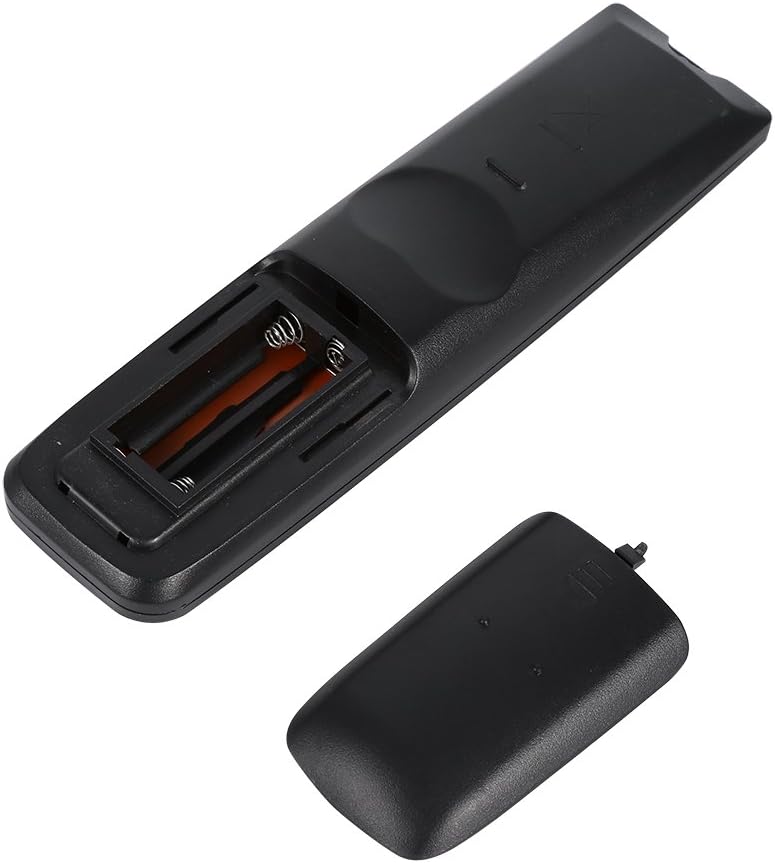
Immagine 2.1: View of the remote control's open battery compartment, ready for AAA battery insertion.
Nota:
- Utilizzare sempre batterie nuove dello stesso tipo.
- Non mischiare batterie vecchie e nuove o diversi tipi di batterie.
- Rimuovere le batterie se il telecomando non viene utilizzato per un periodo prolungato per evitare perdite.
3. Istruzioni per l'uso
The Yunir AKB69680403 remote control is designed for immediate use with compatible LG TVs without any prior programming. Simply point the remote at your television and begin operation.

Immagine 3.1: Passoview of the remote control's buttons and layout.
3.1 Funzioni dei pulsanti
- ENERGIA: Accende o spegne la TV.
- INGRESSO: Seleziona la sorgente di ingresso (HDMI, AV, ecc.).
- RISPARMIO ENERGETICO: Attiva o disattiva le modalità di risparmio energetico.
- TV/RAD: Passa dalla modalità TV alla modalità Radio.
- MODALITÀ AV: Seleziona le modalità audio/video.
- Tasti numerici (0-9): Seleziona direttamente i canali.
- ELENCO: Visualizza l'elenco dei canali.
- Q.VIEW: Ritorna a quello precedente viewed canale.
- VOL +/-: Regola il livello del volume.
- CH +/-: Cambia canale in su o in giù.
- MUTO: Disattiva o riattiva l'audio della TV.
- PAGINA ^/v: Consente di navigare tra le pagine nei menu o negli elenchi.
- Tasti direzionali (su, giù, sinistra, destra) e OK: Consente di navigare nei menu e di confermare le selezioni.
- MENU: Apre il menu principale della TV.
- TESTO: Accede ai servizi di televideo.
- T.OPT: Opzioni del televideo.
- INFORMAZIONI: Visualizza informazioni sul programma o sull'input corrente.
- GUIDA: Apre la guida elettronica dei programmi.
- MARK/FAV: Marks content or accesses favorite channels.
- RITORNO/USCITA: Ritorna alla schermata precedente o esce da un menu.
- Pulsanti colorati (rosso, verde, giallo, blu): Utilizzato per funzioni specifiche all'interno di menu o applicazioni, come indicato sullo schermo del televisore.
Some buttons, such as the number buttons, are fluorescent to assist with operation in low-light conditions.
4. Manutenzione
4.1 Pulizia
Per mantenere l'aspetto e la funzionalità del telecomando:
- Pulire il telecomando con un panno morbido e asciutto.
- Per sporco ostinato, leggermente dampInumidire il panno con acqua o con una soluzione detergente delicata, quindi asciugarlo immediatamente.
- Non utilizzare detergenti abrasivi, alcol o solventi, poiché potrebbero danneggiare la superficie o i componenti interni.
4.2 Cura della batteria
- Sostituire le batterie quando la risposta del telecomando diventa lenta o incoerente.
- Smaltire le batterie usate in modo responsabile secondo le normative locali.
5. Risoluzione Dei Problemi
Se riscontri problemi con il telecomando, fai riferimento ai seguenti problemi comuni e alle relative soluzioni:
- Il telecomando non risponde:
- Controllare che le batterie siano inserite correttamente, rispettando la polarità corretta.
- Sostituisci le batterie con batterie nuove.
- Assicurarsi che non vi siano ostacoli tra il telecomando e il sensore a infrarossi del televisore.
- Make sure you are within the effective operating range and pointing the remote directly at the TV.
- Alcune funzioni non funzionano:
- While this remote is broadly compatible, some specific advanced functions of your original TV remote might not be supported.
- Verify that your TV model is an LG LCD, LED, or Plasma TV.
6. Specifiche
| Caratteristica | Dettaglio |
|---|---|
| Nome del prodotto | TV Remote Controller |
| Modello | Numero di modello: AKB69680403 |
| Compatibilità | Most LG LCD, LED, or Plasma TVs |
| Fonte di alimentazione | 2 x batterie AAA (non incluse) |
| Materiale | addominali |
| Colore | Nero |
| Dimensioni (L x P x A) | 17.9 x 4.7 x 2 cm (7.05 x 1.85 x 0.79 pollici) |
| Peso dell'articolo | 2.46 once |
| Produttore | Tonysa |

Image 6.1: The remote control displaying its physical dimensions.
7. Garanzia e supporto
Specific warranty information for this product is not provided in the available data. For any product-related inquiries, technical support, or warranty claims, please contact the retailer or manufacturer directly. Keep your purchase receipt as proof of purchase.