
1. Introduzione
Grazie per l'acquistoasing the CHEREEKI Digital LED Alarm Clock Model 8808. This manual provides detailed instructions for the proper use, setup, and maintenance of your new alarm clock. Please read this manual thoroughly before use and retain it for future reference.
2. Informazioni sulla sicurezza
- Keep the clock away from heat sources and high humidity environments.
- Use only a 5V/1A or 5V/2A adapter for charging via the USB port.
- Non tentare di smontare o riparare il dispositivo da soli. Contattare personale qualificato per l'assistenza.
- Ensure the power switch is OFF when the clock is not in use for extended periods.
3. Contenuto della confezione
- 1 x CHEREEKI Digital LED Alarm Clock
- 1 cavo di ricarica USB (adattatore non incluso)
- 1 x Manuale utente
4. Prodotto finitoview
The CHEREEKI Digital LED Alarm Clock Model 8808 features a large LED display, dual alarms, temperature display, adjustable brightness, sound activation, and a USB charging port. It is designed for clear visibility and ease of use.

Figura 4.1: Fronte view of the CHEREEKI Digital LED Alarm Clock highlighting its key features and dimensions.
Caratteristiche principali:
- Doppia sveglia con snooze: Set two separate alarms with a 5-minute snooze function.
- USB Charging & Built-in Battery: Powered via USB cable (adapter not included) with an integrated rechargeable battery for settings backup during power outages.
- Temperature Display & Adjustable Brightness: Displays temperature in Celsius. Features automatic 3-level brightness adjustment and manual adjustment.
- Sound Activated Display: The LED screen activates with sound (e.g., clap, tap) or by pressing the SNOOZE/LIGHT button, turning off automatically after 6 seconds when not connected to power.
- 10 Music Options & 4 Volume Levels: Choose from 10 different ringtones and adjust the alarm volume.
- Formato 12/24 ore: Supports both 12-hour and 24-hour time display.
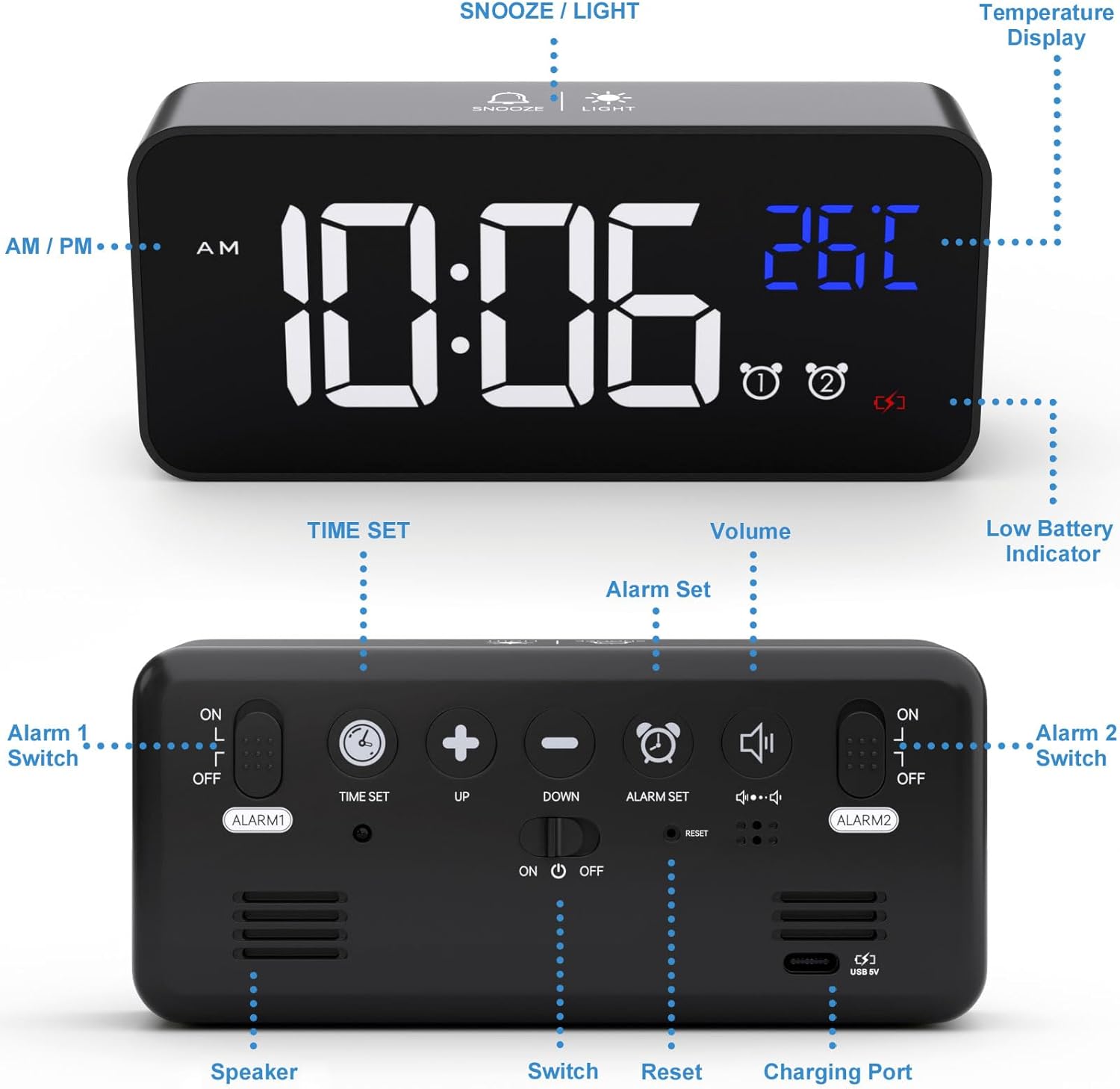
Figure 4.2: Rear panel controls and ports of the alarm clock.
5. Impostazione
5.1 Alimentazione dell'orologio
Connect the provided USB charging cable to the clock's charging port and to a 5V/1A or 5V/2A USB adapter (not included) or a USB port. The clock has a built-in rechargeable battery that saves your settings during power outages.

Figure 5.1: Powering the alarm clock via USB.
Nota: When powered by USB, the display remains continuously on. When running on battery power, the display will turn off after 6 seconds to conserve energy. It can be reactivated by sound or by pressing any button.
5.2 Initial Setup (Removing Protective Film)
For optimal display clarity, please remove the protective film from the screen when using the clock for the first time.
6. Funzionamento
6.1 Impostazione dell'ora
- Premere e tenere premuto il tasto IMPOSTAZIONE DELL'ORA pulsante sul retro dell'orologio. Le cifre delle ore inizieranno a lampeggiare.
- Utilizzare il UP E GIÙ pulsanti per regolare l'ora.
- Premere IMPOSTAZIONE DELL'ORA again to switch to minute adjustment. The minute digits will flash.
- Utilizzare il UP E GIÙ pulsanti per regolare i minuti.
- Premere IMPOSTAZIONE DELL'ORA ancora una volta per confermare e uscire dalla modalità di impostazione dell'ora.
Video 6.1: Demonstration of how to set the time on the alarm clock (0:00-0:18 in video).
6.2 Impostazione degli allarmi (allarme 1 e allarme 2)
The clock supports two independent alarms. Use the ALLARME 1 ON/OFF E ALLARME 2 ON/OFF switches on the back to enable or disable each alarm.
- Per impostare la Sveglia 1, far scorrere il ALLARME 1 ON/OFF switch to 'ON'.
- Premere e tenere premuto il tasto SET ALLARME pulsante. Le cifre dell'ora della sveglia lampeggeranno.
- Utilizzare il UP E GIÙ pulsanti per regolare l'ora della sveglia.
- Premere SET ALLARME again to switch to minute adjustment. The alarm minute digits will flash.
- Utilizzare il UP E GIÙ pulsanti per regolare i minuti della sveglia.
- Premere SET ALLARME ancora una volta per confermare e uscire dalla modalità di impostazione della sveglia.
- Ripetere il procedimento per l'Allarme 2 utilizzando il ALLARME 2 ON/OFF interruttore.
Video 6.2: Demonstration of how to set the alarms on the clock (0:19-1:04 in video).
6.3 Regolazione del volume della sveglia e delle suonerie
The clock offers 10 different ringtones and 4 adjustable volume levels.
- While in alarm setting mode (after setting the time for an alarm), press the SET ALLARME button to cycle through the 10 ringtones.
- Per regolare il volume, premere il tasto VOLUME button repeatedly until the desired volume level (L01-L04) is displayed.

Figure 6.3: Available ringtones and volume levels.
Video 6.3: Demonstration of how to adjust the alarm volume (1:05-1:19 in video).
6.4 Funzione snooze e arresto degli allarmi
When an alarm sounds, you can activate the snooze function for an additional 5 minutes of sleep.
- To activate snooze: Press the SNOOZE / LIGHT button on the top of the clock. The alarm will pause and sound again after 5 minutes.
- To stop the alarm: Press any other button on the clock (except SNOOZE / LIGHT) to turn off the alarm for the day.

Figure 6.4: Dual alarms and snooze function in use.
Video 6.4: Demonstration of snooze and stopping alarms (1:20-1:37 in video).
6.5 Regolazione della luminosità del display
The clock features both automatic and manual brightness adjustment.
6.5.1 Regolazione automatica della luminosità
When connected to power, the LED display automatically adjusts its brightness:
- 7:00 - 6:59: Alta luminosità.
- 7:00 - 11:59: Luminosità media.
- 00:59 - 12:6: Bassa luminosità.
Video 6.5: Demonstration of automatic brightness adjustment throughout the day (2:07-2:38 in video).
6.5.2 Manual Brightness Adjustment
You can manually adjust the brightness to your preference:
- Premere il tasto SNOOZE / LIGHT button on the top of the clock to cycle through 4 levels of brightness.
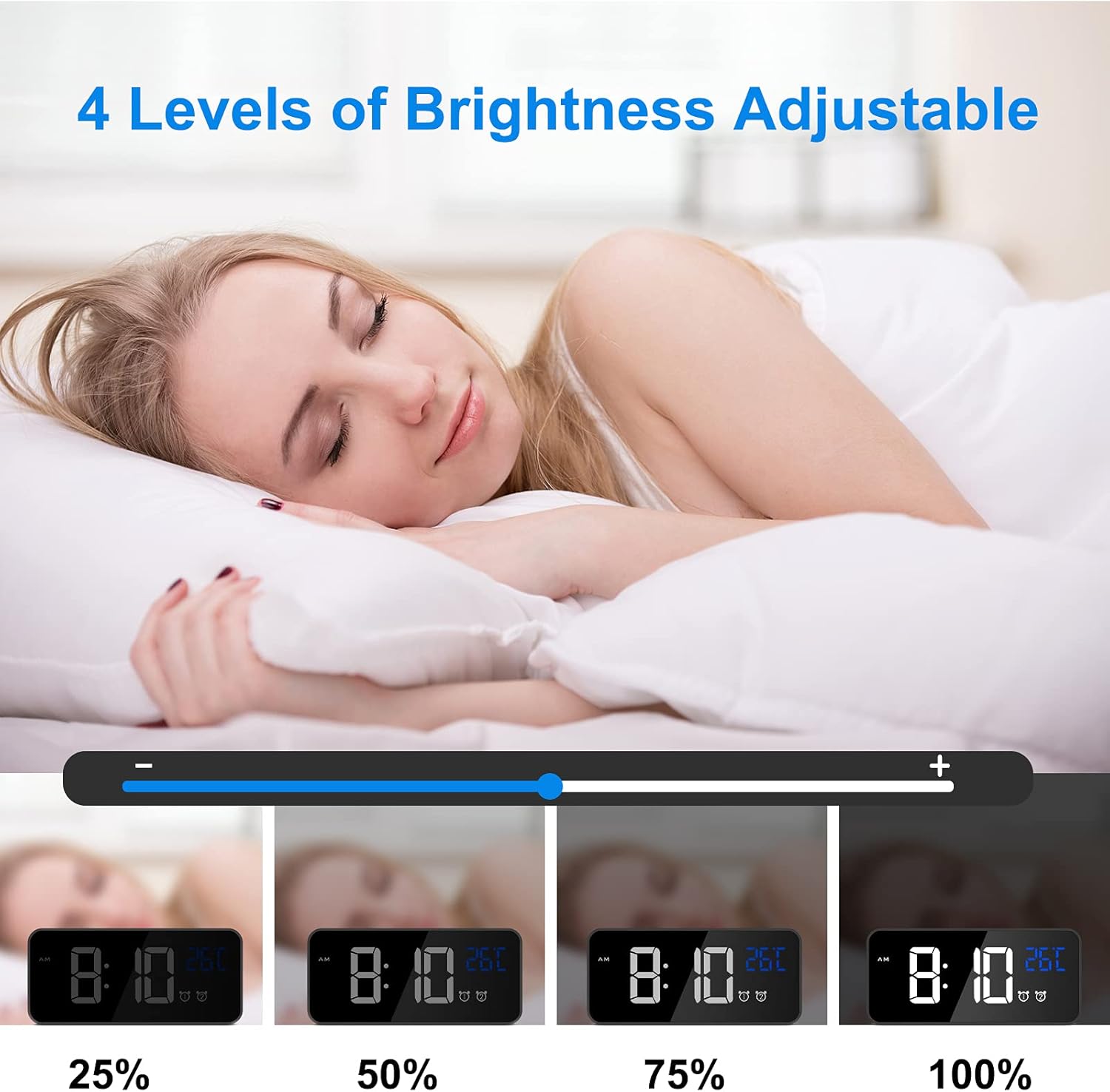
Figure 6.5: Manual brightness adjustment levels.
Video 6.6: Demonstration of manual brightness adjustment (1:38-2:06 in video).
6.6 Sound Activated Display (Battery Mode)
When the clock is running on battery power (not connected to USB), the display will turn off after 6 seconds to save energy. You can activate the display by making a sound (e.g., clapping, tapping the table) louder than 90dB, or by pressing the SNOOZE / LIGHT pulsante.

Figure 6.6: Sound activated display feature.
6.7 Formato 12/24 ore
Per passare dal formato orario a 12 ore a quello a 24 ore, premere il tasto 12/24H pulsante sul retro dell'orologio.

Figure 6.7: Switching between 12-hour and 24-hour display formats.
6.8 Visualizzazione della temperatura
The clock automatically displays the ambient temperature in Celsius.

Figure 6.8: Temperature display feature.
7. Manutenzione
- Pulire l'orologio con un panno morbido e asciutto. Non utilizzare detergenti abrasivi o solventi.
- Evitare di esporre l'orologio alla luce solare diretta o a temperature estreme.
- If the clock will not be used for a long period, turn off the main power switch to preserve battery life.
8. Risoluzione Dei Problemi
| Problema | Soluzione |
|---|---|
| Display shows disordered code or incorrect information. | Use a pin to press the RESET button on the back of the clock. This will restore the clock to its normal operating state. |
| Display turns off quickly when not connected to power. | This is normal behavior to conserve battery. The display is sound-activated or can be turned on by pressing any button. For a continuously lit display, keep the clock connected to a USB power source. |
| L'allarme non suona. | Ensure the corresponding alarm switch (ALLARME 1 ON/OFF or ALLARME 2 ON/OFF) is set to 'ON'. Check that the alarm time is correctly set. |
| L'orologio non si carica o non mantiene la carica. | Verify that the USB cable is securely connected and that the power adapter is 5V/1A or 5V/2A. Ensure the main power switch is 'ON' for charging. |
9. Specifiche
- Marca: CHEREEKI
- Numero modello: 8808
- Colore: Nero
- Tipo di visualizzazione: LED digitale
- Fonte di energia: Battery Powered (rechargeable Lithium-polymer) / USB 5V
- Caratteristiche speciali: Temperature Display, Dual Alarms, Snooze, Adjustable Brightness, Sound Activated, 12/24 Hour Format, 10 Ringtones
- Dimensioni del prodotto: 14.5 cm (L) x 6.5 cm (A)
- Peso dell'articolo: 290 grammi
- Materiale: ABS (Acrylonitrile Butadiene Styrene) Plastic
- Tipo di montaggio: Da tavolo
10. Garanzia e supporto
This product comes with a lifetime warranty. For any questions, issues, or support needs, please contact CHEREEKI customer service. Please refer to your purchase documentation for specific contact details.