
KLIM KBB43
Manuale utente del sistema audio con lettore CD portatile KLIM Boombox B4
Model: KBB43
1. Prodotto finitoview
The KLIM Boombox B4 is a versatile portable audio system designed for various listening preferences. It integrates multiple playback options including a CD player, AM/FM radio, MP3 playback via USB, Bluetooth connectivity, and an auxiliary input. The system features a built-in rechargeable battery for portability and comes with a remote control for convenient operation.
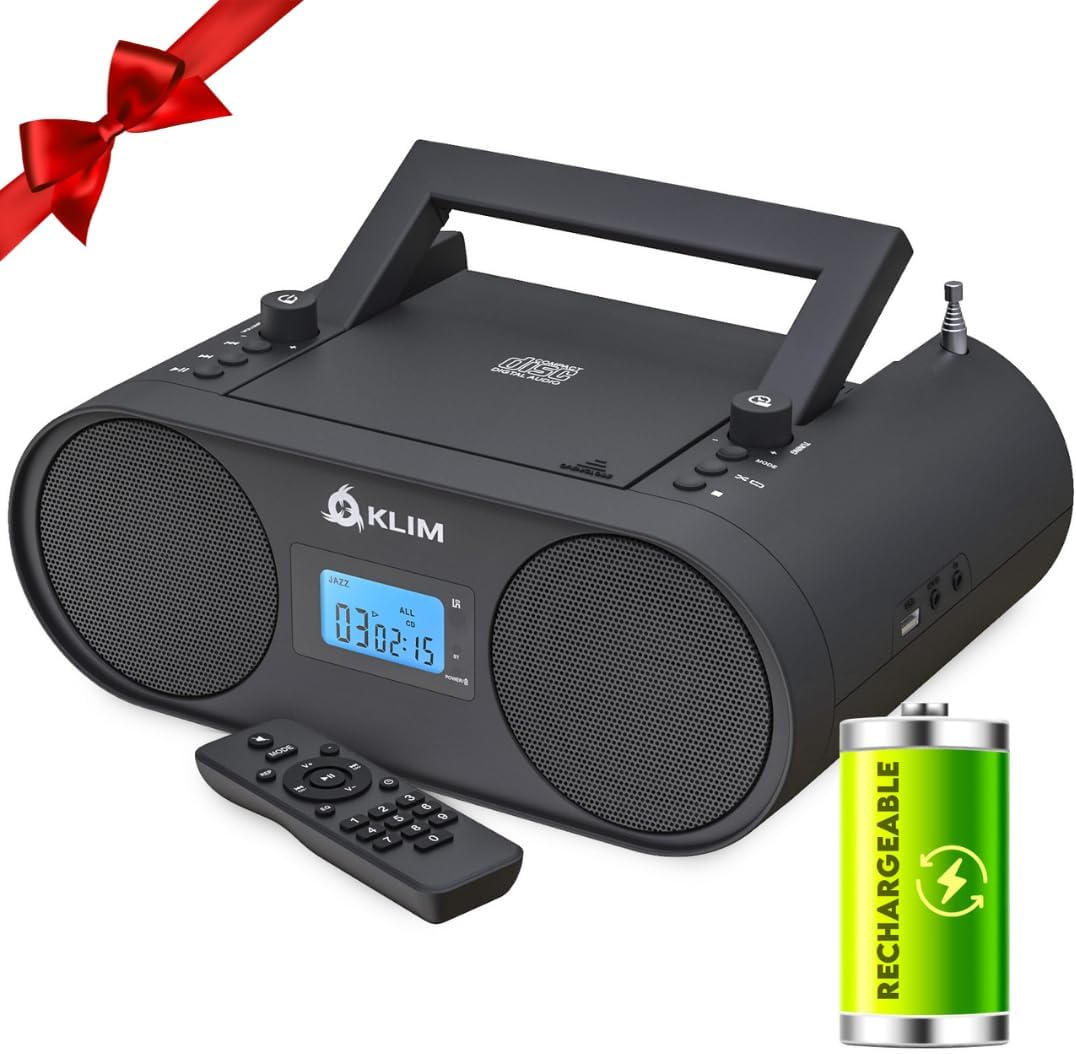
The KLIM Boombox B4, a portable audio system, is shown with its remote control and a visual representation of its rechargeable battery feature. The device is black with two front-facing speakers and a central display.
2. Contenuto della confezione
Assicurarsi che tutti gli articoli siano presenti al momento dell'apertura della confezione:
- KLIM Boombox B4 Unit
- Telecomando
- Cavo di alimentazione
- Manuale dell'utente (questo documento)

Multiplo views of the KLIM Boombox B4 are displayed, highlighting its compact design and integrated carrying handle, emphasizing its portability.
3. Controlli e funzionalità
The KLIM Boombox B4 is equipped with intuitive controls and various connectivity options:
- Lettore CD a caricamento dall'alto: Per riprodurre CD audio.
- Radio AM/FM: Sintonizzatore integrato per trasmissioni radio.
- Connettività Bluetooth: Wireless streaming from compatible devices.
- Porta USB: Per la riproduzione di MP3 da unità flash USB.
- Ingresso AUX: 3.5mm jack for wired connection to external audio sources.
- Jack per cuffie: Per l'ascolto privato.
- Equalizzatore digitale: Pre-set sound modes (Jazz, Pop, Rock, Classic, Flat).
- Telecomando: Telecomando completo per un utilizzo pratico.
- Batteria ricaricabile: Batteria integrata per uso portatile.
- Display digitale: Mostra la modalità corrente, il numero della traccia e l'ora.

Un dettagliato view of the side of the KLIM Boombox B4, clearly showing the USB and AUX IN ports, indicating connectivity options for external devices.
Mostra video ufficiale del prodottoasing the KLIM Boombox B4's various features and design.
4. Impostazione
4.1 Alimentazione del dispositivo
The KLIM Boombox B4 can be powered in two ways:
- Alimentazione CA: Connect the provided power cable to the AC IN port on the back of the unit and then to a standard wall outlet.
- Batteria ricaricabile: The boombox has a built-in rechargeable battery. Ensure it is fully charged before portable use. Connect to AC power to charge. The battery does not need to be removed for charging.
4.2 Uso iniziale
Before first use, fully charge the device. Extend the telescopic antenna for optimal radio reception. Press the power button to turn the unit on.

The image emphasizes the portability of the KLIM Boombox B4, showing it being carried by its handle, with an overlay indicating '6+ hours of playtime' and a rechargeable battery icon.
5. Istruzioni per l'uso
5.1 Selezione della modalità
Press the 'MODE' button on the unit or remote control to cycle through available modes: CD, FM, AM, Bluetooth, AUX, USB.
5.2 Riproduzione CD
- Aprire il coperchio del vano CD.
- Place an audio CD onto the spindle, label side up.
- Chiudere bene il coperchio del vano CD.
- Select 'CD' mode. The CD will begin playing automatically.
- Use the Play/Pause, Stop, Skip Forward/Backward buttons on the unit or remote to control playback.
Radio AM/FM 5.3
- Select 'FM' or 'AM' mode.
- Per una migliore ricezione, estendere l'antenna telescopica.
- Use the 'Tuning' knob or the 'CH+' / 'CH-' buttons on the remote to tune to your desired station.
- Il display digitale mostrerà la frequenza corrente.
5.4 Connettività Bluetooth
- Select 'Bluetooth' mode. The display will show 'bt' and flash, indicating it's ready to pair.
- On your mobile device, enable Bluetooth and search for 'KLIM Boombox B4'.
- Select the device to pair. Once connected, 'bt' will stop flashing.
- Ora puoi trasmettere in streaming l'audio in modalità wireless dal tuo dispositivo.
5.5 AUX/USB Playback
- AUSILIARI: Connect an external audio device (e.g., smartphone, MP3 player) to the 'AUX IN' port using a 3.5mm audio cable. Select 'AUX' mode.
- USB: Inserire una chiavetta USB contenente audio MP3 files into the 'USB' port. Select 'USB' mode. The system will automatically detect and play the MP3 files.
A demonstration video highlighting the unboxing, setup, and various functionalities of the KLIM Boombox B4, including CD playback, radio tuning, and Bluetooth connectivity.
A short video clip demonstrating the mode switching functionality of the KLIM Boombox B4, showing the digital display changing between different input sources.
6. Digital Equalizer
The KLIM Boombox B4 includes a digital equalizer with several pre-set modes to enhance your listening experience. Press the 'EQ' button on the remote control to cycle through the following sound profiles:
- Jazz
- Pop
- Roccia
- Classico
- Piatto (default, no equalization)

This image features the KLIM Boombox B4 alongside its remote control, with an inset showing a detailed view of one of its 3W high-quality speakers, emphasizing sound components and remote functionality.
7. Manutenzione
To ensure the longevity and optimal performance of your KLIM Boombox B4, follow these maintenance guidelines:
- Pulizia: Utilizzare un panno morbido e asciutto per pulire l'esterno dell'unità. Non utilizzare detergenti abrasivi o solventi. Per la lente del lettore CD, utilizzare un detergente specifico per lenti del lettore CD.
- Magazzinaggio: Quando non lo si utilizza per lunghi periodi, conservare il boombox in un luogo fresco e asciutto, lontano dalla luce solare diretta e da temperature estreme.
- Cura della batteria: To maintain battery health, avoid fully discharging the battery frequently. Recharge the unit regularly, even if not in constant use.
- Gestione CD: Always handle CDs by their edges to prevent scratches. Store CDs in their cases when not in use.
8. Risoluzione Dei Problemi
If you encounter issues with your KLIM Boombox B4, refer to the following common problems and solutions:
| Problema | Possibile causa | Soluzione |
|---|---|---|
| Nessun potere | Cavo di alimentazione non collegato; Batteria scarica | Assicurarsi che il cavo di alimentazione sia collegato saldamente. Caricare la batteria. |
| Nessun suono | Volume troppo basso; Modalità selezionata non corretta; Cuffie collegate | Increase volume. Select the correct input mode. Disconnect headphones if external sound is desired. |
| Salto del CD | CD dirty or scratched; Unit unstable | Clean the CD. Ensure the unit is on a stable, flat surface. |
| Scarsa ricezione radio | Antenna non estesa; segnale debole | Estendere completamente e regolare l'antenna telescopica. Provare a spostare l'unità in una posizione diversa. |
| Errore di associazione Bluetooth | Device not in pairing mode; Distance too far | Ensure the boombox is in Bluetooth pairing mode. Move your device closer to the boombox. |
9. Specifiche
| Caratteristica | Dettaglio |
|---|---|
| Dimensioni del prodotto | 11.81 x 8.9 x 4.92 pollici |
| Peso dell'articolo | 4.51 libbre |
| Numero di modello | KBB43 |
| Batterie | È necessaria 1 batteria agli ioni di litio (inclusa) |
| Tecnologia di connettività | Bluetooth |
| Colore | Nero |
| Tipo di altoparlante | Stereo |
10. Garanzia e supporto
The KLIM Boombox B4 comes with a Garanzia di 5 anno, reflecting KLIM's commitment to quality and durability. For any technical assistance, troubleshooting beyond this manual, or warranty claims, please contact KLIM customer service. Detailed contact information can typically be found on the official KLIM websito o all'interno della confezione del prodotto.
Per ulteriore supporto, visita il sito ufficiale KLIM websito: KLIM Technologies Store
Ask a question about this manual
Ask about setup, troubleshooting, compatibility, parts, safety, or missing instructions. Manuals+ will review the question and use this page’s manual context to help answer it.