
Behringer X32 Compact
Manuale utente della console di mixaggio digitale compatta Behringer X32
Model: X32 Compact
1. Introduzione
Welcome to the user manual for your Behringer X32 Compact Digital Mixing Console and S16 Digital Snake. This comprehensive guide will assist you in understanding the features, setup, operation, and maintenance of your new professional audio equipment. The X32 Compact is designed to provide intuitive control and exceptional audio quality for a wide range of applications, from live sound reinforcement to studio recording. The S16 Digital Snake expands your input/output capabilities, offering remote I/O for flexible stage allestimenti in studio.
2. Prodotto finitoview
The Behringer X32 Compact is a 40-input, 25-bus digital mixing console featuring 16 programmable Midas preamps and 17 motorized faders. It offers extensive routing, effects processing, and a USB audio interface for seamless integration with digital audio workstations (DAWs). The S16 Digital Snake provides 16 remote-controllable Midas-designed mic preamps and 8 balanced XLR outputs, connecting to the X32 Compact via a single CAT5e cable using Klark Teknik's SuperMAC technology.
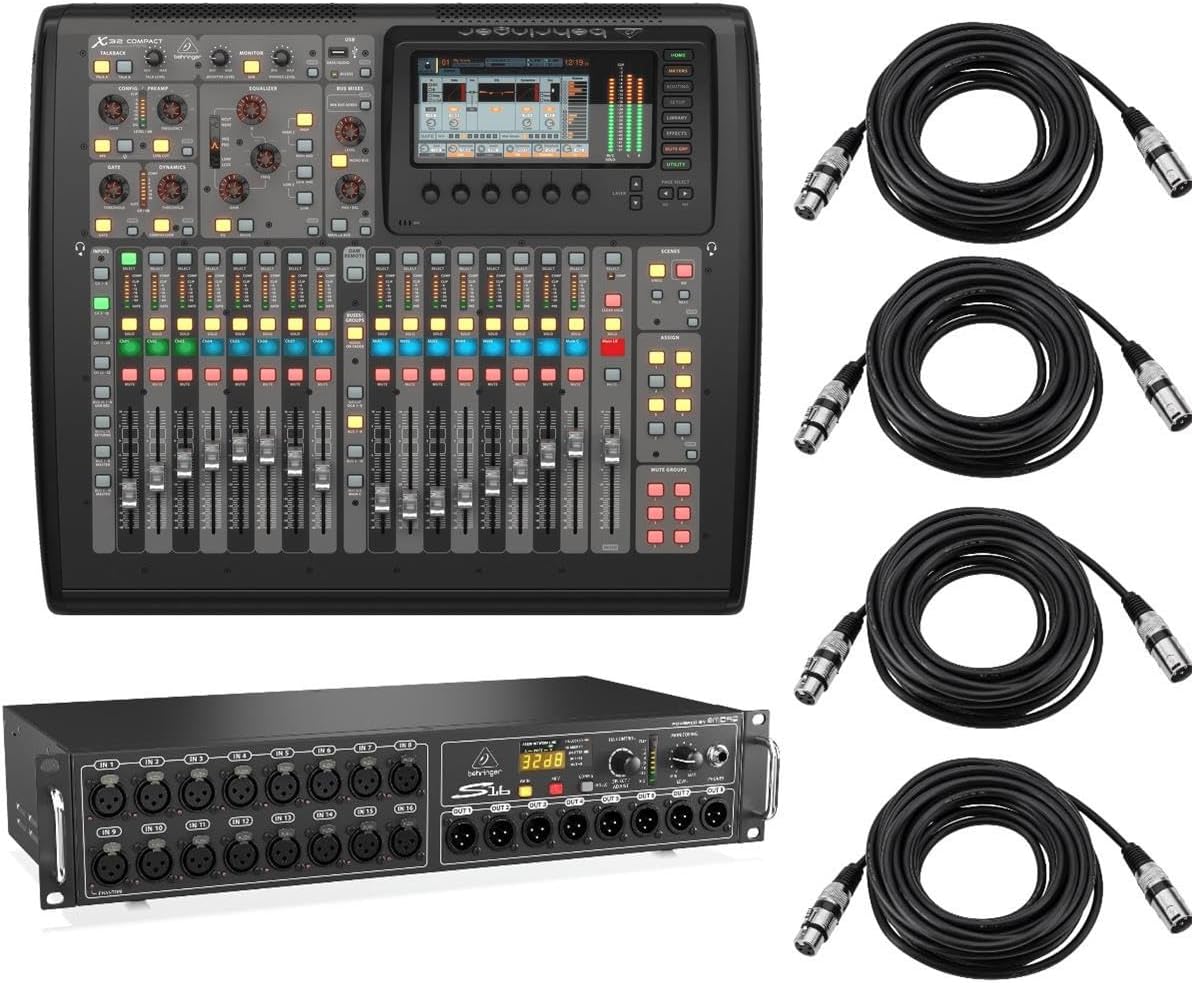
Figure 2.1: The complete Behringer X32 Compact bundle, including the digital mixing console, S16 digital snake, and four XLR cables.
2.1. X32 Compact Digital Mixing Console
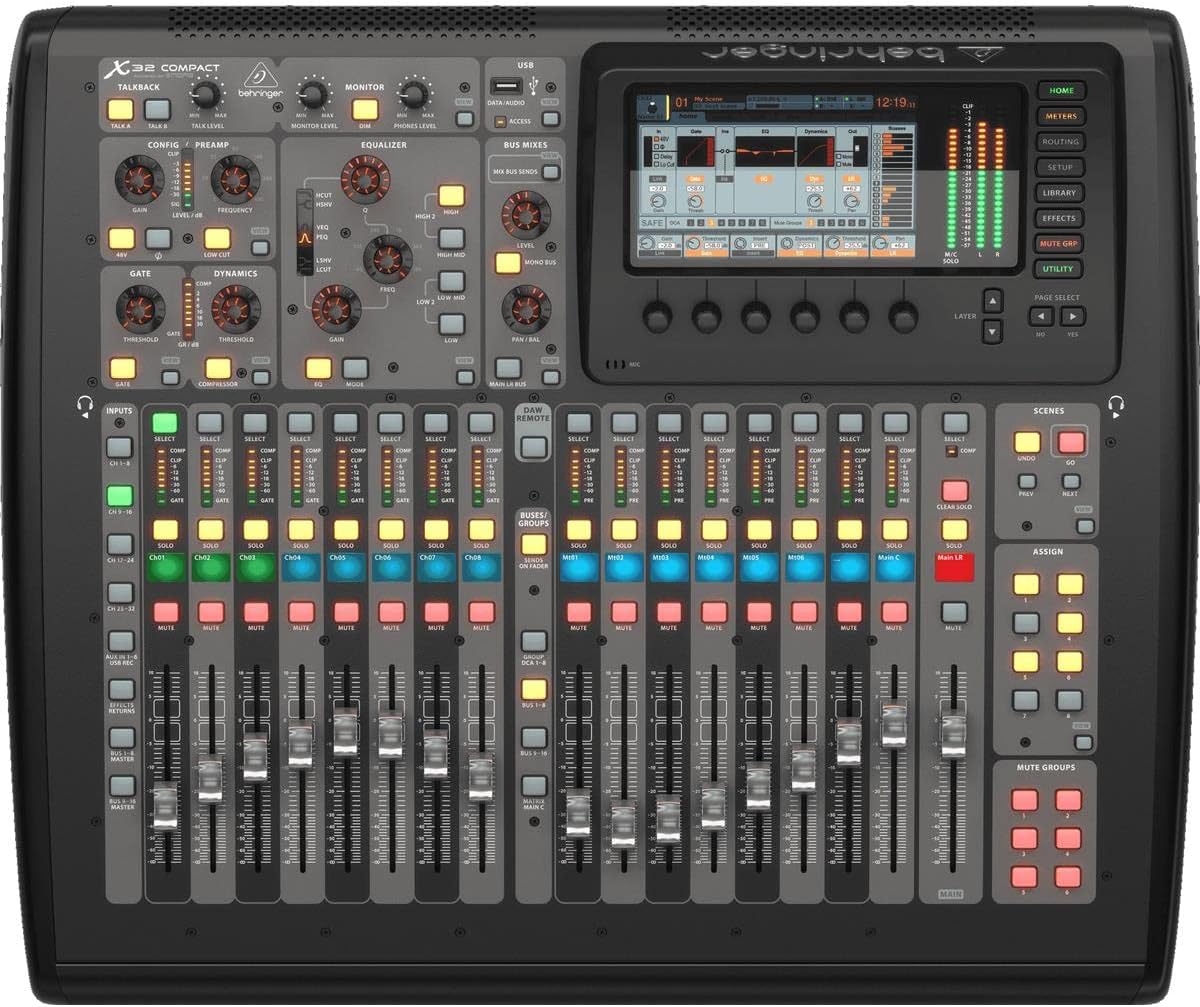
Figura 2.2: in alto view of the X32 Compact, showcasing its faders, control knobs, and central display screen.

Figura 2.3: Angolato view of the X32 Compact, highlighting the ergonomic layout of its controls and the motorized faders.

Figure 2.4: Rear panel of the X32 Compact, showing various input/output connections including XLR, auxiliary inputs, USB, and Ultranet ports.
2.2. S16 Digital Snake

Figura 2.5: Fronte view of the S16 Digital Snake, displaying its 16 XLR inputs and 8 XLR outputs, along with control knobs and a digital display.

Figure 2.6: Rear panel of the S16 Digital Snake, showing power input, USB, AES50, ADAT, and MIDI connections.
3. Impostazione
3.1. Connessioni iniziali
- Collegamento elettrico: Connect the supplied power cable to the X32 Compact and the S16 Digital Snake, then plug into a suitable power outlet. Ensure the power switches are in the OFF position before connecting.
- Connecting S16 to X32 Compact: Use a shielded CAT5e Ethernet cable (maximum 100m/330ft) to connect the AES50 port A on the S16 to the AES50 port A on the X32 Compact. This single cable carries all 16 inputs and 8 outputs, plus control data.
- Ingressi audio: Connect microphones or line-level sources to the XLR inputs on the S16. For the X32 Compact, use the XLR inputs on the rear panel for direct connections if needed.
- Uscite audio: Connect your main PA system or studio monitors to the Main L/R XLR outputs on the X32 Compact. Use the S16's XLR outputs for stage monitors or other remote destinations.
- Connessione USB (facoltativa): For recording or playback with a computer, connect a USB cable from the X32 Compact's USB port to your computer. Install necessary drivers if prompted by your operating system.
3.2. Accensione
Once all connections are secure, power on your equipment in the following order:
- Turn on the S16 Digital Snake.
- Turn on the X32 Compact Digital Mixing Console.
- Finally, turn on your power ampdiffusori acustici o altoparlanti attivi.
To power off, reverse the order: turn off amplifiers/speakers first, then the X32 Compact, and finally the S16.
4. Istruzioni per l'uso
4.1. Navigazione e controlli di base
- Schermo principale: The large color display provides visual feedback for all parameters. Use the rotary encoders and buttons around the screen to navigate menus and adjust settings.
- Channel Strips: Each channel strip features a motorized fader, Mute, Solo, and Select buttons. The Select button activates the channel for detailed editing on the main display.
- Layer Buttons: Use the layer buttons (e.g., Inputs 1-16, 17-32, Aux In/FX Returns) to switch between different sets of channels on the faders.
- Bus Sends: Assign channels to mix buses (e.g., monitor mixes, effects sends) using the 'Sends on Faders' function or the dedicated bus send controls.
4.2. Signal Routing
The X32 Compact offers extensive routing flexibility. Access the 'Routing' menu on the main display to assign physical inputs to console channels, and console outputs to physical output jacks. For the S16, ensure its AES50 port is correctly assigned as an input source for your desired channels.
4.3. Elaborazione degli effetti
The console includes 8 true-stereo (16 mono) effects engines. Navigate to the 'Effects' section to select, configure, and assign various effects such as reverbs, delays, and dynamics processors to channels or buses.
4.4. Gestione della scena
The X32 Compact can store up to 100 total recall scenes, including preamp and fader settings. Use the 'Scenes' section to save, load, and manage different console configurations for various performances or setups.
5. Manutenzione
- Pulizia: Regularly wipe down the console and snake with a soft, dry, lint-free cloth. For stubborn dirt, a slightly damp È possibile utilizzare un panno, ma assicurarsi che nessun liquido penetri nell'unità. Evitare detergenti abrasivi o solventi.
- Aggiornamenti del firmware: Controllare periodicamente il Behringer website for firmware updates. Keeping your console's firmware up-to-date ensures optimal performance, new features, and bug fixes. Follow the instructions provided with the firmware update carefully.
- Magazzinaggio: When not in use, store the equipment in a cool, dry place, away from direct sunlight and extreme temperatures. If transporting, use a dedicated flight case to protect against physical damage.
6. Risoluzione Dei Problemi
6.1. Problemi comuni e soluzioni
| Problema | Possibile causa | Soluzione |
|---|---|---|
| Nessuna uscita audio | Mute engaged, faders down, incorrect routing, faulty cables, amplificatore spento. | Check all mute buttons, raise faders, verify routing in the 'Routing' menu, test cables, ensure amplifiers are on and receiving signal. |
| S16 not recognized by X32 | Faulty CAT5e cable, incorrect AES50 port, S16 not powered on. | Ensure S16 is powered, use a known good CAT5e cable, connect to correct AES50 port (A to A). |
| Motorized faders not moving | Fader calibration issue, power supply problem, internal fault. | Try recalibrating faders via the 'Setup' menu. If problem persists, contact support. |
| Display bloccato o non reattivo | Problema software, fluttuazione di potenza. | Perform a power cycle (turn off, wait 30 seconds, turn on). If persistent, consider a factory reset (refer to manual for procedure). |
6.2. Ripristino delle impostazioni di fabbrica
A factory reset will revert all settings to their default state. This can resolve persistent software issues but will erase all custom scenes and configurations. Refer to the official Behringer X32 Compact manual for the precise factory reset procedure.
7. Specifiche
Below are key specifications for the Behringer X32 Compact Digital Mixing Console and S16 Digital Snake:
- Numero di canali: 32 input channels, 8 aux in channels, 8 FX return channels, 16 buses, 6 matrices, Main LRC
- Effects Engine: Internal: 8 true-stereo / 16 mono
- Scena File Memoria: 100 total recall scenes (including preamp e dissolvenza)
- Elaborazione del segnale: virgola mobile a 40 bit
- Dimensioni del prodotto: 29 x 25 x 12.75 pollici
- Fonte di energia: Elettrico con cavo
- Tecnologia di connettività: Auxiliary, USB, AES50 (for S16)
- Tipo connettore di uscita: XLR
8. Garanzia e supporto
8.1. Informazioni sulla garanzia
This product is covered by an Adorama 1 Year Limited Warranty. Please retain your proof of purchase for warranty claims. For full details regarding warranty terms and conditions, refer to the warranty documentation provided with your purchase or contact Adorama customer service.
8.2. Supporto tecnico
For technical assistance, troubleshooting beyond this manual, or service inquiries, please contact Behringer customer support. You can find contact information and additional resources on the official Behringer webposto (www.behringer.com).
Ask a question about this manual
Ask about setup, troubleshooting, compatibility, parts, safety, or missing instructions. Manuals+ will review the question and use this page’s manual context to help answer it.