
Introduzione
This manual provides comprehensive instructions for the safe and efficient operation of your Flex DD 4G 18.0-EC Cordless Drill Driver. Please read this manual thoroughly before using the tool and keep it for future reference. Understanding the features and proper usage will ensure optimal performance and extend the lifespan of your tool.
Informazioni sulla sicurezza
Avvertenze generali sulla sicurezza degli utensili elettrici
- Indossare sempre protezioni per gli occhi.
- Mantenere l'area di lavoro pulita e ben illuminata.
- Non utilizzare utensili elettrici in atmosfere esplosive, ad esempio in presenza di liquidi, gas o polveri infiammabili.
- Tenere lontani i bambini e gli astanti durante l'utilizzo di un elettroutensile.
- Evitare l'avvio accidentale. Assicurarsi che l'interruttore sia in posizione di spegnimento prima di collegare la batteria, sollevare o trasportare l'utensile.
- Usa l'utensile elettrico corretto per la tua applicazione.
- Scollegare il pacco batteria dall'utensile elettrico prima di effettuare qualsiasi regolazione, sostituire gli accessori o riporre gli utensili elettrici.
- Conservare gli elettroutensili inutilizzati fuori dalla portata dei bambini e non consentire a persone che non hanno familiarità con l'elettroutensile o con le presenti istruzioni di utilizzarlo.
- Mantieni gli utensili elettrici. Controlla eventuali disallineamenti o inceppamenti delle parti mobili, rotture di parti e qualsiasi altra condizione che possa influire sul funzionamento dell'utensile elettrico.
- Utilizzare l'utensile elettrico, gli accessori, gli utensili ecc. in conformità alle presenti istruzioni, tenendo conto delle condizioni di lavoro e del lavoro da svolgere.
Specific Drill Driver Safety Warnings
- Tenere l'utensile elettrico per le superfici di presa isolate durante l'esecuzione di un'operazione in cui l'accessorio di taglio potrebbe entrare in contatto con cavi nascosti o con il proprio cavo.
- Assicurarsi sempre che il pezzo in lavorazione sia ben chiusoamped o trattenuto.
- Do not force the drill. Allow the tool to work at its own pace.
- Ensure the chuck is tightened securely before operation.
Contenuto della confezione
The Flex DD 4G 18.0-EC Cordless Drill Driver package typically includes the following items:
- Flex DD 4G 18.0-EC Cordless Drill Driver (Tool only, battery and charger sold separately)
- 1 Handle (Part No. 489.417)
- 1 Belt Clip (Part No. 467.154)
- 1 Bit Holder (Part No. 453.995)
- 1 Bit Garage (Part No. 430.862)
- 1 L-BOXX 136 Transport Case (Part No. 414.085)
- 1 Case Insert (Part No. 477.591)

An image showing the Flex DD 4G 18.0-EC Cordless Drill Driver, its auxiliary handle, and the L-BOXX 136 transport case with its insert. The drill is red and black, resting on top of the closed black L-BOXX case.
Caratteristiche principali
The Flex DD 4G 18.0-EC Cordless Drill Driver is designed for high performance and durability. Key features include:
- Electronic Management System (EMS): Protects the machine, extends service life, and increases efficiency.
- Motore Brushless: Provides higher efficiency and a longer service life.
- Cambio a 4 velocità: Offers speeds up to 4200 RPM for maximum drilling and screwdriving efficiency.
- Accelerator Switch with Lock-on Function: Allows for variable speed control and continuous operation.
- Electronic Quick Brake: Stops the chuck rotation quickly for increased safety and control.
- Robust Die-Cast Aluminum Gear Housing: Ensures durability and heat dissipation.
- Metal Keyless Chuck with Auto-Lock Function: Per cambi di punta rapidi e facili.
- Tool-Free Removable Chuck: Enhances versatility for various applications.
- Right/Left Rotation with Interlock: For both driving and removing fasteners.
- Maniglia allungabile: Provides user protection even with high torque applications.
- Ergonomic Non-Slip Rubber Grip: Per una maneggevolezza comoda e sicura.
- Luce LED integrata: Illumina l'area di lavoro.
- Display LED della capacità della batteria: Mostra la carica residua della batteria.
- Flex Battery System: Compatible with all 18.0 V battery packs (sold separately).
Impostare
Fissaggio della maniglia ausiliaria
The auxiliary handle provides additional control and safety, especially during high-torque applications.
- Allentare la maniglia ruotandola in senso antiorario.
- Slide the handle onto the front of the drill driver, positioning it for comfortable use.
- Tighten the handle by rotating it clockwise until it is secure.

A close-up image of the Flex DD 4G 18.0-EC Cordless Drill Driver with its auxiliary handle attached. The handle is positioned on the front of the tool, providing an additional grip point.
Installazione/rimozione della batteria
This tool operates with Flex 18.0 V battery packs (not included).
- Installazione: Align the battery pack with the base of the tool and slide it in until it clicks into place.
- Rimozione: Press the battery release button (usually located on the battery pack) and slide the battery pack out.
Installazione/rimozione di punte da trapano o punte da cacciavite
The tool features a metal keyless chuck.
- Installazione: Rotate the chuck counter-clockwise to open the jaws. Insert the bit fully into the chuck. Rotate the chuck clockwise to tighten the jaws securely around the bit.
- Rimozione: Rotate the chuck counter-clockwise to open the jaws and remove the bit.

A close-up image of the metal keyless chuck on the Flex DD 4G 18.0-EC Cordless Drill Driver. The chuck jaws are visible, ready to accept a drill bit or screwdriver bit.
Removable Chuck Function
The chuck can be removed without tools for specific applications or to use a bit directly in the spindle.
- Assicurarsi che l'utensile sia spento e che la batteria sia stata rimossa.
- Rotate the chuck counter-clockwise until it detaches from the spindle.
- To reattach, align the chuck with the spindle and rotate clockwise until it locks securely.
Istruzioni per l'uso
Accensione/spegnimento e controllo della velocità
- Accensione: Press the accelerator switch to start the tool. The speed is variable depending on the pressure applied to the switch.
- Spegni: Release the accelerator switch. The electronic quick brake will stop the chuck rotation.
- Lock-on Function: For continuous operation, press the accelerator switch and then engage the lock-on button (if present, typically on the side of the switch). To release, press the accelerator switch again.
Selecting Rotation Direction (Forward/Reverse)
A forward/reverse switch is located above the accelerator switch.
- Push the switch to the left for forward rotation (drilling/driving).
- Per invertire la rotazione (rimuovendo viti/punte), spingere l'interruttore verso destra.
- Position the switch in the center for the lock-off position, preventing accidental starting.
Selecting Torque and Speed Settings
The tool features a torque collar and a 4-speed gearbox.
- Impostazione della coppia: Rotate the torque collar to select the desired torque level (1-11) for screwdriving. The drill symbol indicates drill mode, which bypasses the clutch for maximum power.
- Impostazione della velocità: Use the gear selector switch (typically on top of the tool) to choose between the four speed ranges (1, 2, 3, 4). Lower speeds are for higher torque applications (e.g., driving large screws), while higher speeds are for drilling.

A person wearing work gloves is operating the Flex DD 4G 18.0-EC Cordless Drill Driver to drill a hole into a metal sheet. The drill is held firmly with both hands, demonstrating proper usage.
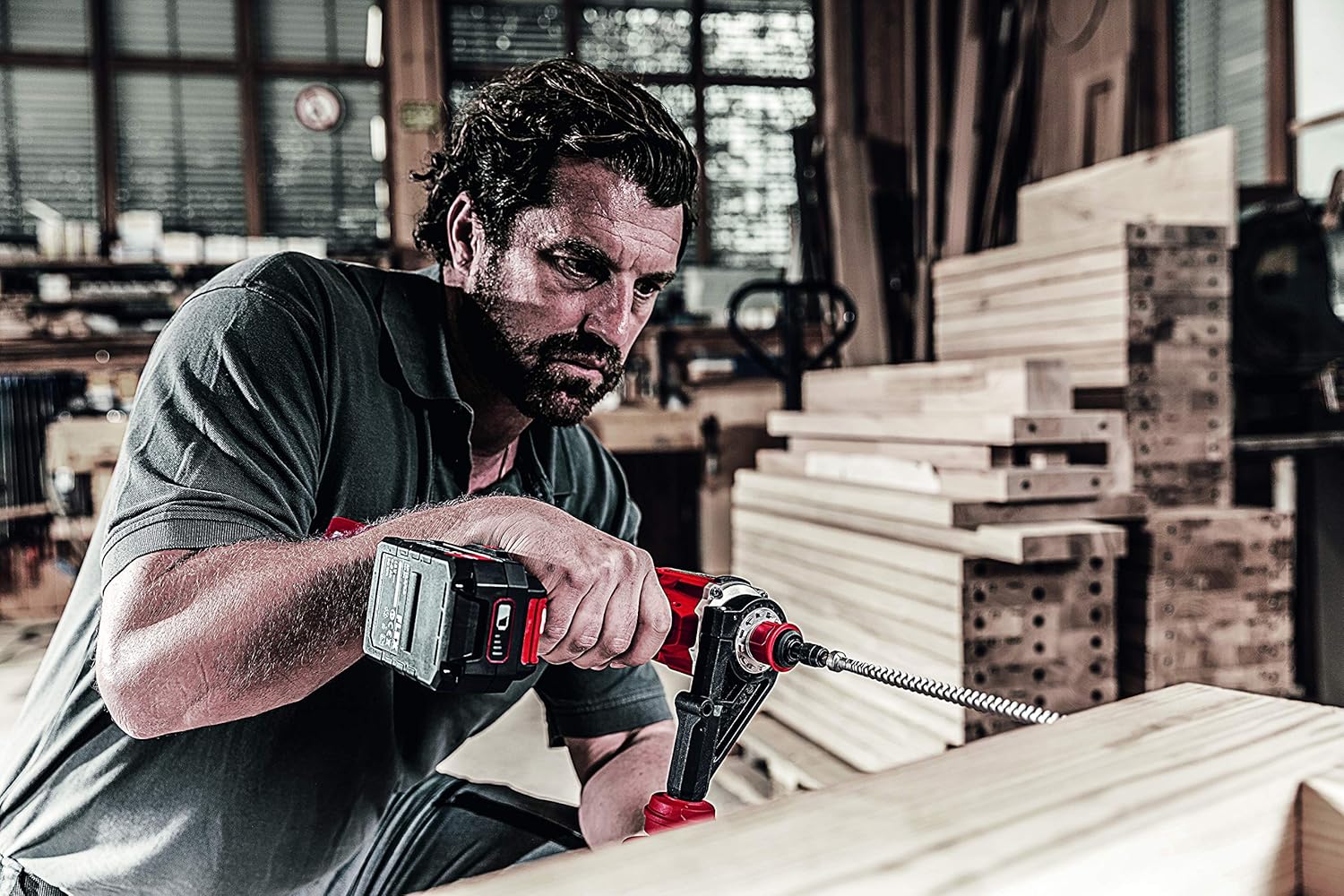
A person is using the Flex DD 4G 18.0-EC Cordless Drill Driver to drill into a wooden beam with a large auger bit. The auxiliary handle is attached, providing stability during the operation.
Manutenzione
Pulizia generale
- Mantenere pulite le fessure di ventilazione dell'utensile per evitare il surriscaldamento.
- Pulire regolarmente l'alloggiamento dell'utensile con un panno morbido eamp stoffa. Non utilizzare solventi o detergenti abrasivi.
- Rimuovere polvere e detriti dalle ganasce del mandrino.
Cura della batteria
- Conservare le batterie in un luogo fresco e asciutto, lontano dalla luce solare diretta e da temperature estreme.
- Do not store battery packs fully discharged. Charge them periodically if not in use for extended periods.
- Refer to the battery pack and charger manuals for specific charging and storage instructions.
Manutenzione del mandrino
- Periodically inspect the chuck jaws for wear or damage.
- If the chuck becomes stiff, apply a small amount of dry lubricant to the jaws.
Risoluzione dei problemi
Lo strumento non si avvia
- Assicurarsi che la batteria sia completamente carica e inserita correttamente.
- Check that the forward/reverse switch is not in the center (lock-off) position.
- Verify that the accelerator switch is being pressed firmly.
Potenza o prestazioni ridotte
- La batteria potrebbe essere scarica. Ricaricarla.
- The selected torque setting may be too low for the application. Increase the torque setting or switch to drill mode.
- The drill bit or screwdriver bit may be dull or damaged. Replace with a sharp, appropriate bit.
- Overload protection may have activated. Allow the tool to cool down.
Chuck Not Holding Bits Securely
- Assicurarsi che il mandrino sia serrato saldamente.
- Check for debris inside the chuck jaws. Clean if necessary.
- Inspect the chuck jaws for wear or damage. If damaged, the chuck may need replacement.
Specifiche
The following are the technical specifications for the Flex DD 4G 18.0-EC Cordless Drill Driver:
| Specificazione | Valore |
|---|---|
| Volume batteriatage | 18 Volt |
| Battery Capacity (compatible) | 2.5/5.0 Ah |
| Max. Torque (Soft/Hard) | 64 / 135 Nm |
| Impostazioni di coppia | 11 + 1 (Modalità Drill) |
| No-Load Speed (1st/2nd/3rd/4th Gear) | 460 / 910 / 2100 / 4200 giri/min |
| Chuck Width | 1.5 - 13 millimetro |
| Diametro massimo di foratura (acciaio) | 13 millimetri |
| Diametro massimo di foratura (legno) | 76 millimetri |
| Peso (senza batteria) | 1.5 kg |
| Dimensioni del prodotto (L x P x A) | Dimensioni: 24 x 7.5 x 21.5 cm |
| Produttore | FLETTERE |
| Numero di modello | 447765 |
| Fonte di alimentazione | Senza fili, alimentato a batteria |
| Materiale | Metallo |
Garanzia e supporto
Informazioni sulla garanzia
Please refer to the warranty card included with your product or visit the official Flex websito per termini e condizioni di garanzia dettagliati. Conservare la prova d'acquisto per eventuali reclami in garanzia.
Assistenza clienti
For technical assistance, spare parts, or service, please contact Flex customer support. Contact information can typically be found on the Flex websito o nella confezione del prodotto.