
Introduzione
The PWAY PW-HT226P2 is a 1x2 Port HDMI Splitter Extender designed to distribute a single HDMI source to two remote displays over Cat5/5e/6/7 Ethernet cables, extending the signal up to 50 meters (165 feet). It supports Full HD 1080P resolution at 60Hz and features Power over Cable (POC) for simplified power management and EDID copy functionality for enhanced compatibility.

Image: The PWAY PW-HT226P2 HDMI Splitter Extender system, showing the main transmitter unit and two receiver units.
Caratteristiche del prodotto
- Trasmissione estesa: Transmits HDMI video and audio signals without latency up to 50 meters (165 feet) over a single Cat5/5e/6/7 Ethernet cable.
- Dual Local Outputs: The transmitter unit includes two local HDMI outputs for connecting displays directly, in addition to the two RJ45 ports for extended connections.
- Supporto ad alta risoluzione: Supports resolutions up to 1920x1080P at 60Hz, and is backward compatible with 1080i, 720P, and 720i.
- Alimentazione tramite cavo (POC): Only one power adapter is required to power both the transmitter and receiver units, simplifying installation and reducing cable clutter.
- Funzione di copia EDID: Equipped with EDID (Extended Display Identification Data) copy functionality to ensure optimal compatibility between the source device and connected displays.
- HDMI 1.3 Compliant: Ensures compatibility with a wide range of HDMI devices.

Immagine: Oltreview of the PWAY HDMI Extender Splitter 1x2, highlighting key features such as 3D support, 1080P resolution, 50m extension, and POC.
Contenuto della confezione
Si prega di controllare il contenuto della confezione al momento del disimballaggio. Se qualche articolo risulta mancante o danneggiato, contattare il rivenditore.
- 1x HDMI Splitter Extender Transmitter (TX)
- 2x HDMI Splitter Extender Receiver (RX)
- 1x adattatore di alimentazione DC 5V
- 1x Manuale utente (questo documento)

Image: The complete packing list, including the transmitter, two receivers, and the power adapter.
Diagramma del prodotto
Unità trasmettitore (TX)
The transmitter unit connects to your HDMI source and distributes the signal.
- CC 5V: Porta di ingresso alimentazione.
- INGRESSO HDMI: Connect to your HDMI source (e.g., DVD player, game console).
- HDMI OUT (Loop): Two local HDMI outputs for connecting displays directly to the transmitter.
- Cat5/6/7: Two RJ45 output ports for connecting to the receiver units via Ethernet cable.
- LED DI STATO: Indica lo stato operativo.
- LED EDID: Indicates EDID status.
- LED DI ALIMENTAZIONE: Indica lo stato dell'alimentazione.
Unità ricevente (RX)
The receiver units connect to your displays and receive the extended HDMI signal.
- Cat5/6/7: RJ45 input port for connecting to the transmitter unit via Ethernet cable.
- USCITA HDMI: Collegalo al tuo dispositivo di visualizzazione (ad esempio, TV, monitor).
- LED STA: Indica lo stato del segnale.
- LED ACCENSIONE: Indica lo stato dell'alimentazione.

Image: A detailed connection diagram illustrating how to connect the video source, transmitter, Cat5e/6 cables, receivers, and multiple display devices.
Istruzioni di installazione
- Spegnimento dei dispositivi: Ensure all devices, including the HDMI source, displays, and the PWAY extender units, are powered off before beginning installation.
- Collegare la sorgente HDMI: Connect your HDMI source device (e.g., Blu-ray player, PC, game console) to the HDMI IN porta sull'unità trasmettitore (TX) utilizzando un cavo HDMI di alta qualità.
- Collegamento dei display locali (facoltativo): Se si desidera utilizzare display locali, collegarli a HDMI OUT (Loop) ports on the Transmitter (TX) unit using HDMI cables.
- Collegare i cavi Ethernet: Connect Cat5e/6/7 Ethernet cables from the Cat5/6/7 output ports on the Transmitter (TX) unit to the Cat5/6/7 input ports on each Receiver (RX) unit. Ensure the cables are properly terminated and meet the specified length requirements for your desired resolution (up to 50m for 1080P).
- Collegare i display remoti: Connect your remote display devices (e.g., TV, monitor) to the Uscita HDMI port on each Receiver (RX) unit using HDMI cables.
- Applicare potenza: Collegare l'adattatore di alimentazione CC 5V fornito al CC 5V port on the Transmitter (TX) unit. Due to the POC function, the receiver units will be powered via the Ethernet cable.
- Accendi i dispositivi: Power on the HDMI source device, then the displays, and finally the PWAY extender units.
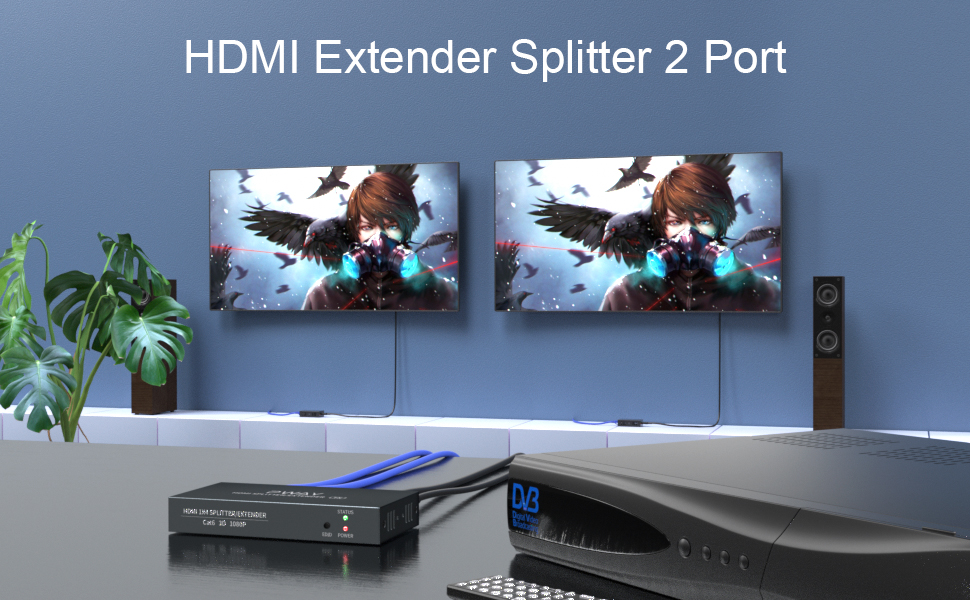
Immagine: Un example setup showing the transmitter connected to a source and two remote displays via receiver units.

Image: A chart indicating the maximum transmission distances based on the type of network cable used: Cat5 up to 40m, Cat5e up to 45m, and Cat6/7 up to 50m.
Istruzioni per l'uso
Once all connections are made and power is applied, the system should operate automatically.
- Rilevamento del segnale: The extender units will automatically detect the HDMI input signal and transmit it to the connected displays.
- Indicatori LED:
- Trasmettitore (TX): The POWER LED should be lit when power is supplied. The STATUS LED and EDID LED will indicate active signal and EDID status respectively.
- Ricevitore (RX): The PWR LED should be lit, indicating power received via POC. The STA LED will indicate active signal reception.
- Gestione dell'EDID: The EDID copy function ensures the source device outputs a compatible resolution and audio format for the connected displays. No manual configuration is typically required.
Manutenzione
To ensure optimal performance and longevity of your PWAY HDMI Splitter Extender, follow these maintenance guidelines:
- Pulizia: Per pulire le unità, utilizzare un panno morbido e asciutto. Non utilizzare detergenti liquidi o spray.
- Ventilazione: Assicurarsi che le unità siano posizionate in un'area ben ventilata per evitare il surriscaldamento. Non ostruire le aperture di ventilazione.
- Gestione dei cavi: Keep cables organized and avoid sharp bends or excessive tension, which can damage cables and ports.
- Condizioni ambientali: Evitare di esporre le unità a temperature estreme, umidità o luce solare diretta.
Risoluzione dei problemi
If you encounter issues with your HDMI Splitter Extender, refer to the following common problems and solutions:
| Problema | Possibile causa | Soluzione |
|---|---|---|
| Nessun video o audio visualizzato. |
|
|
| Scarsa qualità dell'immagine o sfarfallio. |
|
|
| Receiver unit not powering on. |
|
|
Specifiche
| Modello | PW-HT226P2 |
| Marca | PWAY |
| Conformità HDMI | Uscita HDMI 1.3 |
| Conformità HDCP | Conformità HDCP 1.2 |
| Risoluzioni supportate | Up to 1080P@60Hz (1920x1080), 1080i, 720P, 720i |
| Distanza di trasmissione | Up to 50m (165ft) over Cat5e/6/7 cable |
| Requisiti del cavo Ethernet | Cat5/5e/6/7 (UTP/STP) |
| Alimentazione elettrica | DC 5V (tramite adattatore incluso) |
| Caratteristiche | POC (Power over Cable), EDID Copy, Dual Local HDMI Outputs |
Informazioni sulla sicurezza
- Non smontare o modificare il dispositivo.
- Utilizzare esclusivamente l'adattatore di alimentazione fornito.
- Tenere il dispositivo lontano da acqua, umidità e temperature estreme.
- Evitare di far cadere o sottoporre il dispositivo a forti impatti.
- Garantire una ventilazione adeguata per evitare il surriscaldamento.
Garanzia e supporto
PWAY products are designed for reliability and performance. For warranty information or technical support, please refer to the warranty card included with your product or visit the official PWAY websito. Puoi anche contattare il tuo rivenditore per assistenza.
Conservare la prova d'acquisto per eventuali richieste di garanzia.