
Introduzione
The SHAKS S3i is an advanced ultra-low latency Bluetooth gamepad controller designed for a superior gaming experience across multiple platforms. Powered by Qualcomm technology and MFI certified for Apple devices, it offers wide compatibility with Android, Windows, Mac OS, and iOS. This manual provides essential information for setting up, operating, maintaining, and troubleshooting your SHAKS S3i controller.

The SHAKS S3i gamepad controller features a retractable phone mount for mobile gaming.
Impostare
1. Disimballaggio e carica iniziale
Dopo aver aperto la confezione, assicurarsi che siano presenti tutti i componenti:
- SHAKS S3i Gamepad Controller
- Cavo di ricarica USB
- Manuale d'uso

The SHAKS S3i gamepad comes in environmentally friendly recycled cardboard packaging. Contents include the SHAKS S3i controller, a USB charging cable, and a user manual.
Before first use, fully charge the controller using the provided USB cable connected to a compatible USB power source. The LED indicators will show charging status.
2. Accensione/Spegnimento
- Per accendere: Press and hold the SHAKS logo button (center button) until the LED indicators light up.
- Per spegnere: Press and hold the SHAKS logo button until the LED indicators turn off. The controller will also automatically power off after a period of inactivity.
3. Mode Selection and Bluetooth Pairing
The SHAKS S3i supports four distinct modes to ensure optimal compatibility with various devices. It is crucial to select the correct mode for your host device before pairing.
Follow these steps for mode selection and pairing:
- Turn off your device (phone, PC, etc.).
- Select the appropriate mode for your device by pressing and holding the corresponding hotkey combination while powering on the gamepad. Refer to the table below for hotkey combinations and LED indicators.
- Once the mode is selected, press Seleziona + Avvia simultaneously to enter Bluetooth pairing mode. The LED indicators will flash rapidly.
- On your host device, go to Bluetooth settings and search for available devices. Select the SHAKS controller (e.g., "SHAKS xxx Android", "Xbox Wireless xxx") to complete the pairing process.

This table details the SHAKS S3i's compatibility with various operating systems (Windows, Android, iOS) and provides instructions for mode selection and Bluetooth pairing hotkeys. It also shows the LED indicator patterns for different modes.
| Dispositivo | Mode (LED Indicators) | Nome Bluetooth | Hotkeys* |
|---|---|---|---|
| Android | LED 1, 2, 3, 4 (from left) | SHAKS xxx Android | A + L1(LB) |
| Finestre, Mac | LED 1, 2, 3, 4 (from left) | SHAKS xxx Win-MAC | A + Select |
| iPhone, iPad (MFI) | LED 1, 2, 3, 4 (from left) | Xbox Wireless xxx | A + Start |
| Android (Mappatura) | LED 1, 2, 3, 4 (from left) | SHAKS xxx mapping | A + L1(LB) + Select |
*Verify your device and press two keys simultaneously to start. Please update the firmware via our SHAKS application.
Istruzioni per l'uso
1. Controlli di base
The SHAKS S3i controller features a standard gamepad layout for intuitive control:
- Joystick analogici: Two 360-degree analog joysticks for precise movement and camera control.
- Tasto direzionale: An 8-directional D-pad for accurate directional input.
- Pulsanti di azione: Standard A, B, X, Y buttons.
- Pulsanti/grilletti sulle spalle: L1/LB, R1/RB shoulder buttons and L2/LT, R2/RT analog triggers with 256 steps of acceleration for nuanced control.
- Pulsanti Seleziona/Avvia: For in-game menu navigation and other functions.
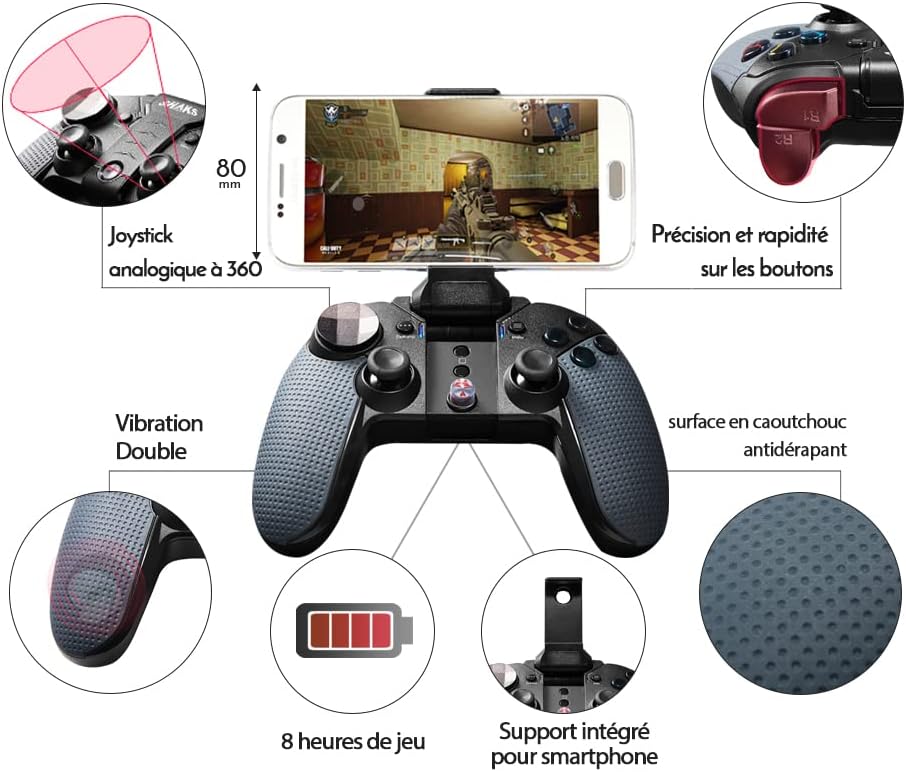
Un diagramma dettagliato mostraasing key features of the SHAKS S3i, including 360-degree analog joysticks, precise and rapid buttons, dual vibration, non-slip rubber surface, 8 hours of battery life, and an integrated smartphone support.
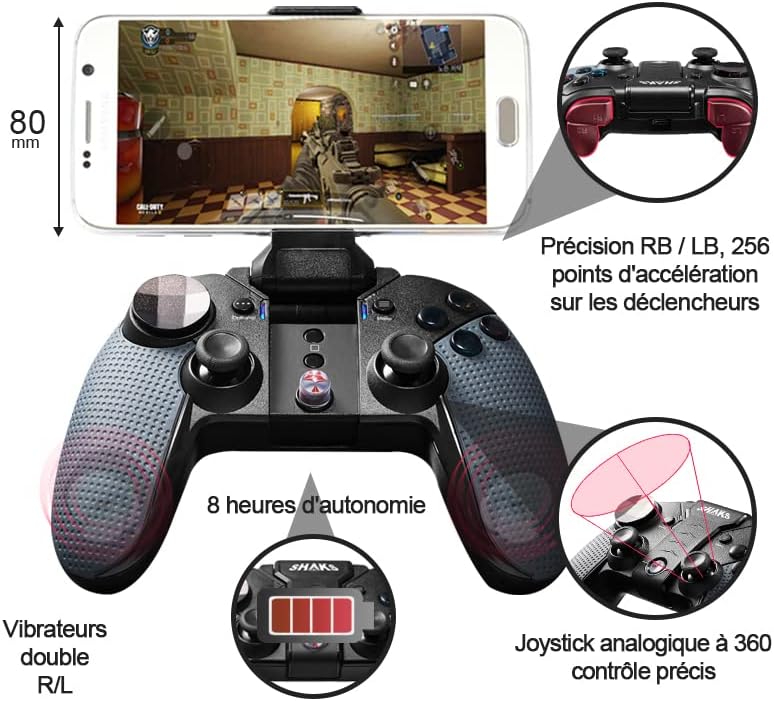
An alternative diagram illustrating the SHAKS S3i's features, emphasizing the precision of RB/LB triggers with 256 acceleration points, dual R/L vibrators, 8 hours of battery life, and 360-degree analog joystick control.
2. Advanced Features (via SHAKS Utility Application)
For Android users, the free SHAKS Utility Application (available on Google Play) unlocks advanced functionalities:
- Shaks Mapping: Convert on-screen touch controls into gamepad inputs, allowing you to play games that do not natively support controllers.
- Snipper: Enhance aiming precision in shooter games.
- Turbo: Abilita la funzionalità di fuoco rapido per pulsanti specifici.
- Virtual Mouse: Control a virtual mouse pointer using the gamepad.
- Test chiave: Verify button functionality.
- Luminosità: Regola la luminosità dello schermo.

This image illustrates the SHAKS S3i's touch mapping feature, allowing conversion of touch controls to gamepad inputs for Android devices. Icons for firmware update, virtual mouse, turbo, sniper, key test, and brightness are shown.
3. Supported Platforms and Services
The SHAKS S3i offers broad compatibility with various operating systems and gaming platforms:
- Sistemi operativi: Android, Windows, Mac OS, iOS (MFI certified).
- Cloud Gaming Services: Stadia, Xbox Cloud Gaming (X-Cloud), NVIDIA GeForce NOW, Luna.
- Game Platforms: Xbox Game Pass, Google Play, Steam, Apple Arcade, Epic Games.

The SHAKS S3i controller supports a wide range of cloud gaming services and local game platforms, including Xbox Game Pass, NVIDIA GeForce NOW, Stadia, Luna, Google Play, Steam, Apple Arcade, and Epic Games.
4. Durata della batteria
The SHAKS S3i provides approximately 8 hours of continuous gameplay on a full charge, depending on usage and vibration settings.
Manutenzione
1. Pulizia
To maintain your controller, wipe it with a soft, dry cloth. Avoid using harsh chemicals or abrasive materials that could damage the surface or internal components.
2. Conservazione
Store the controller in a cool, dry place away from direct sunlight and extreme temperatures. If storing for an extended period, ensure it is partially charged to preserve battery health.
3. Aggiornamenti del firmware
Periodically check for firmware updates through the SHAKS Utility Application. Keeping your controller's firmware up-to-date ensures optimal performance, compatibility, and access to new features.
Risoluzione dei problemi
- Il controller non si accende: Ensure the controller is fully charged. If the issue persists, try connecting it to a different USB port or charger.
- Errore di accoppiamento:
- Confirm you have selected the correct mode for your device using the hotkeys during power-on.
- Assicurati che il Bluetooth sia abilitato sul tuo dispositivo host.
- Forget the device from your host's Bluetooth settings and attempt to re-pair.
- Restart both the controller and your host device.
- Input Lag o disconnessioni:
- Assicurati che il controller si trovi nel raggio d'azione del tuo dispositivo.
- Ridurre al minimo le interferenze provenienti da altri dispositivi wireless.
- Verificare la presenza di eventuali aggiornamenti del firmware disponibili e installarli.
- Pulsanti/joystick non rispondono correttamente:
- Use the Key Test feature in the SHAKS Utility Application (Android only) to diagnose button issues.
- Ensure the controller is in the correct mode for the game or application you are using.
- Mapping Issues (Android): If touch mapping is not working as expected, ensure the SHAKS Utility Application has the necessary permissions and is running in the background. Re-calibrate or re-configure your mapping profile.
Specifiche
| Caratteristica | Specificazione |
|---|---|
| Numero di modello | S3i |
| Produttore | AKSys Co., Ltd |
| Dimensioni del prodotto | Dimensioni: 13.5 x 9 x 3.5 cm |
| Peso | 160 grammi |
| Connettività | Bluetooth (Ultra Low Latency, Qualcomm Powered) |
| Compatibilità | Android, Windows, Mac OS, iOS (MFI Certified) |
| Durata della batteria | Circa 8 ore |
| Controlli | 360-degree Analog Joysticks, 8-directional D-pad, 256-step Trigger Keys |
Supporto
For further assistance, technical support, or warranty inquiries, please refer to the SHAKS Utility Application for resources or contact AKSys Co., Ltd directly. Keep your purchase receipt for warranty claims.