
BIOS 335FC
Manuale utente del contapassi digitale BIOS Living 335FC
Model: 335FC
1. Introduzione
Thank you for choosing the BIOS Living Digital Pedometer 335FC. This compact and smart device is designed to help you maintain a healthy and active lifestyle by accurately tracking your daily physical activity.
It counts your steps walked, distance traveled, and calories burned, all displayed on a large, easy-to-read LCD screen. The pedometer is designed for convenience, easily clipping to your belt or waistband, and offers both 12/24 hour time formats and imperial/metric unit options.
2. Informazioni sulla sicurezza
- Tenere il dispositivo lontano dall'acqua e dall'umidità eccessiva.
- Do not expose the pedometer to extreme temperatures (hot or cold).
- Evitare di far cadere o sottoporre il dispositivo a forti impatti.
- Do not attempt to disassemble or repair the pedometer yourself. Refer to qualified service personnel.
- Tenere le batterie fuori dalla portata dei bambini. In caso di ingestione, consultare immediatamente un medico.
- Smaltire le batterie e il dispositivo secondo le normative locali.
3. Prodotto finitoview
Familiarize yourself with the components of your BIOS Living Digital Pedometer 335FC.

Figura 3.1: Fronte View of Pedometer
This image shows the front of the BIOS Living Digital Pedometer 335FC. It features a prominent LCD screen displaying "23 STEP" and three buttons below it: "RESET", "SET", and "MODE". The device is white with a blue accent around the screen, and "BIOS living" is printed at the top.
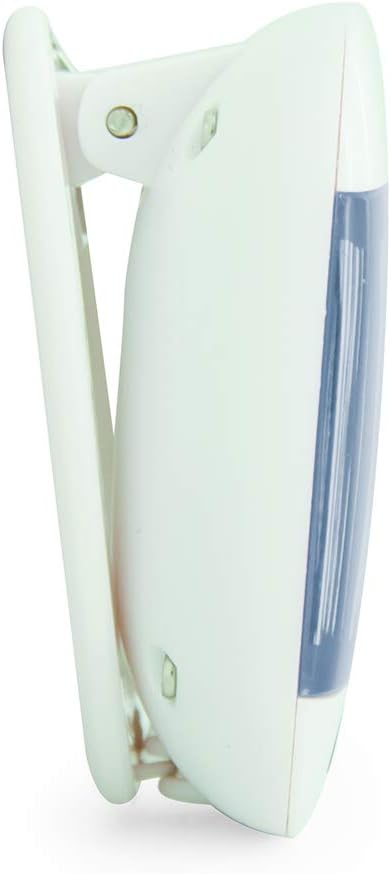
Figura 3.2: lato View with Belt Clip
Questa immagine mostra un lato profile of the BIOS Living Digital Pedometer 335FC. It highlights the integrated white clip mechanism designed for attaching the pedometer to clothing, such as a belt or waistband. The blue accent on the front is visible from this angle.

Figura 3.3: Indietro View con vano batteria
This image shows the back of the BIOS Living Digital Pedometer 335FC. It clearly displays the battery compartment cover, which can be opened to insert or replace the battery. The back is white with some regulatory markings and the brand "HAPTIME" embossed.
Componenti chiave:
- Schermo LCD: Large screen for easy viewing of steps, distance, calories, and time.
- Pulsante di reset: Used to clear current readings or reset settings.
- Pulsante IMPOSTA: Used to confirm settings or enter setting mode.
- Pulsante MODE: Used to cycle through different display modes (Steps, Distance, Calories, Time).
- Clip da cintura: Integrated clip for secure attachment to clothing.
- Vano batteria: Situato sul retro per l'installazione della batteria.
4. Impostazione
4.1 Installazione della batteria
Your pedometer comes with a battery. Follow these steps to install it:
- Locate the battery compartment on the back of the pedometer (refer to Figure 3.3).
- Using a small screwdriver or coin, gently open the battery compartment cover.
- Insert the provided battery, ensuring the correct polarity (+/-) as indicated inside the compartment.
- Riposizionare il coperchio del vano batteria e fissarlo.
4.2 Initial Settings (Time & Units)
After battery installation, the device may prompt you to set the time and units. If not, press and hold the IMPOSTATO pulsante per accedere alla modalità di impostazione.
- Formato ora: The display will flash "12H" or "24H". Use the MODALITÀ button to toggle between 12-hour and 24-hour formats. Press IMPOSTATO per confermare.
- Imposta ora: La cifra dell'ora lampeggerà. Utilizzare il MODALITÀ pulsante per regolare l'ora. Premere IMPOSTATO per confermare. Ripetere per minuti.
- Sistema di unità: The display will flash "KM" (metric) or "MI" (imperial). Use the MODALITÀ button to select your preferred unit system. Press IMPOSTATO per confermare.
- Stride Length (for distance accuracy): If prompted, enter your average stride length. This can be estimated by walking 10 steps and dividing the total distance by 10. Use MODALITÀ per regolare e IMPOSTATO per confermare.
- Weight (for calorie accuracy): If prompted, enter your weight. Use MODALITÀ per regolare e IMPOSTATO per confermare.
The pedometer is now ready for use.
5. Istruzioni per l'uso
5.1 Indossare il contapassi
For accurate readings, clip the pedometer securely to your belt or waistband, preferably near your hip. Ensure it is positioned vertically.
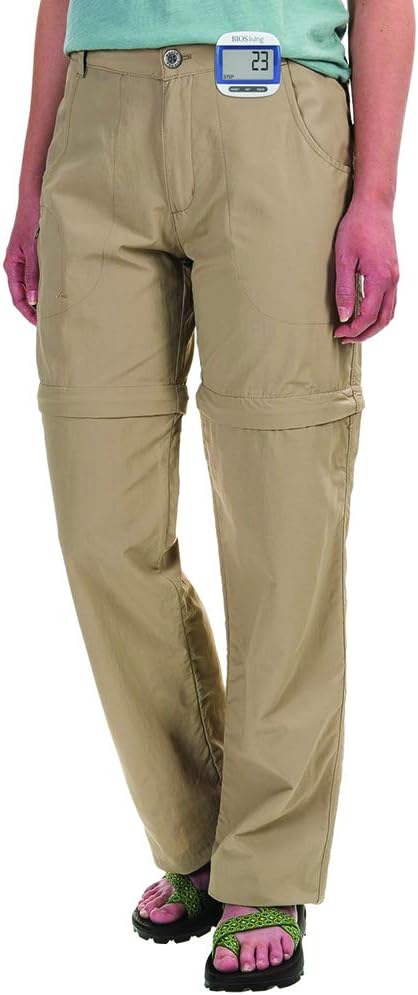
Figure 5.1: Correct Pedometer Placement
This image shows a person wearing the BIOS Living Digital Pedometer 335FC. The pedometer is clipped to the waistband of their khaki pants, positioned on the side of their hip, demonstrating the recommended placement for accurate step counting.
5.2 Modalità di visualizzazione
Premere il tasto MODALITÀ pulsante per scorrere le seguenti modalità di visualizzazione:
- Passaggi: Visualizza il numero totale di passi effettuati.
- Distanza: Displays the total distance traveled (in KM or MI).
- Calorie: Displays the estimated calories burned (in KCAL).
- Tempo: Visualizza l'ora corrente.

Figure 5.2: Time Display Mode
This image shows the BIOS Living Digital Pedometer 335FC displaying the time. The large LCD screen shows "2:34 P", indicating 2:34 PM. A small clock icon is visible on the bottom left of the display.

Figure 5.3: Distance Display Mode
This image shows the BIOS Living Digital Pedometer 335FC displaying distance. The screen shows "1.25" with "DIST" and "KM" below it, indicating a distance of 1.25 kilometers.

Figure 5.4: Calories Display Mode
This image shows the BIOS Living Digital Pedometer 335FC displaying calories burned. The screen shows "4.87" with "KCAL" below it, indicating 4.87 kilocalories.
5.3 Reimpostazione dei dati
To reset your daily steps, distance, and calorie count to zero, press and hold the RESET button until the display clears. This is typically done at the start of a new day or activity.
6. Manutenzione
6.1 Pulizia
Pulire il contapassi con un panno morbido e asciutto. Non utilizzare detergenti abrasivi e non immergere il dispositivo in acqua.
6.2 Sostituzione della batteria
When the display becomes dim or the device stops responding, it's time to replace the battery. Follow the battery installation steps in Section 4.1.
7. Risoluzione Dei Problemi
| Problema | Possibile causa | Soluzione |
|---|---|---|
| Il display è vuoto o poco luminoso. | Batteria scarica o scarica. | Sostituire la batteria (vedere Sezione 6.2). |
| Conteggio dei passi impreciso. | Incorrect placement of pedometer; irregular walking motion; incorrect stride length setting. | Ensure pedometer is clipped securely and vertically to your belt/waistband. Walk naturally. Re-enter stride length in settings (Section 4.2). |
| I pulsanti non rispondono. | Battery issue; temporary software glitch. | Replace battery. If problem persists, try removing and reinserting the battery to perform a hard reset. |
| Impossibile modificare le impostazioni. | Not in setting mode. | Premere e tenere premuto il tasto IMPOSTATO pulsante per accedere alla modalità di impostazione. |
8. Specifiche
| Caratteristica | Dettaglio |
|---|---|
| Numero di modello | 335FC |
| Colore | Blu |
| Materiale | Plastica |
| Dimensioni (L x P x A) | Circa. 5 x 2 x 2 cm |
| Peso | Circa 31.81 g |
| Display | Ampio display LCD |
| Funzioni | Steps, Distance, Calories, Time |
| Formato ora | Selezionabile 12/24 ore |
| Unità | Imperial/Metric selectable |
| Batteria inclusa | SÌ |
| Durata della batteria | 24 Hours (Note: This might refer to continuous operation or a specific test condition, typical pedometer battery life is much longer) |
| Codice UPC | 057475335632 |
9. Garanzia e supporto
This BIOS Living Digital Pedometer 335FC is covered by a manufacturer's warranty against defects in materials and workmanship. Please refer to the warranty card included with your purchase for specific terms and conditions, including the warranty period and how to make a claim.
For technical support, troubleshooting assistance, or warranty inquiries, please contact BIOS Living customer service. Contact information can typically be found on the product packaging or the manufacturer's official websito.
Si prega di conservare la prova d'acquisto ai fini della garanzia.
Documenti correlati - 335FC
 | BIOS Living Digital Pedometer 335FC Instruction Manual Comprehensive user manual for the BIOS Living Digital Pedometer 335FC, including setup, stride calculation, battery replacement, and maintenance instructions. |
Ask a question about this manual
Ask about setup, troubleshooting, compatibility, parts, safety, or missing instructions. Manuals+ will review the question and use this page’s manual context to help answer it.