
1. Introduzione
Thank you for choosing the Lepro Smart LED Strip Light. This manual provides essential information for the safe and efficient use of your new LED strip light. Please read these instructions carefully before installation and operation, and retain them for future reference.
2. Informazioni sulla sicurezza
- Assicurarsi che l'alimentazione sia scollegata prima dell'installazione o della manutenzione.
- Il volume operativotage is 12V. Use only the provided power adapter.
- This product is IP65 waterproof, suitable for both indoor and outdoor use. However, the power adapter and controller are not waterproof and must be protected from moisture.
- Do not bend the LED strip sharply or apply excessive force, as this may damage the circuit.
- Tenere fuori dalla portata dei bambini.
- The LED strip is designed with short-circuit protection for enhanced safety.
- Evitare l'esposizione diretta degli occhi alla fonte di luce per periodi prolungati.
3. Contenuto della confezione
Verificare che tutti i componenti siano presenti nella confezione:
- 5m RGB IP65 Waterproof LED Strip
- Controllore WiFi
- Power Adapter (European Adapter 12V 1.5A)
- Telecomando
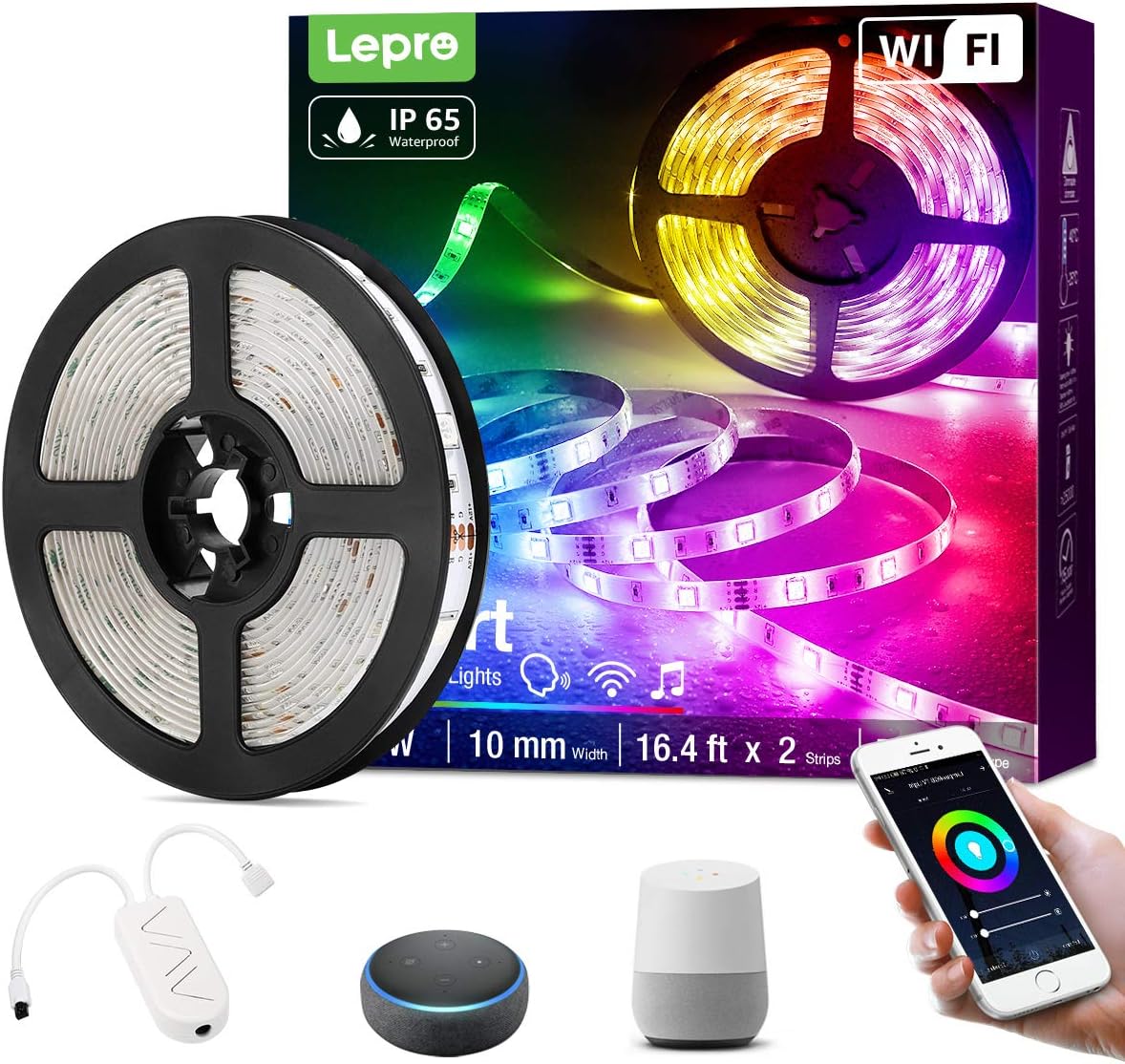
Immagine 3.1: Sopraview of the Lepro Smart LED Strip Light and its included components, such as the LED strip reel, WiFi controller, and power adapter.
4. Caratteristiche del prodotto
- Controllo intelligente: Connects via WiFi (2.4 GHz only) for stable control.
- Controllo vocale: Compatible with Amazon Alexa and Google Assistant, no additional hub required.
- Funzionalità dell'app: Features include countdown, automatic execution, timer function for preset scenarios, and various scene modes.
- Dimmable RGB: Offers a wide range of colors and adjustable brightness.
- IP65 impermeabile: Designed for versatile indoor and outdoor decoration.
- Alta luminosità: Equipped with 30 LEDs per meter for enhanced illumination.
- Sicuro da toccare: Operates at a low 12V, ensuring minimal heat and safety.

Immagine 4.1: The IP65 waterproof LED strip installed in an outdoor setting, demonstrating its suitability for various environments.

Immagine 4.2: Top image shows a hand safely holding the illuminated LED strip. Bottom image provides a close-up view of the IP65 waterproof coating on the LED strip.
5. Guida all'installazione
- Pulisci la superficie: Assicurarsi che la superficie di installazione sia pulita, asciutta e liscia.
- Misura e taglia (facoltativo): If necessary, measure the desired length and cut the LED strip only at the designated cutting marks (usually indicated by a scissor icon or copper pads).
- Staccare e attaccare: Remove the adhesive backing from the LED strip and firmly press it onto the desired surface.
- Collegare i componenti: Connect the LED strip to the WiFi controller, and then connect the controller to the power adapter.
- Collegare: Collega l'alimentatore a una presa elettrica standard.
6. Istruzioni per l'uso
6.1 Basic Control with Controller Button
After plugging in the strip, you can use the physical button on the controller to:
- Accendere/spegnere le luci.
- Cycle through different scene modes.
- Reset the device (usually by holding the button for several seconds).
6.2 Smart Control via Lepro LampUX App
For full functionality, download the "Lepro LampUX" app from your smartphone's app store.
- Scarica l'app: Cercare "Lepro LampUX" and install it.
- Registrati/Accedi: Crea un account o accedi.
- Aggiungi dispositivo: Follow the in-app instructions to add your LED strip light. Ensure your phone is connected to a 2.4 GHz WiFi network during setup.
- Controllare: Once connected, you can control power, color, brightness, set timers, schedules, and customize scene modes directly from the app.

Immagine 6.1: A smartphone screen showing the Lepro LampUX app interface, including a color wheel for light customization and options for smart control. The image also depicts a modern home with LED strip lighting.

Immagine 6.2: A collage of smartphone screens illustrating various features of the Lepro LampUX app, such as timer settings, scheduling, color options, smart modes, scene modes, and DIY customization.
6.3 Controllo vocale con Alexa/Assistente Google
To enable voice control, link your Lepro LampUX account with Amazon Alexa or Google Assistant:
- Open Smart Assistant App: Apri l'app Amazon Alexa o Google Home sul tuo smartphone.
- Abilita Abilità/Azione: Cercare the "LE Lampux" skill (for Alexa) or action (for Google Assistant) and enable it.
- Collega account: Follow the prompts to link your Lepro LampUX account.
- Scopri i dispositivi: Once linked, ask your smart assistant to discover new devices.
- Comandi vocali: You can now use voice commands such as "Alexa, turn on the bedroom light" or "Hey Google, change the strip light to purple."

Immagine 6.3: A visual guide on a smartphone screen demonstrating the process of linking the Lepro LampUX app with Amazon Alexa, showing the steps to enable the skill and connect accounts.

Immagine 6.4: A family enjoying LED strip lighting in their living room, with smart speakers visible, illustrating the convenience of voice control with commands like "Alexa, change the strip light to purple."
7. Manutenzione
- Pulizia: Gently wipe the LED strip with a soft, dry cloth. Do not use abrasive cleaners or solvents.
- Ispezione: Controllare periodicamente la striscia e i collegamenti per verificare la presenza di eventuali segni di danneggiamento o usura.
- Magazzinaggio: If storing the strip for an extended period, ensure it is clean, dry, and coiled loosely to prevent damage.
8. Risoluzione Dei Problemi
| Problema | Possibile causa | Soluzione |
|---|---|---|
| La striscia LED non si accende. | Nessuna alimentazione, connessione allentata, adattatore difettoso. | Controllare la presa di corrente, assicurarsi che tutti i collegamenti siano saldi, provare una presa diversa. |
| Impossibile connettersi al Wi-Fi. | Incorrect WiFi band (not 2.4 GHz), incorrect password, too far from router. | Ensure your router is broadcasting a 2.4 GHz signal. Verify WiFi password. Move the strip closer to the router. Reset the controller and try again. |
| Il controllo vocale non funziona. | Skill/Action not enabled, account not linked, incorrect commands. | Check if the "LE Lampux" skill/action is enabled and your account is linked in the Alexa/Google Home app. Use precise commands. |
| Colors are inconsistent or incorrect. | Damaged section of the strip, connection issue. | Inspect the strip for physical damage. Ensure connections are firm. |
9. Specifiche
| Attributo | Dettaglio |
|---|---|
| Marca | Lebbroso |
| Numero di modello | PR904116-RGB-WP-EU |
| Dimensioni del prodotto | 16.5 x 16.5 x 6.5 cm (confezionato) |
| Peso dell'articolo | 320 grammi |
| Lunghezza | 5 metri |
| Colore | Colore RGB |
| Grado di impermeabilità | IP65 (LED Strip only) |
| Voltage | 12 Volt |
| Energia | 24 Watt |
| Tipo di lampadina | GUIDATO |
| Connettività | Wi-Fi (solo 2.4 GHz) |
| Compatibilità | Amazon Alexa, Assistente Google |
| Componenti inclusi | LED Strip, WiFi Controller, Remote Control, Power Adapter |
10. Garanzia e supporto
Per informazioni sulla garanzia o supporto tecnico, fare riferimento alla documentazione inclusa con l'acquisto o visitare il sito ufficiale Lepro website. Contact details for customer service are typically available on the product packaging or the brand's online support page.