
KLIM K80
Manuale utente del tappetino di raffreddamento per laptop KLIM Cyclone
Modello: K80 | Marca: KLIM
1. Introduzione
The KLIM Cyclone is a high-performance laptop cooling pad designed to effectively dissipate heat from your device, enhancing its performance and extending its lifespan. Featuring five powerful yet quiet fans, adjustable inclination levels, and convenient connectivity options, it provides an optimal cooling solution for laptops up to 17 inches and various gaming consoles.
2. Caratteristiche del prodotto
- Powerful Cooling System: Equipped with 5 fans; one large central fan rotating at 1200 RPM and four smaller fans rotating at 2200 RPM for maximum heat dissipation.
- Ampia compatibilità: Supports laptops up to 17 inches, as well as gaming consoles like PS4, PS5, and Xbox One.
- Design ergonomico: Features sturdy feet with eight adjustable inclination levels to provide a comfortable viewing e angolo di digitazione.
- Posizionamento sicuro: Detachable frontal stoppers prevent your device from sliding off, even at higher inclination angles.
- Connettività conveniente: Includes two USB ports for connecting peripherals and a built-in cable holder for neat cable management.
- Funzionamento ultra silenzioso: The fans operate at a minimal noise level, not exceeding 27 dB, ensuring a quiet environment.
- Costruzione durevole: Made with premium materials, including Acrylonitrile Butadiene Styrene (ABS), for long-lasting use.

Figure 2.1: KLIM Cyclone Laptop Cooling Pad with its USB power cable.

Figure 2.2: Illustration of the five high-powered fans, showing one large fan at 1200 RPM and four smaller fans at 2200 RPM.

Figure 2.3: The cooling pad operates quietly, with noise levels not exceeding 27 dB.

Figura 2.4: primo piano view of the two USB ports, built-in cable holder, and fan speed control dial.
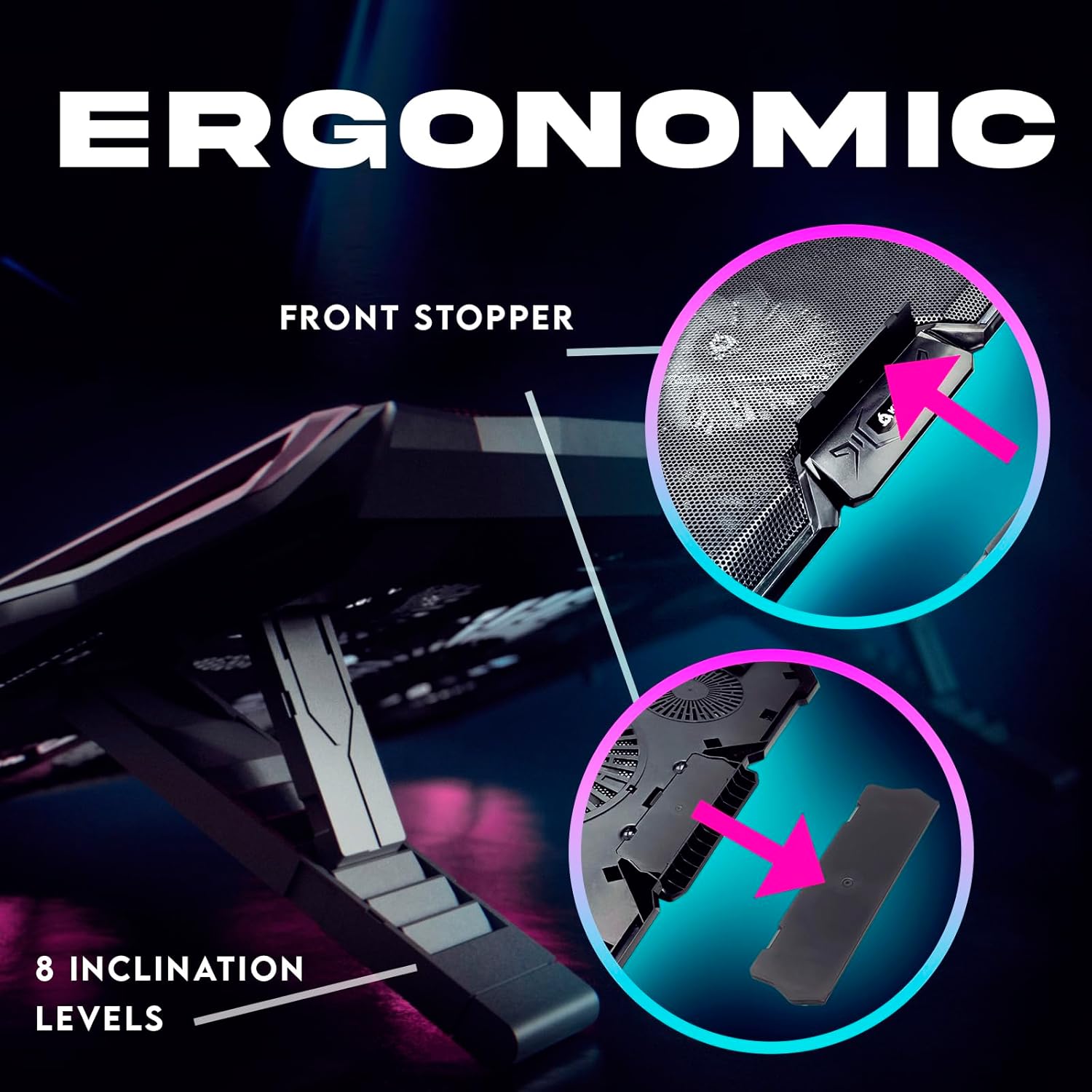
Figure 2.5: The ergonomic design includes eight inclination levels and a detachable front stopper for stability.

Figure 2.6: The cooling pad is compatible with laptops ranging from 11 to 19 inches, as well as PS4, PS5, and Xbox One consoles.

Figure 2.7: Highlighting the durable construction with a braided cable and metallic grid, backed by a 5-year warranty.
3. Guida all'installazione
- Disimballare: Carefully remove the KLIM Cyclone cooling pad from its packaging.
- Posizione: Place the cooling pad on a flat, stable surface where you intend to use your laptop or console.
- Regola l'inclinazione: Flip the cooling pad over and extend the support legs. Adjust the legs to your desired height using one of the eight available inclination levels. Ensure both legs are set to the same level for stability.
- Attach Front Stoppers: If using the cooling pad at an incline, attach the detachable frontal stoppers to the designated slots at the front edge of the cooling pad. These will prevent your laptop from sliding.
- Connetti alimentazione: Connect the provided USB cable from the cooling pad's USB input port to an available USB port on your laptop, gaming console, or a USB wall adapter (not included). The fans will begin to operate once power is supplied.
- Posiziona dispositivo: Carefully place your laptop or gaming console on top of the cooling pad, ensuring it is centered over the fans for optimal cooling.
4. Istruzioni per l'uso
- Accensione/spegnimento: The cooling pad powers on automatically when connected to a powered USB port. To turn it off, simply disconnect the USB cable.
- Regola la velocità della ventola: Use the speed control dial located on the side of the cooling pad to adjust the fan speed. Turn the dial to increase or decrease the fan rotation speed according to your cooling needs.
- Porte USB: The two integrated USB ports can be used to connect other USB devices such as a mouse, keyboard, or external hard drive. These ports function as a USB hub.
- Gestione dei cavi: Utilize the built-in cable holder to neatly route and store the USB power cable when not in use or for a tidier setup.
5. Manutenzione
Regular maintenance ensures optimal performance and longevity of your KLIM Cyclone cooling pad.
- Pulizia: Periodically clean the mesh surface and fan blades to prevent dust buildup, which can impede airflow and reduce cooling efficiency. Use a soft, dry cloth or a can of compressed air to remove dust.
- Evitare i liquidi: Non utilizzare detergenti liquidi né immergere il tappetino refrigerante in acqua.
- Magazzinaggio: When not in use for extended periods, store the cooling pad in a cool, dry place away from direct sunlight and extreme temperatures.
6. Risoluzione Dei Problemi
| Problema | Possibile causa | Soluzione |
|---|---|---|
| I ventilatori non girano. | No power supply or loose USB connection. | Ensure the USB cable is securely connected to both the cooling pad and a powered USB port. Try a different USB port or power source. |
| Le prestazioni di raffreddamento sono scarse. | Dust buildup on fans/mesh, obstructed airflow, or low fan speed. | Clean the cooling pad thoroughly. Ensure no objects are blocking the air intake or exhaust. Increase the fan speed using the control dial. |
| Laptop slides off the pad. | Front stoppers not attached or improperly positioned. | Ensure the detachable frontal stoppers are securely attached to the front of the cooling pad, especially when using an inclined position. |
| Rumore insolito proveniente dai ventilatori. | Dust or debris caught in fan blades. | Disconnect power and carefully inspect the fan blades for any obstructions. Clean as necessary. If the issue persists, contact customer support. |
7. Specifiche
| Attributo | Dettaglio |
|---|---|
| Numero di modello | K80 |
| Dimensioni del prodotto | 16.3 x 11.54 x 1.3 pollici (41.4 x 29.3 x 3.3 cm) |
| Peso dell'articolo | 1.61 libbre (0.73 kg) |
| Materiale | Acrilonitrile Butadiene Stirene (ABS) |
| Configurazione della ventola | 1 large fan (1200 RPM), 4 small fans (2200 RPM) |
| Livello di rumore | Massimo 27 dB |
| Porte USB | 2 (for power and peripherals) |
| Livelli di inclinazione | 8 |
| Compatibilità | Laptops up to 17 inches, PS4, PS5, Xbox One |
8. Video ufficiale del prodotto
Video 8.1: Video ufficiale del prodotto mostratoasing the KLIM Cyclone Laptop Cooler's features and benefits, including its 5 fans and cooling capabilities.
9. Garanzia e supporto
The KLIM Cyclone Laptop Cooling Pad comes with a comprehensive Garanzia di 5 anno, demonstrating our commitment to quality and durability. This warranty covers manufacturing defects and ensures long-term reliability of your product.
For any questions, technical assistance, or warranty claims, please contact KLIM customer support. Our specialists are available to assist you 24/7.
Please visit the official KLIM website for the most up-to-date support information and contact methods: klimtechs.com
Ask a question about this manual
Ask about setup, troubleshooting, compatibility, parts, safety, or missing instructions. Manuals+ will review the question and use this page’s manual context to help answer it.