
Introduzione
This manual provides instructions for the safe and effective use of your URAQT Star Projector Night Light. Please read this manual thoroughly before operation and retain it for future reference.
Contenuto della confezione
- 1 x luce notturna per proiettore stellare
- 1 cavo di ricarica USB
- 1 x telecomando
- 6 x Projection Films (Themes: Confession of Lovers, Ocean, Birthday, Starry Sky, Christmas, Constellation)
- 1 x Manuale di istruzioni

Image: Contents of the URAQT Star Projector Night Light package, showing the main unit, remote control, USB cable, and a set of projection films.
Prodotto finitoview
The URAQT Star Projector Night Light features multiple projection themes, built-in music, adjustable brightness, and a 360° rotation function. It can be used as a projector or a standard night light.

Image: The URAQT Star Projector Night Light displaying multiple projection themes in a bedroom setting, alongside its remote control.
Controlli dell'unità principale
Refer to the image below for the location of controls on the projector unit.
Image: Close-up of the projector's base, showing the ON/OFF button, music ON/OFF switch, rotation ON/OFF switch, and USB charging port. Also shows the remote control layout and projection films.
- Pulsante di accensione: Accende o spegne il proiettore.
- Music ON/OFF Switch: Activates or deactivates the built-in music.
- Rotation ON/OFF Switch: Controls the 360° rotation of the projection.
- Porta di ricarica: Porta USB per caricare il dispositivo.
Funzioni del telecomando
Il telecomando consente un comodo utilizzo a distanza.
- Lighting Up / Dimming: Adjusts projection brightness.
- SPENTO ACCESO: Accendere/spegnere la luce.
- W / Y / B / ALL: Selects white, yellow, blue, or all three colors for projection.
- Interruttore modalità luce: Alterna diversi effetti di luce.
- Music ON/OFF: Attiva/disattiva la riproduzione musicale.
- Rotary ON/OFF: Starts or stops the 360° rotation.
- Timing Switch (15 / 30 minutes): Imposta un timer di spegnimento automatico.
- Volume Adjustment (+ / -): Increases or decreases music volume.
- Switch Music (1-8): Selects specific built-in music tracks.
Impostare
Caricamento del dispositivo
Before first use, fully charge the projector. Connect the provided USB cable to the charge port on the projector and to a standard USB power adapter (not included). The charging time is approximately 2 hours. A full charge provides several hours of operation.
Installing Projection Films
The projector comes with multiple projection films. Follow these steps to install them:
- Open the dome by gently twisting and lifting it off the base.
- Select a projection film. Loop the side film into the cylindrical inner part of the projector.
- Place the circular film on the inner top of the projector.
- Close the dome by aligning it and twisting it back into place.

Image: Six panels illustrating the process of opening the projector dome, inserting the side film, placing the top circular film, and closing the dome to prepare for projection.
Utilizzo come luce notturna
To use the device as a standard night light without projection, ensure the dome is closed and the black film (if any) is removed, allowing the white shade to diffuse light.

Image: Four panels demonstrating how to remove the outer white dome to enable projection, and how to place it back on for night light mode.
Istruzioni per l'uso
Accensione/spegnimento
Press the Power Button on the unit or the ON/OFF button on the remote control to turn the projector on or off.
Adjusting Light Modes and Colors
Use the W, Y, B, or ALL buttons on the remote control to select white, yellow, blue, or a combination of these colors. The Light Mode Switch button cycles through different light effects.

Image: Displays the projector emitting white, yellow, blue, and a mixed three-color light. Below, a series of images shows the projector at 7 different brightness levels.
Regolazione della luminosità
Use the "Lighting Up" and "Dimming" buttons on the remote control to adjust the brightness of the projection.
Funzione di rotazione
Press the Rotation ON/OFF switch on the unit or the "Rotary ON/OFF" button on the remote control to start or stop the 360° rotation of the projection.
Riproduzione musicale
Use the Music ON/OFF switch on the unit or the "Music ON/OFF" button on the remote control to play or pause the built-in music. Use the number buttons (1-8) on the remote to select a specific track, and the volume buttons (+/-) to adjust the sound level.
The projector includes 8 built-in sleep aid music tracks: Music Box Dance, Hark! The GHeard Angle Sing, Joy The World, Bibbidi Bobbidi Boo, Memory, Oh Christmas Tree, Let It Go, Sky City.
Funzione timer
Press the "Timing Switch" button on the remote control to set an automatic shut-off timer for 15 or 30 minutes. If you wish for the light to remain on all night, ensure no timer is set and the device is connected to a power source via the USB cable.
Temi di proiezione
The projector includes 6 interchangeable projection films, each offering a unique theme:
- Confession of Lovers
- Oceano
- Compleanno
- Cielo stellato
- Natale
- Costellazione
To change themes, follow the film installation steps described in the "Setup" section.
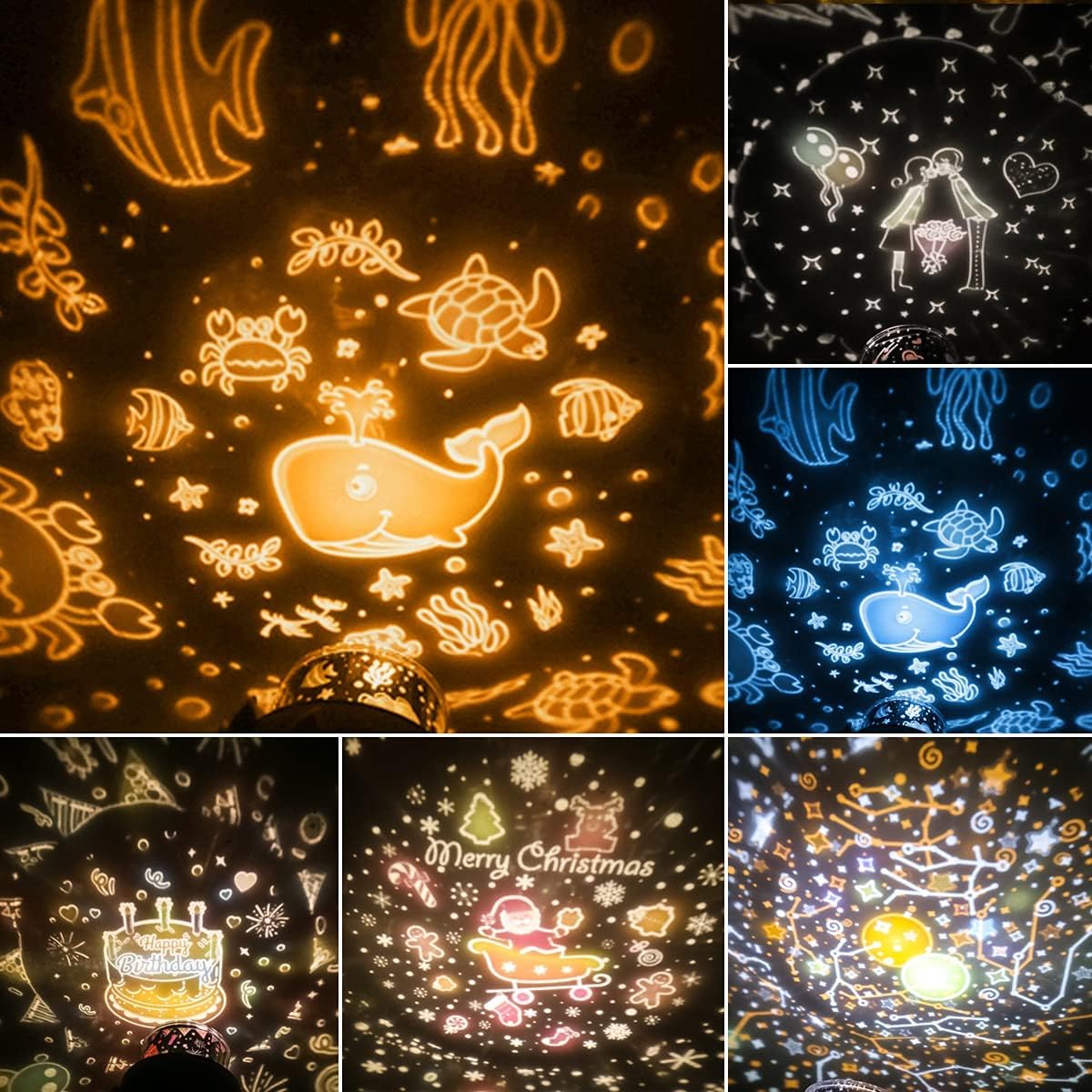
Image: A visual representation of several available projection themes, such as ocean life, birthday celebrations, Christmas scenes, and a starry night sky.
Manutenzione
- Pulizia: Wipe the projector with a soft, dry cloth. Do not use abrasive cleaners or solvents.
- Magazzinaggio: Conservare il dispositivo in un luogo fresco e asciutto, lontano dalla luce solare diretta quando non viene utilizzato.
- Cura della batteria: To prolong battery life, avoid fully discharging the battery frequently. Charge the device regularly if stored for extended periods.
Risoluzione dei problemi
- Projector not turning on: Ensure the device is charged. Connect it to a USB power source and try again.
- No projection: Check if the dome is properly removed and the projection films are correctly installed. Ensure the room is dark enough for the projection to be visible.
- La proiezione è sfocata: Ensure the projection films are clean and properly seated. Adjust the distance to the projection surface for optimal clarity.
- Telecomando non funzionante: Check the battery in the remote control. Ensure there are no obstructions between the remote and the projector.
- La musica non viene riprodotta: Ensure the music function is turned on via the unit's switch or the remote control.
Specifiche
| Caratteristica | Specificazione |
|---|---|
| Numero di modello | U4-LQDD0715-FBA |
| Produttore | URAQT |
| Dimensioni del prodotto | Dimensioni: 15.7 x 11.7 x 11.7 cm |
| Peso dell'articolo | 378 grammi |
| Batteria | 1200mAh agli ioni di litio (ricaricabile) |
| Energia | 1 L |
| Materiali esterni | ABS, Acrylonitrile Butadiene Styrene (Shade) |
| Lamp Tipo | Diodo ad emissione luminosa (LED) |
| Tipo di interruttore | Remote Control, Manual Buttons |
Informazioni sulla sicurezza
- Non smontare o modificare il dispositivo.
- Tenere fuori dalla portata dei bambini piccoli per evitare rischi di soffocamento dovuti a piccole parti.
- Evitare l'esposizione diretta degli occhi alla sorgente luminosa.
- Non esporre il dispositivo all'acqua o a temperature estreme.
- Utilizzare solo il cavo USB in dotazione per la ricarica.
Garanzia e supporto
For warranty information or technical support, please refer to the contact details provided with your purchase or visit the official URAQT website. Please have your model number (U4-LQDD0715-FBA) available when contacting support.