
1. Introduzione
This manual provides detailed instructions for the installation, operation, and maintenance of your ATOTO S8 Gen 2 Ultra Plus Android Car Stereo (Model: S8G2109UP-A). Please read this manual thoroughly before using the product to ensure proper functionality and safety.
The ATOTO S8 Gen 2 is the second generation of ATOTO S8 Android car stereos, featuring a 12nm manufacturing process, an ARM Cortex Octa-Core processor for high efficiency and performance, and the ATOTO AICE 11.0 user interface based on Android Q. This unit offers a comprehensive multimedia and navigation experience for your vehicle.
2. Prodotto finitoview
The ATOTO S8 Gen 2 Ultra Plus (S8G2109UP-A) is an advanced Android car stereo designed to integrate seamlessly into your vehicle's dashboard. It features a 10.1-inch QLED display with a resolution of 1280x720 and a 178° viewing angle, providing clear and vibrant visuals. The floating display design allows for adjustable height and viewangoli di inclinazione.

Immagine: Frontale view of the ATOTO S8 Gen 2 Ultra Plus car stereo unit.

Image: The ATOTO S8 Gen 2 Ultra Plus car stereo installed in a vehicle dashboard, showcasing il suo ampio display.
Caratteristiche principali:
- Schermo QLED: 10.1-inch 1280x720 resolution screen with 178° wide viewangolo di ing.
- Processore Octa-Core: 12nm ARM Cortex Octa-Core for efficient performance.
- Doppio Bluetooth: BT1 with aptX HD codec for high-quality audio, BT2 for internet tethering and device connections.
- Accesso ad Internet: Supports Wi-Fi, Bluetooth tethering, USB tethering, and an integrated 4G cellular modem (SIM card not included).
- Integrazione telefonica: Wired and wireless Apple CarPlay and Android Auto support.
- Assistente AI DriveChat: Advanced voice control for safer driving.
- Controllo gestuale: Hand gesture sensor for basic operations like skipping tracks and adjusting volume.
- Supporto per fotocamera: Compatible with ATOTO AC-HD03LR camera for Virtual Surround-View (VSV) e Live Rear-View (LRV).
- Miglioramenti audio: Digital Signal Processor (DSP) and Speed Compensated Volume Control (SCVC).
3. Configurazione e installazione
3.1 Contenuto della confezione
Prima dell'installazione, verificare che tutti i componenti siano presenti:
- ATOTO S8 Gen 2 Ultra Plus Car Stereo Unit
- Antenna GPS
- Microfono esterno
- Convertitore di uscita di linea
- Cavo di alimentazione
- Antenna 4G LTE
- Staffe di montaggio e viti
- Cavi USB
- Manuale dell'utente (questo documento)

Immagine: Oltreview of the components included in the ATOTO S8 Gen 2 Ultra Plus package.
3.2 Considerazioni sull'installazione
The S8 Gen 2 Ultra Plus features a 10.1-inch floating display. The double DIN base has dimensions of 178x100 mm, and the screen itself measures 252x155 mm. The floating design allows for adjustment of height and viewing angles (up/down).
Nota importante:
- In some vehicles, the edge of the large screen may obstruct air vents, emergency switch buttons, or other controls. Ensure your vehicle's dashboard layout accommodates the screen without inconvenience, or be prepared to accept such minor obstructions.
- When installing the display module, ensure all screw holes are properly secured and screws are tightened. Failure to do so may lead to display issues such as lines, frozen screens, or blurry images.

Image: Diagram illustrating the dimensions and adjustable nature of the ATOTO S8 floating display for vehicle fitment.
3.3 Schema elettrico
Per un corretto collegamento elettrico, fare riferimento allo schema seguente. Un cablaggio errato può danneggiare l'unità o l'impianto elettrico del veicolo.
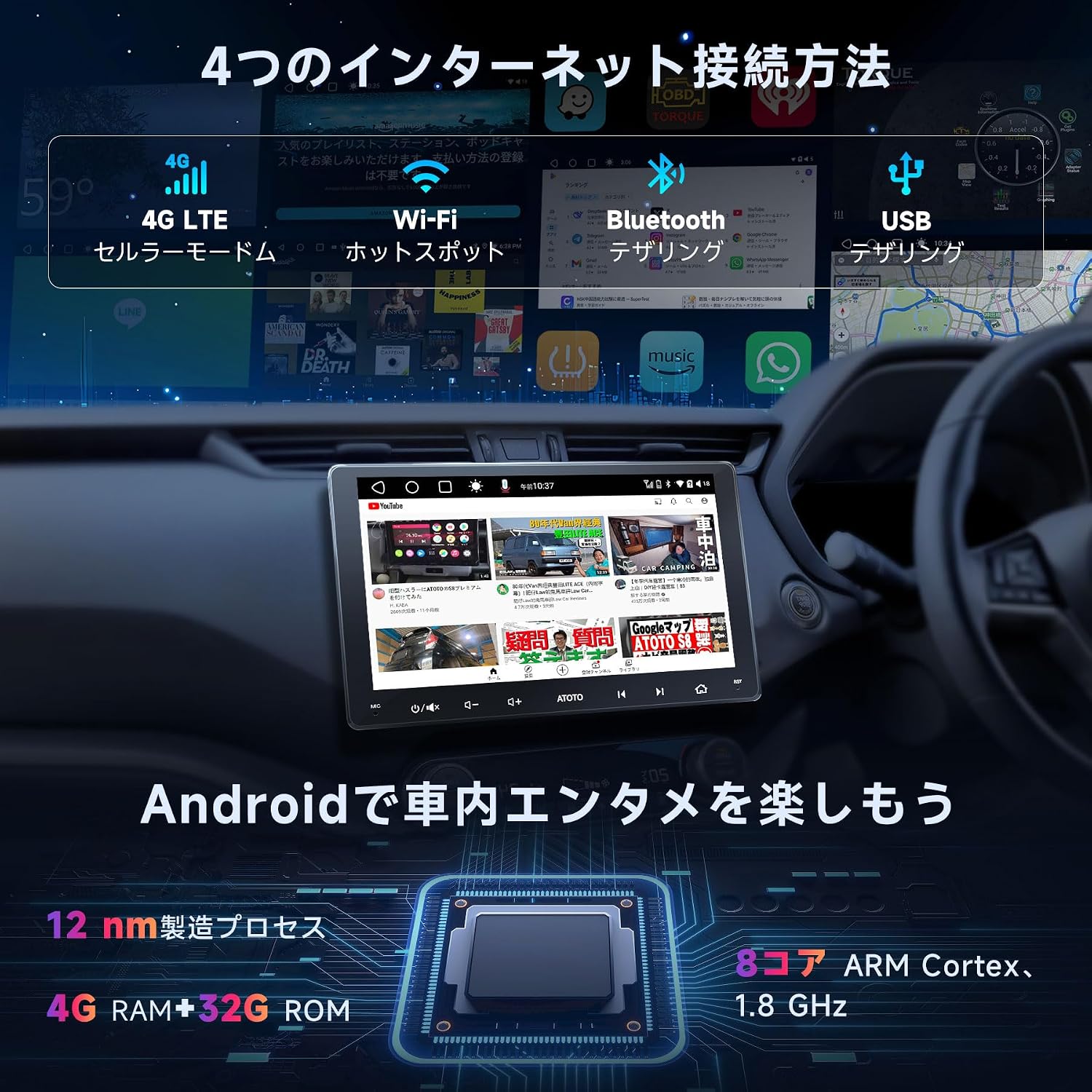
Image: Detailed wiring diagram for the ATOTO S8 Gen 2 Ultra Plus car stereo, showing connections for power, speakers, antennas, and external devices.
Collegamenti chiave:
- Energia: Collegare il cablaggio di alimentazione principale all'alimentazione del veicolo (12 V costanti, 12 V accessori e terra).
- Relatori: Connect speaker wires to the corresponding vehicle speakers. The unit supports 5.1 surround sound.
- antenne: Connect the GPS antenna, Wi-Fi antenna, and 4G LTE antenna to their respective ports.
- Microfono esterno: Collega il microfono esterno per migliorare la qualità delle chiamate e dei comandi vocali.
- Porte USB: Multiple USB ports are available for data transfer, charging, and connecting external devices.
- Posterioreview Ingresso telecamera: Dedicated input for rearview cameras (e.g., ATOTO AC-HD03LR).
- Controllo del volante: Connect to your vehicle's steering wheel control interface (if applicable) via the 3.5mm jack.
3.4 Connettività versatile
The ATOTO S8 Ultra Plus offers various inputs and outputs for enhanced functionality:
- Telecamera DVR USB: Connect a specific 1080P USB On-dash DVR camera for video preview e riproduzione.
- USB TPMS System: Connect a specific ATOTO USB TPMS system. Low tire pressure warnings will appear on the S8 screen with an audible alert.
- Posterioreview Telecamera: Collegare una parte posterioreview camera with CVBS and HD video signal output for safe parking.
- Mirroring dello smartphone: Connect your Android/iOS smartphone via USB/Wi-Fi using EasyConnection to mirror your phone's screen.
- CarPlay/Android Auto: Connect your iOS phone via USB or Bluetooth for wired/wireless CarPlay. Android Auto works with wired USB connection. This integrates your smartphone with the S8 display for calls, music, messages, and navigation.
- OBD II Diagnostic Scanner: Connect an OBD II engine code reader/diagnostic scanner via Bluetooth. Dual Bluetooth ensures stable communication with multiple Bluetooth connections.
- Ricarica rapida: Connect your phone to the dedicated Fast Charge USB interface for quick battery charging.
- Monitor poggiatesta: Connect to headrest monitors using ATOTO USB video output adapters (AC-AHV68: USB to HDMI; AC-AHV48: USB to RCA; both sold separately) to synchronize S8 display content.
4. Istruzioni per l'uso
4.1 Operazioni di base
The unit features a touch-sensitive QLED display for intuitive control. Power-on is quick, typically within 2 seconds after ignition.

Image: The ATOTO S8 Android interface showing various applications and connectivity icons like Wi-Fi and Bluetooth.
4.2 Accesso a Internet
The S8 Ultra Plus offers four methods for internet connectivity:
- Connessione Wi-Fi: Connettiti alle reti Wi-Fi disponibili.
- Tethering Bluetooth: Use your phone's Bluetooth to share its internet connection.
- Tethering USB: Collega il tuo telefono tramite USB per condividere la sua connessione Internet.
- Modem cellulare 4G integrato: Insert a 4G SIM card (not included) directly into the unit for independent internet access.

Image: Visual representation of the four internet connection methods: 4G LTE, Wi-Fi, Bluetooth Tethering, and USB Tethering.
Once connected, you can install numerous Android applications from the Google Play Store.

Image: The Google Play Store interface displayed on the ATOTO S8 unit, showing available applications.
4.3 Connettività Bluetooth
The S8 features dual Bluetooth modules:
- BT1: Supports the QCM aptX HD codec for 24-bit high-quality music streaming (requires a phone compatible with aptX HD).
- BT2: Primarily for internet tethering and connecting other Bluetooth devices.
This dual setup allows simultaneous connections to your phone and other Bluetooth accessories.

Image: The ATOTO S8 display showing music playback via Bluetooth, with controls and track information.
4.4 Apple CarPlay e Android Auto
The S8 supports both wired and wireless Apple CarPlay and Android Auto, integrating your smartphone's features directly onto the car stereo display. This allows for navigation, calls, messages, and music control.

Image: Screenshots of Apple CarPlay and Android Auto interfaces on the ATOTO S8, demonstrating navigation, communication, and media functions.
Nota:
While older package instructions might not mention it, the received car stereo unit is compatible with wireless Android Auto.
4.5 Assistente alla guida DriveChat AI
Enhance your driving safety and convenience with the DriveChat app, your AI driving assistant. It offers advanced voice control to manage the car stereo, answer calls, control music, and more, allowing you to keep your hands on the wheel.
- Interact with multiple "Drivebots" for expert advice and specific needs.
- Customize activation words for a personalized experience.

Image: The DriveChat application interface, demonstrating AI voice control and intelligent conversations for driving assistance.
Nota:
DriveChat is continuously under development with periodic updates. Ensure you update the app or system for the latest version.
4.6 Controllo dei gesti
The S8 features a hand gesture sensor for convenient control of basic functions without touching the screen. This includes skipping tracks, adjusting system volume, and other operations.

Image: Diagram illustrating the hand gesture control functionality of the ATOTO S8, showing the operating plane and detection range.
4.7 Camera Features (VSV & LRV)
When used with the ATOTO AC-HD03LR camera (sold separately), the S8 Ultra Plus can display HD Virtual Surround-View (VSV) e Live Rear-View (LRV).
- Surround virtuale-View (VSV): An integrated panoramic image stitching algorithm processes images from the AC-HD03LR to reconstruct a virtual, nearly real-sized surround view.
- Posteriore in diretta-View (LRV): Allows users to see the rearview while the vehicle is moving forward, eliminating obstructions from headrests and rear pillars, thereby increasing the visual field.

Image: Display showing Virtual Surround View (top) and Live Rear View (bottom) from compatible ATOTO cameras on the S8 screen.
4.8 Caratteristiche audio
- Processore di segnale digitale (DSP): Provides advanced audio processing for a balanced and high-quality sound experience, regardless of speaker placement.
- Controllo del volume compensato dalla velocità (SCVC): Automatically adjusts the system volume as vehicle speed changes, compensating for road and wind noise.
- Equalizzatore avanzato: Offers separate 16-band EQ adjustments for front and rear audio channels.

Image: Visuals demonstrating the Digital Signal Processor (DSP) for time alignment, Speed Compensated Volume Control (SCVC), and the advanced equalizer interface on the ATOTO S8.
5. Manutenzione
To ensure the longevity and optimal performance of your ATOTO S8 Gen 2 Ultra Plus, follow these maintenance guidelines:
- Pulizia dello schermo: Utilizzare un panno morbido e privo di lanugine per pulire delicatamente lo schermo QLED. Per le macchie ostinate, strofinare leggermenteampPulisci il panno con acqua o un detergente per schermi. Evita prodotti chimici aggressivi o materiali abrasivi.
- Aggiornamenti software: Regularly check for and install software updates via OTA (Over-The-Air) through the FindApps application. Updates often include performance improvements, bug fixes, and new features.
- Ripristino del sistema: If the unit experiences persistent issues, a factory reset may resolve them. Refer to the troubleshooting section or contact support before performing a reset, as it will erase all user data and settings.
- Condizioni ambientali: Evitare di esporre l'unità a temperature estreme, alla luce solare diretta per periodi prolungati o a umidità eccessiva.
- Connessioni via cavo: Controllare periodicamente tutti i collegamenti dei cavi per assicurarsi che siano saldi e privi di danni.

Image: Illustration of the software update process, emphasizing the importance of regular updates for optimal performance.
6. Risoluzione Dei Problemi
This section addresses common issues you might encounter with your ATOTO S8 Gen 2 Ultra Plus. For more complex problems, please contact ATOTO customer support.
| Problema | Possibile causa | Soluzione |
|---|---|---|
| L'unità non si accende. | Cablaggio di alimentazione errato, fusibile bruciato, problema alla batteria del veicolo. | Check power cable connections (constant 12V, accessory 12V, ground). Inspect vehicle fuses. Ensure vehicle battery is charged. |
| Nessun suono o audio distorto. | Cablaggio degli altoparlanti errato, volume troppo basso, impostazioni audio configurate in modo errato. | Verify speaker connections. Adjust volume. Check EQ and DSP settings. Ensure correct audio source is selected. |
| Problemi di connessione Bluetooth. | Dispositivo non in modalità di associazione, processo di associazione errato, interferenza. | Assicurarsi che entrambi i dispositivi siano in modalità di associazione. Eliminare le associazioni precedenti e ripetere l'associazione. Avvicinarsi all'unità. Riavviare entrambi i dispositivi. |
| Perdita o imprecisione del segnale GPS. | Antenna GPS non installata correttamente o ostruita, mappe obsolete. | Assicurarsi che l'antenna GPS sia collegata saldamente e abbia una visuale libera view del cielo. Aggiorna il software/le mappe di navigazione. |
| Screen issues (lines, frozen, blurry). | Loose display module screws, software glitch. | Check and tighten the screws on the display module. Perform a soft reset (power cycle). If persistent, contact support. |
| CarPlay/Android Auto non si connette. | Cavo USB errato, impostazioni del telefono, incompatibilità del software. | Use a high-quality USB cable. Ensure CarPlay/Android Auto is enabled on your phone. Update phone OS and unit firmware. |
7. Specifiche
| Caratteristica | Dettaglio |
|---|---|
| Numero di modello | S8G2109UP-A |
| Marca | ATOTO |
| Dimensioni del prodotto | Dimensioni: 12.6 x 17.8 x 10 cm; 2.1 kg |
| Tipo di visualizzazione | 10.1-inch QLED, 1280x720 resolution, 178° viewangolo di ing |
| Processore | ARM Cortex Octa-Core (12nm manufacturing process) |
| Sistema operativo | Android Q (ATOTO AICE 11.0 UI) |
| Tecnologia di connettività | Bluetooth (Dual, aptX HD), USB, Wi-Fi, Integrated 4G LTE Modem |
| Dispositivi compatibili | Smartphone |
| Caratteristiche speciali | Quick start (2s), Privacy protection, Digital Signal Processor (DSP), HD rearview input with Virtual Surround View (VSV), QLED screen, Hand gesture recognition, CarPlay, Android Auto, Integrated 4G LTE cellular modem. |
| Modalità di uscita audio | Stereo, Surround (5.1 channels) |
| Potenza di uscita | 180 Watt |
| Codifica video | H.264, H.265/HEVC |
| Metodo di controllo | Tocco |
| UPC / GTIN | 799257526356 |
8. Garanzia e supporto
8.1 Garanzia del prodotto
The ATOTO S8 Gen 2 Ultra Plus comes with an 18-month product care period:
- 12 mesi for manufacturing defects.
- Un ulteriore 6 mesi of product care can be obtained by contacting ATOTO. This provides top-priority support, as ATOTO can access initial order details and the product's Serial Number (SN code).
Please retain your purchase receipt and product SN code for warranty claims.
8.2 Assistenza clienti
For technical assistance, troubleshooting, or warranty inquiries, please contact ATOTO customer support through the following channels:
- Visita il sito ufficiale ATOTO websito per risorse di supporto e informazioni di contatto.
- Refer to the "Cercare help" section within the FindApps application on your device.
- Supporto e-mail all'indirizzo support@atotoglobal.com.

Image: Steps to access ATOTO customer support, including purchasing information and direct inquiry options.
Image: Contact information for ATOTO support, including product care duration and update methods.