
1. Introduzione
Thank you for choosing the Vantrue T3 Dash Cam. This manual provides essential information for setting up, operating, and maintaining your device. The Vantrue T3 is designed to capture high-quality video footage of your journeys and parking incidents, offering features such as 1520P resolution, radar motion detection parking mode, and enhanced night vision. Please read this manual thoroughly before use to ensure proper operation and to maximize the benefits of your dash cam.
2. Prodotto finitoview
2.1 Contenuto della confezione
- Vantrue T3 Dash Cam
- OBD Hardwired Cable
- Cavo dati USB-C
- Caricabatterie per auto
- Supporto a ventosa
- Manuale d'uso
2.2 Disposizione del dispositivo
Familiarize yourself with the buttons and ports on your Vantrue T3 Dash Cam:

Immagine: Vantrue T3 Dash Cam with labeled components. Key features include the 2.45" IPS Screen, Button Panel, Emergency Button, Mic, Type-C USB port, Micro SD Card slot (supports up to 256GB), Reset Button, Radar Microwave Detection Indicator, Sony Starvis CMOS Sensor, 6-Glass Lens, and F1.4 Large Aperture.
- Button Panel: Per la navigazione e la selezione del menu.
- Bottone di emergenza: Manually locks current recording.
- Schermo IPS da 2.45": Visualizza in diretta view, menu e riproduzione.
- Mic: Registra l'audio all'interno del veicolo.
- USB di tipo C: Ingresso di potenza e trasferimento dati.
- Slot per scheda microSD: Insert your memory card here (up to 256GB).
- Pulsante di reset: Ripristina il dispositivo alle impostazioni di fabbrica.
- Radar Microwave Detection Indicator: Lights up when radar motion is detected.
- Lente: High-resolution 6-glass lens with F1.4 aperture and 160° wide angle.
3. Impostazione
3.1 Inserimento della scheda Micro SD
- Assicurarsi che la dash cam sia spenta.
- Insert a Class 10 or higher Micro SD card (up to 256GB recommended) into the Micro SD card slot until it clicks into place.
- Per rimuoverla, spingere delicatamente la scheda finché non scatta, quindi rilasciarla.
Nota: Always format the Micro SD card within the dash cam before first use and periodically thereafter to ensure stable recording performance.
3.2 Montaggio della Dash Cam
- Pulisci la zona del parabrezza dove intendi montare la dash cam.
- Fissare il supporto a ventosa alla dash cam.
- Premere saldamente la ventosa contro il parabrezza e ruotare la leva per fissarla.
- Adjust the lens angle to ensure it captures the road ahead clearly, avoiding obstruction from the rearview specchietto o tergicristalli.
3.3 Power Connection (OBD Hardwired Cable)
The Vantrue T3 includes an OBD hardwired cable for continuous power, enabling 24/7 parking monitoring and protecting your car battery from depletion.
- Individua la porta OBD-II del tuo veicolo (solitamente sotto il cruscotto, lato conducente).
- Plug the OBD connector into the vehicle's OBD-II port.
- Connect the USB-C end of the OBD cable to the dash cam's Type-C USB port.
- Route the cable neatly along the windshield and dashboard edges to avoid obstructing your view o interferire con i comandi di guida.
The dash cam will automatically power on and begin recording when the vehicle's ignition is turned on, and switch to parking mode when the ignition is off.
3.4 Configurazione iniziale
Upon first power-on, you may need to set the date, time, and language. Navigate the menu using the button panel.
Optional GPS Functionality: For GPS tracking of location and speed, an external GPS mount (sold separately, ASIN: B083XBS88L) is required. Attach the GPS mount to the dash cam and connect it to power instead of the standard mount.
4. Istruzioni per l'uso
4.1 Registrazione di base
Once powered on, the Vantrue T3 automatically starts continuous loop recording. The 1520P resolution and 160° wide-angle lens capture a broad view della strada.

Immagine: Comparison of 1520P and 1080P recording quality, highlighting the 160° wide angle and other features like Sony Starvis Sensor and F1.4 Aperture.
4.2 Visione notturna e HDR
The dash cam features a Sony Starvis Sensor, 6-glass lens, and F1.4 large aperture, combined with High Dynamic Range (HDR) technology, to deliver clear and detailed video even in low-light conditions or at night.

Immagine: Illustrates the Super Night Vision capability of the Vantrue T3, equipped with Sony Starvis Sensor, HDR technology, and F1.4 Large Aperture for clear low-light recording.
4.3 24/7 Radar Detection Parking Monitor
When the vehicle is parked and the ignition is off, the dash cam enters parking mode. The integrated microwave radar sensitively detects any movement in front of the car or vibrations, triggering recording to capture potential incidents.
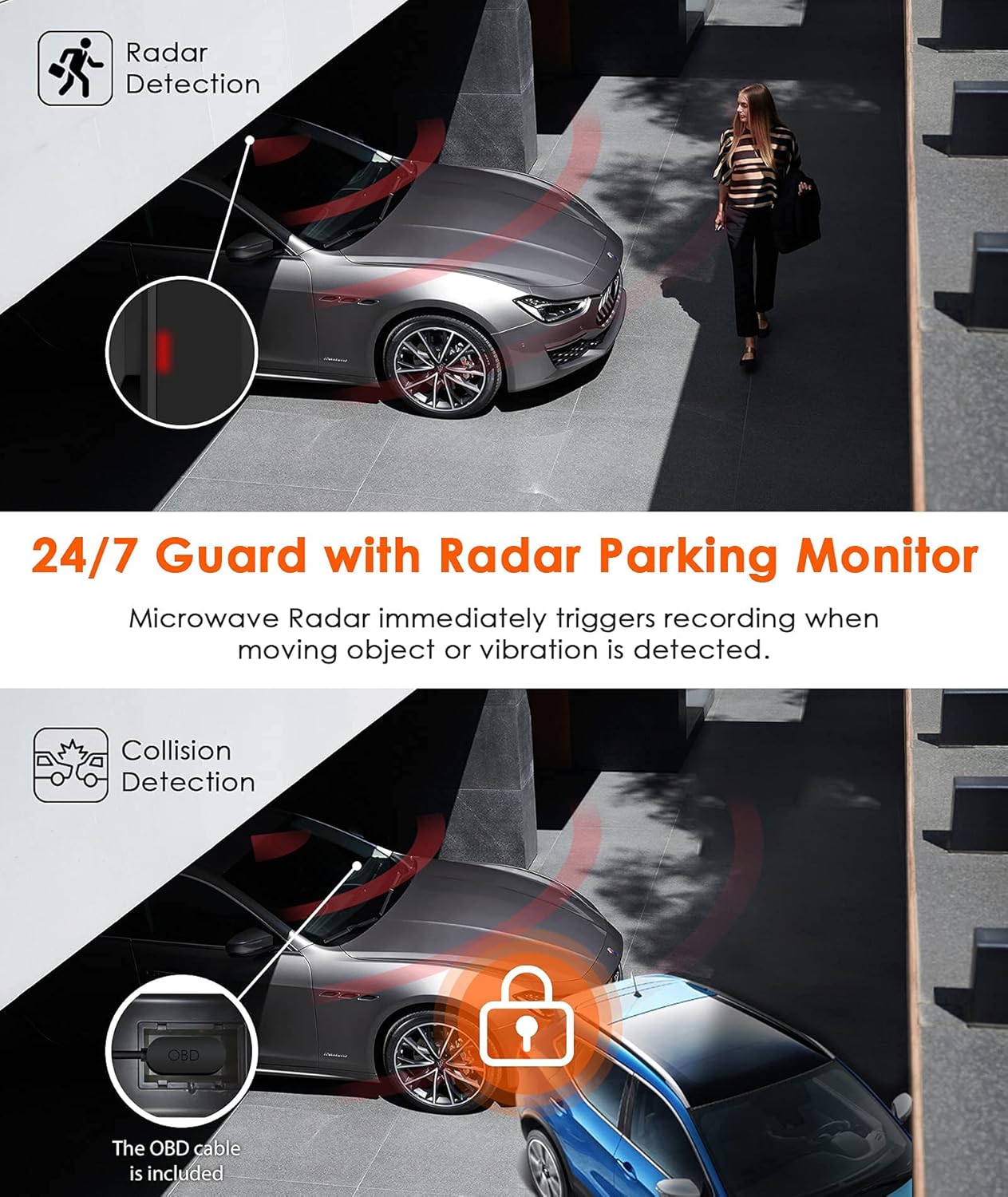
Immagine: Depicts the 24/7 Guard with Radar Parking Monitor, showing how microwave radar triggers recording upon movement. Also illustrates Collision Detection, where the OBD cable ensures continuous power.
4.4 G-Sensor (rilevamento collisioni)
The built-in G-sensor automatically detects sudden shakes or collisions. When activated, it locks and saves the current footage to a protected folder, preventing it from being overwritten by loop recording. This ensures critical incident evidence is preserved.

Immagine: Shows the G-Sensor feature, acting as a reliable witness by automatically recording incidents and locking video footage for insurance claims, captured in 2592x1520 at 30FPS.
4.5 Registrazione in loop senza interruzioni
La dash cam registra continuamente video in brevi segmenti (ad esempio, 1, 3 o 5 minuti). Quando la scheda Micro SD è piena, il file sbloccato più vecchiotage is automatically overwritten by new recordings. This ensures uninterrupted recording without manual intervention.

Immagine: Illustrates Seamless Loop Recording, where the dash cam continuously records and overwrites the oldest footage. Also shows the Time Lapse function, which records frames to create a condensed video, saving memory card space.
4.6 Registrazione temporizzata
The Time Lapse function allows the dash cam to capture still images at set intervals (e.g., one photo per second) and then combine them into a video. This is useful for monitoring long periods, such as a multi-week road trip, while conserving memory card space.
4.7 Super Capacitor Technology
The Vantrue T3 utilizes a super capacitor instead of a traditional battery. This provides superior heat and cold resistance, allowing the dash cam to operate reliably in temperatures ranging from 14°F to 158°F (-10°C to 70°C). This design enhances durability, prevents overheating issues, and extends the device's service life.

Immagine: Demonstrates the high performance of the Super Capacitor, providing heat resistance from 14°F to 158°F, ensuring explosion-proof operation and extended working life for stable recording.
5. Manutenzione
5.1 Gestione della scheda Micro SD
- Formattazione: Regularly format your Micro SD card (at least once a month) through the dash cam's menu to prevent data corruption and ensure optimal performance.
- Capacità supportata: The Vantrue T3 supports Micro SD cards up to 256GB. Using a high-quality, reputable brand Class 10 (or higher) card is crucial for reliable recording.
- Durata della carta: Micro SD cards have a limited number of write cycles. If you experience frequent recording errors, consider replacing the card.
5.2 Aggiornamenti firmware
Vantrue continuously provides firmware updates to improve performance and add new features. Check the official Vantrue website for the latest firmware. Firmware updates are typically performed by downloading the update file to your Micro SD card and inserting it into the dash cam.
6. Risoluzione Dei Problemi
If you encounter issues with your Vantrue T3 Dash Cam, please refer to the following common problems and solutions:
- La dash cam non si accende:
- Assicurarsi che il cavo OBD sia collegato saldamente sia alla dash cam sia alla porta OBD-II del veicolo.
- Check if the vehicle's ignition is on (if not using 24/7 parking mode).
- Try using the standard car charger to rule out an issue with the OBD cable.
- Dash cam stops recording or freezes:
- Format the Micro SD card within the dash cam.
- Ensure you are using a genuine Class 10 (or higher) Micro SD card from a reputable brand. Counterfeit or low-quality cards can cause issues.
- Try a different Micro SD card to see if the issue persists.
- Perform a factory reset via the dash cam's menu.
- Video pippotage è sfocato o poco chiaro:
- Clean the dash cam lens and the section of the windshield in front of the lens.
- Assicurarsi che la pellicola protettiva sia stata rimossa dalla lente.
- Controllare le impostazioni della risoluzione video nel menu.
- Parking monitor is not working:
- Ensure the OBD hardwired cable is correctly installed and providing continuous power.
- Verify that parking mode is enabled in the dash cam's settings.
- Adjust the radar detection sensitivity if necessary.
If these steps do not resolve your issue, please contact Vantrue customer support for further assistance.
7. Specifiche
| Caratteristica | Specificazione |
|---|---|
| Marca | VANTRUE |
| Numero di modello | T3 |
| Risoluzione di acquisizione video | 1520p (2592x1520 @ 30FPS) or 1080P @ 60FPS |
| Campo di View | 160 gradi |
| Dimensioni dello schermo | 2.45 pollici (IPS LCD) |
| Caratteristiche speciali | F1.4 Large Aperture, Parking Monitor (Radar Detection), Super Capacitor, Night Vision (HDR), G-Sensor, Loop Recording, Time Lapse |
| Tecnologia di connettività | USB |
| Tipo di memoria flash | MicroSD (Supports up to 256GB) |
| Fonte di alimentazione | OBD Hardwired Cable (12V/24V compatible) |
| Temperatura di esercizio | Da 14°F a 158°F (da -10°C a 70°C) |
| Peso dell'articolo | 100 grammi |
8. Garanzia e supporto
The Vantrue T3 Dash Cam comes with an Garanzia di 18 mesi dalla data di acquisto. Questa garanzia copre i difetti di fabbricazione e garantisce che il prodotto sia privo di difetti di materiali e lavorazione in normali condizioni di utilizzo.
Vantrue also provides supporto tecnico a vita. If you have any questions, encounter issues, or require assistance with your device, please do not hesitate to contact our support team. We are committed to continuously updating the firmware to improve performance and features, and our team is ready to help you resolve any product-related concerns.
For support, please visit the official Vantrue websito o fare riferimento alle informazioni di contatto fornite sulla confezione del prodotto.