
Introduzione
Thank you for choosing the SENTRY HPXKX50 RGB Gaming Mouse. This high-performance wired gaming mouse is designed to enhance your gaming and computing experience with its precise optical sensor, customizable RGB lighting, and ergonomic design. This manual provides detailed instructions on setting up, operating, maintaining, and troubleshooting your new mouse.
Contenuto della confezione
- SENTRY HPXKX50 RGB Gaming Mouse
- Manuale dell'utente (questo documento)

Image: The retail packaging for the SENTRY HPXKX50 RGB Gaming Mouse, showing the mouse inside the box with its features highlighted.
Impostare
Follow these simple steps to set up your SENTRY HPXKX50 RGB Gaming Mouse:
- Disimballare il mouse: Carefully remove the mouse and its USB cable from the packaging.
- Collegati al tuo dispositivo: Locate an available USB port on your computer (PC, Laptop, Mac) or compatible gaming console (PS4/PS5). Insert the USB connector of the mouse into the USB port.
- Installazione del driver: The SENTRY HPXKX50 is a plug-and-play device. Your operating system (Windows, macOS) will automatically detect and install the necessary drivers. No additional software installation is required for basic functionality.
- Verifica connessione: Once connected, the mouse's RGB lighting will illuminate, indicating a successful connection. You can now move the mouse to test cursor movement.

Immagine: un primo piano view of the USB connector of the SENTRY HPXKX50 RGB Gaming Mouse, which is used for connecting to a computer.

Image: Icons illustrating the compatibility of the SENTRY HPXKX50 RGB Gaming Mouse with various devices, including laptops, desktop computers, HDTVs, PS4/PS5 consoles, and Mac computers.
Operativo
The SENTRY HPXKX50 RGB Gaming Mouse offers intuitive operation with its standard buttons and advanced features.
Funzioni di base
- Clic sinistro: Pulsante di azione principale.
- Clic destro: Pulsante di azione secondario, in genere per i menu contestuali.
- Rotella di scorrimento: Scorre il contenuto verso l'alto o verso il basso. Può anche essere premuto per attivare la funzionalità del clic centrale.
- Pulsante DPI: Located behind the scroll wheel, this button allows you to cycle through different DPI (Dots Per Inch) sensitivity settings.
Illuminazione RGB
The mouse features dynamic RGB lighting that illuminates the edges and scroll wheel. The lighting effects are pre-programmed and will cycle automatically, adding an aesthetic appeal to your setup.
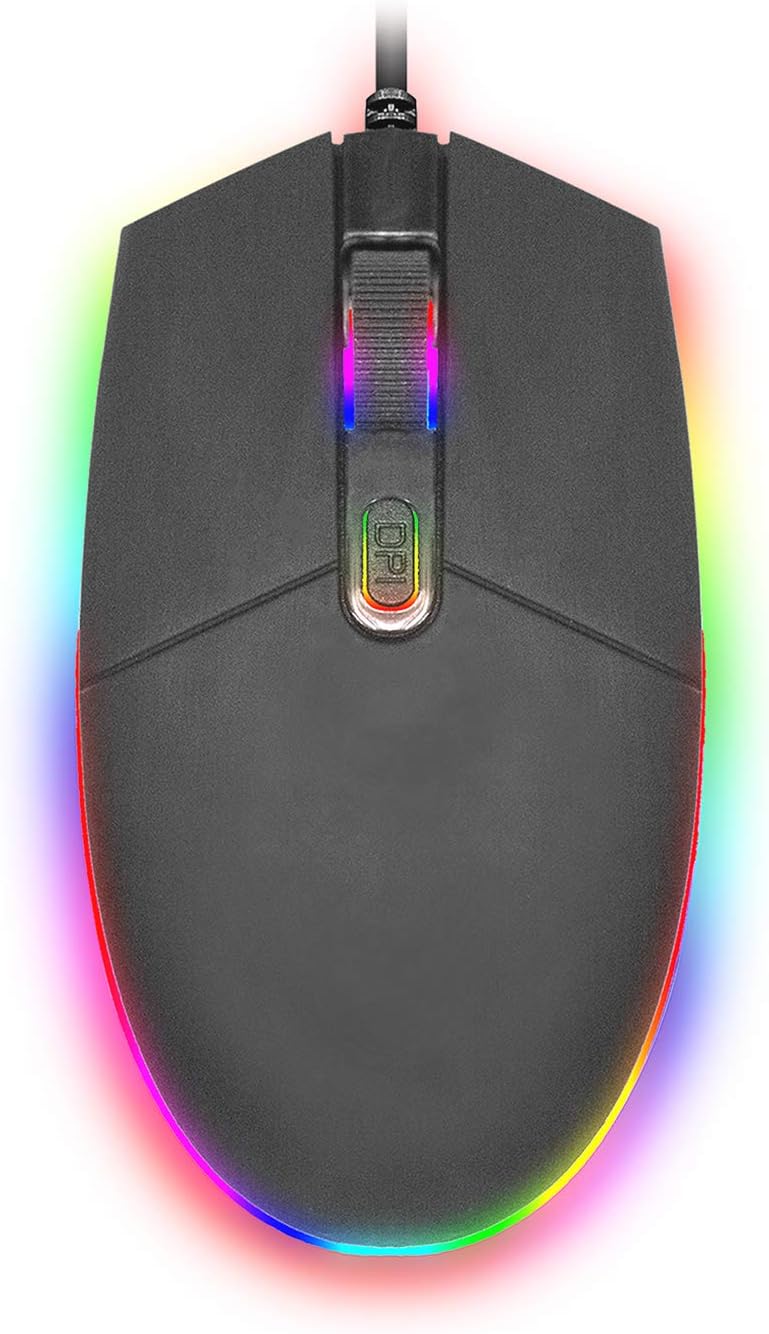
Immagine: dall'alto verso il basso view of the SENTRY HPXKX50 RGB Gaming Mouse, showcasing its vibrant, multi-color RGB lighting along the base and around the scroll wheel.

Immagine: Un lato profile view of the SENTRY HPXKX50 RGB Gaming Mouse, highlighting the illuminated RGB strip along its bottom edge in a dark environment.
Sensibilità DPI
The HPXKX50 mouse is equipped with a high-precision optical sensor, offering up to 7200 DPI. This allows for highly sensitive and accurate cursor movements, ideal for fast-paced gaming or precise graphic design work. Press the DPI button to switch between sensitivity levels. The mouse is designed for smooth tracking and ultra-high sensitivity.

Image: The SENTRY HPXKX50 RGB Gaming Mouse with an overlay indicating its 7200 DPI high-precision optical sensor, emphasizing its accuracy for gaming.
Manutenzione
To ensure the longevity and optimal performance of your SENTRY HPXKX50 RGB Gaming Mouse, follow these maintenance guidelines:
- Pulizia: Utilizzare un panno morbido, asciutto e privo di lanugine per pulire la superficie del mouse. Per lo sporco ostinato, leggermente dampLavare il panno con acqua. Evitare l'uso di prodotti chimici aggressivi, solventi o detergenti abrasivi.
- Cura del sensore: Keep the optical sensor on the bottom of the mouse clean and free from dust or debris. Use a cotton swab or compressed air to gently clean the sensor area.
- Gestione dei cavi: Avoid sharp bends or kinks in the USB cable. Store the mouse in a way that prevents the cable from being tangled or stressed. The braided cable is designed for durability.
- Magazzinaggio: Quando non lo si utilizza per lunghi periodi, conservare il mouse in un luogo fresco e asciutto, lontano dalla luce solare diretta e da temperature estreme.
Risoluzione dei problemi
If you encounter issues with your SENTRY HPXKX50 RGB Gaming Mouse, refer to the table below for common problems and solutions:
| Problema | Possibile causa | Soluzione |
|---|---|---|
| Il mouse non risponde | Connessione USB allentata, porta USB difettosa, problema con il driver. | Ensure USB cable is firmly plugged in. Try a different USB port. Restart your computer. |
| Il movimento del cursore è irregolare o saltellante | Sensore ottico sporco, superficie del tappetino per mouse non adatta. | Pulisci il sensore ottico. Utilizza una superficie del tappetino per mouse pulita e uniforme. |
| RGB lighting is off or flickering | Insufficient power from USB port, internal fault. | Try a different USB port, preferably a direct port on the motherboard (for desktops). If the issue persists, contact support. |
| Il pulsante DPI non cambia la sensibilità | Conflitto software, malfunzionamento dei pulsanti. | Ensure no conflicting mouse software is running. Restart your computer. |
Specifiche
| Caratteristica | Dettaglio |
|---|---|
| Marca | SENTINELLA |
| Numero di modello | 50M1-05000 |
| Tecnologia di connettività | USB cablato |
| Tecnologia di rilevamento del movimento | Ottico |
| DPI (punti per pollice) | Fino a 7200 DPI |
| Illuminazione | Colore RGB |
| Colore | Nero |
| Piattaforma hardware | PC |
| Compatibilità del sistema operativo | Windows, macOS (Plug & Play) |
| Peso dell'articolo | 6.4 once (circa 181 g) |
| Dimensioni del prodotto (LxWxH) | 4.75 x 2 x 7.25 pollici (circa 12.07 x 5.08 x 18.42 cm) |
| Caratteristica speciale | Design ergonomico |
| Produttore | Vendita all'ingrosso di cavi |
Garanzia e supporto
For warranty information and customer support, please refer to the documentation provided with your purchase or visit the official SENTRY or CableWholesale websito. Conservare la prova d'acquisto per eventuali reclami in garanzia.
For additional assistance, you may contact the manufacturer directly through their official support channels.