
1. Introduzione
The T'nB Mood in-ear headphones (Model ESMOODBK) are designed for audio playback and hands-free communication. Featuring an integrated universal microphone and a flat, tangle-free cable, these earphones offer a convenient and reliable audio experience for various devices with a 3.5mm audio jack.

Image 1: T'nB Mood in-ear headphones showing the earbuds, inline microphone, and 3.5mm audio jack.
2. Contenuto della confezione
Si prega di controllare la confezione per verificare la presenza dei seguenti elementi:
- 1 x T'nB Mood In-Ear Headphones (Model ESMOODBK)
- 1 x Manuale d'uso
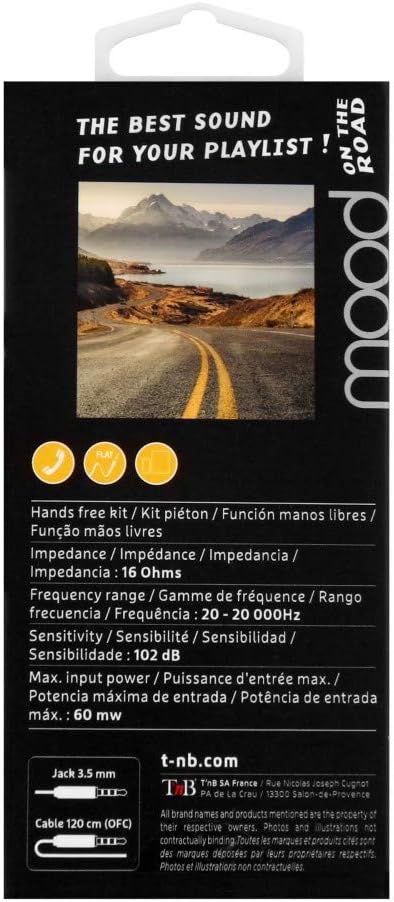
Image 2: Retail packaging for T'nB Mood headphones, highlighting key features and specifications.
3. Caratteristiche del prodotto
- Integrated Universal Microphone: Per chiamate in vivavoce e comandi vocali.
- Flat OFC Cable: Designed to prevent tangles and enhance durability.
- 3.5mm Jack Connector: Compatibile con un'ampia gamma di dispositivi audio.
- 10mm Driver Diameter: Fornisce un'uscita audio nitida.
- Ampia gamma di frequenze: 20 - 20,000 Hz for comprehensive sound reproduction.
- Impedenza ottimale: 16 Ohms for efficient power usage.
- 120 cm Cable Length: Fornisce ampraggiungere per un utilizzo confortevole.
4. Impostazione
- Disimballare le cuffie: Carefully remove the T'nB Mood headphones and user guide from the packaging.
- Connetti al dispositivo audio: Insert the 3.5mm audio jack firmly into the headphone port of your smartphone, tablet, computer, or other compatible audio device.
- Posizione degli auricolari: Place the earbuds comfortably into your ears. Ensure a snug fit for optimal sound quality and bass response.
- Regola volume: Adjust the volume on your connected device to a comfortable listening level before playing audio.
5. Istruzioni per l'uso
5.1 Riproduzione audio
- Una volta connesso, riproduci l'audio dal tuo dispositivo. Il suono verrà trasmesso tramite le cuffie.
- Controlla la riproduzione (riproduci/pausa, salta traccia) e il volume direttamente dal tuo dispositivo connesso.
5.2 Using the Universal Microphone
The T'nB Mood headphones feature an inline universal microphone for hands-free communication.
- Risposta / chiusura delle chiamate: When a call comes in, press the button on the inline microphone to answer. Press it again to end the call.
- Comandi vocali: Depending on your device, you may be able to activate voice assistants (e.g., Siri, Google Assistant) by pressing and holding the microphone button. Refer to your device's manual for specific instructions.
- Posizionamento del microfono: Ensure the microphone is positioned close to your mouth for clear voice transmission during calls.
6. Manutenzione
Una cura adeguata prolungherà la durata delle tue cuffie.
- Pulizia degli auricolari: Pulisci delicatamente gli auricolari con un panno morbido, asciutto e privo di lanugine. Non utilizzare prodotti chimici aggressivi o materiali abrasivi.
- Cura del cavo: Avoid excessive pulling, twisting, or bending of the cable. The flat design helps prevent tangles, but proper handling is still recommended.
- Magazzinaggio: Quando non vengono utilizzate, conservare le cuffie in un luogo pulito e asciutto, lontano da temperature estreme e dalla luce solare diretta. Evitare di avvolgere il cavo troppo stretto.
- Evitare l'umidità: Non esporre le cuffie all'acqua o a umidità eccessiva.
7. Risoluzione Dei Problemi
If you encounter issues with your T'nB Mood headphones, please refer to the following common solutions:
- Nessun suono o volume basso:
- Assicurati che il jack da 3.5 mm sia completamente inserito nella porta audio del tuo dispositivo.
- Check the volume level on your connected device and ensure it is not muted.
- Prova le cuffie con un altro dispositivo audio per escludere un problema specifico del dispositivo.
- Scarsa qualità del suono (distorsione, rumore statico):
- Assicurarsi che gli auricolari siano puliti e privi di detriti.
- Verify the earbuds are properly seated in your ears for a good seal.
- Prova una sorgente audio diversa o file to check if the issue is with the content.
- Microfono non funzionante:
- Ensure the 3.5mm jack is fully inserted. A loose connection can affect microphone functionality.
- Controlla le impostazioni di ingresso audio del tuo dispositivo per assicurarti che sia selezionato il microfono esterno.
- Prova il microfono con un'altra applicazione o un altro dispositivo.
8. Specifiche
| Marca | T'nB |
| Numero di modello | ESMOODBK |
| Colore | Nero |
| Fattore di forma | In-ear (auricolare) |
| Tecnologia di connettività | Cablato |
| Presa per cuffie | 3.5 mm Jack |
| Diametro del driver | 10 millimetri |
| Gamma di frequenza | 20 - 20,000 Hz |
| Impedenza | 16 Ohm |
| Potenza massima in ingresso | 60mW |
| Sensibilità | 102 dB |
| Lunghezza del cavo | 120 centimetri |
| Materiale | Plastica |
| Componenti inclusi | 1 x MOOD Earphones, 1 x User Guide |
9. Garanzia e supporto
Specific warranty details for the T'nB Mood headphones are not provided within this manual. For information regarding warranty coverage, terms, and conditions, please refer to the documentation included with your purchase or contact T'nB customer support directly.
For technical support or further assistance, please visit the official T'nB websito o contattare il loro servizio clienti.