
1. Introduzione
The KETOTEK DC 6.5-100V 20A Voltmeter Ammeter is a versatile 4-in-1 digital multimeter designed for measuring voltage, current, active power, and energy consumption in DC electrical systems. This device is suitable for indoor use and can monitor batteries, solar systems, electric bike generators, and other DC applications. It features a large LCD with backlight, voltage alarm function, energy reset, and power-off data storage. An integrated shunt simplifies installation.
2. Contenuto della confezione
Si prega di verificare che tutti gli articoli siano presenti nel pacco:
- 1 x KETOTEK DC Voltmeter Ammeter (Model: KT-D132)
- 1 x Manuale utente
3. Caratteristiche del prodotto
- Misurazione 4 in 1: Visualizza contemporaneamente il volumetage, corrente, potenza attiva ed energia.
- Ampia gamma di misurazioni: Tensione CC 6.5-100Vtage, 0-20A current, 0-2kW active power, and 0-9999kWh energy.
- Schermo LCD: Large, clear LCD with blue backlight for easy readability.
- Voltage Allarme: Vol configurabile dall'utentetage alarm threshold with flashing display.
- Funzione di ripristino dell'energia: Allows resetting accumulated energy data.
- Archiviazione dati: Automatically saves data when power is off.
- Integrated Shunt: Non è richiesto alcuno shunt esterno per la misurazione della corrente fino a 20 A.

Image 1: The KETOTEK DC Voltmeter Ammeter displaying its four measurement parameters: voltage, current, power, and energy, along with their respective ranges.

Image 2: Visual representation of the meter's key functions: backlight control, voltage alarm, energy reset, and power-off data saving.
4. Specifiche
| Parametro | Valore |
|---|---|
| Marca | CHETOTECNICA |
| Modello | KT-D132 |
| Stile | DC 20A |
| Voltage Intervallo di misurazione | CC 6.5V - 100V |
| Intervallo di misurazione corrente | 0A - 20A |
| Intervallo di misurazione della potenza attiva | 0W - 2kW |
| Intervallo di misurazione dell'energia | 0kWh - 9999kWh |
| Volume di esercizio minimotage | 6.5 Volt CC |
| Massimo volume di eserciziotage | 100 Volt CC |
| Fonte di alimentazione | Alimentato a batteria (dal circuito misurato) |
| Tipo di visualizzazione | LCD con retroilluminazione |
| Dimensioni (L x P x A) | Dimensioni: 8.5 x 5 x 2.4 cm |
| Peso dell'articolo | 100 grammi |
| Colore | Nero |
| Conformità | CE, 3C, FCC |
| Codice UPC | 723260104911 |
| Numero di parte del produttore | KT-0132 |
Nota: The 20A current rating is for short-term loads. For continuous operation exceeding 15A, consider a higher amperage version (e.g., 50A or 100A) to prevent damage to the device.

Image 3: Detailed dimensions of the KETOTEK DC Voltmeter Ammeter (Model KT-D132).
5. Precauzioni di sicurezza
- Questo dispositivo è progettato per solo per uso internoNon utilizzarlo all'aperto.
- Ensure the load does not exceed the rated voltage and current of the device (DC 6.5-100V, 20A).
- Always connect the device according to the provided wiring diagram. Incorrect wiring can lead to product damage or malfunction.
- If you intend to use a different connection method, consult with a qualified professional or contact customer support first.
- Tenere il dispositivo lontano da acqua, umidità e temperature estreme.
- Non tentare di smontare o modificare il dispositivo.
6. Installazione e cablaggio
The KETOTEK DC Voltmeter Ammeter features an integrated shunt, simplifying the wiring process. Follow the diagram below for correct installation.
Schema elettrico
Connect the power supply and load as shown in the diagram. The device measures voltage across its input terminals and current through the integrated shunt.

Image 4: Wiring diagram for the KETOTEK DC Voltmeter Ammeter (Model KT-D132). Connect the positive and negative terminals of the DC input to the power supply, and the load in series with the current measurement path.
- Connect the positive terminal of your DC power supply to the '+' (DC input) terminal of the meter.
- Connect the negative terminal of your DC power supply to the '-' (DC input) terminal of the meter.
- Connect the positive terminal of your load to the '+' (Load) terminal of the meter.
- Connect the negative terminal of your load to the '-' (Load) terminal of the meter.
- Prima di applicare l'alimentazione, assicurarsi che tutti i collegamenti siano sicuri e corretti.
7. Istruzioni per l'uso
The device operates automatically once connected to a DC power source within its specified voltage range. The LCD will display voltage, current, power, and energy simultaneously.
Funzioni dei pulsanti
The meter features a single button on the right side of the display for various functions:
- Pressione breve: Attiva/disattiva la retroilluminazione.
- Pressione lunga (3 secondi): Resets the accumulated energy (kWh) data. The energy value will flash, then reset to 0.
- Pressione lunga (5 secondi): Enters the voltage alarm setting mode.
Voltage Impostazione sveglia
Per impostare il voltage alarm threshold:
- Press and hold the button for 5 seconds until the voltage value on the display starts flashing. This indicates you are in alarm setting mode.
- Short press the button to adjust the voltage alarm threshold. Each short press will increment the value.
- Once the desired threshold is set, press and hold the button again for 3 seconds to save the setting and exit the alarm mode.
- Se il volume misuratotage falls below the set alarm threshold, the display will flash to indicate a low voltage condizione.
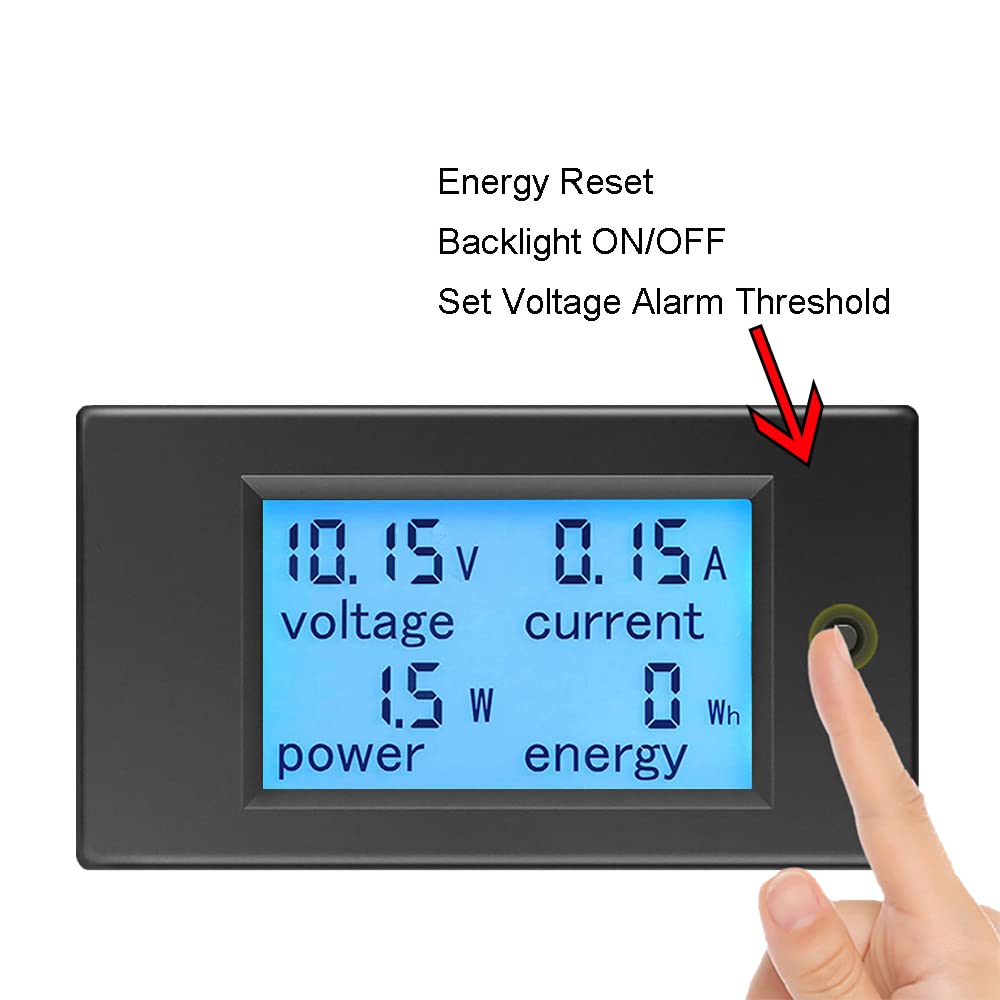
Image 5: Demonstrates the interaction with the control button for backlight, energy reset, and voltage impostazioni di allarme.
8. Manutenzione
- Mantenere il dispositivo pulito e asciutto. Utilizzare un panno morbido e asciutto per pulire il display easing.
- Evitare l'uso di detergenti o solventi abrasivi.
- Conservare il dispositivo in un luogo fresco e asciutto quando non viene utilizzato.
- Controllare regolarmente i collegamenti dei cavi per verificarne la tenuta e l'eventuale presenza di segni di usura.
9. Risoluzione Dei Problemi
- Nessuna visualizzazione:
- Check if the DC input voltage is within the 6.5V-100V range. The device requires at least 6.5V to power on.
- Verificare che tutti i collegamenti elettrici siano corretti e sicuri.
- Ensure the power supply is active.
- Letture errate:
- Confirm the wiring matches the diagram precisely. Incorrect current path can lead to inaccurate readings.
- Ensure the load current does not exceed 20A for continuous operation. Overloading can affect accuracy or damage the device.
- Controllare che non vi siano collegamenti allentati o cavi danneggiati.
- Energy (kWh) Not Resetting:
- Ensure you are pressing and holding the button for approximately 3 seconds until the energy value flashes and resets.
- Voltage Alarm Not Working:
- Verify the alarm threshold is set correctly by entering the alarm setting mode (long press for 5 seconds).
- Assicurarsi che il volume misuratotage is actually below the set threshold.
10. Garanzia e supporto
KETOTEK products are manufactured to high-quality standards. For warranty information, please refer to the terms and conditions provided at the time of purchase or contact your retailer. If you encounter any issues or require technical assistance, please contact KETOTEK customer support through the official website or your purchase platform. Provide your product model (KT-D132) and a detailed description of the issue for efficient support.