
1. Introduzione
The TAKSTAR PRO 82 are professional reference and monitor headphones designed for high-fidelity audio reproduction. They feature a high-quality driver unit and a polymer-coated diaphragm, delivering clear sound with excellent resolving power. These headphones are suitable for various applications including recording monitoring, music appreciation, and general listening. The unique three-stage bass adjustment function allows users to customize the sound profile to match different music styles and preferences.

Image 1.1: TAKSTAR PRO 82 On-Ear Monitor Headphones (Silver and Black versions).
2. Caratteristiche principali
- Driver ad alte prestazioni: Equipped with a Ø40mm NdFeB driver for high sensitivity, wide frequency response, and dynamic sound characteristics.
- Advanced Diaphragm: Utilizes a polymer-coated diaphragm for pure bass, penetrating midrange, and refined treble.
- Three-Level Bass Adjustment: Allows users to adjust bass output according to music style for an optimized listening experience.
- Design ergonomico: Features soft and comfortable ear cushions and an adjustable headband for extended wear without discomfort.
- Costruzione durevole: Designed for reliability and long-term use in various environments.
- Ampia compatibilità: Compatible with a broad range of audio devices including smartphones, tablets, laptops, and professional audio equipment.
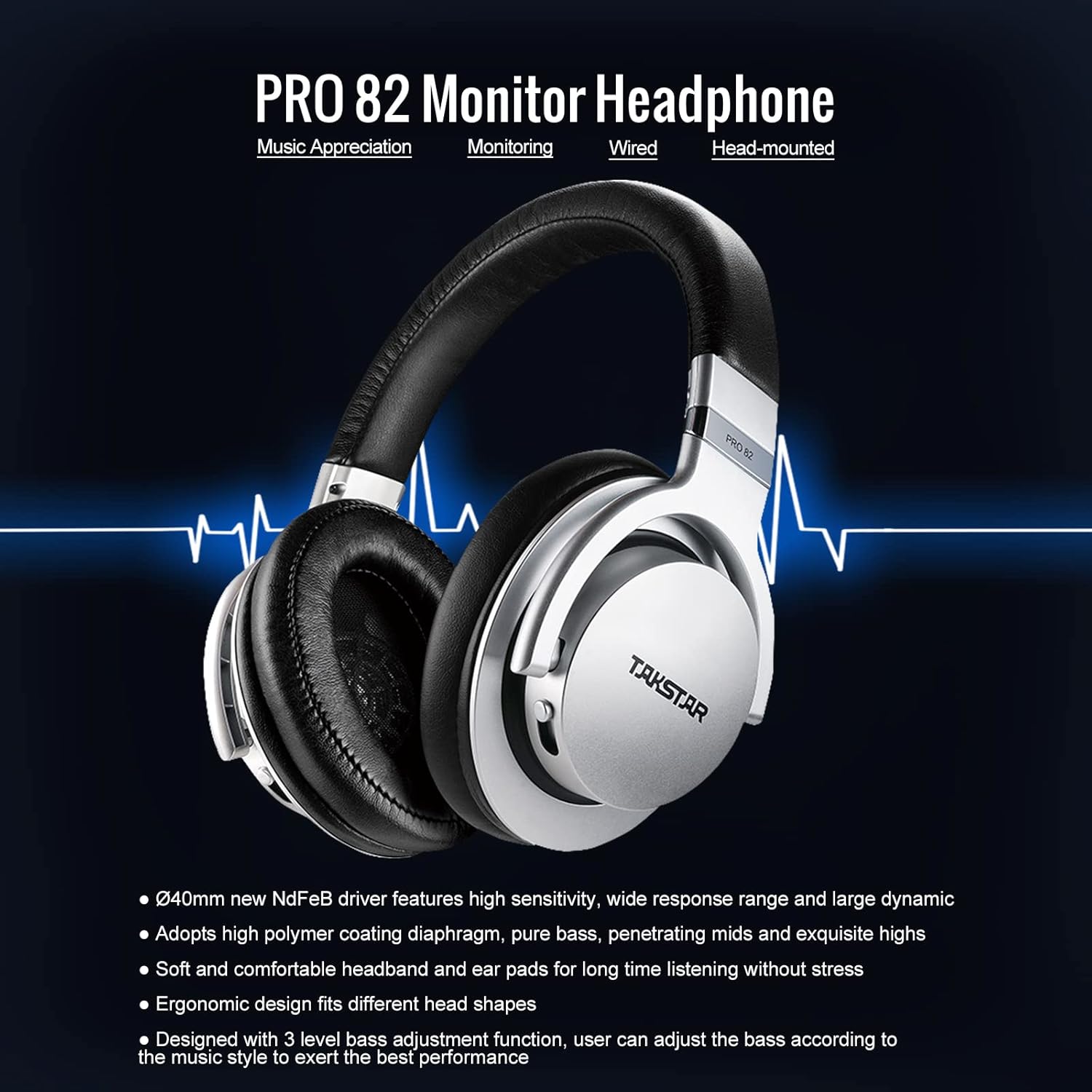
Image 2.1: Key features of the PRO 82 Monitor Headphone.
3. Contenuto della confezione
Si prega di controllare attentamente il pacco per assicurarsi che tutti gli articoli siano presenti e in buone condizioni.
- PRO82 Monitor Headphone (1 pc)
- Portable Muslin Bag (1 pc)
- Connecting Cable (1 pc)
- Aluminum Alloy Case (1 pc)
- Manuale dell'utente (1 pz)
- Certificate of Quality (1 pc)

Image 3.1: Product Content - What's included in the box.
4. Impostazione
4.1 Collegamento del cavo
- Locate the audio input jack on the left earcup of the PRO 82 headphones.
- Insert the smaller end (2.5mm) of the provided connecting cable firmly into the headphone jack.
- Connect the larger end (3.5mm) of the cable to your audio source (e.g., smartphone, computer, audio interface). If your audio source requires a 6.35mm (1/4 inch) jack, use the included adapter.
4.2 Regolazione per il comfort
For optimal sound and comfort, adjust the headphones to fit your head properly.
- Regolazione della fascia: Gently slide the headband up or down on both sides until the earcups comfortably cover your ears and the headband rests securely on your head.
- Padiglione auricolare girevole: The earcups can swivel 90 degrees to adapt to different head shapes and for flat storage. Ensure they are positioned correctly over your ears for a good seal.

Image 4.1: Headband and earcup adjustments for comfortable fit.
5. Istruzioni per l'uso
5.1 Bass Adjustment Function
The PRO 82 headphones feature a unique three-level bass adjustment switch located on the left earcup. This allows you to tailor the low-frequency response to your preference or the specific audio content.

Image 5.1: Three-stage bass regulation function switch.
- BASS1 (Gear 1): Standard low frequency (20-200Hz) sound pressure. This is the neutral setting, ideal for monitoring and critical listening.
- BASS2 (Gear 2): Low frequency (20-200Hz) increase by 3dB. Provides a moderate bass boost for a fuller sound.
- BASS3 (Gear 3): Low frequency (20-200Hz) increase by 6dB. Delivers a significant bass boost for genres that benefit from enhanced low-end.
To adjust, simply slide the switch to your desired bass level. Experiment with different settings to find what best suits your audio material.
5.2 Controllo del volume
The connecting cable may include an in-line remote with volume control. Use this to adjust the listening volume directly from the cable. Ensure your audio source's volume is also set to an appropriate level.
6. Compatibilità
The TAKSTAR PRO 82 headphones are designed for broad compatibility with various audio devices.
- Cellulari (Android, iOS)
- compresse
- Computer portatili
- Computer desktop
- Giocatori MP3 / MP4
- Audio Mixers and Interfaces
- Amplificatori (AMP)

Image 6.1: Strong compatibility with various devices.
7. Manutenzione
Proper care and maintenance will extend the life and performance of your PRO 82 headphones.
- Pulizia: Use a soft, dry cloth to clean the exterior of the headphones. For ear cushions, gently wipe with a slightly damp panno e lasciare asciugare completamente all'aria prima dell'uso. Evitare l'uso di prodotti chimici aggressivi o detergenti abrasivi.
- Magazzinaggio: When not in use, store the headphones in the provided portable muslin bag or aluminum alloy case to protect them from dust, moisture, and physical damage.
- Cura del cavo: Avoid sharp bends or excessive pulling on the connecting cable. Disconnect by gripping the plug, not the cable itself.
- Temperatura: Non esporre le cuffie a temperature estreme (calde o fredde) o a elevata umidità.
8. Risoluzione Dei Problemi
If you encounter issues with your PRO 82 headphones, please refer to the following common solutions:
- Nessun suono:
- Assicurarsi che il cavo audio sia collegato saldamente sia alle cuffie sia alla sorgente audio.
- Check the volume level on your audio source and the in-line remote (if applicable).
- Prova le cuffie con una sorgente audio o un dispositivo diverso per escludere problemi di origine.
- Verify that the audio output settings on your device are correctly configured for the headphones.
- Suono distorto:
- Abbassare il volume della sorgente audio.
- Controllare che il cavo audio non sia danneggiato o che i collegamenti siano allentati.
- Ensure the bass adjustment switch is not set to an excessively high level for the audio content.
- Vestibilità scomoda:
- Adjust the headband length on both sides until the earcups sit comfortably over your ears.
- Ensure the earcups are swiveled correctly to conform to your head shape.
Se questi passaggi non risolvono il problema, contattare l'assistenza clienti TAKSTAR per ulteriore assistenza.
9. Specifiche
| Caratteristica | Specificazione |
|---|---|
| Marca | STELLARE DI TAK |
| Numero di modello | PRO82 |
| Tipo di conducente | Driver dinamico |
| Dimensioni del conducente | 40 millimetri |
| Gamma di frequenza | 10 Hz - 20 kHz |
| Tecnologia di connettività | Cablato |
| Presa per cuffie | 3.5 mm Jack |
| Posizionamento dell'orecchio | Sull'orecchio |
| Controllo del rumore | Cancellazione attiva del rumore |
| Peso dell'articolo | 1 chilogrammo |
| Materiale della custodia per il trasporto | Alluminio |
| Bass Adjustment Levels | 3 |
10. Garanzia e supporto
For warranty information and customer support, please refer to the warranty card included in your product package or visit the official TAKSTAR websito. Conservare la ricevuta d'acquisto come prova d'acquisto per eventuali reclami in garanzia.
Produttore: STELLARE DI TAK