
PowerPac PPFS212B 2-in-1 Dual-Usage Stand Fan Instruction Manual
Model: PPFS212B
1. Informazioni importanti sulla sicurezza
Leggere attentamente tutte le istruzioni prima di utilizzare questo apparecchio e conservarle per riferimento futuro. Il mancato rispetto di queste istruzioni può causare scosse elettriche, incendi o lesioni gravi.
- Assicurare il volumetage indicato sull'etichetta di potenza corrisponde al volume di alimentazione della rete elettricatage.
- Non immergere la ventola, la spina o il cavo in acqua o altri liquidi.
- Scollegare la ventola dalla presa di corrente prima di pulire, montare o smontare i componenti.
- Tenere dita, matite o altri oggetti lontani dalla griglia della ventola quando è in funzione.
- Non utilizzare il ventilatore con un cavo o una spina danneggiati. Contattare personale di assistenza qualificato per la riparazione.
- This appliance is equipped with thermal fuse protection against overheating. If the fan stops working unexpectedly, unplug it and allow it to cool before attempting to restart.
- Questo apparecchio non è destinato all'uso da parte di persone (bambini compresi) con ridotte capacità fisiche, sensoriali o mentali, o prive di esperienza e conoscenza, a meno che non siano supervisionate o abbiano ricevuto istruzioni riguardanti l'uso dell'apparecchio da una persona responsabile della loro sicurezza.
2. Prodotto finitoview
The PowerPac PPFS212B is a versatile 2-in-1 dual-usage stand fan designed for efficient cooling in indoor environments. It features 7 blades for maximum airflow, 3-speed settings, and an oscillation function for wider air distribution. The fan is equipped with thermal fuse protection for enhanced safety.
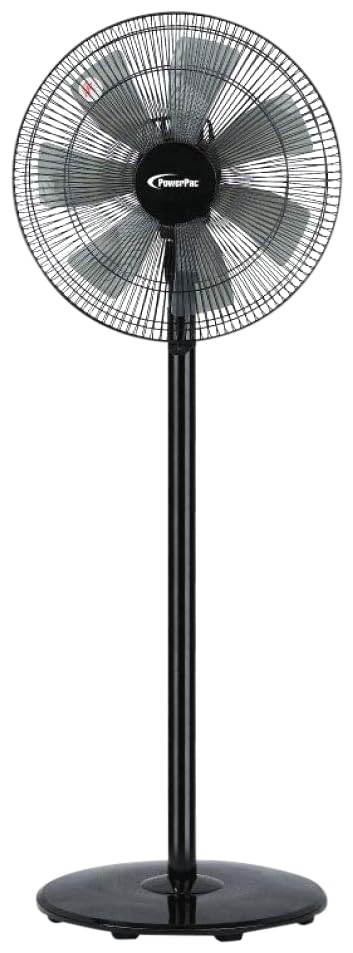
Image: PowerPac PPFS212B 2-in-1 Dual-Usage Stand Fan, showcasing its black finish and stand configuration.
3. Contenuto della confezione
Please check the package contents upon opening to ensure all parts are present and undamaged:
- 1 x PowerPac PPFS212B Stand Fan (includes fan head, stand pole, and base)
4. Istruzioni di montaggio
Follow these steps to assemble your PowerPac PPFS212B fan:
- Disimballare con cura tutti i componenti dall'imballaggio.
- Attach the stand pole to the fan base. Ensure it is securely fastened according to the markings or locking mechanism.
- Mount the fan head assembly onto the top of the stand pole. Align the connection points and secure it firmly.
- Ensure all screws and fasteners are tightened to prevent wobbling during operation.
- Posizionare il ventilatore assemblato su una superficie piana e stabile.
Image: Illustrative diagram of the PowerPac PPFS212B fan assembly, showing the base, stand, and fan head components.
5. Istruzioni per l'uso
To operate your PowerPac PPFS212B fan:
- Collegare il cavo di alimentazione a una presa elettrica idonea.
- Accensione/spegnimento: Press the 'ON/OFF' button (or corresponding button) on the control panel to turn the fan on or off.
- Regolazione della velocità: Press the 'SPEED' button repeatedly to cycle through the 3 available speed settings (Low, Medium, High).
- Funzione di oscillazione: Press the 'OSC' button (or corresponding button) to activate or deactivate the oscillation feature, which allows the fan head to sweep from side to side.
- When finished, press the 'ON/OFF' button to turn off the fan and unplug it from the power outlet.
6. Manutenzione e pulizia
Regular cleaning and maintenance will help ensure optimal performance and longevity of your fan:
- Scollegare sempre la ventola dall'alimentazione prima della pulizia.
- Utilizzare un morbido, damp cloth to wipe the exterior surfaces of the fan. Do not use abrasive cleaners, solvents, or harsh chemicals.
- To clean the fan blades, carefully remove the front grille (if detachable) according to the product design. Wipe the blades with a soft cloth. Ensure all parts are dry before reassembling.
- Non consentire all'acqua di gocciolare nell'alloggiamento del motore.
- Quando non si utilizza il ventilatore per lunghi periodi, conservarlo in un luogo fresco e asciutto.
7. Risoluzione Dei Problemi
If you encounter issues with your fan, refer to the following table for common problems and solutions:
| Problema | Possibile causa | Soluzione |
|---|---|---|
| La ventola non si accende. | Nessuna alimentazione elettrica. Thermal fuse activated. | Controllare che la spina sia inserita saldamente nella presa. Assicurarsi che la presa di corrente sia funzionante. Unplug and allow the fan to cool down for 30 minutes before restarting. |
| Flusso d'aria debole o assente. | La velocità della ventola è impostata troppo bassa. Le pale del ventilatore sono sporche. | Aumentare la velocità della ventola. Unplug the fan and clean the blades as per maintenance instructions. |
| La ventola non oscilla. | La funzione di oscillazione è disattivata. | Press the 'OSC' button to activate oscillation. |
| Rumore insolito durante il funzionamento. | Parti sciolte. Ostruzione. | Unplug the fan and check for any loose components or obstructions around the blades or motor. Tighten any loose parts. |
Se il problema persiste dopo aver provato queste soluzioni, contattare l'assistenza clienti.
8. Specifiche
| Caratteristica | Specificazione |
|---|---|
| Marca | PowerPac |
| Numero di modello | PPFS212B |
| Tipo | 2-in-1 Dual-Usage Stand Fan |
| Numero di lame | 7 |
| Numero di velocità | 3 |
| Fonte di alimentazione | Elettrico con cavo |
| Cosatage | 50 watt |
| Metodo di controllo | Premere il pulsante |
| Caratteristiche speciali | Oscillating, Thermal Fuse Protection |
| Materiale | Plastica |
| Uso interno/esterno | Al chiuso |
| Colore | Nero |
9. Garanzia e supporto
This PowerPac PPFS212B fan comes with a Garanzia di 2 anno dalla data di acquisto. La presente garanzia copre i difetti di fabbricazione in normali condizioni d'uso.
For warranty claims, technical support, or any inquiries regarding your product, please contact PowerPac customer service. Keep your proof of purchase for warranty validation.