
1. Prodotto finitoview
The Victrix Gambit Gaming Headset offers both wireless and wired connectivity for versatile use with Xbox One, Xbox Series X|S, and PC. Designed for competitive gaming, it features Dolby Atmos surround sound, 50mm HD speaker drivers, and a bi-directional noise-canceling microphone.

Image 1.1: The Victrix Gambit Gaming Headset, showcasing its sleek black design and over-ear cups.

Image 1.2: The Victrix Gambit headset highlighting its dual wireless and wired modes for home and tournament play.
2. Istruzioni per l'installazione
2.1 Contenuto della confezione
- Cuffie da gioco Victrix Gambit
- Dongle USB wireless
- Cavo audio da 3.5 mm con controlli in linea
- Cavo di ricarica USB
- Manuale dell'utente (questo documento)
2.2 Ricarica dell'auricolare
Before initial use, fully charge the headset. Connect the USB charging cable to the headset's charging port and to a powered USB port (e.g., console, PC, or USB wall adapter). The LED indicator will show charging status.
2.3 Wireless Connection (Xbox/PC)
- Insert the wireless USB dongle into an available USB port on your Xbox console or PC.
- Accendere l'auricolare tenendo premuto il pulsante di accensione finché l'indicatore LED non si illumina.
- L'auricolare e il dongle dovrebbero associarsi automaticamente. Un LED acceso fisso su entrambi indica la corretta connessione.
- If pairing does not occur automatically, press the pairing button on the USB dongle, then press and hold the Power/Pairing button on the headset until the LED flashes rapidly, then becomes solid.
2.4 Connessione cablata (3.5 mm)
For wired use or tournament play, connect the supplied 3.5mm audio cable from the headset's 3.5mm port to your controller or device's audio jack. The headset will automatically switch to wired mode.
3. Utilizzo dell'auricolare
3.1 Accensione/spegnimento
- Accensione: Press and hold the Power button on the headset until the LED illuminates.
- Spegni: Press and hold the Power button until the LED turns off.
3.2 Volume and Audio Controls
The headset features on-ear controls for convenient audio adjustments.

Image 3.1: Close-up of the headset's right earcup, showing the power button, mode switch, and game/chat balance dial.
- Volume principale: Use the volume dial on the earcup to adjust the overall audio level.
- Saldo gioco/chat: Use the dedicated dial to balance game audio and chat volume.
- Interruttore di modalità: Toggle between different audio modes or profiles if available (refer to specific software for customization).
3.3 Utilizzo del microfono
The bi-directional noise-canceling microphone ensures clear communication.

Image 3.2: The flexible boom microphone of the Victrix Gambit headset, designed for clear voice capture.
- Capovolgi per disattivare l'audio: Flip the microphone boom arm upwards to mute the microphone. Flip it down to unmute.
- Monitoraggio del microfono: The headset may offer a three-stage mic monitor. Adjust this feature through the headset's companion software on PC or console settings to hear your own voice feedback.
3.4 Dolby Atmos Integration
The headset includes integrated Dolby Atmos for immersive surround sound. A lifetime subscription is included. Ensure Dolby Atmos is enabled in your console or PC audio settings for the best experience.
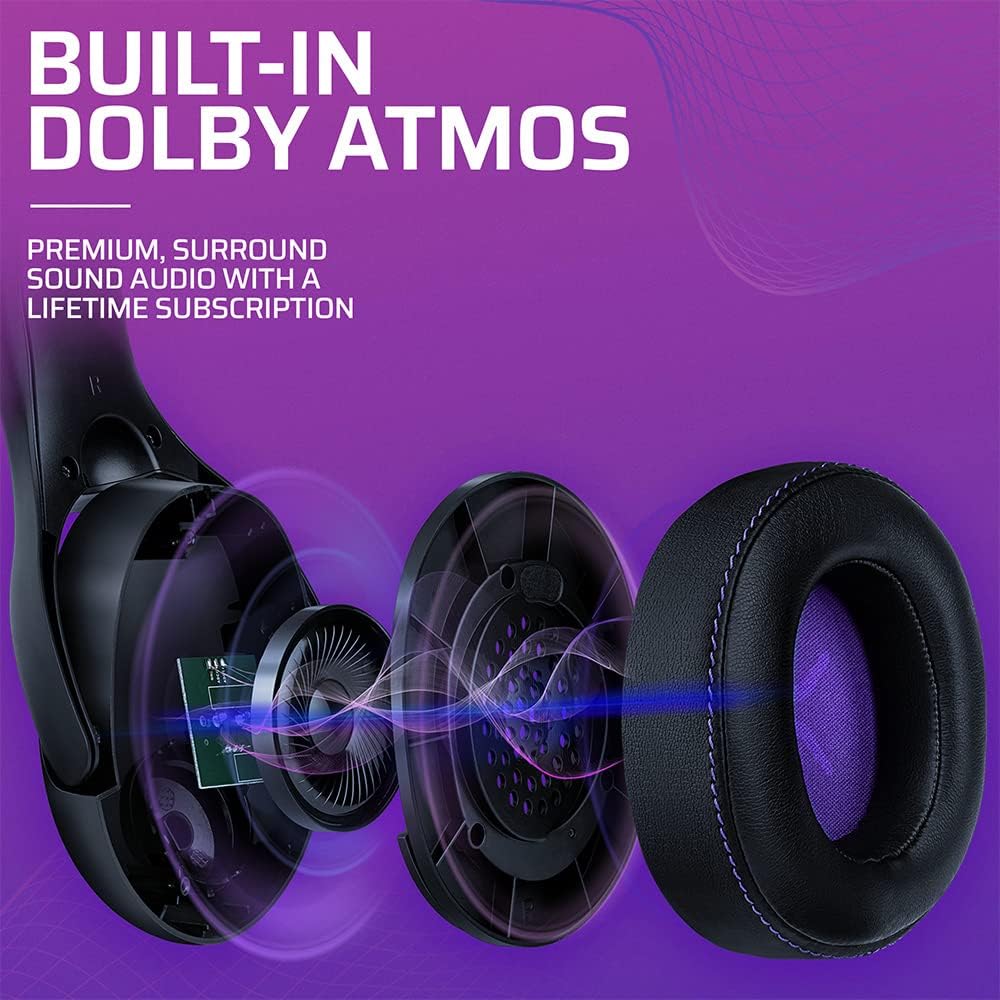
Immagine 3.3: Un esploso view of the Victrix Gambit earcup, illustrating the 50mm speaker drivers and the audio waves representing Dolby Atmos sound.
4. Manutenzione
4.1 Pulizia
- Per pulire le superfici delle cuffie, utilizzare un panno morbido e asciutto.
- Per i padiglioni auricolari, pulire delicatamente con un panno.amp cloth and mild soap solution if necessary, then dry thoroughly. Avoid excessive moisture.
- Non utilizzare prodotti chimici aggressivi o detergenti abrasivi.
4.2 Conservazione
Conservare le cuffie in un luogo fresco e asciutto, lontano dalla luce solare diretta e da temperature estreme. Evitare di posizionare oggetti pesanti sulle cuffie per evitare danni.
4.3 Cura della batteria
Per prolungare la durata della batteria, evitare di scaricare completamente le cuffie frequentemente. Caricarle regolarmente, anche se non vengono utilizzate per lunghi periodi.
5. Risoluzione Dei Problemi
5.1 Nessun audio
- Ensure the headset is powered on and properly paired (for wireless) or connected (for wired).
- Check the volume levels on the headset, your console/PC, and the game/application.
- Verify that the correct audio output device is selected in your system settings.
- For wireless, try re-pairing the headset with the USB dongle.
5.2 Il microfono non funziona
- Assicurarsi che il microfono sia abbassato (attivato).
- Check microphone input settings on your console/PC and in-game chat settings.
- Verify that the correct microphone input device is selected in your system settings.
- Test the microphone with another application or device if possible.
5.3 Problemi di connettività
- Senza fili: Ensure the USB dongle is securely plugged in. Try a different USB port. Move closer to the dongle to rule out range issues.
- Wired: Ensure the 3.5mm cable is fully inserted into both the headset and the device. Try a different 3.5mm cable if available.
5.4 L'auricolare non si carica
- Ensure the USB charging cable is securely connected to both the headset and a powered USB port.
- Prova una porta USB o un cavo di ricarica diversi.
- Verificare che la fonte di alimentazione sia attiva.
6. Specifiche
| Numero di modello | 049-003-NA |
| Connettività | Wireless (USB Dongle, up to 12.19 meters range), Wired (3.5mm audio cable) |
| Driver degli altoparlanti | 50mm alta definizione |
| Tecnologia audio | Dolby Atmos (lifetime subscription included) |
| Microfono | Bi-directional, Noise-Canceling, Flip-to-Mute |
| Batteria | 1 agli ioni di litio (inclusa) |
| Dimensioni (L x P x A) | Dimensioni: 1 x 260.4 x 215.9 cm |
| Peso | 610 grammi |
| Compatibilità | Microsoft Xbox One, Xbox Series X|S, PC |
7. Informazioni sulla garanzia
For detailed warranty information, please refer to the official PDP websito o sulla scheda di garanzia inclusa nella confezione del prodotto. I termini e le condizioni della garanzia possono variare a seconda della regione.
8. Assistenza clienti
If you encounter any issues or have questions not covered in this manual, please contact PDP customer support. Visit the official PDP website for support contact details, FAQs, and additional resources.