
1. Finitaview
The BLACK+DECKER BCF601AA Alkaline Cordless Screwdriver is designed for quick and efficient driving and removal of screws in various household projects. This compact and versatile tool comes with a 42-piece accessory set, providing a wide range of bits for different applications. Its ergonomic design and integrated features enhance user convenience and productivity.
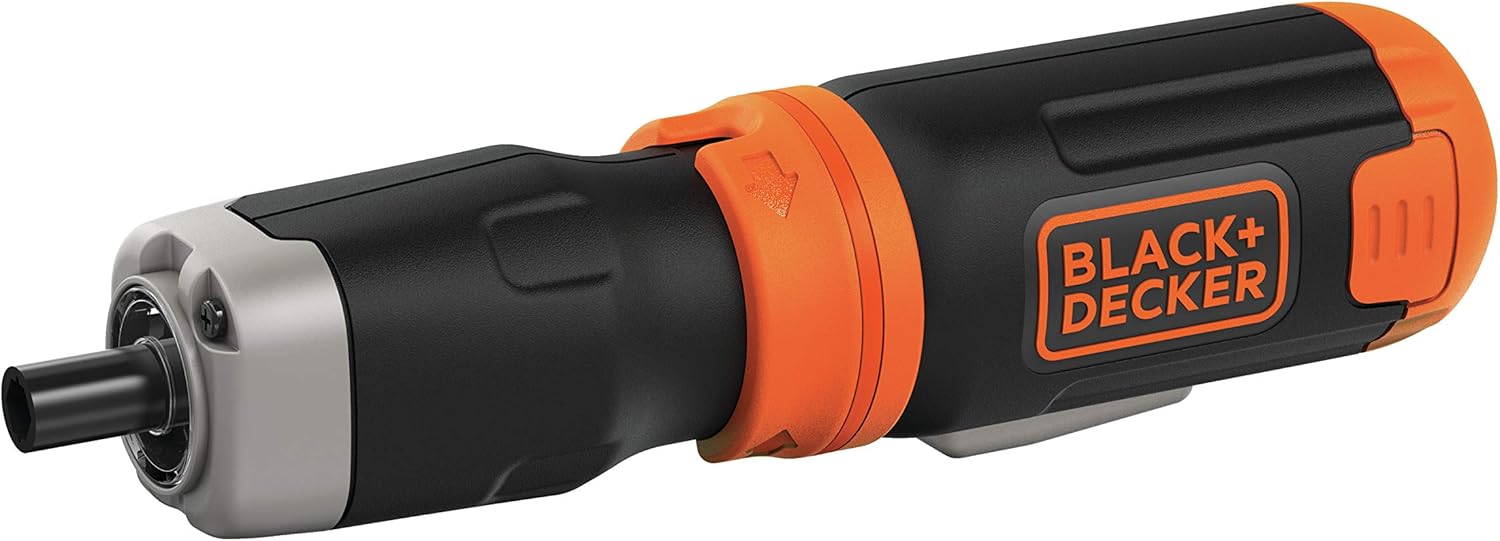
Figure 1: BLACK+DECKER BCF601AA Cordless Screwdriver with a Phillips bit inserted.
Caratteristiche principali:
- Velocità 220 giri/min: Provides quick driving for various tasks.
- Albero di prolunga: Offers further reach for accessing tight or recessed areas.
- Luce LED integrata: Illuminates poorly lit work surfaces for improved visibility.
- Ideal Sizes: Includes a variety of 1-inch screwdriver bits suitable for frequent use and installation projects.
- Magnetic Drive Guide: Helps to hold screws in place for easier starting.
2. Impostazione
2.1 Installazione della batteria
The BLACK+DECKER BCF601AA screwdriver operates on four (4) AA alkaline batteries. To install or replace batteries:
- Locate the battery compartment at the base of the screwdriver handle.
- Squeeze the two pressure points on the sides of the battery compartment cover and pull it downwards to remove.
- Insert four (4) fresh AA alkaline batteries, ensuring correct polarity (+/-) as indicated inside the compartment.
- Riposizionare il coperchio del vano batteria finché non scatta in posizione.
Inserimento a 2.2 bit
The screwdriver uses standard 1-inch hex shank bits. To insert a bit:
- Select the appropriate bit from the 42-piece accessory set for your task.
- Simply push the bit firmly into the chuck at the front of the screwdriver until it is seated. The bits are held in place by friction.
- Per rimuovere una punta, tirarla direttamente fuori dal mandrino.

Figure 2: The included 42-piece screwdriver bit set.
3. Istruzioni per l'uso
3.1 Accensione/spegnimento e controllo della direzione
The screwdriver features a simple two-button control for operation and direction:
- Premere il tasto pulsante sinistro to rotate the bit counter-clockwise (for unscrewing).
- Premere il tasto bottone giusto to rotate the bit clockwise (for screwing).
- Release the button to stop the rotation.
3.2 Blocco di sicurezza
To prevent accidental activation, the screwdriver is equipped with a safety lock mechanism. This is typically a collar or switch near the chuck:
- Rotate the collar to the 'locked' position (often indicated by a padlock symbol) when not in use or during storage. This will prevent the buttons from being pressed.
- Rotate the collar to the 'unlocked' position to enable the forward/reverse buttons for operation.
3.3 Luce LED integrata
The screwdriver includes an LED light to illuminate your work area:
- The LED light automatically activates when either the forward or reverse button is pressed, providing visibility in dimly lit spaces.

Figura 3: lato view of the screwdriver, highlighting its compact design.
3.4 Using the Extension Shaft
For tasks requiring extended reach or access to confined areas, the screwdriver features an extension shaft:
- To attach the extension shaft, align it with the chuck and push it firmly until it locks into place.
- Insert your desired screwdriver bit into the end of the extension shaft.
- To remove the extension shaft, pull it firmly away from the screwdriver.

Figure 4: Screwdriver with the extension shaft for increased reach.
4. Manutenzione
4.1 Pulizia
- Keep the tool's ventilation slots clean to prevent overheating.
- Utilizzare un morbido, damp cloth to clean the exterior of the screwdriver. Do not use harsh chemicals or abrasive cleaners.
- Assicurarsi che l'utensile sia asciutto prima di riporlo.
4.2 Cura della batteria
- Per prestazioni ottimali, utilizzare sempre batterie alcaline di alta qualità.
- Remove batteries from the tool if it will not be used for an extended period to prevent leakage.
- Smaltire le batterie usate in modo responsabile secondo le normative locali.
4.3 Bit Care
- Store screwdriver bits in their provided case to keep them organized and prevent loss or damage.
- Replace worn or damaged bits to ensure efficient and safe operation.
5. Risoluzione Dei Problemi
Problemi comuni e soluzioni:
- Il cacciavite non si accende:
- Check if the safety lock is disengaged.
- Assicurarsi che le batterie siano installate correttamente e con la giusta polarità.
- Sostituisci le batterie vecchie o esaurite con batterie nuove.
- Bit slipping or not engaging screw:
- Ensure the correct bit type and size are used for the screw head.
- Check if the bit is fully inserted into the chuck or extension shaft.
- Replace worn or damaged bits.
- Potenza o velocità ridotte:
- Le batterie potrebbero essere scariche; sostituirle.
- Ensure the tool is not being overloaded with tasks beyond its intended capacity.
6. Specifiche
| Caratteristica | Dettaglio |
|---|---|
| Marca | NERO+DECKER |
| Nome del modello | BCF601AA |
| Fonte di alimentazione | Alkaline Batteries (4 x AA) |
| Velocità | 220 giri al minuto |
| Stile della testa | Piatto, Phillips |
| Materiale | Metallo, Plastica |
| Colore | Nero |
| Caratteristica speciale | Cordless, Integrated LED Light, Extension Shaft, Magnetic Drive Guide |
| Usi consigliati | Miglioramento della casa |
7. Garanzia e supporto
For warranty information, technical support, or service inquiries, please refer to the documentation included with your product or visit the official BLACK+DECKER websito. Conservare la ricevuta d'acquisto come prova d'acquisto per eventuali reclami in garanzia.
Puoi trovare maggiori informazioni e recapiti sul sito Negozio BLACK+DECKER su Amazon.


