Introduzione
The Lexibook CR753EN Collins Crossword Solver is an electronic device designed to assist with crossword puzzles, word games, and general word reference. It features a comprehensive database from the Collins Bradford 11th edition dictionary, phonetic spell-correction, and various word-solving tools.

Image: The Lexibook CR753EN Collins Crossword Solver, a compact electronic device with a QWERTY keyboard and a green display screen.
Impostare
Installazione della batteria
The device requires one CR2032 battery (included). To install or replace the battery:
- Individuare il vano batteria sul retro del dispositivo.
- Use a small screwdriver or coin to open the battery compartment cover.
- Inserire la batteria CR2032 con il lato positivo (+) rivolto verso l'alto.
- Riposizionare il coperchio del vano batteria e fissarlo.
Accensione/spegnimento
Premere il tasto pulsante di accensione rosso located on the top right of the keyboard to turn the device on or off.
Istruzioni per l'uso
The Lexibook CR753EN offers several functions to assist with word puzzles and general reference. Use the dedicated function buttons (XWORD, CLUE, ADV, SYN, SOLV) and the QWERTY keyboard for input.
Xword Function (Crossword Solver)
This function helps solve crosswords by finding words that match a given pattern.
- Premere il tasto XWORD pulsante.
- Enter the known letters of the word, using a question mark (?) for unknown letters. For example, to find a 5-letter word starting with 'L' and ending with 'R', enter "L???R".
- Premere ENTRARE. The device will display a list of matching words. Use the arrow keys to scroll through the list.
Clue Function
Use this function to find words based on a clue and a pattern.
- Premere il tasto TRACCIA pulsante.
- Enter the clue (e.g., "Planet").
- Enter a pattern if known (e.g., "E?RT?").
- Premere ENTRARE. The device will suggest words related to the clue and pattern.
Synonyms Function
Find synonyms for a given word.
- Premere il tasto SINCRO pulsante.
- Enter the word for which you need synonyms (e.g., "Learn").
- Premere ENTRARE. A list of synonyms will be displayed.
Funzione avanzata
This function helps find words that are related to a given word or pattern, often used for word association.
- Premere il tasto AVANZATO pulsante.
- Enter a word or pattern (e.g., "Game").
- Premere ENTRARE. The device will show related words.
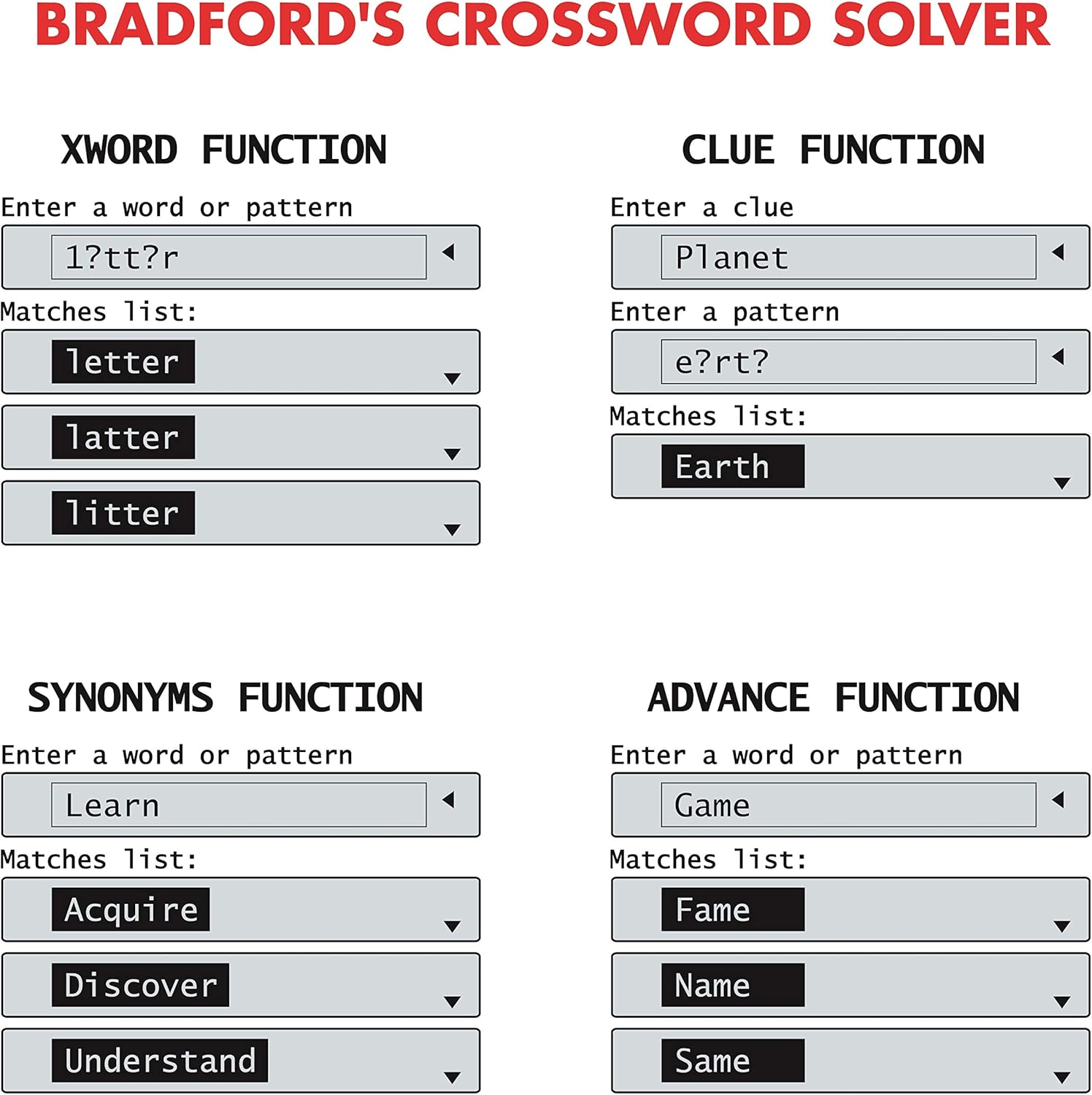
Image: Screen examples demonstrating the Xword, Clue, Synonyms, and Advance functions, showing input fields and matching word lists.
List Function (User List)
Create and manage a personalized list of words.
- Premere il tasto LISTA pulsante.
- Follow the on-screen prompts to add, edit, or search words within your custom list.
Solver Function (Anagram & Word Builder)
This function includes tools for solving anagrams and building words.
- Premere il tasto SOLV pulsante.
- Seleziona uno dei due Risolutore di anagrammi or Costruttore di parole dal menù.
- For Anagram Solver: Enter a jumbled set of letters (e.g., "snutes"). Press ENTRARE to see possible words (e.g., "sunset").
- For Word Builder: Enter a set of letters, and the device will suggest words that can be formed from them.
Phonetic Spell-Correction
Corrects misspelled words phonetically.
- Enter a word as it sounds (e.g., "fonetik").
- The device will suggest the correct spelling (e.g., "phonetic"). This feature is often integrated into the main word entry functions.
Giochi di parole
The device includes three word games: Hangman, Word Jumble, and Anagram.
- Access the games through the main menu or a dedicated game button if available.
- Follow the on-screen instructions to play each game.

Image: Screen examples showing the Anagram Solver, Phonetic Spell-Correction, and various Word Games like Hangman and Word Jumble.
Altre utilità
The device also includes a calculator, currency converter, and unit converter. These can typically be accessed via the main menu or dedicated buttons.
Guida su schermo
Contextual help is available at any time. Look for a 'Help' or '?' icon on the screen or press a designated Help button if present.
Manutenzione
Pulizia
- Pulisci il dispositivo con un panno morbido e asciutto.
- Non utilizzare detergenti liquidi o materiali abrasivi.
Magazzinaggio
- Conservare il dispositivo in un luogo fresco e asciutto, lontano dalla luce solare diretta.
- Se si conserva il prodotto per un periodo prolungato, rimuovere la batteria per evitare perdite.
Risoluzione dei problemi
Il dispositivo non si accende
- Controllare che la batteria sia installata correttamente.
- Sostituire la batteria CR2032 con una nuova.
Incorrect Word Suggestions
- Ensure the correct function (Xword, Clue, Synonyms) is selected.
- Verify the spelling or pattern entered.
- The device uses the Collins Bradford 11th edition dictionary; some very obscure or newly coined words may not be included.
Problemi di visualizzazione dello schermo
- If the screen is dim or flickering, the battery may be low. Replace the battery.
- If the screen is blank, try turning the device off and on again.
Specifiche
| Numero di modello | CR753EN |
| Marca | Libro Lexi |
| Dimensioni (L x P x A) | Dimensioni: 11.8 x 7.8 x 1.4 cm |
| Peso | 160 grammi |
| Fonte di alimentazione | 1 x CR2032 batteria |
| Materiale | Plastica |
Garanzia
This Lexibook CR753EN device comes with a Garanzia di 2 anno dalla data di acquisto. Si prega di conservare la prova d'acquisto per eventuali reclami in garanzia. La garanzia copre i difetti di fabbricazione in normali condizioni d'uso.
Supporto
For further assistance or technical support, please refer to the official Lexibook websito web o contattare il servizio clienti. Le informazioni di contatto sono in genere reperibili sulla confezione del prodotto o sul cartellino del produttore. websito.