
1. Introduzione
Grazie per l'acquistoasing the YESIDO YSP03 Sports Bluetooth In-Ear Earphones. This manual provides essential information for the safe and efficient use of your new earphones. Please read it thoroughly before use and retain it for future reference.
2. Informazioni sulla sicurezza
- Do not expose the earphones to extreme temperatures, humidity, or corrosive environments.
- Avoid dropping, impacting, or bending the earphones.
- Non smontare o modificare gli auricolari. Ciò potrebbe invalidare la garanzia e causare danni.
- Tenere gli auricolari lontano dalla portata dei bambini e degli animali domestici.
- Utilizzare solo il cavo di ricarica fornito o un equivalente certificato.
- Per evitare danni all'udito, ascoltare a volume moderato.
- Non utilizzare gli auricolari durante la guida o in situazioni in cui è necessario prestare attenzione all'ambiente circostante.
3. Contenuto della confezione
Si prega di controllare la confezione per verificare la presenza dei seguenti elementi:
- YESIDO YSP03 Sports Bluetooth In-Ear Earphones
- Cavo di ricarica USB
- Manuale d'uso
- Ear tips (various sizes, typically)
4. Prodotto finitoview
The YESIDO YSP03 earphones feature an in-ear design with a control unit for easy operation. They support Bluetooth wireless connectivity and also offer direct music playback via an SD card.
Control Unit and Ports
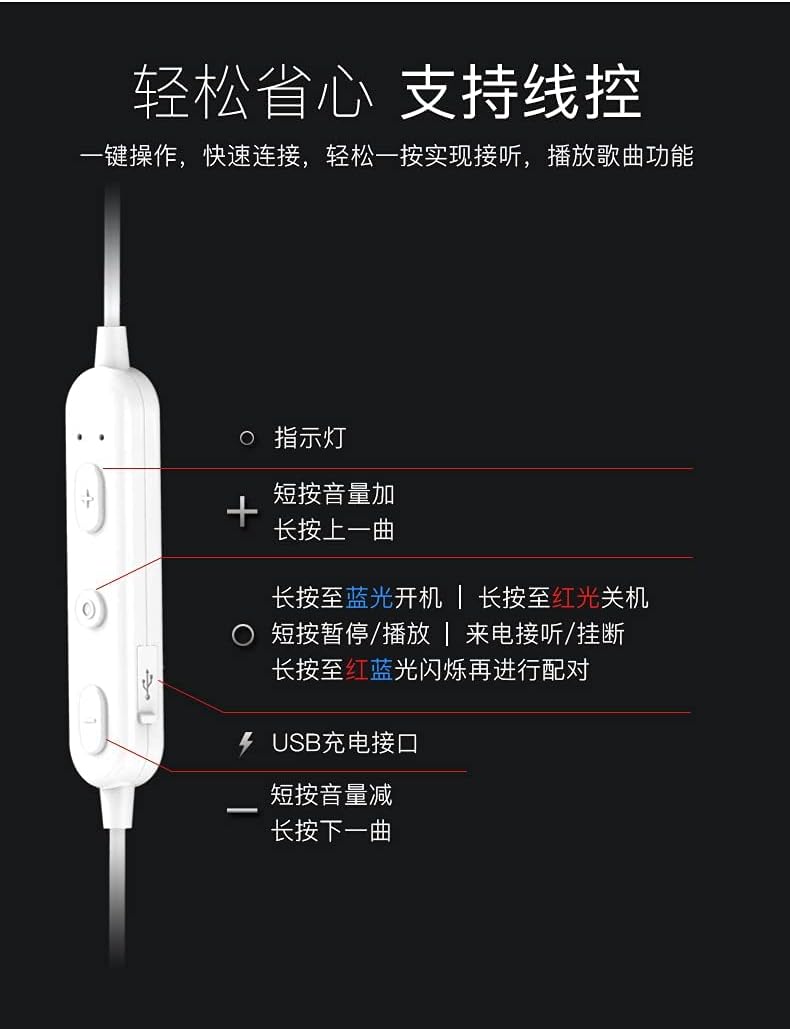
Immagine: Dettagliato view of the earphone control unit, showing the indicator light, volume/track buttons, multi-function button, and USB charging port.
- Spia luminosa: Visualizza lo stato (alimentazione, associazione, ricarica).
- Pulsante '+': Short press for Volume Up; Long press for Previous Track.
- Pulsante multifunzione (centrale): Long press for Power On (blue light) / Power Off (red light); Short press for Play/Pause or Answer/Hang up calls; Long press until red and blue lights flash for Pairing Mode.
- Pulsante '-': Short press for Volume Down; Long press for Next Track.
- Porta di ricarica USB: Per collegare il cavo di ricarica.
Slot per scheda SD
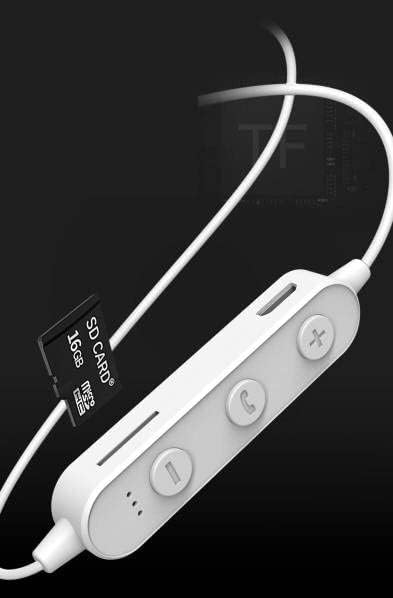
Immagine: Close-up of the control unit showing the SD card slot, indicating direct music playback without a phone. A 64GB card can store approximately 15,000 songs.
The earphones feature an integrated SD card slot, allowing you to play music directly from a memory card without needing a connected device. This is ideal for sports or activities where carrying a phone is inconvenient.
5. Impostazione
5.1 Ricarica degli auricolari
- Connect the USB charging cable to the USB charging port on the earphone control unit.
- Collegare l'altra estremità del cavo USB a un adattatore di alimentazione USB (non incluso) o alla porta USB di un computer.
- The indicator light will typically show a red light during charging and turn off or change color when fully charged.
- Per una carica completa sono necessarie circa 1-2 ore.
5.2 Associazione Bluetooth
- Assicurarsi che gli auricolari siano spenti.
- Press and hold the Multi-function Button (center button) for approximately 5-7 seconds until the indicator light flashes red and blue alternately. This indicates pairing mode.
- On your mobile phone or Bluetooth-enabled device, go to the Bluetooth settings and turn on Bluetooth.
- Cercare available devices. You should see "YESIDO YSP03" or a similar name in the list.
- Select "YESIDO YSP03" to connect. Once successfully paired, the indicator light will typically flash blue slowly or turn off.
- Se viene richiesta una password, immettere "0000".
5.3 Inserimento di una scheda SD
- Locate the SD card slot on the control unit.
- Gently insert a formatted Micro SD card (TF card) with the metal contacts facing down until it clicks into place.
- The earphones will automatically detect the card and switch to SD card playback mode if no Bluetooth device is connected or if Bluetooth is disconnected.
6. Istruzioni per l'uso
6.1 Accensione/spegnimento
- Accensione: Press and hold the Multi-function Button until the blue indicator light appears.
- Spegni: Press and hold the Multi-function Button until the red indicator light appears.
6.2 Riproduzione musicale (modalità Bluetooth)
- Riproduci/Pausa: Premere brevemente il pulsante multifunzione.
- Aumenta volume: Short press the '+' Button.
- Volume basso: Short press the '-' Button.
- Traccia successiva: Premere a lungo il pulsante '-'.
- Traccia precedente: Premere a lungo il pulsante '+'.
6.3 Gestione delle chiamate
- Rispondi/Termina chiamata: Short press the Multi-function Button when an incoming call is received.
- Rifiuta chiamata: Long press the Multi-function Button when an incoming call is received.
- Ricomponi l'ultimo numero: Premere due volte il pulsante multifunzione.
6.4 Riproduzione della scheda SD
- Once an SD card is inserted and detected, the earphones will automatically begin playing music from the card.
- The same controls for Play/Pause, Volume, Next/Previous Track apply as in Bluetooth mode.
7. Manutenzione
- Pulizia: Per pulire gli auricolari, utilizzare un panno morbido e asciutto. Non utilizzare prodotti chimici aggressivi o materiali abrasivi.
- Magazzinaggio: Conservare gli auricolari in un luogo fresco e asciutto, lontano dalla luce solare diretta e da temperature estreme.
- Cura della batteria: To prolong battery life, charge the earphones regularly, even if not in frequent use. Avoid fully discharging the battery for extended periods.
8. Risoluzione Dei Problemi
| Problema | Soluzione |
|---|---|
| Earphones won't power on. | Ensure the earphones are fully charged. Press and hold the Multi-function Button for a longer duration. |
| Impossibile associare il dispositivo. | Ensure earphones are in pairing mode (red and blue flashing light). Turn off and on Bluetooth on your device. Move closer to the earphones. Forget the device in your phone's Bluetooth settings and try pairing again. |
| Nessun suono. | Check volume levels on both earphones and your connected device. Ensure earphones are properly connected via Bluetooth or that the SD card is inserted correctly and contains playable files. |
| La scheda SD non funziona. | Assicurarsi che la scheda SD sia inserita correttamente e contenga audio compatibile files (e.g., MP3). Try re-inserting the card. Ensure no Bluetooth device is actively connected, as SD card playback might be prioritized when Bluetooth is disconnected. |
| Qualità del suono scadente. | Ensure there are no obstructions between the earphones and your device. Move closer to your device. Try a different audio source or file. |
9. Specifiche
| Caratteristica | Dettaglio |
|---|---|
| Marca | YESIDO |
| Numero di modello | YSP03 |
| Colore | Bianco |
| Posizionamento dell'orecchio | In-ear (auricolare) |
| Tecnologia di connettività | Wireless (Bluetooth) |
| Controllo del rumore | Nessuno |
| Dispositivi compatibili | Telefoni cellulari |
| Usi specifici per il prodotto | Sportivi |
| Caratteristica del cavo | Cable-free |
| Livello di resistenza all'acqua | Non resistente all'acqua |
| Tipo di controllo | Controllo vocale |
| Metodo di controllo | App (Voice Control implies app integration for some functions) |
Prestazioni della batteria

Immagine: Visual representation of battery performance metrics for the YESIDO YSP03 earphones.
- Tempo di riproduzione musicale: Circa 9 ore
- Headphone Standby Time: Circa 120 ore
- Durata della chiamata: Circa 7.5 ore
*Note: These data are obtained from YESIDO laboratory tests, and slight deviations may occur due to changes in objective environment and usage patterns.
10. Garanzia e supporto
10.1 Informazioni sulla garanzia
This product is provided without an explicit warranty. Please refer to your retailer's return policy for any issues within the applicable return period.
10.2 Assistenza clienti
For further assistance or inquiries, please contact the retailer where you purchased the product. You may also visit the official YESIDO website for general product information and potential support resources.