
1. Introduzione
This manual provides essential instructions for the safe and efficient operation of your Lenco DIR-250 Internet Radio. Please read this manual thoroughly before using the device and retain it for future reference. The Lenco DIR-250 is a versatile audio system offering Internet Radio, DAB+, FM radio, Bluetooth connectivity, Spotify Connect, and USB playback.
2. Informazioni sulla sicurezza
- Non esporre l'unità alla pioggia o all'umidità per evitare incendi o scosse elettriche.
- Assicurare una ventilazione adeguata. Non ostruire le aperture di ventilazione.
- Utilizzare solo l'alimentatore fornito con l'unità.
- Non aprire il casing. Affidare tutti gli interventi di manutenzione a personale qualificato.
- Tenere l'unità lontana dalla luce solare diretta, da fonti di calore e da forti campi magnetici.
- Evitare di posizionare oggetti pesanti sopra l'unità.
3. Contenuto della confezione
Verificare che tutti gli articoli siano presenti al momento del disimballaggio:
- Lenco DIR-250 Internet Radio Unit
- Adattatore di alimentazione
- Telecomando
- Manuale dell'utente (questo documento)
- Antennas (2 included)
4. Prodotto finitoview

Figura 4.1: Davanti view of the Lenco DIR-250 Internet Radio and its remote control.

Figura 4.2: Close-up of the right side of the front panel, featuring the TFT LCD display, volume control knob, Dimmer, and Alarm buttons.
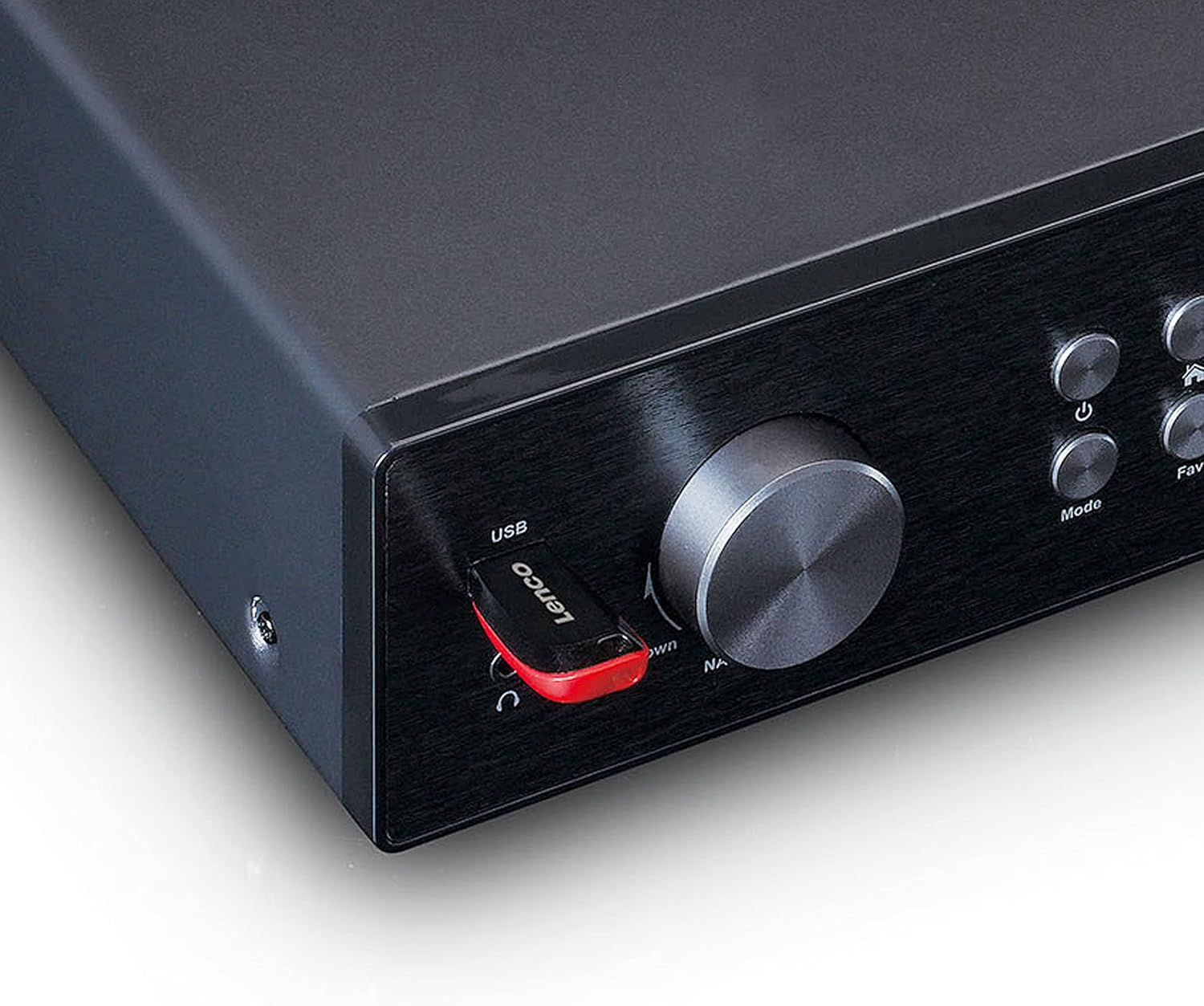
Figura 4.3: Close-up of the left side of the front panel, showing the USB port, headphone jack, Navigate/OK knob, Mode, and Favorite buttons.

Figura 4.4: Rear panel connections, including DC IN, Audio Output (RCA), Analog Input/Output, Optical Output, Coaxial Output, LAN (RJ45), and Antenna ports.
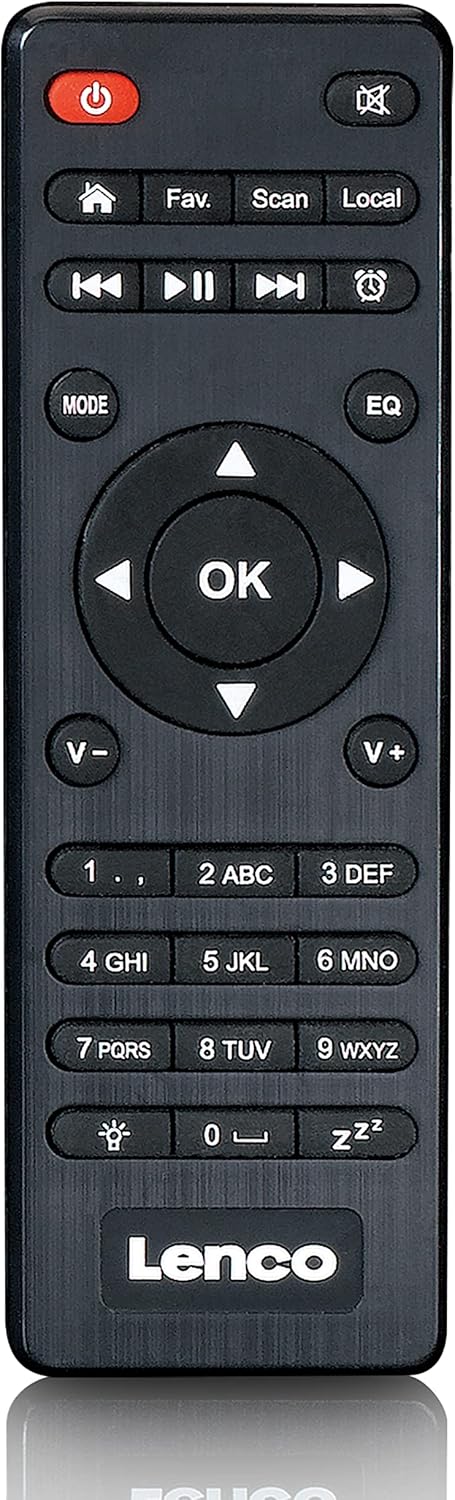
Figura 4.5: The included remote control for convenient operation of the Lenco DIR-250.
5. Impostazione
5.1. Collegamento elettrico
- Connect the supplied power adapter to the DC IN port on the rear of the unit.
- Collegare l'adattatore di corrente a una presa a muro.
5.2. Collegamento dell'antenna
For optimal reception of DAB+ and FM radio, connect the provided antennas to their respective ports on the rear panel. Extend the telescopic antenna fully for best results.
5.3. Connessione di rete
The DIR-250 supports both Wi-Fi and Ethernet connections for Internet Radio and Spotify Connect.
- Wifi: Upon first power-on, the unit will guide you through the Wi-Fi setup. Select your network from the list and enter the password using the navigation knob and OK button, or the remote control.
- Collegamento Ethernet: Connect an Ethernet cable from your router to the LAN port on the rear of the unit. The device will automatically detect the wired connection.
5.4. Installazione guidata iniziale
The first time you power on the DIR-250, an initial setup wizard will appear on the display. Follow the on-screen prompts to configure language, time, date, and network settings. This ensures the device is ready for use.
6. Operativo
6.1. Controlli di base
The DIR-250 can be operated using the front panel controls or the included remote control.
- Pulsante di accensione: Turns the unit on/off or puts it into standby mode.
- Manopola del volume: Ruota per regolare il volume. Premi per disattivare/riattivare l'audio.
- Navigate/OK Knob: Rotate to scroll through menus and options. Press to confirm a selection.
- Pulsante Modalità: Cycles through available modes (Internet Radio, DAB+, FM, Bluetooth, USB, AUX).
- Fav. Button: Accesses your list of favorite stations or saves the current station as a favorite.
- Pulsante dimmer: Regola la luminosità del display.
- Pulsante di allarme: Sets or manages alarms.
6.2. Radio Internet
Access thousands of radio stations worldwide via your internet connection.
- Premere il tasto Modalità pulsante fino a selezionare "Radio Internet".
- Utilizzare il Navigate/OK knob or remote control to browse stations by location, genre, or search.
- Premere OK per selezionare una stazione.
- Per salvare una stazione come preferita, tenere premuto il tasto preferito pulsante.
6.3. Radio DAB+
Goditi trasmissioni radiofoniche digitali di alta qualità.
- Premere il tasto Modalità button until "DAB+" is selected.
- La radio cercherà automaticamente le stazioni DAB+ disponibili.
- Utilizzare il Navigate/OK knob or remote to select a station from the list.
6.4. Radio FM
Sintonizzati sulle stazioni radio FM analogiche tradizionali.
- Premere il tasto Modalità button until "FM" is selected.
- Utilizzare il Scansione pulsante sul telecomando o sul Navigate/OK manopola per cercare le stazioni.
- Premere OK to listen to a selected station.
6.5. Modalità Bluetooth
Riproduci in streaming l'audio in modalità wireless dal tuo smartphone, tablet o altri dispositivi abilitati Bluetooth.
- Premere il tasto Modalità button until "Bluetooth" is selected. The display will show "Pairing".
- On your external device, enable Bluetooth and search for "Lenco DIR-250".
- Select the device to pair. Once connected, you can play audio from your device through the radio.
6.6. Connessione Spotify
Controlla la tua musica direttamente dall'app Spotify sul tuo smartphone o tablet.
- Ensure your Lenco DIR-250 and your smartphone/tablet are connected to the same Wi-Fi network.
- Apri l'app Spotify sul tuo dispositivo.
- Riproduci un brano e tocca l'icona "Dispositivi disponibili" (solitamente un'icona di un altoparlante o di un computer).
- Select "Lenco DIR-250" from the list of available devices.
6.7. Riproduzione USB
Riproduci audio files (MP3, WAV, AAC) from a USB flash drive.
- Inserire una chiavetta USB nella porta USB sul pannello frontale.
- Premere il tasto Modalità pulsante fino a selezionare "USB".
- Utilizzare il Navigate/OK knob or remote to browse and select audio files.
6.8. Ingresso AUX
Collegare dispositivi audio esterni tramite un cavo audio da 3.5 mm.
- Connect your external audio device to the AUX IN port on the rear panel.
- Premere il tasto Modalità pulsante fino a selezionare "AUX".
- Riproduci l'audio dal tuo dispositivo connesso.
6.9. Sveglia e timer di spegnimento
Set alarms to wake up to your favorite radio station or use the sleep timer to automatically turn off the radio.
- Allarme: Premere il tasto Allarme button on the front panel or remote. Follow the on-screen instructions to set alarm time, source, and volume.
- Sveglia: Premere il tasto Sonno button on the remote control repeatedly to cycle through available sleep timer durations (e.g., 15, 30, 60 minutes, Off).
7. Manutenzione
7.1. Pulizia
To clean the unit, wipe it with a soft, dry cloth. Do not use abrasive cleaners, waxes, or solvents as these may damage the surface. Ensure the unit is unplugged before cleaning.
7.2. Conservazione
If you plan not to use the unit for an extended period, unplug it from the power outlet and store it in a cool, dry place, away from direct sunlight and extreme temperatures.
8. Risoluzione Dei Problemi
| Problema | Possibile causa | Soluzione |
|---|---|---|
| Nessun potere | Adattatore di alimentazione non collegato o presa difettosa. | Controllare i collegamenti elettrici. Provare una presa diversa. |
| Nessun suono | Volume too low, muted, or incorrect input selected. | Increase volume. Check if muted. Select correct input mode. |
| Impossibile connettersi al Wi-Fi | Password errata, fuori portata o problema con il router. | Verificare la password Wi-Fi. Avvicinare l'unità al router. Riavviare il router. |
| Buffering/disconnessione della radio Internet | Weak Wi-Fi signal or slow internet connection. | Improve Wi-Fi signal strength. Check internet speed. Try wired Ethernet connection. |
| Scarsa ricezione DAB+/FM | Antenna non collegata o estesa correttamente. | Ensure antennas are fully extended and positioned for best reception. |
| Problemi di associazione Bluetooth | Dispositivo non in modalità di associazione o già associato a un altro dispositivo. | Ensure DIR-250 is in Bluetooth mode. Disconnect from other devices. |
| L'unità si blocca o non risponde più | Problema temporaneo del software. | Unplug the power adapter, wait 10 seconds, then plug it back in to restart the unit. |
9. Specifiche
| Marca | Lenco |
| Numero di modello | A004231 |
| Tecnologia di visualizzazione | LCD |
| Connettività | Bluetooth V5.0, Ethernet (RJ45), Wi-Fi |
| Bande radio supportate | Radio Internet, DAB+, FM |
| Caratteristiche speciali | Spotify Connect, USB Playback, Alarm, Sleep Timer |
| Dimensioni (L x P x A) | Dimensioni: 43 x 28.7 x 7.2 cm |
| Peso | 1.5 chilogrammi |
| Fonte di alimentazione | Wired (AC Adapter) |
| Dispositivi compatibili | Tablet, Smartphone, USB storage devices |
10. Garanzia
This product comes with a manufacturer's warranty of 24 months from the date of purchase. Please retain your proof of purchase for warranty claims. The warranty covers defects in materials and workmanship under normal use. It does not cover damage caused by misuse, accidents, unauthorized modifications, or normal wear and tear.
11. Supporto
For technical support, service, or further inquiries regarding your Lenco DIR-250 Internet Radio, please visit the official Lenco website or contact their customer service department. Contact information can typically be found on the Lenco websito o nella documentazione di garanzia allegata al prodotto.
Lenco Official Websito: www.lenco.com