
Introduzione
This manual provides essential information for the safe and efficient operation of your QFX SBX-213 12-inch Portable Bluetooth Speaker. Please read it thoroughly before using the product and retain it for future reference.
Istruzioni di sicurezza
Per garantire un funzionamento sicuro ed evitare danni, osservare le seguenti precauzioni di sicurezza:
- Non esporre l'unità a pioggia, umidità o temperature estreme.
- Non aprire l'altoparlante casing. Affidare tutti gli interventi di manutenzione a personale qualificato.
- Keep the speaker away from heat sources, direct sunlight, and open flames.
- Use only the specified power adapter and charging cable provided with the unit.
- Assicurare una ventilazione adeguata attorno all'altoparlante per evitare il surriscaldamento.
- Evitare di posizionare oggetti pesanti sull'altoparlante.
Contenuto della confezione
Dopo aver disimballato, verificare che tutti gli articoli elencati di seguito siano presenti e in buone condizioni:
- QFX SBX-213 Portable Bluetooth Speaker
- Cavo di alimentazione
- Telecomando
- Manuale dell'utente (questo documento)
Prodotto finitoview
The QFX SBX-213 is a 12-inch portable speaker designed for versatile audio playback. It features Bluetooth connectivity for wireless streaming, an FM radio tuner, and a USB input for playing audio fileda una chiavetta USB.
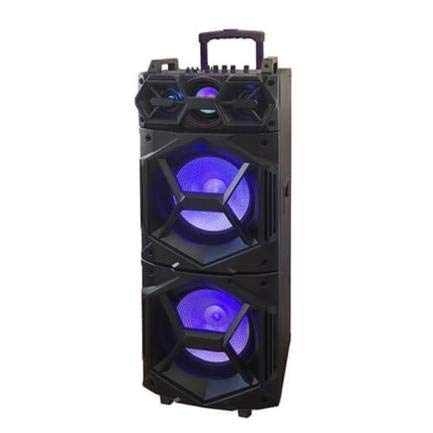
Immagine: Frontale view of the QFX SBX-213 Portable Bluetooth Speaker, showcasing its 12-inch driver and robust design. The speaker features a black finish and a protective grille over the main driver.
The speaker's control panel and ports typically include:
- Interruttore di accensione/spegnimento
- Mode Button (to switch between Bluetooth, FM, USB inputs)
- Volume Control Knobs or Buttons
- Play/Pause, Previous/Next Track Buttons
- Porta USB per la riproduzione multimediale
- Charging Port for power cable connection
- LED Indicator Lights for power, charging, and Bluetooth status
Impostare
- Ricarica dell'altoparlante: Before first use, connect the provided power cable to the speaker's charging port and plug it into a standard electrical outlet. Allow the speaker to fully charge. The charging indicator light will typically change color or turn off when charging is complete.
- Posizionamento: Place the speaker on a stable, flat surface. For optimal sound dispersion, avoid placing it in enclosed spaces or directly against walls.
Istruzioni per l'uso
1. Accensione/spegnimento
To power on the speaker, locate the power switch, usually on the back or side panel, and slide it to the "ON" position. To power off, slide the switch to the "OFF" position.
2. Accoppiamento Bluetooth
- Accendi l'altoparlante. In genere, entrerà automaticamente in modalità di associazione Bluetooth, indicata da una luce LED lampeggiante e da un segnale acustico.
- Abilita il Bluetooth sul tuo dispositivo mobile (smartphone, tablet, ecc.).
- Cercare available Bluetooth devices. You should see "QFX SBX-213" or a similar name in the list.
- Select the speaker to pair. Once connected, you will hear a confirmation sound, and the LED indicator will stop flashing.
- Ora puoi riprodurre l'audio dal tuo dispositivo tramite l'altoparlante.
3. Funzionamento della radio FM
- Press the "MODE" button on the speaker or remote control until "FM" mode is selected.
- Press the "Play/Pause" button to initiate an automatic scan for FM stations. The speaker will save all found stations.
- Use the "Previous/Next Track" buttons to navigate between saved FM stations.
4. Riproduzione USB
- Inserire una chiavetta USB contenente audio MP3 filenella porta USB dell'altoparlante.
- Press the "MODE" button until "USB" mode is selected. The speaker will automatically begin playing audio files dall'unità USB.
- Utilizzare i pulsanti "Riproduci/Pausa" e "Traccia precedente/successiva" per controllare la riproduzione.
5. Controllo del volume
Adjust the master volume using the dedicated volume knob or buttons on the speaker. You can also control the volume from your connected Bluetooth device or the remote control.
Manutenzione
- Pulizia: Use a soft, dry cloth to clean the speaker's exterior. Do not use abrasive cleaners, waxes, or solvents, as these may damage the finish.
- Magazzinaggio: Quando non viene utilizzato per lunghi periodi, conservare l'altoparlante in un luogo fresco e asciutto, lontano dalla luce solare diretta e da temperature estreme.
- Cura della batteria: To prolong battery life, avoid fully discharging the battery frequently. Charge the speaker regularly, even if not in use for long periods, to maintain battery health.
Risoluzione dei problemi
If you encounter any issues with your QFX SBX-213 speaker, please refer to the following table for common problems and solutions:
| Problema | Possibile causa | Soluzione |
|---|---|---|
| Nessun potere | Battery discharged; Power cable not connected securely | Charge the speaker fully; Ensure power cable is securely connected to both the speaker and the power outlet. |
| Nessuna connessione Bluetooth | Bluetooth not enabled on device; Speaker not in pairing mode; Device too far from speaker | Enable Bluetooth on your device; Put the speaker into Bluetooth pairing mode; Move your device closer to the speaker (within 10 meters). |
| Nessuna uscita audio | Volume too low; Incorrect mode selected; Device or speaker is muted | Increase the volume on both the speaker and your connected device; Press the MODE button to select the correct input (Bluetooth, USB, FM); Check if the speaker or device is muted. |
| Radio FM statica o scarsa ricezione | Segnale debole; Interferenza | Relocate the speaker to an area with better reception; Perform an auto-scan for stations again; Avoid placing near other electronic devices that may cause interference. |
Specifiche
- Marca: QFX
- Modello: SBX-213
- Dimensioni altoparlante: 12 pollici
- Tecnologia di connettività: USB, Bluetooth
- Caratteristiche speciali: Lightweight, Portable, FM Radio
- Tipo di montaggio: Floor, Table Mount
- Tipo di controller: Telecomando
- Fonte di energia: Cavo elettrico
- Dimensioni (A x L x P): Circa 113 x 42 x 42 cm
- Peso: Circa 4 kg
- Codice UPC: 606540036341
- ASIN: B08GL3SHQP
Garanzia e supporto
QFX products are designed for reliability and performance. For detailed warranty information or technical support, please refer to the warranty card included with your purchase or visit the official QFX websito. Conservare la prova d'acquisto per eventuali reclami in garanzia.
For further assistance, please contact QFX customer service through their official channels.