
1. Introduzione
This manual provides detailed instructions for the installation, operation, and maintenance of the TSL LTS CMIP8342W-M Platinum Network Mini Bullet IP Camera. Please read this manual thoroughly before using the product to ensure proper setup and optimal performance. Keep this manual for future reference.
2. Prodotto finitoview
The TSL LTS CMIP8342W-M is a 4MP High Definition Network Mini Bullet IP Camera designed for robust surveillance. It offers clear imaging up to 2560x1520 at 30 frames per second with a 4mm fixed lens. Key features include True WDR 120dB for balanced images in varying light conditions, Matrix IR 2.0 for night vision up to 100 feet, and support for H.265/H.264 video compression. The camera is WEATHERPROOF IP67 rated, making it suitable for both indoor and outdoor use, and includes a MicroSD slot for local storage up to 128GB. It supports both DC 12V and Power over Ethernet (PoE) for flexible power options. Advanced Video Content Analytics (VCA) features such as Line Crossing, Intrusion Detection, and Face Detection enhance its surveillance capabilities.
- Risoluzione: 4MP - Image Sensor 1/3” sensor - True WDR 120dB
- Lente: 4mm @F1.6: horizontal FOV: 83°, vertical FOV: 45°, diagonal FOV: 99°
- Compressione video: Main stream: H.265/H.264; Sub-stream: H.265/H.264/MJPEG; Third stream: H.265/H.264
- Frequenza dei fotogrammi: 60Hz: 15fps (2048 x 1536), 30fps (1920 × 1080), 30fps (1280 x 720); 50Hz: 12.5fps (2048 x 1536), 25fps (1920 × 1080), 25fps (1280 x 720)
- Risoluzione massima: 2688 × 1520 - WEATHERPROOF IP67
3. Informazioni sulla sicurezza
- Garantire l'alimentazione voltage is correct before connecting the camera.
- Non esporre la fotocamera a temperature estreme, umidità o ambienti corrosivi.
- Evitare di puntare l'obiettivo della fotocamera direttamente verso fonti di luce intensa per periodi prolungati.
- Handle the camera with care. Do not drop or subject it to strong physical shocks.
- Utilizzare solo gli accessori specificati dal produttore.
- L'installazione e la manutenzione devono essere eseguite da personale qualificato.
4. Contenuto della confezione
Verificare che tutti gli articoli siano presenti e in buone condizioni all'apertura della confezione:
- TSL LTS CMIP8342W-M IP Camera
- Viti di montaggio e tasselli
- Connettore impermeabile per cavo Ethernet
- Guida rapida
- Modello di perforazione (se applicabile)
Note: A power adapter (DC 12V) may be sold separately or included depending on the specific package. An Ethernet cable is required for network connection.
5. Impostazione
5.1 Installazione fisica
- Scegli una posizione di montaggio: Selezionare una posizione che fornisca il campo desiderato di view and is within range of power and network connections. Ensure the surface is strong enough to support the camera.
- Montare la fotocamera: Use the provided drill template to mark and drill holes. Secure the camera base to the wall or ceiling using the mounting screws and wall plugs.
- Regola l'angolazione della telecamera: Loosen the adjustment screws on the camera body to position the lens for optimal coverage. Tighten the screws once the desired angle is achieved.
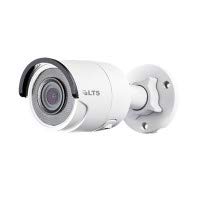
Figura 5.1: Fronte view of the TSL LTS CMIP8342W-M Platinum Network Mini Bullet IP Camera, showing the lens and IR illuminators.
5.2 Alimentazione e connessione di rete
- Collegamento elettrico:
- PoE (Alimentazione tramite Ethernet): If using a PoE-enabled switch or NVR, connect an Ethernet cable from the camera's RJ45 port directly to the PoE port. No separate power adapter is needed.
- Alimentazione CC 12V: If not using PoE, connect a 12V DC power adapter (not included) to the camera's power input port.
- Connessione di rete: Connect an Ethernet cable from the camera's RJ45 port to your network switch or router. Use the waterproof connector for outdoor installations to protect the RJ45 connection.
- Installazione della scheda MicroSD (facoltativa): If local storage is desired, carefully open the MicroSD card slot cover (refer to the camera diagram in the quick start guide) and insert a MicroSD card (up to 128GB) with the contacts facing down. Close the cover securely.
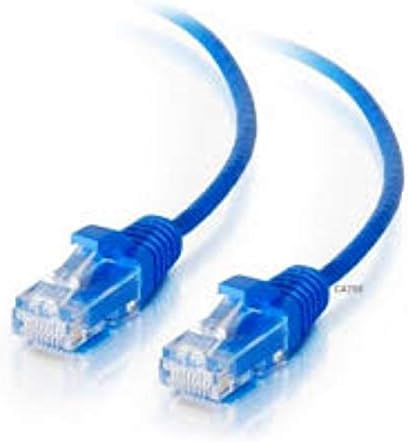
Figura 5.2: lato view of the TSL LTS CMIP8342W-M Platinum Network Mini Bullet IP Camera, illustrating the mounting bracket and cable connections.
5.3 Configurazione iniziale
- Scopri la fotocamera: Use the manufacturer's IP camera search tool (e.g., SADP Tool) on a computer connected to the same network to find the camera's IP address.
- Attiva la fotocamera: For first-time use, you may need to activate the camera by setting a strong password.
- Accesso Web Interfaccia: Aprire un web browser and enter the camera's IP address. Log in with the newly set password.
- Impostazioni di rete: Configure network settings (e.g., static IP, DHCP) as needed for your network environment.
- Data e ora: Set the correct date and time, preferably using NTP (Network Time Protocol) for synchronization.
6. Operativo
6.1 Vivere View e Registrazione
Once configured, access the camera's live view attraverso il web interface, a compatible NVR, or a mobile application. From the live view, puoi:
- Monitora il feed video in tempo reale.
- Manually start/stop recordings.
- Scatta delle istantanee.
- Adjust image parameters (brightness, contrast, saturation).
6.2 Funzionalità avanzate
- True WDR 120dB: Enable Wide Dynamic Range in settings to improve image clarity in scenes with both very bright and very dark areas.
- Matrix IR 2.0: The camera automatically activates its infrared illuminators in low-light conditions for night vision.
- Rilevamento del movimento: Configure motion detection zones and sensitivity. Set up actions such as recording, sending notifications, or triggering alarms upon detection.
- VCA (Analisi dei contenuti video): Utilize Line Crossing Detection, Intrusion Detection, and Face Detection features by defining specific rules and areas in the camera's settings.
- Registrazione su scheda SD: Configure continuous, scheduled, or event-triggered recording to the installed MicroSD card.
7. Manutenzione
- Pulizia: Regularly clean the camera lens with a soft, dry cloth. For stubborn dirt, use a mild lens cleaning solution. Do not use harsh chemicals.
- Aggiornamenti del firmware: Controllare il produttore website periodically for firmware updates. Updating firmware can improve performance, add new features, and fix bugs. Follow the provided instructions carefully during the update process.
- Gestione della memoria: If using a MicroSD card, regularly back up important recordings and format the card periodically to maintain optimal performance.
- Ispezione dei cavi: Periodically inspect all cables and connections for wear, damage, or corrosion, especially in outdoor installations.
8. Risoluzione Dei Problemi
| Problema | Possibile causa | Soluzione |
|---|---|---|
| Nessuna alimentazione alla telecamera | Loose power connection, faulty power adapter/PoE switch, power outage. | Check all power connections. Verify power adapter/PoE switch is functioning. Restore power. |
| Nessuna immagine sullo schermo | Network connection issue, incorrect IP address, camera not activated, software/browser issue. | Verify network cable is connected. Check camera's IP address. Ensure camera is activated and logged in. Try a different browser or client software. |
| Scarsa qualità dell'immagine | Dirty lens, incorrect focus, low bandwidth, improper settings (WDR, exposure). | Clean the lens. Adjust focus if applicable. Check network bandwidth. Adjust image settings in the web interfaccia. |
| Impossibile accedere alla telecamera tramite la rete | Incorrect IP address, network configuration mismatch, firewall blocking. | Use the discovery tool to find the correct IP. Ensure camera and computer are on the same subnet. Check firewall settings on your computer or router. |
| La scheda SD non registra | SD card full, faulty SD card, incorrect recording schedule, SD card not formatted. | Check SD card status in settings. Replace faulty card. Verify recording schedule. Format the SD card via the camera's web interfaccia. |
9. Specifiche
| Caratteristica | Specificazione |
|---|---|
| Numero di modello | CMIP8342W-M |
| Risoluzione di acquisizione video | 4 MP |
| Risoluzione fissa efficace | 4 MP |
| Lente | 4 mm a F1.6 |
| Frequenza dei fotogrammi | 30 fps (max) |
| Gamma di visione notturna | 100 piedi |
| Tecnologia a bassa luminosità | Colore notturno |
| Vero WDR | 120 dB |
| Compressione video | H.265, H.265+, H.264, H.264+, MJPEG |
| Slot per MicroSD | Fino a 128 GB |
| Alimentazione elettrica | CC 12V, PoE |
| Valutazione internazionale di protezione | Grado di protezione IP67 |
| Tipo di montaggio | Montaggio a parete |
| Fattore di forma | Proiettile |
| Tecnologia di connettività | Cablato (Ethernet) |
| Uso interno/esterno | Interno, Esterno |
| Tipo di avviso | Motion Only (VCA: Line Crossing, Intrusion Detection, Face Detection) |
10. Garanzia e supporto
For warranty information and technical support, please refer to the official TSL webo contattare il rivenditore autorizzato. Conservare la ricevuta d'acquisto come prova d'acquisto per eventuali reclami in garanzia.
Produttore: LTS
Marca: TSL