
1. Introduzione
This manual provides detailed instructions for the proper use and maintenance of your LEAP PC3860 Stopwatch. Please read this manual thoroughly before operating the device to ensure optimal performance and longevity. This stopwatch is designed for accurate timekeeping in various activities, including sports, laboratory work, and other events requiring precise timing.
2. Prodotto finitoview
The LEAP PC3860 Stopwatch features a clear digital display and multiple functions for versatile time measurement. It is equipped with a durable casing and a lanyard for convenient portability.

Immagine 1: anteriore view of the LEAP PC3860 Stopwatch, showing the digital display and control buttons. A black lanyard is attached to the bottom.
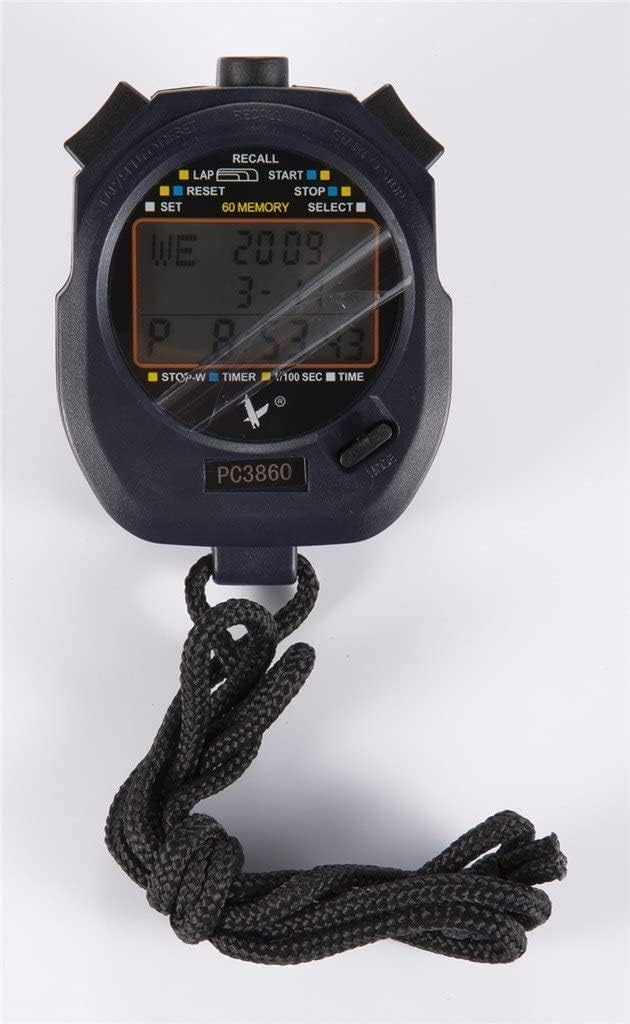
Immagine 2: Primo piano view of the LEAP PC3860 Stopwatch display, highlighting the various indicators for LAP, START, STOP, RESET, SELECT, SET, and 60 MEMORY functions.
Componenti chiave:
- Display: Digital screen showing time, lap, split, and other mode information.
- Pulsante AVVIO/ARRESTO: Initiates and pauses timing.
- Pulsante LAP/RESET: Records lap times and resets the stopwatch.
- MODE/SELECT Button: Switches between different operating modes and selects settings.
- Pulsante IMPOSTA: Used for adjusting time and date in Modalità Ora.
- Pulsante RICHIAMO: Accesses stored memory records.
- Cordino: Per un trasporto sicuro.
3. Impostazione
3.1 Accensione iniziale
Upon first use, or after a battery replacement, the stopwatch may require initial setup. Remove any protective film from the display.
3.2 Impostazione di data e ora
- Premere il tasto MODALITÀ/SELEZIONA button repeatedly until the stopwatch is in Modalità Ora (displaying the current time).
- Premere e tenere premuto il tasto IMPOSTATO finché le cifre dell'ora non iniziano a lampeggiare.
- Utilizzare il AVVIO/ARRESTO pulsante per regolare la cifra lampeggiante (ore, minuti, secondi).
- Utilizzare il GIRO/RESET pulsante per passare alla cifra o all'impostazione successiva (ad esempio, mese, giorno, anno).
- Ripetere i passaggi 3 e 4 finché non saranno configurate tutte le impostazioni desiderate.
- Premere il tasto IMPOSTATO di nuovo il pulsante per uscire dalla modalità di impostazione.
4. Istruzioni per l'uso
4.1 Modalità di commutazione
Premere il tasto MODALITÀ/SELEZIONA pulsante per scorrere le modalità disponibili: Modalità Ora, Modalità cronometro, E Modalità timer.
4.2 Stopwatch Mode (Timing Events)
- Ensure the stopwatch is in Modalità cronometro. The display will typically show '00:00:00'.
- Premere il tasto AVVIO/ARRESTO pulsante per iniziare il cronometraggio.
- To pause the timing, press the AVVIO/ARRESTO button again. The time will freeze on the display.
- To resume timing from the paused point, press the AVVIO/ARRESTO pulsante ancora una volta.
- To stop and finalize the timing, press the AVVIO/ARRESTO pulsante.
- Per azzerare il cronometro, premere il tasto GIRO/RESET pulsante mentre il cronometro è fermo.
4.3 Lap and Split Timing
The PC3860 stopwatch supports lap and split timing, allowing you to record intermediate times during an event.
- In Modalità cronometro, premere il tasto AVVIO/ARRESTO pulsante per iniziare il cronometraggio.
- Per registrare un tempo sul giro, premere il tasto GIRO/RESET button while the stopwatch is running. The lap time will be displayed briefly, and the main timer will continue running in the background.
- Repeat step 2 for subsequent laps. The stopwatch can store up to 60 lap/split records.
- Per interrompere il cronometraggio complessivo, premere il tasto AVVIO/ARRESTO pulsante.
- A view recorded lap and split times, press the RICHIAMO pulsante. Utilizzare il AVVIO/ARRESTO E GIRO/RESET pulsanti per navigare tra i record memorizzati.
- Premere il tasto RICHIAMO button again to exit memory recall mode.
- To clear all stored memory, ensure the stopwatch is stopped and not in recall mode, then press and hold the GIRO/RESET pulsante.
4.4 Timer Mode (Countdown)
- Premere il tasto MODALITÀ/SELEZIONA button until you reach Modalità timer. The display will show a countdown time, or '00:00:00' if not set.
- Per impostare il conto alla rovescia, tenere premuto il tasto IMPOSTATO finché le cifre non lampeggiano.
- Utilizzare il AVVIO/ARRESTO pulsante per regolare la cifra lampeggiante (ore, minuti, secondi).
- Utilizzare il GIRO/RESET pulsante per passare alla cifra successiva.
- Premere il tasto IMPOSTATO button again to confirm the countdown time.
- Premere il tasto AVVIO/ARRESTO pulsante per avviare il conto alla rovescia.
- Per mettere in pausa il conto alla rovescia, premere il tasto AVVIO/ARRESTO pulsante. Premere di nuovo per riprendere.
- When the countdown reaches zero, an alarm will sound (if enabled).
- To reset the timer to the preset time, press the GIRO/RESET button while the timer is stopped.
5. Manutenzione
5.1 Pulizia
To clean the stopwatch, use a soft, dry cloth. For stubborn dirt, a slightly damp cloth with mild soap can be used, followed by immediate drying. Avoid using abrasive cleaners, solvents, or harsh chemicals, as these can damage the display or casing.
5.2 Conservazione
Store the stopwatch in a cool, dry place away from direct sunlight and extreme temperatures. If storing for an extended period, consider removing the battery to prevent leakage, although specific battery type information is not provided.
5.3 Sostituzione della batteria
When the display becomes dim or unresponsive, the battery may need replacement. This typically requires opening the back casing of the stopwatch. It is recommended to have battery replacement performed by a qualified technician to avoid damaging the internal components or compromising water resistance (if applicable).
6. Risoluzione Dei Problemi
- Il display è vuoto o poco luminoso:
Check the battery. If the battery is low, replace it. Ensure the stopwatch is not exposed to extreme cold, which can temporarily affect LCD performance. - I pulsanti non rispondono:
Try resetting the stopwatch by removing and reinserting the battery (if accessible). Ensure no debris is lodged around the buttons. - Ora/data errate:
Per reimpostare l'ora e la data, seguire le istruzioni nella Sezione 3.2. - Stopwatch not timing accurately:
Ensure the stopwatch is in Modalità cronometro and has been reset before starting a new timing session. If issues persist, contact customer support.
7. Specifiche
| Caratteristica | Dettaglio |
|---|---|
| Marca | SALTO |
| Numero di modello | PC3860 (19280086-101) |
| Tipo di visualizzazione | Digitale |
| Materiale | Fiber, Metal |
| Peso | 0.09 chilogrammi |
| Dimensioni del pacco | Dimensioni: 17.78 x 10.16 x 3.05 cm |
| Caratteristica speciale | Stopwatch, 60 Memory |
| Codice UPC | 748079196933 |
8. Garanzia e supporto
LEAP products are manufactured to high-quality standards. For information regarding warranty coverage, please refer to the warranty card included with your purchase or contact the retailer where the product was acquired. For technical support or further assistance, please reach out to the official LEAP customer service channels, typically found on the product packaging or the brand's official websito.