
1. Introduzione
Thank you for choosing the KZ Zax 16-Unit Hybrid In-Ear Monitors. These high-fidelity earphones are engineered for musicians, audiophiles, and anyone seeking precise audio reproduction and comfortable wear. Featuring a sophisticated hybrid driver configuration and a detachable cable system, the KZ Zax delivers exceptional sound quality and versatility.

Figura 1: generale view of KZ Zax In-Ear Monitors.
2. Impostazione
2.1 Collegamento del cavo staccabile
- Identify the left (L) and right (R) earpieces and cable connectors. The connectors are typically marked.
- Align the 0.75mm 2PIN connector on the cable with the corresponding port on the earpiece. Ensure correct orientation to avoid damage.
- Gently push the connector firmly into the earpiece port until it clicks into place. Do not force the connection.
- Ripetere l'operazione per l'altro auricolare.
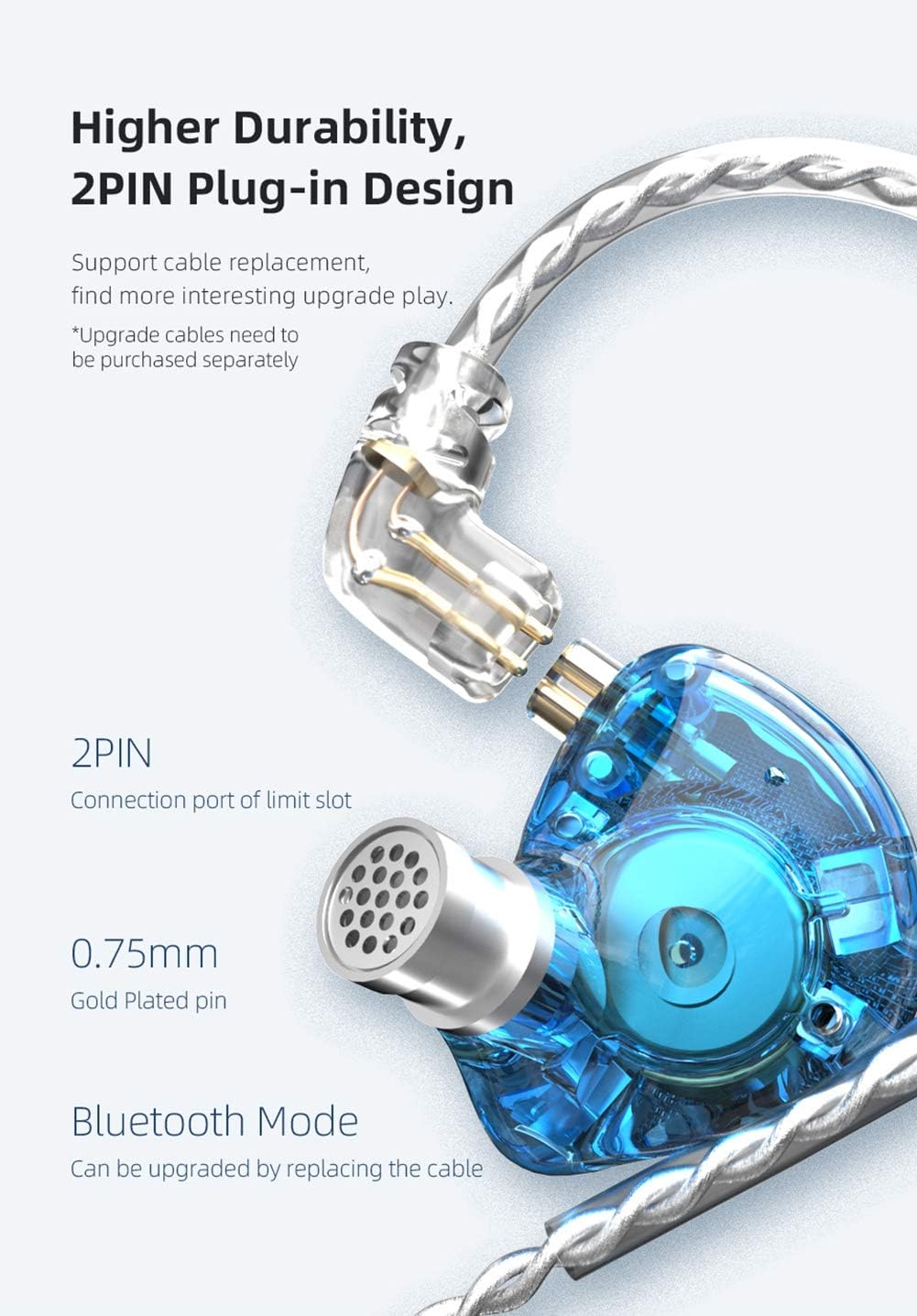
Figura 2: dettagliata view of the 2PIN detachable cable connection.
2.2 Scelta degli auricolari
The KZ Zax comes with various ear tip sizes to ensure optimal comfort and sound isolation. Experiment with different sizes to find the best fit for your ears. A proper seal is crucial for achieving the intended sound quality and bass response.
2.3 Indossamento corretto
The KZ Zax features an ear-hook design for secure and comfortable wear. Gently loop the cable over your ear, positioning the earpiece snugly into your ear canal. The pre-formed ear hooks help keep the earphones in place during movement, reducing microphonics and ensuring a stable fit.

Figure 3: Proper wearing of the KZ Zax In-Ear Monitors.
3. Istruzioni per l'uso
3.1 Riproduzione audio
Connect the 3.5mm plug of the cable to your audio source (e.g., smartphone, digital audio player, computer). Ensure the volume is set to a low level before playing audio to prevent sudden loud sounds.
3.2 Media Control (for versions with inline microphone/controls)
Note: This specific product variant is without a microphone. The following instructions apply to KZ Zax models equipped with an inline microphone and media controls.
- Riproduci/Pausa: Short press the control button once.
- Prossima canzone: Fare doppio clic sul pulsante di controllo.
- Canzone precedente: Triple-click the control button.
- Rispondi/Chiudi chiamata: Short press the control button once during an incoming call or active call.
- Rifiuta chiamata: Premere a lungo il pulsante di controllo durante una chiamata in arrivo.

Figure 4: Inline microphone and control button (if applicable).
3.3 Bluetooth Upgrade (Optional)
The detachable cable system allows for an optional upgrade to a Bluetooth module (sold separately). This enables wireless connectivity, offering greater freedom of movement. Refer to the Bluetooth module's specific instructions for pairing and operation.
4. Manutenzione
4.1 Pulizia
- Pulire regolarmente i gommini auricolari con un panno morbido eamp panno per rimuovere cerume e detriti. Assicurarsi che i tappi auricolari siano completamente asciutti prima di riapplicarli.
- Wipe the earpiece shells and cable with a dry, soft cloth. Avoid using harsh chemicals or abrasive materials.
- Ensure the nozzle of the earpiece is clear of any obstructions.
4.2 Conservazione
When not in use, store your KZ Zax monitors in a clean, dry place, preferably in a protective case, to prevent tangling and damage.
5. Risoluzione Dei Problemi
- Nessun suono:
- Check if the 3.5mm plug is fully inserted into the audio source.
- Ensure the detachable cables are securely connected to the earpieces.
- Verify the audio source's volume is turned up and not muted.
- Provare con una sorgente audio o un cavo diverso per isolare il problema.
- Scarsa qualità del suono / mancanza di bassi:
- Ensure the ear tips create a proper seal in your ear canal. Try different sized ear tips.
- Check for any obstructions in the earpiece nozzles.
- Verifica l'audio file qualità.
- Suono intermittente:
- Check for loose connections at both the earpiece and audio source ends.
- Ispezionare il cavo per verificare la presenza di eventuali danni visibili.
6. Specifiche
| Caratteristica | Specificazione |
|---|---|
| Marca | KZ (erjigo) |
| Modello | ZAX |
| Drive Unit | 7 Balanced Armature (BA) + 1 Dynamic Driver (DD) |
| Driver dinamico | 10mm PEK Spring Diaphragm |
| Connettività | Wired (Detachable 0.75mm 2PIN cable) |
| Tipo di spina | 3.5mm |
| Sensibilità | 113 dB/mW |
| Impedenza | 24Ω |
| Gamma di frequenza | Da 10 Hz a 40 kHz |
| Peso | 27±3g (0.95 oz) |
| Lunghezza del cavo | 125±5cm (49.2±2 inches) |
| Microfono | Optional (This variant is Without Mic) |
| Materiale | Rame, Metallo |
| Controllo del rumore | Isolamento acustico |
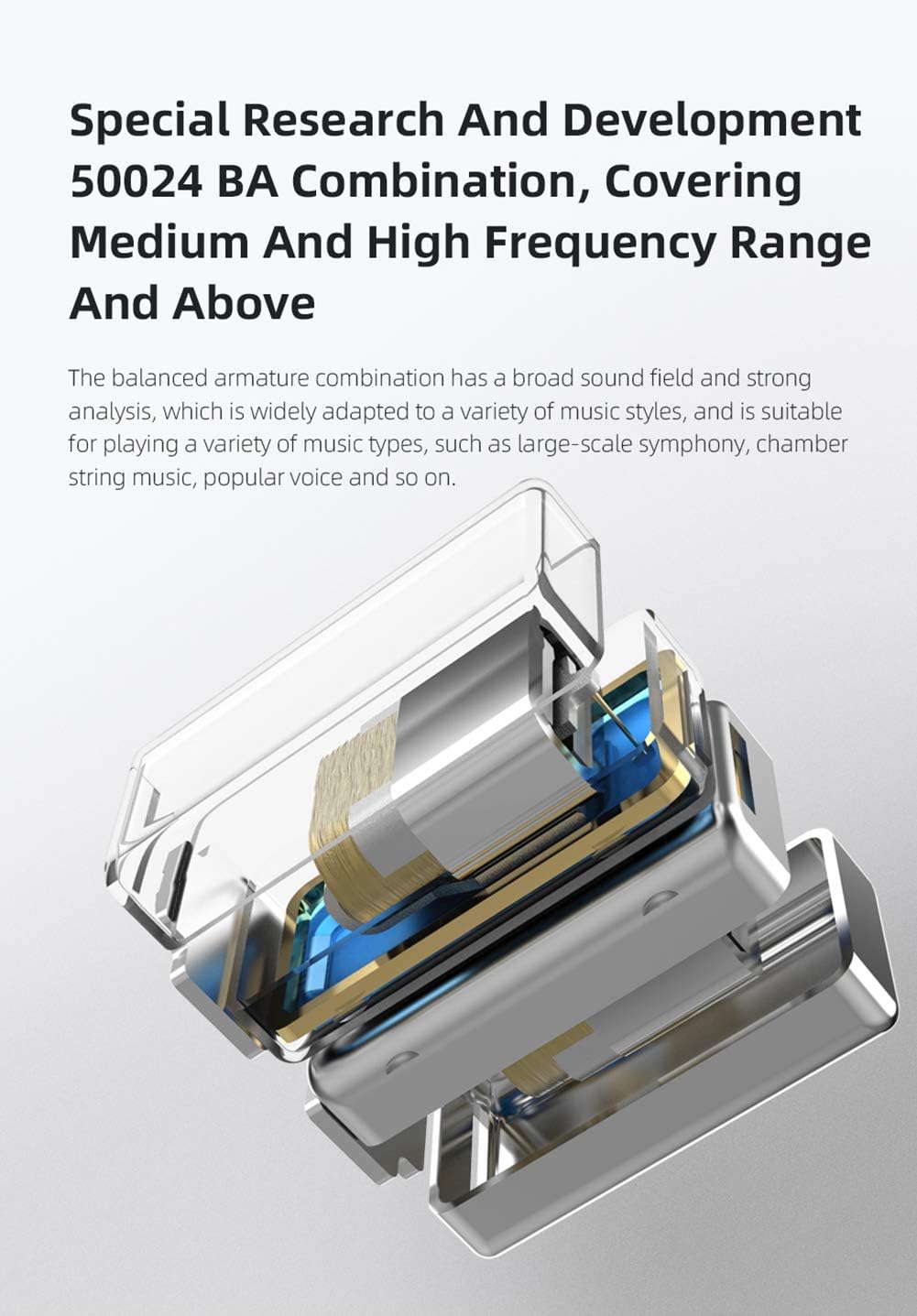
Figure 5: Internal structure showcasing the 7BA+1DD hybrid drivers.
7. Video ufficiali dei prodotti
KZ Zax In-Ear Monitors Earphones - Overview
Questo video fornisce una panoramica generaleview of the KZ Zax In-Ear Monitors, highlighting their design and key features.
KZ Zax In-Ear Monitors Earphones - Features
This video details the specific features and benefits of the KZ Zax In-Ear Monitors, including their hybrid driver configuration and detachable cable system.
8. Garanzia e supporto
The KZ Zax In-Ear Monitors come with a 1-year manufacturer's warranty. For any issues or support inquiries, please contact the seller or manufacturer directly. Keep your purchase receipt as proof of purchase for warranty claims.