
Sharp B08H3STVWG
Sharp Digital Clock with Alarm and Dual USB FastCharge Charging Ports
Model: B08H3STVWG
Marca: Sharp
1. Prodotto finitoview
The Sharp Digital Clock is designed for simplicity and convenience, featuring a clear green LED display and dual USB FastCharge ports for charging your devices. It includes an alarm function and a battery backup system to retain settings during power outages.

Figura 1: Fronte view of the Sharp Digital Clock, highlighting the large green LED display and dual USB charging ports.
2. Guida all'installazione
2.1 Collegamento di alimentazione
Connect the provided power adapter to the DC IN jack located at the back of the clock. Plug the other end into a standard electrical outlet. The display will illuminate, and the clock will be ready for time setting.
2.2 Backup della batteria (opzionale)
Per la funzionalità di backup della batteria, che conserva le impostazioni di ora e sveglia durante un'interruzione di correntetage, install two (2) AAA batteries (not included) into the battery compartment located on the bottom of the unit. During battery backup, the display will go blank to conserve power, but settings will be preserved.
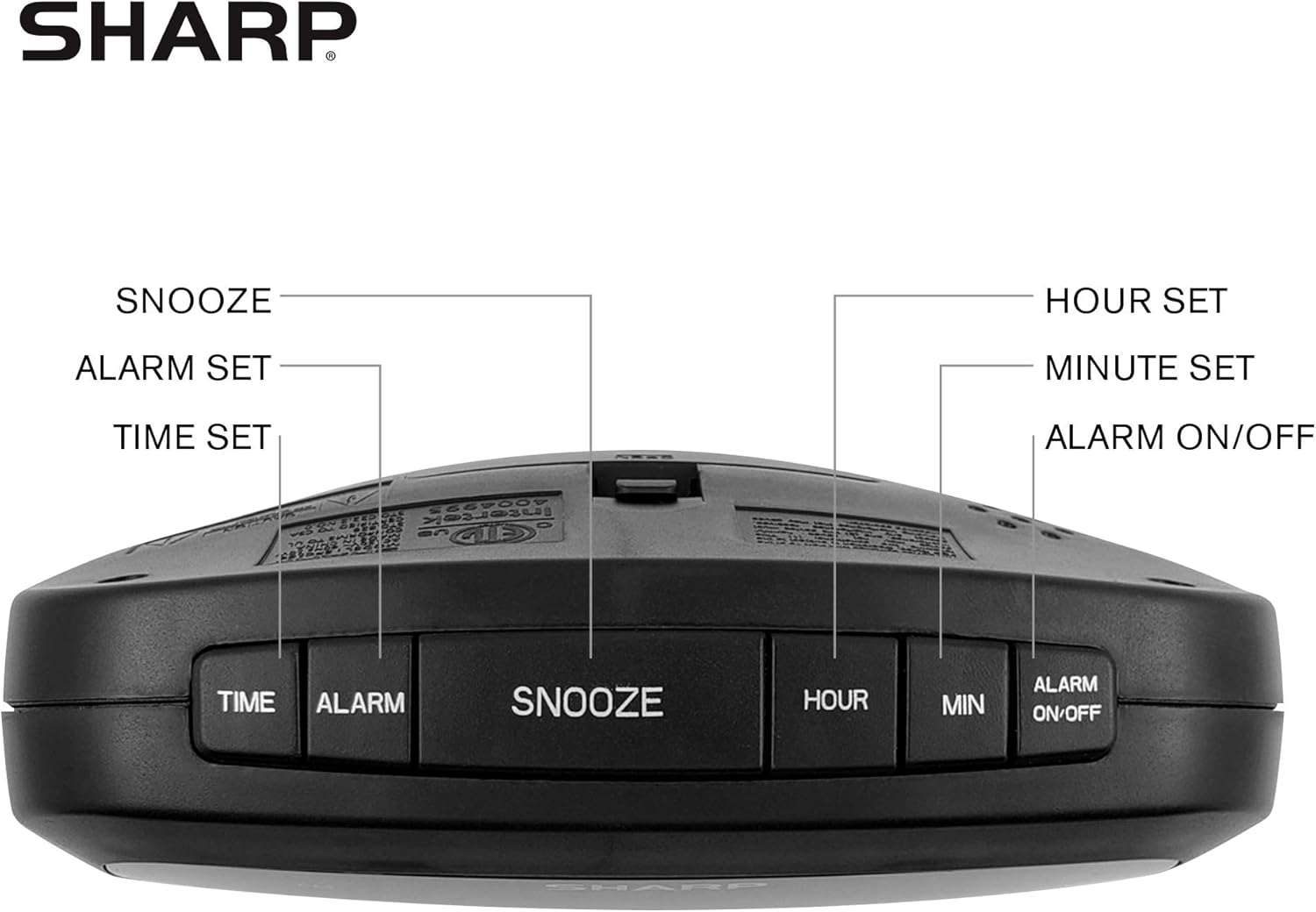
Figure 2: Underside of the clock with the battery compartment visible, requiring 2 AAA batteries for backup.
3. Istruzioni per l'uso
The clock features intuitive top-mounted buttons for easy operation.

Figure 3: Top panel of the clock with clearly labeled buttons for time, alarm, snooze/dimmer, hour, minute, and alarm on/off.
3.1 Impostazione dell'ora
- Premere e tenere premuto il tasto TEMPO finché le cifre dell'ora non iniziano a lampeggiare.
- Premere il tasto ORA button to adjust the hour. Pay attention to the PM indicator if setting a PM time.
- Premere il tasto MINIMO pulsante per regolare i minuti.
- Premere il tasto TEMPO nuovamente il pulsante per confermare e salvare l'ora.
3.2 Impostazione dell'allarme
- Premere e tenere premuto il tasto ALLARME finché le cifre dell'ora della sveglia non iniziano a lampeggiare.
- Premere il tasto ORA pulsante per regolare l'ora della sveglia.
- Premere il tasto MINIMO pulsante per regolare i minuti della sveglia.
- Premere il tasto ALLARME button again to confirm and save the alarm time.
- Per attivare o disattivare l'allarme, premere il tasto ALLARME ON / OFF button. An alarm indicator light will appear on the display when the alarm is active.
3.3 Snooze and Dimmer Function
- Quando suona la sveglia, premere il tasto grande SNOOZE/DIMMER button to temporarily silence the alarm for a few minutes.
- To adjust the brightness of the green LED display, repeatedly press the SNOOZE/DIMMER button when the alarm is not sounding. Cycle through bright, medium, and low brightness settings.
3.4 Utilizzo delle porte di ricarica USB
The clock is equipped with two 2 AMP USB charging ports on the front, allowing you to conveniently charge your smartphone or other USB-powered devices directly from the clock.

Figure 4: The clock demonstrating its dual USB charging capability with two smartphones connected.
- Simply connect your device's USB charging cable to one of the USB ports on the front of the clock.
- Ensure your device is compatible with 2 AMP charging for optimal speed.
4. Manutenzione
To ensure the longevity and proper functioning of your Sharp Digital Clock, follow these simple maintenance guidelines:
- Pulizia: Wipe the clock with a soft, dry cloth. Do not use abrasive cleaners, waxes, or solvents as they may damage the finish.
- Posizionamento: Posizionare l'orologio su una superficie stabile e piana, lontano dalla luce solare diretta, da fonti di calore e da umidità eccessiva.
- Sostituzione della batteria: If using the battery backup, replace the AAA batteries annually or when the clock consistently loses time during power interruptions.
5. Risoluzione Dei Problemi
| Problema | Possibile causa | Soluzione |
|---|---|---|
| Il display dell'orologio è vuoto. | Nessun potere o potere outage. | Ensure the power adapter is securely plugged into the clock and a working electrical outlet. If there was a power outage, check if backup batteries are installed and functional. |
| L'allarme non suona. | Allarme non impostato o non attivato. | Verify that the alarm time is correctly set and that the alarm indicator light is visible on the display (press ALARM ON/OFF). |
| Le porte USB non sono dispositivi di ricarica. | Device incompatibility or faulty cable. | Ensure your device is compatible with USB charging. Try a different USB cable. Confirm the clock is powered on. |
| Il display è troppo luminoso/scurato. | L'impostazione della luminosità necessita di regolazione. | Press the SNOOZE/DIMMER button repeatedly to cycle through brightness levels (bright, medium, low). |
6. Specifiche del prodotto
- Marca: Affilato
- Modello: B08H3STVWG
- Tipo di visualizzazione: Digital Green LED
- Fonte di energia: Elettrico con cavo
- Batteria di backup: 2 batterie AAA (non incluse)
- Porte USB: 2x2 AMP USB FastCharge Ports
- Dimensioni del prodotto: 5.95"L x 2.3"A
- Peso dell'articolo: 9.59 once
- Colore: Led verde
- Materiale: Plastica
- Codice UPC: 049353005089
7. Garanzia e supporto
This Sharp Digital Clock comes with a limited warranty. For detailed warranty information, product support, or to purchase accessories, please visit the official Sharp websito o contattare il servizio clienti. Puoi anche visitare il sito Sharp Store su Amazon.
Conservare la ricevuta d'acquisto per eventuali reclami in garanzia.
Ask a question about this manual
Ask about setup, troubleshooting, compatibility, parts, safety, or missing instructions. Manuals+ will review the question and use this page’s manual context to help answer it.