
1. Introduzione
This user manual provides comprehensive instructions for the CANMORE HG200 Golf GPS. The HG200 is a water-resistant, full-color 2-inch display GPS device designed to enhance your golf game by providing accurate course data, hazard distances, shot distances, and a digital scorecard. It comes preloaded with over 41,000 golf courses worldwide and offers free course updates.

Figure 1: The CANMORE HG200 Golf GPS device, displaying front, middle, and back distances to the green on a vibrant color screen.
2. Informazioni sulla sicurezza
Please read and understand the following safety precautions before using your CANMORE HG200 Golf GPS:
- Ricarica: Only charge the device using a 5V USB power source. Higher voltages may damage the battery.
- Resistenza all'acqua: The device is IPX7 rated waterproof, meaning it can withstand immersion in water up to 1 meter for 30 minutes. However, for optimal performance and longevity, avoid prolonged submersion and store the product in a cool, dry place. Clean the device after exposure to sweat and dirt.
- Segnale GPS: For accurate GPS location, ensure the device is in an open area with no obstructions that could hinder the GPS signal. Do not cover the GPS receiver when locating.
- Durata della batteria: If the distance measurement displays "---" instead of figures, connect the device to power to recharge. Low battery levels can initiate power reserve mode, reducing GPS range and affecting location accuracy.
3. Contenuto della confezione
Verify that all items are present in your CANMORE HG200 package:
- CANMORE HG200 Golf GPS Device
- Cavo di ricarica USB
- Powerful Magnet (for attachment)
- Windshield Mount (if included in specific package)
- Batteria ai polimeri di litio (preinstallata)
4. Prodotto finitoview
The CANMORE HG200 features a compact design with a 2-inch full-color display, designed for easy readability even in bright sunlight. Its robust construction includes a rubberized coating for enhanced grip and shock absorption.

Figure 2: Dimensions of the CANMORE HG200, highlighting its 2-inch full-color display and compact size.
The device is equipped with spacious buttons for easy operation, even when wearing golf gloves. A powerful magnet is integrated for convenient attachment to your belt, pants pocket, or golf cart uprights.

Figure 3: The CANMORE HG200 can be easily attached to a golf cart, belt, or golf bag using its strong clip and powerful magnet.
5. Impostazione
5.1. Carica del dispositivo
Before first use, fully charge your CANMORE HG200. Connect the provided USB charging cable to the device's charging port and plug the other end into a 5V USB power adapter. A full charge typically takes several hours.

Figure 4: The CANMORE HG200 charging cable connected to the device's charging port.
5.2. Accensione iniziale
Press and hold the power button (usually located on the front or side) until the screen illuminates. The device will then begin searching for GPS satellites and preloaded golf courses.
5.3. Course Data Updates
To ensure the most accurate course data, it is recommended to regularly update the course maps. Elements of each hole can change over time. You can update course data from the official Canmore website. Refer to the product's Quick Start Guide for the specific link and method. Course data is typically updated every two weeks.

Figure 5: The CANMORE HG200 supports weekly global course updates, with over 41,000 preloaded course maps in more than 30 countries.
5.4. Aggiornamenti del firmware
For the best GPS accuracy and overall performance, regularly update the device's firmware. Information and instructions for firmware updates are available on the Canmore Official Websito.
6. Istruzioni per l'uso
The CANMORE HG200 is designed for user-friendly operation with intuitive button controls.
Video 1: Demonstrates the ease of use and various features of the CANMORE Golf GPS, showing how it can be used on the golf course.
6.1. Navigazione di base
Use the arrow buttons to navigate through menus and adjust settings. The central button typically serves as a selection or confirmation button.

Figura 6: primo piano view of the CANMORE HG200's control buttons, including power, up, down, and select.
6.2. Selecting a Course
Once powered on and GPS signal is acquired, the device will automatically detect nearby golf courses. Select your desired course from the list.
6.3. Utilizzo delle funzioni GPS
- Distance to Green (F/M/B): The main display shows distances to the front, middle, and back of the green.
- Distanza di pericolo: Passare alla schermata dei pericoli per view distances to various course hazards (e.g., bunkers, water).
- Distanza di tiro: Use the shot distance feature to measure the length of your shots.
- Avanzamento automatico del foro: The GPS automatically updates your distance and advances to the next hole as you move on the course.

Figure 7: The user-friendly interface of the CANMORE HG200, illustrating screens for distance to green, scorecard, hazard distances, and shot distance.
6.4. Scorecard Function
The device includes a digital scorecard feature. Access this function to input and track your scores during a round.
6.5. Modifica delle unità
The default display unit is yards. To change the unit to meters, go to the "Setting" menu, select "Unit," and choose between YARD or METER.
7. Manutenzione
7.1. Pulizia
Regularly clean the charging port with brushes and a soft cloth, as sweat and dirt may affect charging performance. Wipe the device exterior with a damp panno secondo necessità.
7.2. Conservazione
For the best performance and longevity, store the CANMORE HG200 in a cool, dry place when not in use.
7.3. Resistenza all'acqua
The device is IPX7 rated waterproof, providing protection against accidental immersion. However, it is not designed for continuous underwater use. Ensure the charging port cover is securely closed to maintain water resistance.
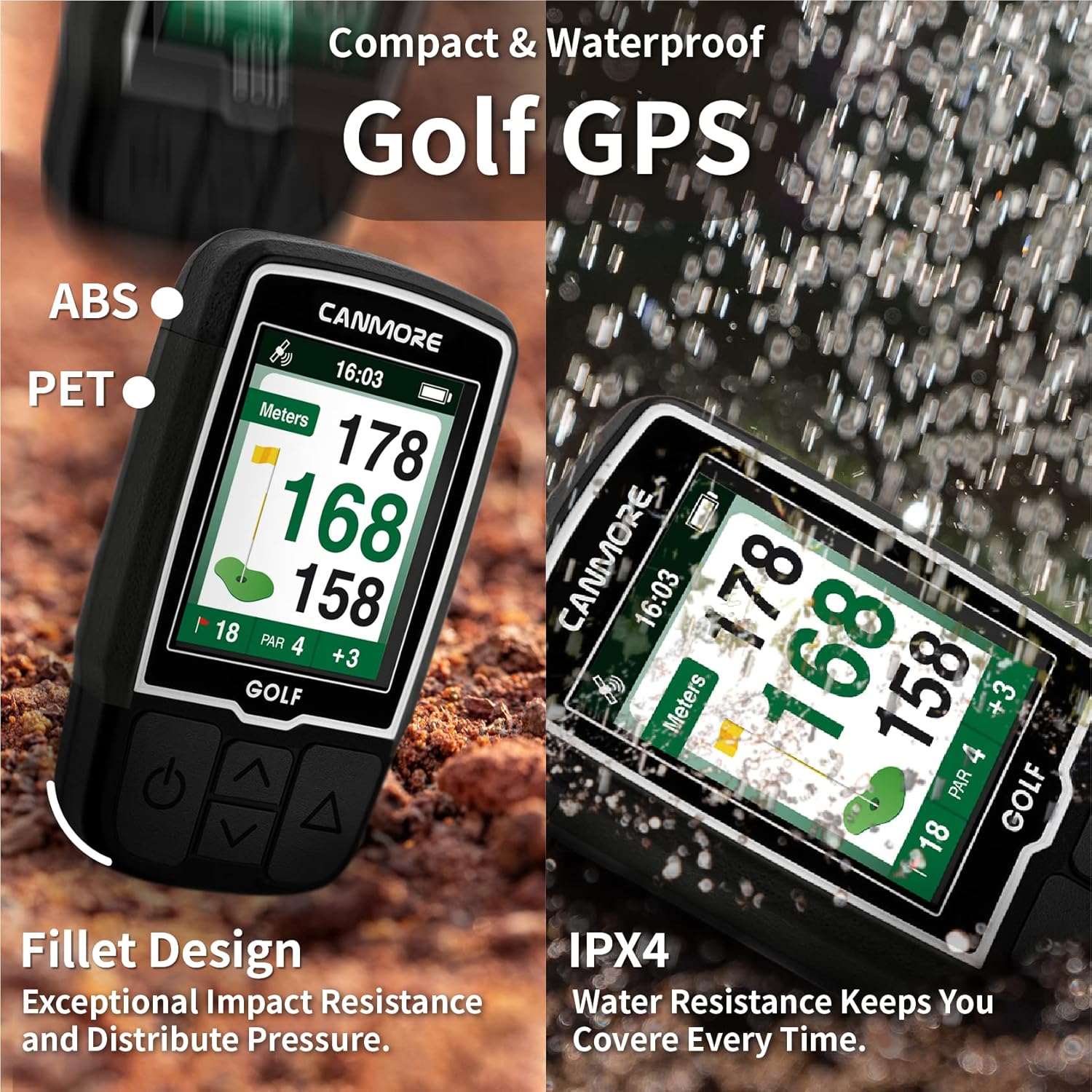
Figure 8: The CANMORE HG200 is designed to be compact and waterproof (IPX7). Its fillet design provides exceptional impact resistance.
8. Risoluzione Dei Problemi
If you encounter issues with your CANMORE HG200, refer to the following common problems and solutions:
| Problema | Possibile causa/soluzione |
|---|---|
| Distance measurement displays "---" | This indicates a low battery level. Connect the device to power to recharge. The watch enters power reserve mode at low battery, reducing GPS range. |
| GPS not locating positions accurately | Ensure the device is in an open area with no obstructions. Update to the latest firmware for improved GPS accuracy. |
| Dispositivo non in carica | Verify you are using a 5V USB power source. Clean the charging connectors to remove any sweat or dirt that might be obstructing the connection. |
| Automatic hole advance not working | Ensure you have the latest course maps and firmware installed. Sometimes, manual advancement may be required if the GPS signal is weak or obstructed. |
For further assistance, please refer to the support section on the Canmore Official Websito.
9. Specifiche
| Caratteristica | Dettaglio |
|---|---|
| Dimensioni del prodotto | 1.57 x 0.59 x 2.19 pollici |
| Peso dell'articolo | 2.65 once |
| Display | LCD a colori da 2 pollici |
| Resistenza all'acqua | IPX7 Rated Waterproof |
| Batteria | 1 batteria ai polimeri di litio (inclusa) |
| Connettività | USB |
| Corsi precaricati | Oltre 41,000 in tutto il mondo |
| Nome del modello | HG200 |
| Produttore | CANMORE |
10. Garanzia e supporto
CANMORE offers a "One Time Purchase, Lifetime Service" commitment for the HG200 Golf GPS. This includes free weekly course updates with no subscription fees, and troubleshooting support for GPS connection, charging, shutdown, and other issues.
Benefit from regular firmware updates and stay informed with the latest product information on the Canmore Official Websito.

Figure 9: Screenshot of the CANMORE support page, highlighting the "One Time Purchase, Lifetime Service" commitment.