
Introduzione
The Coolpad Snap 3311A is an Android 4G LTE clamshell flip phone designed for ease of use and reliable communication. It features a large outer display, tactile buttons, a camera, FM radio, and a 3.5mm audio jack. This device also supports Wi-Fi mobile hotspot functionality and memory cards for expanded storage.
Cosa c'è nella scatola
- Coolpad Snap 3311A Device
- Caricabatterie
- 32 GB SD Card (pre-installed or included separately)
- Batteria
Dispositivo suview
Familiarize yourself with the physical components of your Coolpad Snap 3311A flip phone.

Figura 1: Fronte view of the Coolpad Snap 3311A, closed, displaying the outer screen with time and network status.
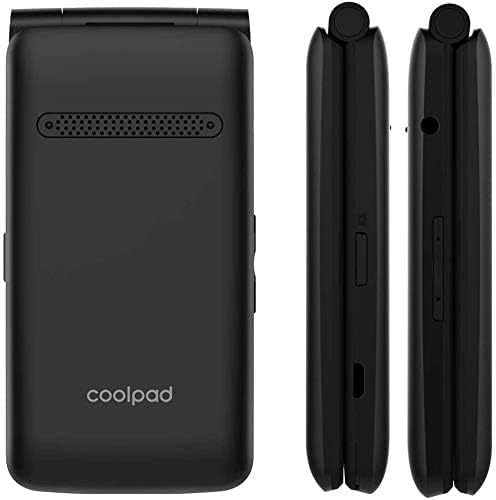
Figura 2: Retro e lato views of the device, highlighting the speaker, brand logo, and various side controls/ports.

Figura 3: Lato dettagliato views illustrating the location of the volume buttons, Micro-USB charging port, and the combined SIM/SD card tray.
Impostare
1. Installare la batteria
- Rimuovere la cover posteriore del telefono.
- Allineare i contatti della batteria con i terminali all'interno del telefono.
- Premere delicatamente la batteria in posizione.
- Riposizionare il coperchio posteriore, assicurandosi che scatti saldamente.
2. Insert SIM Card and SD Card
The Coolpad Snap 3311A is unlocked for use with any GSM carrier. A SIM card is not included and must be obtained from your service provider. A 32 GB SD card is included with your purchase for expanded storage.
- Locate the SIM/SD card slot on the side of the phone (refer to Figure 3).
- Aprire con cautela il coperchio dello slot.
- Insert your Nano-SIM card into the designated slot with the gold contacts facing down.
- Insert the 32 GB MicroSD card into its designated slot.
- Chiudere bene il coperchio dello slot.
3. Caricare la batteria
Prima del primo utilizzo, caricare completamente la batteria del telefono.
- Connect the charger to the Micro-USB port on the phone.
- Collegare il caricabatterie a una presa di corrente.
- L'indicatore di carica apparirà sullo schermo.
- Una volta completata la carica, scollegare il caricabatterie.
4. Accensione/spegnimento
- Per accendere: Tenere premuto il pulsante di accensione/fine chiamata finché lo schermo non si illumina.
- Per spegnere: Press and hold the Power/End Call button, then select 'Power off' from the options on the screen.
Utilizzo del telefono
Effettuare e ricevere chiamate
- Per effettuare una chiamata: Open the flip, dial the number using the keypad, and press the Call button.
- Per rispondere a una chiamata: Aprire lo sportellino o premere il pulsante Chiama quando squilla il telefono.
- Per terminare una chiamata: Chiudere lo sportellino o premere il pulsante di accensione/fine chiamata.
Invio di messaggi
Navigate to the Messaging application from the main menu to compose and send text messages (SMS) or multimedia messages (MMS).
Funzioni della fotocamera
The phone features a 2+ megapixel camera capable of taking photos and recording video (CIF 352 x 288 resolution). Access the Camera application from the main menu to capture images or videos.
Connettività
- Wifi: Connect to available Wi-Fi networks via the Settings menu for internet access.
- Hotspot mobile: Share your phone's 4G LTE data connection with other devices by enabling the Mobile Hotspot feature in Settings.
- Bluetooth: Pair with Bluetooth-enabled devices such as headsets or car kits through the Bluetooth settings.
Caratteristiche audio
The phone includes a 3.5mm audio jack for connecting headphones or external speakers. It also has an FM radio feature.
Accessibilità
The Coolpad Snap 3311A is Hearing Aid Compatible and offers adjustable text size options in the display settings for enhanced readability.
Manutenzione
Pulizia del dispositivo
Use a soft, lint-free cloth to gently wipe the phone's screen and body. Avoid using harsh chemicals or abrasive materials, as these can damage the device's surfaces.
Cura della batteria
- Evitare di esporre la batteria a temperature estreme.
- Non forare o smontare la batteria.
- Per una durata ottimale della batteria, evitare di scaricarla completamente prima di ricaricarla.
Risoluzione dei problemi
If you encounter issues with your Coolpad Snap 3311A, refer to the following common solutions:
Phone Not Powering On
- Assicurarsi che la batteria sia installata correttamente e carica.
- Collegare il telefono al caricabatterie e attendere qualche minuto prima di provare ad accenderlo nuovamente.
Nessuna connessione di rete
- Verifica che la scheda SIM sia inserita correttamente.
- Check if your service plan is active with your carrier.
- Riavviare il telefono.
- Assicurati di trovarti in una zona con copertura di rete.
La batteria si scarica rapidamente
- Ridurre la luminosità dello schermo.
- Chiudere le applicazioni non utilizzate in esecuzione in background.
- Turn off Wi-Fi, Bluetooth, or Mobile Hotspot when not in use.
Impossibile connettersi al Wi-Fi
- Assicurati che il Wi-Fi sia abilitato sul tuo telefono.
- Verificare che la password Wi-Fi sia corretta.
- Riavvia il router Wi-Fi.
Specifiche
| Caratteristica | Dettaglio |
|---|---|
| Nome del modello | Snap 3311A |
| Sistema operativo | Android |
| Operatore di telefonia mobile | Sbloccato (GSM) |
| Tecnologia cellulare | 4G LTE |
| Tecnologie di comunicazione wireless | Bluetooth, cellulare, Wi-Fi |
| Tecnologia di connettività | Wifi |
| Numero di slot per schede SIM | SIM singola |
| Fattore di forma | Capovolgere |
| Telecamera | 2+ Megapixel (Video: CIF 352 x 288) |
| Presa audio | 3.5 millimetri |
| Tipo di connettore | Micro USB |
| Potenza nominale della batteria | 1250 mAh (ioni di litio) |
| Capacità di archiviazione della memoria | 32 GB (scheda SD inclusa) |
| Peso dell'articolo | 8.4 once |
| Dimensioni del pacco | 4.72 x 2.87 x 2.24 pollici |
Informazioni sulla garanzia
This product is covered by a manufacturer's limited warranty. Please refer to the warranty card included with your purchase or visit the official Coolpad websito per termini e condizioni dettagliati riguardanti la copertura della garanzia, la durata e le procedure di reclamo.
Supporto
For further assistance, technical support, or service inquiries, please contact Coolpad customer support. Contact information, including phone numbers and online resources, can typically be found on the official Coolpad websito o nella documentazione fornita con il dispositivo.