1. Introduzione
This manual provides detailed instructions for the installation, operation, and maintenance of your Cooler Master MasterFan MF200R ARGB 200mm fan. This fan is designed to provide efficient cooling for your PC system while offering customizable Addressable RGB lighting effects.

Immagine 1.1: anteriore view of the Cooler Master MasterFan MF200R ARGB 200mm fan, showcasing its customizable lighting.
2. Caratteristiche del prodotto
- Illuminazione RGB indirizzabile: Experience full color customization with Addressable RGB (ARGB) technology. Compatible with popular motherboard ARGB software such as Asus Aura Sync, ASRock Polychrome Sync, and MSI Mystic Light Sync. Note: Requires a +5V, 3-pin ARGB header.
- Tecnologia di raffreddamento silenzioso: Engineered with noise reduction technologies and sound-absorbing materials to ensure quiet operation, even under heavy workloads. Features a durable rifle bearing for an extended lifespan.
- Hybrid Blade Design: A unique combination of jet engine and helicopter blade designs provides optimal static air pressure without compromising airflow, ensuring effective heat dissipation.
- Smart Fan Sensor for Jam Protection: Integrated sensors protect your cables and internal components by automatically stopping the fan rotation if an obstruction is detected, preventing damage.

Image 2.1: Multiple MasterFan MF200R ARGB fans demonstrating various lighting effects.

Image 2.2: Illustration of the fan's hybrid blade design, combining jet engine and helicopter blade elements.
3. Contenuto della confezione
Si prega di verificare che tutti gli articoli siano presenti nel pacco:
- 1 x Cooler Master MasterFan MF200R ARGB Cooling Fan
- 4 viti di montaggio
- Small mounting accessories (e.g., additional screws, 3-pin to 4-pin adapter, small instruction sheet)
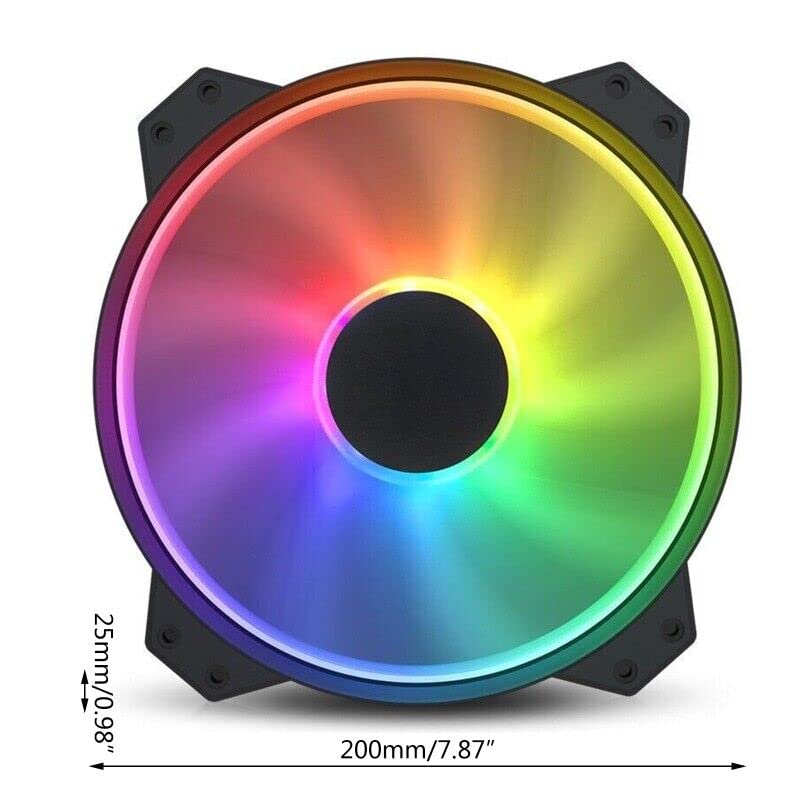
Image 3.1: Included accessories with the MasterFan MF200R ARGB fan.
4. Specifiche
| RGBProfile | Addressable RGB (+5V, 3-pin) |
| Dimensioni della ventola | 200 x 200 x 25 mm (7.9 x 7.9 x 1 pollici) |
| Peso del ventilatore | 259g (0.57 lb) |
| Velocità della ventola | 800 ± 150 giri/min |
| Flusso d'aria della ventola | 90.3 CFM ± 10% |
| Pressione dell'aria del ventilatore | 0.88mm di acqua |
| Livello di rumore della ventola | 28 dB(A) |
| MTTF (tempo medio al guasto) | 160,000 ore |
| Tipo di cuscinetto | Cuscinetto del fucile |
| Connettore di alimentazione | 3-Pin (4-pin with 3rd pin blocked) |
| Voto dei fan Voltage | 12V CC |
| Corrente nominale della ventola | 0.3A |
| Consumo energetico | 4.08±0.2W |

Image 4.1: Technical specifications of the MasterFan MF200R ARGB.
5. Note importanti sulla compatibilità
- The Addressable RGB (ARGB) lighting function DOVERE be connected to an Addressable RGB (+5V, 3-pin) capable motherboard header or a compatible Addressable RGB (+5V, 3-pin) controller.
- Questo ventilatore è NON compatible with 4-pin RGB or standard RGB+12V headers. Connecting to an incompatible header may cause damage to the fan or motherboard.
- For Gigabyte RGB Fusion Addressable RGB capable motherboards, an additional Gigabyte Adapter Cable may be required. This adapter is VENDUTO SEPARATAMENTE.
- Questo ventilatore è NON compatible with the Cooler Master HAF XB EVO chassis.
6. Configurazione e installazione
6.1 Installazione fisica
- Identify the desired mounting location for the 200mm fan within your PC case. Ensure adequate clearance.
- Align the fan's mounting holes with the corresponding screw holes on your PC case.
- Secure the fan using the four provided mounting screws. Do not overtighten.
6.2 Collegamento elettrico
- Collegamento elettrico: Locate the 3-pin fan power connector on the MasterFan MF200R. Connect this to an available 3-pin or 4-pin fan header on your motherboard. If connecting to a 4-pin header, ensure the 3rd pin on the fan connector is blocked as indicated in the specifications.
- Collegamento illuminazione ARGB: Locate the 3-pin ARGB connector on the MasterFan MF200R. Connect this to a +5V, 3-pin Addressable RGB header on your motherboard or a compatible ARGB controller. Refer to your motherboard manual for the exact location of the ARGB header.

Image 6.1: Identification of the 3-pin power and 5V 3-pin ARGB connectors.

Image 6.2: Connecting the 5V 3-pin ARGB connector to a motherboard header.

Immagine 6.3: Dettagliata view of a 5V 3-pin ARGB header on a motherboard.
7. Istruzioni per l'uso
7.1 Funzionamento del ventilatore
Once connected, the fan will operate at its rated speed of 800 ± 150 RPM, providing consistent airflow for cooling your system.
7.2 Controllo dell'illuminazione ARGB
To customize the Addressable RGB lighting effects, install and use the appropriate software provided by your motherboard manufacturer. Exampincludono:
- Sincronizzazione Asus Aura
- Sincronizzazione policroma ASRock
- Sincronizzazione MSI Mystic Light
These software applications allow you to select various lighting modes, colors, and synchronization options for your ARGB components.
8. Manutenzione
Una manutenzione regolare contribuisce a garantire prestazioni ottimali e longevità del ventilatore.
- Pulizia: Periodically inspect the fan blades and housing for dust buildup. With the PC powered off and unplugged, use compressed air or a soft, dry cloth to gently remove any dust. Avoid using liquid cleaners directly on the fan.
- Ispezione: Check mounting screws periodically to ensure they remain secure.
9. Risoluzione Dei Problemi
If you encounter issues with your MasterFan MF200R ARGB, refer to the following common solutions:
- La ventola non gira:
- Ensure the 3-pin power connector is securely plugged into a functional fan header on your motherboard.
- Controlla le impostazioni BIOS/UEFI della scheda madre per assicurarti che il connettore della ventola sia abilitato e configurato correttamente.
- Illuminazione ARGB non funzionante:
- Verify that the 3-pin ARGB connector is securely plugged into a +5V, 3-pin ARGB header on your motherboard or controller.
- Confirm that you are using compatible motherboard ARGB software and that it is correctly installed and configured.
- Ensure the fan is not connected to a 4-pin RGB or +12V RGB header, as this is incompatible and can prevent lighting from functioning.
- Rumore eccessivo:
- Check for any cables or obstructions that might be interfering with the fan blades.
- Ensure the fan is securely mounted and that all mounting screws are tightened appropriately.
- Dust buildup can cause noise; clean the fan as described in the Maintenance section.
10. Garanzia e supporto
For warranty information and technical support regarding your Cooler Master MasterFan MF200R ARGB fan, please refer to the official Cooler Master websito o contattare direttamente il servizio clienti.
For purchase-related inquiries or issues, please contact the seller, Toptekits, through your original point of purchase.