1. Introduzione
This manual provides instructions for the Intotal XR 11 Xfinity Voice Remote, model JS463-DDD-699. This ergonomic remote control is designed for use with televisions, offering intuitive control over your entertainment system.

Figura 1: Fronte view of the Intotal XR 11 Xfinity Voice Remote.
2. Impostazione
2.1 Installazione della batteria
The Intotal XR 11 Xfinity Voice Remote requires two AA batteries for operation. These batteries are typically included with the remote.
- Individuare il coperchio del vano batterie sul retro del telecomando.
- Per aprirlo, far scorrere il coperchio verso il basso oppure premere il fermo.
- Inserire due batterie AA, assicurandosi che i terminali positivo (+) e negativo (-) siano allineati correttamente con gli indicatori all'interno del vano.
- Richiudere il coperchio del vano batteria, assicurandosi che scatti saldamente in posizione.
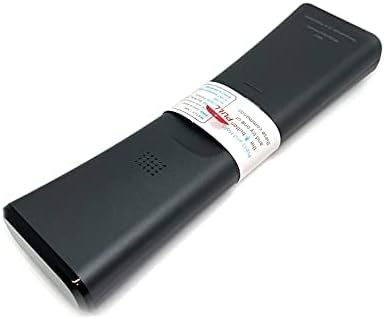
Figura 2: Indietro view of the remote, indicating the battery compartment location.
2.2 Pairing with Your Television
After installing batteries, the remote may need to be paired with your television or Xfinity set-top box. Refer to your Xfinity service provider's instructions or your television's user manual for specific pairing procedures. Generally, this involves pressing and holding specific buttons on the remote while pointing it at the device.
3. Istruzioni per l'uso
The Intotal XR 11 Xfinity Voice Remote features an ergonomic design and a range of buttons for controlling your television and Xfinity services. Below is a general overview di funzioni comuni.

Figura 3: Angolato view of the remote, showing button layout.
3.1 Funzioni di base
- Potenza TV: Accende o spegne la televisione.
- Tutto il potere: Turns your television and Xfinity set-top box on or off simultaneously.
- VOL (volume): Regola il volume della televisione.
- Disattiva audio: Disattiva o riattiva l'audio del televisore.
- CH (Canale): Cambia i canali televisivi in su o in giù.
- Rigiocare: Jumps back a few seconds in live TV or recorded content.
- Riproduzione/Pausa, Avanzamento rapido, Riavvolgimento: Controlla la riproduzione multimediale.
3.2 Controllo vocale
Premere e tenere premuto il tasto Pulsante del microfono (often located near the center of the remote) and speak your command clearly. Release the button when you are finished speaking. Examples of voice commands include changing channels, searching for content, or launching apps.
3.3 Navigazione e menu
- Guida: Accesses the Xfinity program guide.
- Uscita: Exits current menu or returns to previous screen.
- Informazioni: Visualizza le informazioni sul programma corrente.
- Directional Pad (Up, Down, Left, Right) and OK: Consente di navigare nei menu e selezionare le opzioni.
- Pagina su/giù: Scorre le pagine della guida o dei menu.
3.4 Tastierino numerico
The numeric keypad allows direct channel entry and other numerical inputs. The "Setup" button may be used for programming the remote, and "TV Input" for changing television inputs.
4. Manutenzione
4.1 Pulizia
Per pulire il telecomando, strofinarlo delicatamente con un panno morbido e asciutto. Per lo sporco ostinato, strofinare leggermenteampImmergere il panno in acqua. Evitare l'uso di prodotti chimici aggressivi, detergenti abrasivi o umidità eccessiva, poiché potrebbero danneggiare la finitura del telecomando o i componenti interni.
4.2 Sostituzione della batteria
Replace batteries when the remote's performance degrades or if it stops responding. Always replace both AA batteries at the same time with new ones. Dispose of used batteries according to local regulations.
4.3 Conservazione
Store the remote in a cool, dry place away from direct sunlight and extreme temperatures. If storing for an extended period, it is advisable to remove the batteries to prevent leakage.
5. Risoluzione Dei Problemi
| Problema | Possibile causa | Soluzione |
|---|---|---|
| Il telecomando non risponde | Dead or incorrectly inserted batteries. Remote not paired. Obstruction between remote and device. | Replace batteries. Re-pair the remote with your television/set-top box. Ensure a clear line of sight. |
| I comandi vocali non funzionano | Microphone button not held down. Speaking too softly or too far from the remote. Remote not properly paired for voice functions. | Press and hold the Microphone button while speaking. Speak clearly and directly into the remote. Verify pairing for voice control. |
| I pulsanti sono bloccati o non rispondono | Sporcizia o detriti sotto i pulsanti. | Clean the remote as described in the Maintenance section. Avoid spilling liquids on the remote. |
6. Specifiche
- Numero modello: JS463-DDD-699
- Marca: Totale
- Dispositivi compatibili: Televisione
- Numero massimo di dispositivi supportati: 1
- Colore: Grigio
- Caratteristica speciale: Design ergonomico
- Dimensioni del prodotto: 12 x 3 x 1 pollici
- Peso dell'articolo: 5 once
- Batterie: 2 batterie AA (incluse)
- Produttore: cavo
- ASIN: B08HM5R7DL
7. Garanzia e supporto
Specific warranty information for the Intotal XR 11 Xfinity Voice Remote (Model: JS463-DDD-699) is not explicitly provided in this manual. For details regarding warranty coverage, please refer to the documentation included with your purchase or contact the retailer or manufacturer directly.
For technical support or further assistance, please consult the support resources provided by your Xfinity service provider or the manufacturer, Intotal.
Puoi visitare il Intotal Store on Amazon per ulteriori informazioni sul prodotto.