
cable XR15
XR15 Voice Control Remote Instruction Manual
Model: XR15 | Brand: cable
1. Introduzione
This manual provides instructions for the XR15 Voice Control Remote, designed for use with Xfinity and Comcast X1, Xi6, Xi5, and XG2 systems. The remote allows users to control their television and compatible TV box, offering features such as voice commands, backlit keypad, and direct access to accessibility options.

Image 1.1: The XR15 Voice Control Remote, a replacement remote for Xfinity Comcast systems.
2. Contenuto della confezione
Verificare che tutti gli articoli siano presenti nel pacco:
- 1 x XR15 Voice Control Remote
- 2 batterie AA
- 1 x User's Guide (this document)
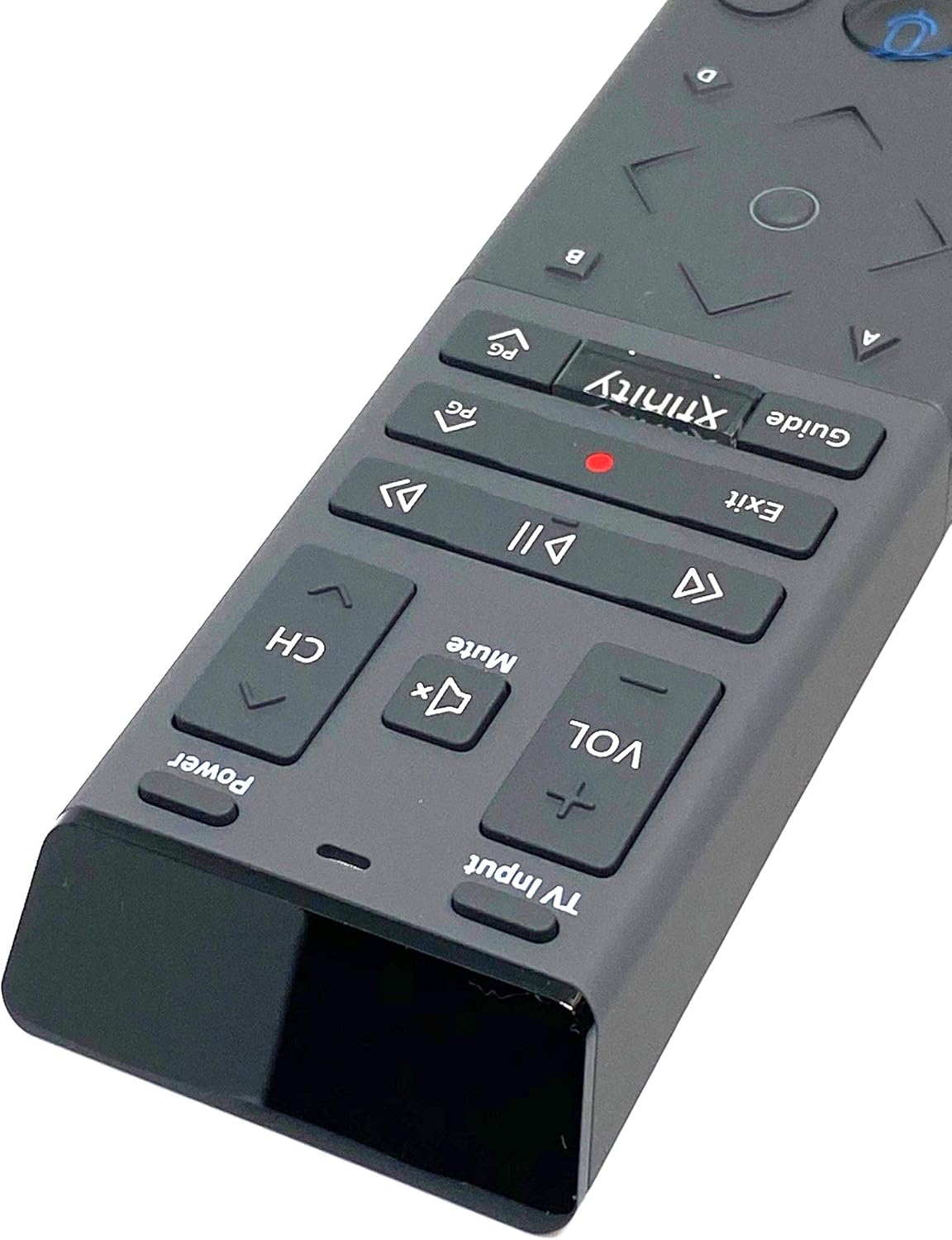
Image 2.1: The XR15 Voice Control Remote as received in its protective packaging.
3. Caratteristiche principali
The XR15 Voice Control Remote offers several advanced features for an enhanced user experience:
- Controllo vocale: Use voice commands to change channels, search for content, and get recommendations.
- Tastiera retroilluminata: Buttons illuminate for visibility in low-light conditions.
- Funzione Mira ovunque: Operates without needing to point directly at the device.
- Associazione automatica: Simplifies the setup process with compatible devices.
- Funzionalità di accessibilità: Quick access to Closed Captioning, video description, and voice guidance.
- Controllo ingresso TV: Manage TV power and input settings.
4. Impostazione
4.1 Installazione della batteria
To power your remote, install the two AA batteries provided:
- Individua il vano batteria sul retro del telecomando.
- Per aprire il coperchio della batteria, farlo scorrere verso il basso.
- Inserire due batterie AA, assicurandosi che i terminali positivo (+) e negativo (-) siano allineati correttamente con gli indicatori all'interno del vano.
- Far scorrere il coperchio della batteria in posizione finché non scatta in modo sicuro.

Immagine 4.1: posteriore view of the XR15 remote, highlighting the battery compartment area.
4.2 Istruzioni per l'associazione
The XR15 remote can be paired with your Xfinity X1 TV Box and television for full functionality. Follow these steps:
- Pairing with X1 TV Box:
- Assicurati che il tuo TV Box sia acceso.
- Point the remote at the TV Box.
- Premere e tenere premuto il tasto Xfinità pulsante e il Informazioni (i) button simultaneously for five seconds until the status light on the remote changes from red to green.
- Seguire le istruzioni sullo schermo per completare il processo di associazione.
- Pairing with Television (for TV Power and Volume):
- After pairing with the TV Box, the remote may automatically attempt to pair with your TV.
- If not, or if it fails, press and hold the Impostare button (usually a small, recessed button on the side or back, or a combination of buttons like Xfinità E Muto) until the status light turns green.
- Enter the TV brand code. Refer to your TV's user manual for specific codes if the Xfinity codes do not work.
- Prova il Energia E Volume buttons. If they work, the pairing is successful.
5. Istruzioni per l'uso
The XR15 remote features a clear layout for intuitive control. Below is a guide to its primary buttons and their functions:

Immagine 5.1: Primo piano view of the upper section of the XR15 remote, showing TV Input, Volume, Mute, Power, and Channel buttons.
5.1 Funzioni dei pulsanti
| Pulsante | Funzione |
|---|---|
| Energia | Turns the TV and compatible TV Box on or off. |
| Ingresso TV | Cycles through available TV input sources. |
| VOL + / VOL- | Aumenta o diminuisce il volume. |
| Muto | Attiva o disattiva l'audio. |
| CH+ / CH- | Seleziona il canale successivo o precedente. |
| Riproduci/Pausa (►▮▮) | Riproduce o mette in pausa la TV in diretta, Xfinity On Demand o i contenuti DVR. |
| FF (►►) | Avanza rapidamente i contenuti Xfinity On Demand o DVR. |
| Rew (◄◄) | Riavvolge i contenuti Xfinity On Demand o DVR. |
| Uscita | Exits on-screen guides; stops and exits Xfinity On Demand and DVR content. Returns to "Live" point during live TV replay. |
| Record (Punto Rosso) | Records the current program. |
| Xfinità | Displays the main menu of the guide, providing access to DVR and Xfinity On Demand. |
| Guida | Visualizza i programmi TV. |
| Controllo vocale (icona del microfono) | Activates voice command functionality. Press and speak into the remote. |
| Tasti direzionali (su, giù, sinistra, destra, OK) | Consente di navigare nei menu e selezionare le opzioni. |
| Informazioni (i) | Visualizza informazioni sul programma corrente o sull'elemento selezionato. |
| Tastierino numerico (0-9) | Inserisce direttamente i numeri dei canali o altri input numerici. |

Immagine 5.2: Primo piano view of the lower section of the XR15 remote, featuring the voice control button, directional pad, and numeric keypad.
6. Manutenzione
To ensure the longevity and optimal performance of your XR15 Voice Control Remote, follow these maintenance guidelines:
- Pulizia: Pulisci il telecomando con un panno morbido e asciutto. Per lo sporco ostinato, strofina leggermenteampPulire il panno con acqua o con un detergente delicato e non abrasivo. Evitare l'eccessiva umidità.
- Sostituzione della batteria: Replace batteries when the remote's performance degrades or the status LED indicates low power. Always use new AA batteries and dispose of old batteries responsibly.
- Magazzinaggio: Conservare il telecomando in un luogo fresco e asciutto, lontano dalla luce solare diretta e da temperature estreme.
- Evitare gocce: Proteggere il telecomando dagli urti fisici, poiché le cadute possono danneggiare i componenti interni.
7. Risoluzione Dei Problemi
If you encounter issues with your XR15 Voice Control Remote, refer to the following common problems and solutions:
- Il telecomando non risponde:
- Controllare l'orientamento delle batterie e assicurarsi che siano nuove.
- Verify the remote is paired correctly with your X1 TV Box and TV (refer to Section 4.2).
- Assicurarsi che non vi siano ostacoli tra il telecomando e il TV Box/TV.
- Comandi vocali non funzionanti:
- Ensure the remote is paired for voice control (refer to Section 4.2).
- Parlare in modo chiaro e diretto nel microfono.
- Check your Xfinity X1 system settings for voice control activation.
- Accensione/volume TV non funzionanti:
- Confirm the remote is programmed with the correct TV code (refer to Section 4.2).
- Try re-programming the TV code, potentially using codes from your TV's original manual.
- Backlight Not Illuminating:
- The backlight activates when the remote is moved or a button is pressed. If it doesn't, check batteries.
- Ensure the remote is not in a power-saving mode if such an option exists in your Xfinity settings.
8. Specifiche
| Caratteristica | Dettaglio |
|---|---|
| Numero di modello | Modello XR15 |
| Marca | cavo |
| Dimensioni del prodotto | 12 x 3 x 1 pollici |
| Peso dell'articolo | 5.9 once |
| Batterie richieste | 2 batterie AA |
| Caratteristiche speciali | Backlit, Voice Search |
| Numero massimo di dispositivi supportati | 1 (TV Box + TV) |
| Dispositivi compatibili | Set Top Box, Television (Xfinity X1, Xi6, Xi5, XG2) |
| Tecnologia di connettività | Radiofrequenza (RF) |
| Data prima disponibilità | 7 settembre 2020 |
9. Garanzia e supporto
For warranty information or technical support, please refer to the documentation provided by your service provider (Xfinity/Comcast) or contact the product manufacturer directly. Keep your purchase receipt for warranty claims.
Ask a question about this manual
Ask about setup, troubleshooting, compatibility, parts, safety, or missing instructions. Manuals+ will review the question and use this page’s manual context to help answer it.