
1. Introduzione
Thank you for choosing the Sinopé TH1310WF Smart Wi-Fi Thermostat. This device is designed to provide precise and efficient control over your in-floor heating system, enhancing comfort and energy savings. It integrates seamlessly with various smart home platforms, offering convenient control via mobile applications and voice commands.
This manual provides detailed instructions for the installation, operation, and maintenance of your TH1310WF thermostat. Please read it thoroughly before installation and keep it for future reference.

Figure 1: Sinopé TH1310WF Smart Wi-Fi Thermostat
The image displays the front of the Sinopé TH1310WF thermostat, a white rectangular device with a black digital display showing time, indoor temperature, and outdoor temperature. Below the screen, the Sinopé logo is visible, along with two circular buttons.
2. Informazioni sulla sicurezza
AVVERTIMENTO: Risk of electric shock. This product must be installed by a qualified electrician in accordance with local and national electrical codes. Disconnect power at the circuit breaker before installation or any maintenance.
- Ensure the power supply is OFF before handling any wiring.
- Non installare il termostato con le mani bagnate o stando in piedi su superfici bagnate.
- Questo termostato è progettato esclusivamente per l'uso in ambienti interni.
- Verificare che il volume del termostatotage e cosatage ratings match your heating system's requirements (240V, 3600W max).
3. Prodotto finitoview
3.1 Caratteristiche principali
- Nessun hub richiesto: Connects directly to your Wi-Fi network.
- In-floor Heating Compatibility: Works with heating cables and heating cable mats. Includes a 15-foot floor sensor.
- Uscita ausiliaria: Features a second output for controlling an auxiliary heating system or connecting up to 10 expansion units (TR1310) for systems exceeding 15 A.
- Integrazione della casa intelligente: Compatible with Apple HomeKit, Amazon Alexa, Google Home, and Neviweb.
- Neviweb Applicazione: Offers advanced features such as automations, scenes, geofencing, and real-time energy reports.

Figure 2: Smart Home Platform Compatibility
This image shows the Sinopé TH1310WF thermostat alongside logos of compatible smart home platforms: Neviweb, SmartThings, Apple HomeKit, Amazon Alexa, and Google Home, highlighting its versatile integration capabilities.
3.2 Componenti
- TH1310WF Thermostat Unit
- 15-foot Floor Sensor
- Viti di montaggio
4. Impostazione
4.1 Installazione e cablaggio
Installation of the TH1310WF thermostat involves electrical wiring and should only be performed by a qualified electrician. Ensure the power is disconnected at the main circuit breaker before beginning any wiring.
The thermostat is designed for a 240V AC power source and can handle up to 3600 watts. Connect the heating cables or mats to the LOAD terminals and the power supply to the LINE terminals. The included floor sensor should be installed within the heating mat area to accurately measure floor temperature.

Figure 3: Thermostat Wiring Terminals
This image shows the back of the Sinopé TH1310WF thermostat, highlighting the LOAD (120/240V, 15A max) and LINE (L1, L2(N)) wiring terminals. A strip gauge is also visible for proper wire preparation.

Figure 4: Thermostat Back Panel and Sensor Ports
The image displays the back panel of the Sinopé TH1310WF thermostat, showing regulatory information (FCC, IC, cETLus certification) and the auxiliary (Aux 1, Aux 2) and sensor (Sonde) connection ports.
4.2 Configurazione iniziale e connessione Wi-Fi
After physical installation, power on the thermostat. Follow the on-screen prompts to set the date, time, and initial operating mode. To enable smart features, connect the thermostat to your Wi-Fi network.
- Scarica Neviweb app dall'app store del tuo smartphone (disponibile per iOS e Android).
- Create a Neviweb account oppure accedi se ne hai già uno.
- Follow the in-app instructions to add your new TH1310WF thermostat to your account. This typically involves putting the thermostat into pairing mode and connecting it to your home Wi-Fi network.
5. Funzionamento
5.1 Basic On-Device Control
The thermostat features a clear LCD display and two physical buttons for basic control. You can adjust the setpoint temperature, switch between operating modes (e.g., Manual, Program), and view current temperature readings directly on the device.
5.2 Neviweb Controllo dell'app
I Neviweb app provides comprehensive control and advanced features for your thermostat:
- Telecomando: Regola le impostazioni ovunque ti trovi.
- Pianificazione: Crea programmi di riscaldamento personalizzati per diversi orari del giorno e della settimana.
- Automazioni: Set up triggers and actions based on schedules or other events.
- Scene: Activate personalized ambiances with a single tap.
- Geofencing: Automatically adjust heating based on your proximity to home.
- Rapporti energetici: Monitor your energy consumption and savings in real-time.
- Multi-Location Management: Control thermostats in multiple properties from one account.

Figure 5: Neviweb App Device List
This image shows a smartphone screen displaying the Neviweb app interface, which lists various connected smart devices and their current status, allowing users to manage their smart home ecosystem.

Figure 6: Neviweb App Multi-Location Management
The image displays a smartphone screen with the Neviweb app open to the 'Locations' section, showing icons for 'Home', 'Cabin', and other properties, illustrating the ability to manage multiple locations from a single account.
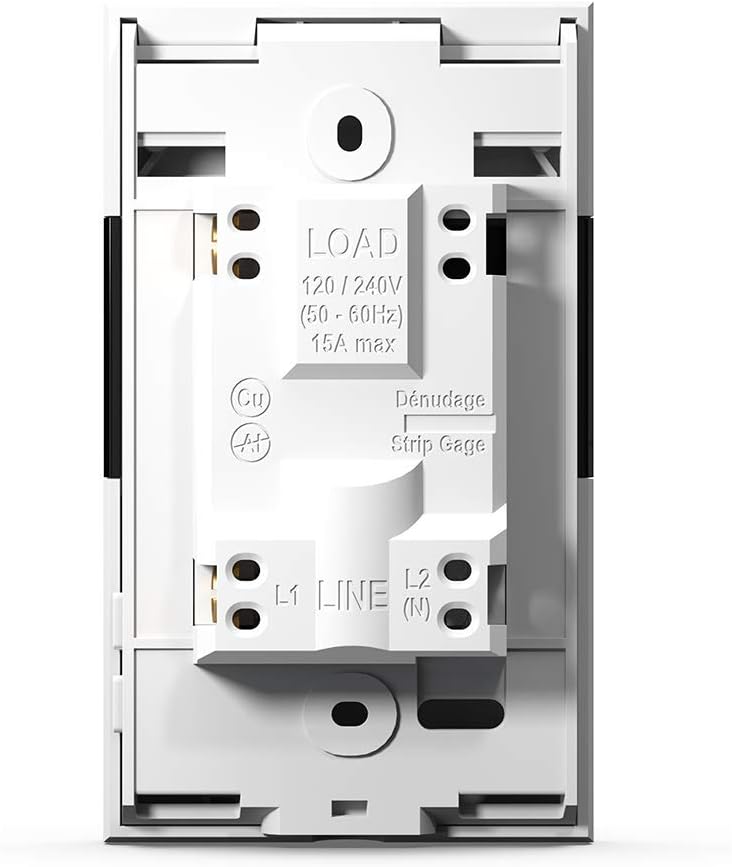
Figure 7: Neviweb App Energy Report
This image shows a smartphone displaying the Neviweb app's energy report feature, presenting a bar graph of energy consumption over time (24 hours, 30 days, 24 months) and estimated costs, allowing users to track their energy savings.
5.3 Controllo vocale
The TH1310WF thermostat can be controlled using voice commands through compatible smart assistants:
- Amazon Alexa: "Alexa, imposta il termostato del soggiorno a 72 gradi."
- Pagina iniziale di Google: "Hey Google, what's the temperature in the kitchen?"
- Apple HomeKit: Use Siri to control your thermostat once added to HomeKit.

Figura 8: Integrazione dell'assistente vocale
The image features an Amazon Echo Dot smart speaker on a kitchen shelf, illustrating how users can interact with their thermostat using voice commands through compatible voice assistants.
6. Manutenzione
The Sinopé TH1310WF thermostat requires minimal maintenance. Keep the device clean by wiping it with a soft, dry cloth. Do not use abrasive cleaners or solvents. Ensure the vents are free from dust accumulation to maintain proper operation.
There are no user-serviceable parts inside the thermostat. Any repairs should be performed by qualified personnel.
7. Risoluzione Dei Problemi
| Problema | Possibile causa | Soluzione |
|---|---|---|
| Il display del termostato è vuoto. | Nessuna alimentazione elettrica. | Check circuit breaker. Ensure proper wiring connections. |
| Impossibile connettersi al Wi-Fi. | Incorrect Wi-Fi password; Thermostat too far from router; Router issues. | Verify Wi-Fi password. Move thermostat closer to router or use a Wi-Fi extender. Restart router. |
| L'impianto di riscaldamento non risponde. | Thermostat in OFF mode; Wiring issue; Heating system malfunction. | Check thermostat mode. Verify wiring. Consult a qualified electrician or HVAC technician. |
| Lettura della temperatura imprecisa. | Floor sensor not properly installed or damaged. | Ensure floor sensor is correctly placed within the heating mat. Inspect sensor for damage. |
8. Specifiche
| Caratteristica | Specificazione |
|---|---|
| Numero di modello | TH1310WF |
| Voltage | 240 Volt |
| Cosatage | 3600 watt |
| Attuale | 15A max |
| Connettività | Wifi |
| Tipo di controllore | Amazon Alexa, Apple HomeKit, Assistente Google, Neviweb |
| Intervallo di temperatura | Da 41 a 97 gradi Fahrenheit |
| Componenti inclusi | Floor sensor - 15 ft |
| Dimensioni | 4.8 x 2.83 x 1.02 pollici |
| Peso dell'articolo | 13 once |
| Materiale | Plastica |
| Tipo di visualizzazione | LCD |
| Tipo di montaggio | Montaggio a parete |
9. Garanzia e supporto
9.1 Informazioni sulla garanzia
The Sinopé TH1310WF Smart Wi-Fi Thermostat is covered by a Garanzia del produttore di 3 anni dalla data di acquisto. La presente garanzia copre i difetti di materiali e di fabbricazione in condizioni di normale utilizzo. Non copre danni derivanti da installazione impropria, incidenti, uso improprio, abuso o modifiche non autorizzate.
Conservare la prova d'acquisto per eventuali richieste di garanzia.
9.2 Assistenza clienti
For technical assistance, troubleshooting, or warranty inquiries, please contact Sinopé Technologies customer support:
- Websito: www.sinopetech.com
- E-mail: support@sinopetech.com
- Telefono: Refer to the contact section on the official Sinopé websito per i numeri di telefono regionali.
When contacting support, please have your product model number (TH1310WF) and purchase date available.