
1. Introduzione
This manual provides essential information for the installation, operation, and maintenance of your ADATA XPG GAMMIX S50 Lite PCIe Gen4x4 M.2 2280 Solid State Drive. The GAMMIX S50 Lite is designed to deliver next-generation performance with PCIe Gen4x4 interface, offering sustained read/write speeds up to 3900/3200 MB per second. It is backward compatible with PCIe 3.0 and features 3D NAND Flash memory for enhanced capacity and durability, making it ideal for gamers, overclockers, and PC enthusiasts.
Please read this manual thoroughly before proceeding with installation to ensure proper setup and optimal performance of your SSD.
2. Informazioni sulla sicurezza
Osservare le seguenti precauzioni di sicurezza per evitare danni al prodotto o lesioni personali:
- Always disconnect power from your computer and discharge static electricity before handling internal components.
- Handle the SSD by its edges to avoid touching the gold connectors or components on the circuit board.
- Non tentare di smontare o modificare l'SSD. Ciò invaliderà la garanzia.
- Keep the SSD away from moisture, extreme temperatures, and direct sunlight.
- Ensure proper ventilation within your system to maintain optimal operating temperatures for all components, including the SSD.
3. Contenuto della confezione
Verifica che il pacco contenga i seguenti articoli:
- ADATA XPG GAMMIX S50 Lite PCIe Gen4x4 M.2 2280 Solid State Drive
- (Optional: M.2 mounting screw, depending on motherboard accessories)

Figure 3.1: The ADATA XPG GAMMIX S50 Lite SSD shown in its retail box, highlighting the product's branding and key features.
4. Configurazione e installazione
The XPG GAMMIX S50 Lite is an M.2 2280 form factor SSD, designed for easy installation into compatible motherboards. Ensure your motherboard supports PCIe Gen4x4 M.2 NVMe SSDs.
4.1. Elenco di controllo pre-installazione
- A compatible motherboard with an available M.2 slot (Key M, 2280 size).
- Un cacciavite a croce.
- An M.2 mounting screw and standoff (usually provided with your motherboard).
- Cinturino da polso antistatico (consigliato).
4.2. Fasi di installazione
- Spegni: Shut down your computer completely and disconnect the power cable from the power supply unit.
- Caso aperto: Aprire il case del computer per accedere alla scheda madre.
- Individuare lo slot M.2: Identify an available M.2 slot on your motherboard. It typically looks like a small horizontal slot with a screw hole at the end.
- Install Standoff: If not already present, install the M.2 standoff into the appropriate screw hole for the 2280 size.
- Inserire SSD: Gently slide the XPG GAMMIX S50 Lite SSD into the M.2 slot at a 30-degree angle. The gold contacts on the SSD should align with the slot.
- SSD sicuro: Once fully inserted, push the SSD down until it is parallel with the motherboard. Secure it with the M.2 mounting screw. Do not overtighten.
- Chiudi custodia e accendi: Chiudere il case del computer, ricollegare il cavo di alimentazione e accendere il computer.
- Initialize & Format: After booting into your operating system, you may need to initialize and format the new SSD through Disk Management (Windows) or Disk Utility (macOS) before it can be used. Refer to your operating system's documentation for detailed steps.

Figure 4.1: An M.2 SSD being installed into a compatible slot on a motherboard, demonstrating the simple insertion and securing process.
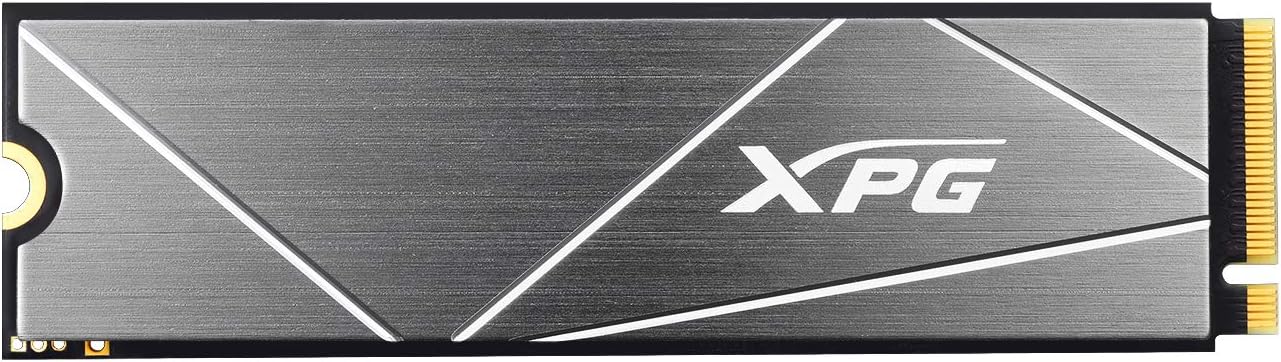
Figure 4.2: A direct overhead view of the ADATA XPG GAMMIX S50 Lite SSD, showcasing its sleek design and XPG branding.
5. Istruzioni per l'uso
Once installed and formatted, the XPG GAMMIX S50 Lite SSD operates as a high-speed storage device within your system. Its performance benefits include:
- Next-Generation Performance: Leveraging PCIe Gen4x4, the SSD provides significantly faster read/write speeds compared to SATA SSDs, enhancing system responsiveness, game loading times, and large file trasferimenti.
- Raffreddamento efficiente: Equipped with a robust aluminum heatsink, the GAMMIX S50 Lite effectively dissipates heat, maintaining optimal performance even under heavy loads. This can reduce temperatures by up to 20%.
- Advanced Caching: Utilizes dynamic SLC Caching and a DRAM Cache Buffer to achieve high random read/write IOPS, crucial for demanding applications like video editing, animation, and gaming.
- Maggiore durata: Built with 3D NAND Flash and featuring a wide range of data protection and correction technologies (like LDPC and E2E Data Protection), ensuring high Total Bytes Written (TBW) for extended product lifespan.

Figure 5.1: Visual representation of the SSD's cooling efficiency, indicating a 20% temperature reduction due to its integrated heatsink.

Figure 5.2: An abstract diagram depicting the SLC Caching and DRAM Cache Buffer technologies at work within the SSD, enhancing its performance.

Figure 5.3: A graphic illustrating the 2TB storage capacity of the SSD, surrounded by various application icons, symbolizing its suitability for diverse uses like gaming and content creation.
6. Manutenzione
SSDs generally require less maintenance than traditional hard drives. However, following these practices can help ensure longevity and optimal performance:
- Aggiornamenti del firmware: Periodically check the official XPG/ADATA website for firmware updates for your S50 Lite SSD. Firmware updates can improve performance, stability, and compatibility.
- Comando TRIM: Ensure that the TRIM command is enabled in your operating system. TRIM helps the SSD manage its data more efficiently, preventing performance degradation over time. Modern operating systems typically enable TRIM by default for SSDs.
- Evitare la deframmentazione: Do not defragment your SSD. Defragmentation is unnecessary for SSDs and can reduce their lifespan by causing unnecessary write cycles.
- Mantieni spazio libero: While not strictly necessary, maintaining some free space on your SSD (e.g., 10-15%) can help with performance and wear leveling.
- Backup dei dati: Regularly back up important data. While SSDs are reliable, no storage device is immune to failure.
7. Risoluzione Dei Problemi
If you encounter issues with your XPG GAMMIX S50 Lite SSD, refer to the following common troubleshooting steps:
7.1. SSD non rilevato dal sistema
- Controllare le connessioni: Ensure the SSD is fully seated in the M.2 slot and the mounting screw is secure.
- Impostazioni BIOS/UEFI: Enter your system's BIOS/UEFI settings. Verify that the M.2 slot is enabled and configured correctly (e.g., NVMe mode). Some motherboards may disable certain SATA ports when an M.2 SSD is installed.
- Installazione del driver: Ensure your operating system has the necessary NVMe drivers. Windows 10/11 typically includes native NVMe support. For older OS versions, you might need to install specific drivers.
- Inizializza disco: If detected in BIOS but not in OS, check Disk Management (Windows) or Disk Utility (macOS) to see if the drive needs to be initialized and formatted.
- Compatibilità della scheda madre: Confirm your motherboard's M.2 slot supports PCIe Gen4x4 NVMe SSDs.
7.2. Prestazioni lente
- Slot PCIe: Ensure the SSD is installed in a PCIe Gen4x4 compatible M.2 slot. Using a Gen3 slot will limit performance.
- TRIM abilitato: Verificare che il comando TRIM sia abilitato nel sistema operativo.
- Firmware: Check for and install the latest firmware updates from the XPG/ADATA websito.
- Temperatura: High temperatures can cause thermal throttling. Ensure adequate airflow in your PC case. The integrated heatsink helps, but overall system cooling is important.
- Processi in background: Chiudere le applicazioni in background non necessarie che potrebbero consumare I/O sul disco.
If problems persist, contact XPG/ADATA customer support for further assistance.
8. Specifiche
| Caratteristica | Specificazione |
|---|---|
| Marca | XPG |
| Numero di modello | S50 Lite (AGAMMIXS50L-2T-C for 2TB) |
| Fattore di forma | M.2 2280 |
| Interfaccia | PCIe Gen4x4 |
| Memoria flash NAND | 3D NAND (TLC) |
| Capacità | 2TB (2000GB) |
| Lettura sequenziale (max) | Fino a 3900 MB/s |
| Scrittura sequenziale (max) | Fino a 3200 MB/s |
| Random Read IOPS (Max) | Fino a 490 IOPS |
| Random Write IOPS (Max) | Fino a 540 IOPS |
| Temperatura di esercizio | da 0°C a 70°C |
| Temperatura di conservazione | -40°C a 85°C |
| Resistenza agli urti | 1500G/0.5ms |
| MTBF (tempo medio tra guasti) | 2,000,000 ore |
| Dimensioni (L x P x A) | Dimensioni: 80 x 22 x 4.3 mm |
| Peso | 10g |
| Compatibilità | PC, Laptop, Gaming Console (with M.2 2280 PCIe Gen4x4 NVMe slot) |
Note: Performance figures may vary based on SSD capacity, host hardware, software, and system usage.
9. Garanzia e supporto
XPG products are manufactured to the highest standards and undergo rigorous testing. This product is covered by a limited warranty from the date of purchase. The specific warranty period and terms may vary by region and product type. Please refer to the official XPG/ADATA websito per le informazioni sulla garanzia più aggiornate e dettagliate.
For technical support, driver downloads, firmware updates, or warranty claims, please visit the official XPG support websito:
When contacting support, please have your product model number (S50 Lite) and serial number ready.