
Introduzione
Welcome and thank you for choosing the Umax Webcam W5. This manual provides essential information for setting up, operating, maintaining, and troubleshooting your webcam. Please read it carefully before use to ensure proper functionality and longevity of your device.
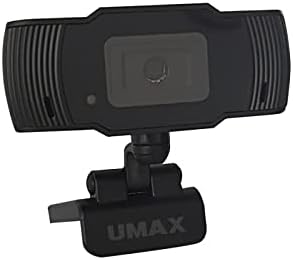
Immagine: Frontale view of the Umax W5 Webcam. This image displays the main unit of the webcam, highlighting its lens and overall design.
1. Impostazione
1.1 Contenuto della confezione
- Umax W5 Webcamma
- Specchio
1.2 Requisiti di sistema
L'Umax W5 Webcam is compatible with most operating systems that support standard USB webcams, including Windows, macOS, and Linux distributions.
1.3 Collegamento del Webcamma
- Spiega il webcam's integrated clip/stand.
- Posizionare il webcam securely on top of your monitor, laptop screen, or a flat surface.
- Collegare il cavo USB dal webcam a una porta USB disponibile sul computer.
- IL webcam should be automatically recognized by your operating system. No additional drivers are typically required for basic functionality.
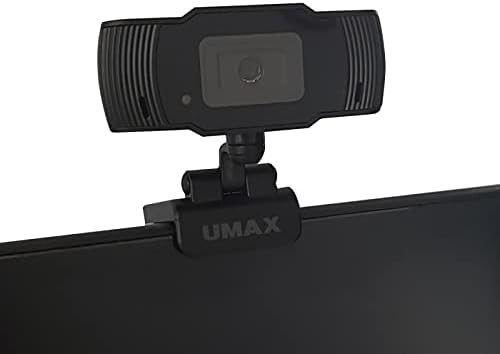
Image: Umax W5 Webcam mounted on top of a computer monitor. This image shows the webcam securely positioned on the upper edge of a computer monitor, demonstrating its typical mounting configuration.
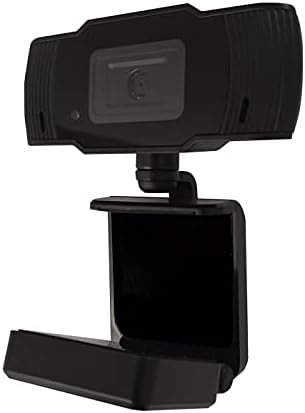
Image: Umax W5 Webcam with its adjustable clip/stand unfolded. This image displays the webcam with its integrated clip fully extended, illustrating how it can be adjusted to fit various monitor thicknesses or stand independently on a flat surface.
2. Funzionamento del Webcamma
2.1 Funzionalità di base
Once connected, the Umax W5 Webcam is ready for use with various video conferencing applications, streaming software, and other programs that utilize a webCamera.
2.2 Utilizzo con le applicazioni
- Open your desired application (e.g., Zoom, Skype, OBS Studio).
- Navigate to the application's settings or preferences menu.
- Select "Umax W5 Webcam" as your primary video input device.
- Adjust video settings such as resolution or frame rate within the application if these options are available.
2.3 Messa a fuoco manuale
L'Umax W5 Webcam features manual focus. To adjust the focus, gently rotate the lens ring located around the camera lens until the image displayed on your screen appears clear and sharp.
3. Manutenzione
3.1 Pulizia della lente
To ensure optimal image quality, periodically clean the weblente della camma.
- Use a soft, lint-free cloth specifically designed for optical surfaces.
- Avoid abrasive materials or harsh chemical cleaners, as these can damage the lens coating.
- Pulisci delicatamente l'obiettivo con un movimento circolare per rimuovere polvere o macchie.
3.2 Conservazione
Quando non è in uso, conservare il webcam in a clean, dry place away from extreme temperatures, high humidity, and direct sunlight to prevent damage.
4. Risoluzione Dei Problemi
4.1 Webcam non rilevata
- Assicurarsi che il cavo USB sia collegato saldamente a entrambi i dispositivi webcam and an active USB port on your computer.
- Prova a collegare il webcam su una porta USB diversa del computer.
- Riavvia il computer.
- Check your operating system's Device Manager (Windows) or System Information (macOS) to see if the webla cam è elencata.
4.2 Scarsa qualità dell'immagine
- Adjust the manual focus ring on the webcam until the image is clear.
- Ensure adequate lighting in your environment. Poor lighting can significantly affect image quality.
- Pulisci il weblente della camma come descritto nella sezione Manutenzione.
- Check the video settings within your application (e.g., resolution, frame rate) to ensure they are set appropriately.
5. Specifiche
| Caratteristica | Dettaglio |
|---|---|
| Marca | Umax |
| Nome del modello | W5 |
| Numero modello articolo | W5 |
| Colore | Nero |
| Dimensioni del pacco | 6.18 x 3.43 x 1.89 pollici |
| Peso dell'articolo | 5.6 once |
| Tipo di lente | Ingrandire |
| Tipo di messa a fuoco | Messa a fuoco manuale |
| Stabilizzazione dell'immagine | NO |
| Batterie | Sono necessarie 2 batterie AA (incluse). |
| Componenti inclusi | Specchio |
| Data prima disponibilità | 14 settembre 2020 |
| Produttore | Umax |
6. Garanzia e supporto
For warranty information and technical support, please refer to the official Umax websul sito o contattare direttamente il servizio clienti. Si consiglia di conservare la ricevuta d'acquisto come prova d'acquisto per eventuali reclami in garanzia.
Produttore: Umax
Data prima disponibilità: 14 settembre 2020