
Introduzione
The UMAX Air Mouse M1 is a versatile wireless controller designed to enhance your interaction with various devices. Featuring a built-in gyroscope for precise air mouse functionality, a full QWERTY keyboard for easy text input, and voice control capabilities, it offers a comprehensive solution for navigation and command. Its ergonomic design ensures comfortable handling, and the integrated Li-Ion battery provides extended usage time. This manual will guide you through the setup, operation, and maintenance of your Air Mouse M1.

Figura 1: Fronte view of the UMAX Air Mouse M1, showing the directional pad, OK button, volume controls, and voice button.
Contenuto della confezione
Si prega di assicurarsi che tutti gli articoli siano presenti nel pacco:
- UMAX Air Mouse M1
- Ricevitore USB
- Cavo di ricarica
- Manuale dell'utente (questo documento)
Impostare
1. Carica del dispositivo
The UMAX Air Mouse M1 comes with a built-in Li-Ion battery. Before first use, it is recommended to fully charge the device. Connect the charging cable to the charging port on the Air Mouse and the other end to a standard USB power source (e.g., computer USB port, USB wall adapter).
2. Collegamento del ricevitore USB
The Air Mouse M1 connects wirelessly via a USB receiver. Locate the USB receiver, typically stored within the battery compartment or a dedicated slot on the device itself. Insert the USB receiver into an available USB port on your target device (e.g., Smart TV, PC, Android TV Box).
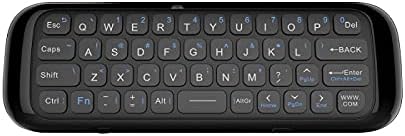
Figura 2: Indietro view of the UMAX Air Mouse M1, showing the full QWERTY keyboard.
3. Initial Pairing (Automatic)
Once the USB receiver is plugged in, the Air Mouse M1 should automatically pair with your device. No manual pairing steps are typically required. The device should be ready for use within a few seconds.
Istruzioni per l'uso
1. Funzione Air Mouse
The Air Mouse M1 utilizes a gyroscope for cursor control. Hold the remote in your hand and move your wrist to control the on-screen cursor. The cursor will follow your hand movements. Press the OK button to click.
2. Input da tastiera
Flip the Air Mouse M1 over to access the full QWERTY keyboard. Use the keys to type text as you would on a standard keyboard.
3. Controllo vocale
Premere e tenere premuto il tasto dedicato Voce button (often indicated by a microphone icon) to activate voice input. Speak clearly into the microphone located on the device. Release the button when you have finished speaking. This feature requires compatible software or operating system support on your connected device.
4. Funzioni dei pulsanti
- Pulsante di accensione: Accende/spegne il dispositivo o lo mette in modalità sospensione.
- Pulsante OK: Confirms selection, acts as left-click.
- Pad direzionale: Consente di navigare tra i menu e le selezioni.
- Pulsanti del volume (V+/V-): Regola il volume audio.
- Pulsante Home: Ritorna alla schermata iniziale del dispositivo connesso.
- Pulsante Indietro: Consente di tornare indietro nei menu o nelle applicazioni.
- Pulsante Menu: Apre i menu contestuali.
Manutenzione
1. Cura della batteria
The UMAX Air Mouse M1 is equipped with a rechargeable Li-Ion battery. To prolong battery life:
- Evitare di scaricare completamente la batteria frequentemente.
- Charge the device when the low battery indicator appears.
- Se non utilizzato per lunghi periodi, conservare il dispositivo in un luogo fresco e asciutto.
2. Pulizia
Per pulire il dispositivo, utilizzare un panno morbido e asciutto. Per lo sporco ostinato, un panno leggermenteamp cloth can be used, but ensure no moisture enters the device's ports or openings. Do not use harsh chemicals or abrasive cleaners.
Risoluzione dei problemi
| Problema | Possibile causa | Soluzione |
|---|---|---|
| Il dispositivo non risponde | Low battery; USB receiver not connected; Device not paired. | Charge the device; Ensure USB receiver is securely plugged in; Re-insert USB receiver to re-establish connection. |
| Cursore irregolare o che non si muove fluidamente | Interferenza; Batteria scarica. | Move closer to the USB receiver; Ensure no strong electromagnetic interference; Charge the device. |
| La tastiera non scrive | Device in air mouse mode; Low battery. | Ensure the device is flipped to the keyboard side; Charge the device. |
| Il controllo vocale non funziona | Microphone blocked; No internet connection on host device; Host device does not support voice input. | Ensure microphone is clear; Check host device's internet connection; Verify host device's compatibility with voice input. |
Specifiche
- Modello: UMAX Air Mouse M1 (laishutin)
- Tecnologia di rilevamento del movimento: Stabilizzazione giroscopica
- Connettività: Senza fili (ricevitore USB)
- Batteria: 1 batteria agli ioni di litio (inclusa)
- Colore: Arancia (Note: Product images show a black device, but specifications list 'Orange'.)
- Peso dell'articolo: 7 once (0.2 chilogrammi)
- Dimensioni della confezione: 7.09 x 3.94 x 0.79 pollici
- Sistemi operativi compatibili: Android, Windows, Linux
Supporto e garanzia
For technical support or inquiries regarding your UMAX Air Mouse M1, please refer to the official UMAX website or contact their customer service. Specific warranty details may vary by region and retailer. Please retain your proof of purchase for warranty claims.
Per maggiori informazioni, visita: UMAX Official Websito